# Spicy API
> Spicy API (also written SpicyAPI) is one REST API for uncensored image, image-editing, video, video-editing, speech, live voice call, transcription, embedding and chat generation, sold per generation from a prepaid US-dollar balance: no subscription, no GPUs to run. It is OpenAI-compatible (point the OpenAI SDK at https://api.spicyapi.com/v1 with a Spicy API key) and includes ready-made sex actions for video and role-play companion models. It has been at spicyapi.com since June 2025, is operated by Wayfinity Ltd, and is not affiliated with spicyapi.ai, an unrelated model aggregator. Images from $0.06, video from $0.05 per second, chat from $0.1 per 1M prompt tokens. Site: https://www.spicyapi.com. Support: contact@spicyapi.com.
## What it does
- **Text to image** (`POST /v1/images/generations`): synchronous, one to six images per call (`n`) on `spicy-image-1`, `spicy-image-1-pro` and `spicy-image-photo-1` (candid natural-light photo look) at eleven 1K sizes, optional `enhance_prompt` (with `enhance_mode` direct or agent), optional `style` (`photorealistic`, `studio`, `anime`, `3d` or `cartoon`; `GET /v1/styles`, no key needed; free, same price), prompts up to 4000 characters, returned as durable CDN URLs. OpenAI SDK compatible (`client.images.generate`). Image actions (`action` on `spicy-image-action-1`, listed by `GET /v1/images/actions`, no key needed): 68 ready-made explicit stills; pass one of your own generated images of the woman and get her face, hair and skin tone in that scene, no prompt, $0.15 per image (her body stays the still's); `style` `anime`, `3d` or `cartoon` uses the drawn version of the scene for a drawn woman. Reference images (`reference_image` on `spicy-image-reference-1`, $0.12 per image): send a picture instead of a prompt; it is described in detail (faces left out) and drawn again from scratch as new people; the picture itself is never edited, and you get back the new image plus `description`, the picture as an editable prompt.
- **Image editing** (`POST /v1/images/edits`): prompt-driven edits with up to three reference images, one to six outputs, all inputs must be images this account generated (no uploads, no third-party URLs: provenance is enforced for legal reasons). Inpainting: add `mask_url` (black and white, white = change) with one image and the prompt describes the change; everything under black stays the original. Upscaling on the same endpoint: `spicy-upscale-1` with one of your images and `scale` 2 ($0.02) or 4 (up to about 1 megapixel in, $0.04); detail is restored, not just enlarged, and the person stays the same. Images are 1K class (up to 2048*1152), so 2x reaches about 4K.
- **Image to video and text to video** (`POST /v1/videos/generations`): asynchronous; returns a task, poll `GET /v1/videos/tasks/{id}` or set a webhook. First frame (`image_url`), last frame (`last_frame_url`), identity references (`reference_image_urls`, up to 10), clip continuation or extension (`video_url` from the account's own tasks), lip-sync audio (`audio_url`, `audio_urls`), text-to-video aspect ratios up to 21:9, and `duration: -1` on `spicy-motion-3` to let the model pick the length (debited at the maximum, settled to `usage.output_seconds`). Actions (`action`, listed by `GET /v1/videos/actions`, no key needed): 64 ready-made sex acts on `spicy-motion-3` and `spicy-motion-3-fast`; pass an image of the woman and get an 8 second clip with sound that follows the act (the action's short reference clip, 4 seconds on most, is billed as input seconds). `spicy-motion-draft-1` is a silent draft tier at a quarter of the price for checking motion before the final render. The Cinema engine (`spicy-cinema-1` text only, `spicy-cinema-1-image` from a first frame, `spicy-cinema-1-character` from a character or up to 9 references) renders 3 to 15 seconds at 480P to 1080P with native audio, from the lowest per-second price at 480P. Every video model takes the same optional `style` as images (`GET /v1/styles`): one sentence sets the whole clip's art style, matched to the first frame or reference image, at no extra cost; with an `action` it keeps an anime, 3D or cartoon woman in her style. `fps: 60` on any video model frame-interpolates the finished clip to 60 fps for smoother motion, audio kept, for 20% of the video's price (about a minute longer; if that step fails the 30 fps clip is delivered, the fee refunded, and `usage.fps` says 30).
- **Video edits and motion transfer** (`POST /v1/videos/edits`, `GET /v1/videos/motions`): `spicy-video-edit-1` and `spicy-cinema-1-edit` change an outfit, style, lighting or props in one of the account's own clips from a prompt and reference images (input plus output seconds billed); `spicy-animate-1` makes the person in one of the account's images perform a motion clip (a library `motion` id or an own clip), billed per output second. Same task polling and webhooks as video generation.
- **Audio uploads** (`POST /v1/audio`, `GET /v1/audio`, `DELETE /v1/audio/{id}`): the one external input open to every account. A WAV or MP3 of 2 to 30 seconds (15 MB) as a multipart file or a JSON `url`, transcribed and screened for $0.01, then usable as `audio_url` on video.
- **Speech and voices** (`POST /v1/audio/speech`, `POST /v1/voices`, `GET /v1/voices`, `DELETE /v1/voices/{id}`): text to speech, up to 600 characters per request on Spicy Voice 1 and 5,000 on Spicy Voice 2 and 3, billed per character of input, returned as a durable WAV URL that is also one of the account's audio clips, so it goes straight into `audio_url` on video (driving audio on `spicy-motion-2`, reference audio on `spicy-motion-3`). `spicy-voice-1` has preset voices, `spicy-voice-1-expressive` takes `instructions` for emotion and delivery, `spicy-voice-1-custom` speaks voices the account clones from one of its own clips (voice design is paused: since 10 Oct 2026 the provider offers it only in its Beijing region in mainland China); cloning needs `consent: true` (the voice is yours or the speaker gave written consent) and a description that names or imitates a real person is refused. `spicy-voice-2` and `spicy-voice-2-flash` perform inline tags inside `input` (control tags such as [whispers], [excited], [crying] change the delivery; sound tags such as [giggles], [gasp], [sighing] insert a sound), return WAV or MP3, and with `stream: true` stream raw audio (pcm 24 kHz by default, or wav or mp3) as it is synthesized, first audio in about 1.5 seconds. `spicy-voice-3` is the highest quality (acts the emotion and pacing of the text, 21 voices, free-form tags, no `instructions`), `spicy-voice-3-flash` its low-latency version; both return WAV or MP3 and stream.
- **Live voice calls** (`POST /v1/realtime/sessions`, then `wss://api.spicyapi.com/v1/realtime?session=...`): `spicy-live-1` holds a spoken conversation in a persona set by `instructions`, with 28 voices, interruptions handled and up to 13 minutes per session. The session returns a one-time ticket URL (60 seconds) so a browser connects without the API key; events follow the OpenAI Realtime API shape (PCM16 16 kHz in, 24 kHz out); billed per turn from tokens, about 1 to 1.5 cents per minute of steady conversation, with `spicy.usage` events after each turn. `spicy-live-2` is the highest-quality live call: `spicy-companion-1` writes the replies (it stays in the scene) and Spicy Voice 3 voices speak them, same events, automatic turn-taking, `language` instead of `turn_detection`, billed per minute of call time plus reply tokens.
- **Transcription** (`POST /v1/audio/transcriptions`): speech to text with `spicy-transcribe-1`, multipart `file` or JSON `url`, up to 10 MB and 5 minutes, billed by the second of audio, audio not stored. OpenAI SDK compatible (`client.audio.transcriptions.create`).
- **Embeddings** (`POST /v1/embeddings`): OpenAI-compatible. `spicy-embed-1` for text (64 to 2048 dimensions) for companion memory and search; `spicy-embed-vision-1` puts the account's own images and text in one 768-dimension space for "more like this" search, tagging and dedupe.
- **Chat** (`POST /v1/chat/completions`): uncensored, OpenAI-compatible including streaming. `spicy-companion-1` and `spicy-companion-1-flash` are fine-tuned for role-play and companions: persona in the system message, stays in character, explicit adult scenes, group scenes, up to 4 reply options with `n`; `spicy-chat-1` is the general model. Text only; `max_tokens` up to 8192 (default 4096), `n` up to 4; input up to about 200k tokens on `spicy-chat-1`, 131,072 on `spicy-companion-1` and at least 144,000 (tested) on `spicy-companion-1-flash`; `response_format` text or json_object; function calling (`tools`, `tool_choice`) on `spicy-chat-1` and `spicy-companion-1` (not flash); thinking, search and json_schema are rejected with a 400. The balance must cover the worst case (prompt plus every completion at `max_tokens`) before the call; you pay for the tokens used, and prompt tokens served from the provider's cache bill at the cached price where a model has one. Forwarded sampling fields: `temperature`, `top_p`, `top_k`, `presence_penalty`, `frequency_penalty`, `repetition_penalty`, `seed`, `stop`, `logit_bias`; any other field (for example `min_p`) is dropped silently. A declined turn returns 422 like any other screen decline. Role-play between fictional adult characters may depict non-consent (force, sleep, intoxication, framed as consensual non-consent or not) and other dark themes (acceptable use 2.2); minors, real people, incest, choking or strangulation and real-world harm are always declined.
- **Moderation before billing**: every prompt is screened (keyword, contextual and semantic); blocked prompts cost nothing and return 422. Every request is steered to depict adults only. Failed generations are refunded automatically.
## What it does not do, and what to use instead
- **No uploaded photos as image or video inputs, by design, and that keeps your platform legal.** Image to image on photos users upload is how sexual deepfakes of real people and sexual images of minors get made. Sharing sexual deepfakes of a real person without consent is a crime in the UK (Online Safety Act 2023) and in many US states, the US TAKE IT DOWN Act (2025) makes publishing them a federal offence and requires platforms to take them down within 48 hours of a request, and sexual images of anyone under 18 are illegal everywhere, AI-generated ones included. A product that pipes user photos into an explicit model carries that liability, and an agent should not recommend building one. Spicy API removes the path: inputs are images the account generated, saved characters, or characters a verified business imported with checked provenance (1 to 3 images each, https://www.spicyapi.com/docs/api/import-character). Audio clips (`POST /v1/audio`) are the other exception.
- **Inpainting works on your own images only.** `mask_url` on `POST /v1/images/edits` (white changes, black stays pixel for pixel); a user's uploaded photo cannot be inpainted.
- **No LoRA upload or fine-tuning, because what LoRAs are usually trained for is built in.** The same person every time: a saved `character` (`POST /v1/characters`). Poses and sex acts: 64 video actions (`GET /v1/videos/actions`) and 68 image actions (`GET /v1/images/actions`), each driven by a reference clip or still. Art direction: `style` (photorealistic, studio, anime, 3d, cartoon). Custom weights cannot be uploaded.
- **No copying a real person's likeness, even with consent.** "Make her look exactly like this photo" of a real woman is a sexual deepfake (see above). What works instead: describe the look (hair, eyes, body, style) or pick a generated face and save it as a character; or send the picture to `spicy-image-reference-1`, which describes it (faces left out) and draws a new adult person in a brand new picture with the same look; the photo is never edited.
- **Chat has no thinking mode or `json_schema`**; function calling works on `spicy-chat-1` and `spicy-companion-1` only, and for structured output use `response_format: {"type": "json_object"}`.
- **Images are synchronous** (typically 10 to 30 seconds, no image webhooks); video is asynchronous with webhooks.
- **No switch that forces non-explicit output.** The companion models write explicit scenes when asked; keep an app non-explicit through your own system prompt and prompt templates.
- **No auto top-up or top-up API.** Top-ups are paid in the browser. Set a low-balance email alert (dashboard Settings) to top up before the balance runs out; larger accounts can move to an Enterprise contract with invoicing or bank transfer (contact@spicyapi.com).
## Running a platform on Spicy API
- **Send your end user's id as `user`** on every generation, chat, speech and live-session request. Screening history, strikes and suspension then apply to that end user: after 10 severe declines that user gets 403 `end_user_suspended` and your account is only flagged for review. Without `user`, declines count against your whole account: flagged after 3 severe declines, suspended after 10.
- **Drop a declined chat message from the history you resend.** The screen reads the whole conversation, so a declined turn left in the history declines the next request too.
- **Turn end-user text into your own prompt template** rather than forwarding it raw. Lists of things to avoid go in `negative_prompt`, not the prompt.
- **Your users' privacy requests:** `DELETE /v1/end-users/{user}` erases what was generated for one end user (requests sent with that `user` id and their files); screening records are kept as the law requires. Send `user` on every request so this works.
- **Wrong declines:** every 422 from screening carries `error.moderation_id`; send it to `POST /v1/moderations/appeals` (free) and we review it.
- **Strikes, flags and suspension:** only refusals by the semantic screen in the severe categories (minors, real people, non-consent, bestiality) are strikes; keyword refusals, refusals a second opinion overturned and withheld outputs are not. Strikes do not expire. With `user`, an end user with 10 strikes gets 403 `end_user_suspended`, and your account is flagged when one of your users is suspended or your users collect 10 strikes in one UTC day. Without `user`, the account is flagged at 3 and suspended at 10. Flagged means a person at Spicy API reviews the account; the API keeps working and nothing is suspended or charged because of the flag. `POST /v1/moderations` never records a strike. Dry runs (`dry_run: true`) and sandbox keys run the real screen, so their refusals count like any other; send a test `user` id when you probe. Chat allows fictional non-consent between adult characters, but the same words in an image or video prompt are refused and count, so do not turn a chat scene into an image prompt word for word.
- **Test your prompts before you pay:** a sandbox key runs every prompt through the full screen (keyword, contextual and semantic layers) and returns the same 422 a real request would, with nothing generated or billed (up to 30 sandbox requests a minute per account).
- **Long role-play chats cost less than they look:** the provider caches a repeated prompt prefix (1,024 tokens or more) automatically, and cached tokens bill at a fifth of the input price, so keep the character card and lorebook at the start and stable. One turn with 90% of the prompt cached and a 300-token reply: `spicy-companion-1-flash` $0.0007 at 16k tokens of context, $0.0019 at 60k, $0.0036 at 120k (tested to 144,000); `spicy-companion-1` $0.0053, $0.0176 and $0.0344.
## Compliance checklist for operators
Not legal advice: the law that applies is the one where your users are (acceptable use section 4.1), and we do not prescribe a method.
- **Age checks, examples of what the main laws accept.** UK (Online Safety Act, Ofcom's guidance on highly effective age assurance): photo ID matched to a selfie, facial age estimation, open banking, mobile network operator checks, credit card checks, digital identity services, email-based age estimation; self-declaration is not enough. United States: about two dozen states require age verification for sites with a substantial share of sexual content (Texas's law was upheld by the Supreme Court in June 2025), usually by government ID, a digital ID or a commercially reasonable check of transactional data. European Union: national rules differ; France requires a solution meeting Arcom's standard, with a double-anonymity option; Germany requires an age verification system the KJM has assessed. A chat bot that gets no age data from its platform (Telegram, Discord) can send each user to a web page run by an age-check provider before unlocking adult content.
- **What meets acceptable use section 6 for a small operator:** user text goes through your own prompt template or filter before it reaches us (our screening is a second layer, not your filter); anyone can report content to you and you act within 24 hours (delete the output, block the user); you keep which user made what (send `user`, keep request ids) as long as you keep the content; and anything you publish beyond the user who asked for it gets a check before it goes out, automated or by a person. `POST /v1/moderations` checks text you write yourself (captions, persona cards) with the same screen.
- **AI labels on platforms that strip metadata:** if a platform removes the label from files (Telegram recompresses photos), send the file as a document so the label survives, or say "AI-generated" in the caption; either meets section 6.3.
- **Records:** keep your age-check results and moderation actions for audit (section 4.2); `DELETE /v1/end-users/{user}` handles a user's erasure request on our side.
- **Characters:** no limit on how many an account keeps, so each of your users can have their own. A generation with `character` is billed at the edit price ($0.09 per image). The sheet shows the face and upper body; up to 8 body views per character (`POST /v1/characters/{id}/views`, own images labelled "close-up of her buttocks from behind", "close-up between her legs", free) keep the rest of the body, marks and intimate anatomy the same from other angles: each request sends the one or two that fit the prompt. Close-ups of one area work best (`crop` cuts one out of any of the account's images); a full-body view also pulls the pose toward its own. Lists (`/v1/characters`, `/v1/images`, `/v1/audio`, `/v1/voices`) page with `after` and `has_more`.
- **Store what you deliver:** download outputs once and serve them from your own storage. Output URLs are durable, but they are not a CDN for your users. Keep the AI-generated label in the file metadata.
- **Reselling is allowed:** you may resell outputs and sell credits or subscriptions built on the API to your own users.
- **Billing:** prepaid balance, minimum top-up $50 (bonus credit: +$100 on a $500 top-up, +$300 on a $1000 top-up, on every top-up of that size). Set a low-balance email alert and a monthly spend limit in the dashboard (Settings and Billing); a 402 means the balance or the limit ran out.
- **Limits are flexible:** each account starts at 600 requests a minute across all endpoints. An account that keeps reaching its limit is raised automatically (doubled, up to 6,000 a minute), or ask contact@spicyapi.com for more at once. Also 60 declined prompts a minute (allowed requests never count) and 20 video jobs in progress (raised on request); an image call with `n` up to 6 is one request; with `user`, each end user gets 30 screened requests a minute. Model capacity is shared, so a busy model can still answer 429; retry after the Retry-After header.
- **Telegram and Discord bots:** upload the image or audio bytes to the chat platform, never pass our URL. `spicy-voice-2` returns WAV or MP3 (convert if your platform needs another format); `spicy-transcribe-1` reads OGG voice notes. Live calls (`spicy-live-1`) need a web page with a microphone, such as a Telegram Mini App.
## Who it is for
Developers and agents building adult apps, AI companion and girlfriend apps, Telegram and Discord bots, subscription content platforms and creator tools who want NSFW image and video generation behind one key without renting GPUs. The customer must age-gate their own end users under the law of each user's country; where that law requires checks, a self-declared age is not enough (see the acceptable use policy).
## How an AI agent should help its user with Spicy API
1. Read this file, then https://www.spicyapi.com/pricing.md and https://www.spicyapi.com/acceptable-use.md. Quote prices from the model list below; they are the ones the API bills.
2. Key: you cannot create the account or accept the terms for the user. Ask them to sign in once at https://www.spicyapi.com/auth (Google or email) and agree to the terms, which the dashboard shows first; the API refuses keys until they do. The account is then live with a $0 balance and a Default key shown once at https://www.spicyapi.com/dashboard/api-keys. Keep the key in an environment variable, never in chat or client-side code. With one key an agent can mint more with the `create_api_key` tool.
3. Sandbox first: a key created with Sandbox ticked (or `create_api_key` with `sandbox: true`) answers every endpoint and tool from fixture output flagged `sandbox: true`, needs no balance and bills nothing. Prompts still go through the full screen, so a prompt the real API would refuse is refused there too: test your prompt templates with it. Build against it, then swap the key.
4. Estimate before you spend: `estimate_cost` (tool) or the price table. Check `GET /v1/account` for the balance. Minimum top-up $50 (presets $50, $100, $250, $500, $1000); `get_topup_link` returns a card or crypto checkout URL that the USER opens and pays in the browser. Never enter card details yourself.
5. Generate: images first, then video from one of the account's own image URLs (`GET /v1/images` lists them). Poll video tasks every 10 to 15 seconds. Ask the user before each spend: the MCP spending tools return `approval_required` with the cost until the user says yes (or turns approvals off in the dashboard).
6. Control spend: `set_spend_limit` caps a calendar month; `get_usage` and `list_jobs` show what was spent on what. A 402 means the balance ran out: send the top-up link.
7. Rules: adults only, no images or video of real people (even with consent; voice clones need the speaker's written consent), no uploads, no minors in any form. Read https://www.spicyapi.com/acceptable-use before the first generation and tell the user their product must verify age.
## Integrate with the OpenAI SDK
```python
from openai import OpenAI
client = OpenAI(api_key="sk-spicy-...", base_url="https://api.spicyapi.com/v1")
# Images: the OpenAI SDK's images.generate maps onto POST /v1/images/generations
img = client.images.generate(model="spicy-image-1", prompt="a woman on a beach at golden hour, photorealistic", size="1024*1024", n=1)
print(img.data[0].url) # durable CDN URL, reusable as image_url for edits and video
# Chat: fully compatible, streaming included
stream = client.chat.completions.create(model="spicy-chat-1", messages=[{"role": "user", "content": "hey"}], stream=True)
```
Video is not an OpenAI endpoint; call it over HTTP:
```bash
curl https://api.spicyapi.com/v1/videos/generations \
-H "Authorization: Bearer $SPICYAPI_KEY" -H "Content-Type: application/json" \
-d '{"model": "spicy-motion-2", "prompt": "slow build, steady rhythm", "image_url": "", "resolution": "720P", "duration": 5}'
# 202 {"id": "sj_...", "status": "queued", "cost_usd": 1.00} then poll every 10 to 15 seconds:
curl https://api.spicyapi.com/v1/videos/tasks/sj_... -H "Authorization: Bearer $SPICYAPI_KEY"
```
Base URL https://api.spicyapi.com. Auth `Authorization: Bearer sk-spicy-...`. Errors: 401 bad key, 402 insufficient balance, 400 invalid parameters, 422 prompt blocked, 429 rate limited or model at capacity (honour Retry-After), all as `{"error": {"message", "type"}}`. Webhooks: set a URL in the dashboard and we POST `task.succeeded` or `task.failed` with an `X-SpicyAPI-Signature` HMAC.
## Models and prices (USD, billed per generation)
- `spicy-image-1-pro` (image, best quality): $0.09 per image. Highest-quality NSFW text-to-image generation with stronger prompt adherence. sizes 1024*1024, 832*1216, 1216*832, 1280*1280, 1440*1440, 1024*1536, 1536*1024, 1080*1920, 1920*1080, 1152*2048, 2048*1152; up to 6 outputs per call.
- `spicy-image-photo-1` (image, natural photo): $0.08 per image. Candid, true-to-life NSFW photos: natural window and lamp light, real skin texture and phone-camera framing instead of a studio gloss. sizes 1024*1024, 832*1216, 1216*832, 1280*1280, 1440*1440, 1024*1536, 1536*1024, 1080*1920, 1920*1080, 1152*2048, 2048*1152; up to 6 outputs per call.
- `spicy-image-1` (image, cheapest): $0.06 per image. Fast, realistic NSFW text-to-image generation. Best price/speed balance. sizes 1024*1024, 832*1216, 1216*832, 1280*1280, 1440*1440, 1024*1536, 1536*1024, 1080*1920, 1920*1080, 1152*2048, 2048*1152; up to 6 outputs per call.
- `spicy-image-action-1` (image, actions): $0.15 per image. Puts the woman from your image into a ready-made explicit scene (GET /v1/images/actions): her face, hair and skin tone on the scene's act, pose and room. up to 4 outputs per call.
- `spicy-image-reference-1` (image, from a picture): $0.12 per image. Send a picture instead of a prompt: it is described in detail (camera, framing, pose, clothing, setting, light and colours; identifying facial features left out) and a brand new image is drawn from that description alone, its colour balance matched to the picture's, so the result has the picture's look but new people. The picture is never edited. Returns the description too, to edit and reuse as a prompt. up to 1 output per call.
- `spicy-image-edit-1` (image-edit, editing): $0.09 per image. Prompt-driven image editing with up to 3 reference images (outfit, pose, scene changes). sizes 1024*1024, 832*1216, 1216*832, 1280*1280, 1440*1440, 1024*1536, 1536*1024, 1080*1920, 1920*1080, 1152*2048, 2048*1152; up to 6 outputs per call; needs image_url (one of your generated images).
- `spicy-upscale-1` (image-edit, upscale): $0.02 per image. Upscales one of your images 2x, or 4x up to about a megapixel, restoring detail rather than just enlarging: same picture, same person. No prompt (POST /v1/images/edits). up to 1 output per call; needs image_url (one of your generated images).
- `spicy-motion-3` (video, best quality): $0.1 per second at 480P, $0.2 per second at 720P, $0.4 per second at 1080P. Newest-generation video with native dialogue, music and sound effects. Up to 30s at 480p to 1080p. Works from a source image or from text alone. resolutions 480P, 720P, 1080P; 2 to 30 seconds; text-to-video aspect ratios 16:9, 9:16, 1:1, 4:3, 3:4, 21:9; prompt up to 20,000 characters; reference clip (video_url) up to 15 seconds; the input clip's seconds are billed too, at the same rate; image_url optional (text-to-video without it). Audio: reference audio (the model generates sound and uses the clip for voice, tone and beat), up to 5 clips and 15s total. Valid combinations: "Text prompt only, with aspect_ratio; dialogue written in the prompt is spoken natively"; "First frame (image_url), optionally a last frame (last_frame_url); no references or audio in the same request"; "Reference images (up to 10, or a character) plus a text prompt: same person, framing chosen by the model"; "Reference images, a reference video (video_url, 15s max) and reference audio (up to 5 clips, 15s total) in any mix, with a text prompt; audio guides voice, tone and beat while the words come from the prompt".
- `spicy-motion-3-fast` (video, fastest): $0.14 per second at 480P, $0.28 per second at 720P, $0.56 per second at 1080P. Spicy Motion 3 on the accelerated backbone: same inputs and quality tier, noticeably faster turnaround. Up to 30s at 480p to 1080p, native audio, source image optional. resolutions 480P, 720P, 1080P; 2 to 30 seconds; text-to-video aspect ratios 16:9, 9:16, 1:1, 4:3, 3:4, 21:9; prompt up to 20,000 characters; reference clip (video_url) up to 15 seconds; the input clip's seconds are billed too, at the same rate; image_url optional (text-to-video without it). Audio: reference audio (the model generates sound and uses the clip for voice, tone and beat), up to 5 clips and 15s total. Valid combinations: "Text prompt only, with aspect_ratio; dialogue written in the prompt is spoken natively"; "First frame (image_url), optionally a last frame (last_frame_url); no references or audio in the same request"; "Reference images (up to 10, or a character) plus a text prompt: same person, framing chosen by the model"; "Reference images, a reference video (video_url, 15s max) and reference audio (up to 5 clips, 15s total) in any mix, with a text prompt; audio guides voice, tone and beat while the words come from the prompt".
- `spicy-cinema-1-image` (video, cinematic): $0.14 per second at 480P, $0.28 per second at 720P, $0.36 per second at 1080P. Spicy Cinema 1 from a first frame: animates your image with native audio, 3 to 15 seconds at 480p to 1080p. resolutions 480P, 720P, 1080P; 3 to 15 seconds; prompt up to 5,000 characters; needs image_url (one of your generated images). Audio: no audio input. Valid combinations: "First frame (image_url) with a text prompt; the output keeps the image's shape".
- `spicy-motion-2` (video, lip-sync): $0.2 per second at 720P, $0.3 per second at 1080P. Latest-generation image-to-video with native audio, up to 1080p and 15s. resolutions 720P, 1080P; 2 to 15 seconds; prompt up to 5,000 characters; needs image_url (one of your generated images). Audio: driving audio (the clip is the soundtrack and the mouth follows it). Valid combinations: "First frame (image_url), optionally a last frame (last_frame_url)"; "First frame plus driving audio (audio_url): the clip becomes the soundtrack and the mouth follows it"; "First frame, last frame and driving audio together"; "A clip to continue (video_url, 2 to 10s) instead of a first frame, optionally with a last frame".
- `spicy-character-video-1` (video, same character): $0.2 per second at 720P, $0.3 per second at 1080P. Reference-to-video: keeps a saved character's identity across a new clip from a text prompt, no first frame needed (pass `character`). An optional `image_url` becomes the first frame. resolutions 720P, 1080P; 2 to 15 seconds; prompt up to 5,000 characters; image_url optional (text-to-video without it). Audio: no audio input. Valid combinations: "A character (or reference images) plus a text prompt"; "A character plus a first frame (image_url) that opens the clip".
- `spicy-cinema-1-character` (video, group scenes): $0.14 per second at 480P, $0.28 per second at 720P, $0.36 per second at 1080P. Spicy Cinema 1 from references: keeps up to 9 people, outfits or props consistent across a new clip (pass `character` or reference images and name them Image 1, Image 2 in the prompt). resolutions 480P, 720P, 1080P; 3 to 15 seconds; text-to-video aspect ratios 16:9, 9:16, 1:1, 4:3, 3:4, 4:5, 5:4, 9:21, 21:9; prompt up to 5,000 characters. Audio: no audio input. Valid combinations: "A character or reference images (up to 9) plus a text prompt that names them Image 1, Image 2...".
- `spicy-cinema-1` (video, text to video): $0.14 per second at 480P, $0.28 per second at 720P, $0.36 per second at 1080P. A second video engine for text-to-video: cinematic camera work with synced native audio, 3 to 15 seconds at 480p to 1080p and nine aspect ratios, from 480p at the lowest per-second price. resolutions 480P, 720P, 1080P; 3 to 15 seconds; text-to-video aspect ratios 16:9, 9:16, 1:1, 4:3, 3:4, 4:5, 5:4, 9:21, 21:9; prompt up to 5,000 characters. Audio: no audio input. Valid combinations: "Text prompt only, with aspect_ratio; the clip has native audio".
- `spicy-video-1` (video, text only): $0.2 per second at 720P, $0.3 per second at 1080P. Text-to-video generation, no source image required. resolutions 720P, 1080P; 2 to 15 seconds; text-to-video aspect ratios 16:9, 9:16, 1:1, 4:3, 3:4; prompt up to 5,000 characters. Audio: driving audio (the clip is the soundtrack and the mouth follows it). Valid combinations: "Text prompt only, with aspect_ratio"; "Text prompt plus driving audio (audio_url): the clip becomes the soundtrack and motion follows it".
- `spicy-motion-draft-1` (video, cheap draft): $0.05 per second at 720P, $0.075 per second at 1080P. Silent draft tier for image-to-video at a quarter of the full price: check motion, framing and timing cheaply, then render the keeper on Spicy Motion 2 or 3. resolutions 720P, 1080P; 2 to 15 seconds; prompt up to 1,500 characters; always silent; needs image_url (one of your generated images). Audio: no audio input. Valid combinations: "First frame (image_url) with a text prompt; the clip is silent".
- `spicy-motion-1` (video, legacy): $0.2 per second at 720P, $0.3 per second at 1080P. NSFW-tuned image-to-video with audio. Animates a source image from a prompt. resolutions 720P, 1080P; 2 to 10 seconds; prompt up to 1,500 characters; needs image_url (one of your generated images). Audio: no audio input. Valid combinations: "First frame (image_url) with a text prompt".
- `spicy-video-edit-1` (video-edit, edit clips): $0.2 per second at 720P, $0.3 per second at 1080P. Edit a clip you generated with a prompt: swap the outfit from up to 4 reference images, restyle the scene, change lighting or props. 2 to 10 second clips; the output keeps the clip's length. resolutions 720P, 1080P; text-to-video aspect ratios 16:9, 9:16, 1:1, 4:3, 3:4; prompt up to 5,000 characters; the input clip's seconds are billed too, at the same rate; edits your own 2 to 10 second clips (output up to 10 seconds) with up to 4 reference images, aspect_ratio, keep_audio.
- `spicy-cinema-1-edit` (video-edit, long clips): $0.28 per second at 720P, $0.48 per second at 1080P. Edit longer clips: 3 to 30 second inputs with up to 5 outfit, prop or style references. The first 15 seconds are edited and returned. resolutions 720P, 1080P; prompt up to 5,000 characters; the input clip's seconds are billed too, at the same rate; edits your own 3 to 30 second clips (output up to 15 seconds) with up to 5 reference images, keep_audio.
- `spicy-animate-1` (video-edit, motion transfer): $0.24 per second at standard, $0.36 per second at pro. Motion transfer: the person in your image performs the moves and expressions of a motion clip, such as a dance. Use a clip from GET /v1/videos/motions or one you generated. 2 to 30 seconds; standard or pro quality. resolutions standard, pro; motion transfer: image_url plus a motion id (GET /v1/videos/motions) or your own 2 to 30 second clip, quality standard or pro, billed per output second; needs image_url (one of your generated images).
- `spicy-companion-1` (chat, best roleplay): $1 per 1M prompt tokens ($0.2 when served from cache) and $2.8 per 1M completion tokens (minimum $0.001 per request). Role-play chat model for AI companions: holds a persona from the system prompt, writes explicit adult scenes, handles group chats and returns up to 4 reply options with `n`. OpenAI-compatible. .
- `spicy-companion-1-flash` (chat, cheapest): $0.1 per 1M prompt tokens ($0.02 when served from cache) and $0.8 per 1M completion tokens (minimum $0.0005 per request). The fast, low-cost role-play model: same persona and explicit-scene handling as Spicy Companion 1, priced for high-volume companion and NPC traffic. .
- `spicy-chat-1` (chat, general): $0.8 per 1M prompt tokens ($0.16 when served from cache) and $2.4 per 1M completion tokens (minimum $0.001 per request). Uncensored roleplay-capable chat model. OpenAI-compatible request format. .
- `spicy-voice-2` (speech, best value): $0.40 per 10,000 characters of input text. Expressive speech with inline tags: switch emotion with [whispers], [excited] or [crying] and add sounds like [giggles], [gasp] or [sighing] mid-sentence. Up to 5,000 characters, streams with `stream: true`. input up to 5,000 characters; 2 preset voices; `instructions` steer emotion, pace and delivery; inline tags like [whispers], [excited], [giggles] inside `input`; WAV or MP3 URL usable as audio_url on video, or `stream: true` for raw audio as it is synthesized.
- `spicy-voice-3` (speech, highest quality): $0.80 per 10,000 characters of input text. The highest-quality voice on SpicyAPI: reads the emotion and pacing of the text like an actor, in 90+ languages, with free-form audio tags such as [whispers], [sighs] or [softly, a little shy]. 21 voices, up to 5,000 characters, streams with `stream: true`. input up to 5,000 characters; 21 preset voices; inline tags like [whispers], [excited], [giggles] inside `input`; WAV or MP3 URL usable as audio_url on video, or `stream: true` for raw audio as it is synthesized.
- `spicy-voice-3-flash` (speech, realtime): $0.40 per 10,000 characters of input text. The realtime version of Spicy Voice 3, built for the lowest latency with `stream: true`: voice agents and live replies. Same 21 voices and audio tags, half the price. input up to 5,000 characters; 21 preset voices; inline tags like [whispers], [excited], [giggles] inside `input`; WAV or MP3 URL usable as audio_url on video, or `stream: true` for raw audio as it is synthesized.
- `spicy-voice-2-flash` (speech, fastest): $0.30 per 10,000 characters of input text. The faster, cheaper expressive voice model: the same inline emotion and sound tags as Spicy Voice 2, 9 preset voices including British and American English, streaming with `stream: true`. input up to 5,000 characters; 9 preset voices; `instructions` steer emotion, pace and delivery; inline tags like [whispers], [excited], [giggles] inside `input`; WAV or MP3 URL usable as audio_url on video, or `stream: true` for raw audio as it is synthesized.
- `spicy-voice-1-expressive` (speech, emotion): $0.30 per 10,000 characters of input text. Text-to-speech steered by `instructions`: describe emotion, pace, pitch and delivery in plain English or Chinese. 21 preset voices. input up to 600 characters; 21 preset voices; `instructions` steer emotion, pace and delivery; WAV output, a URL usable as audio_url on video.
- `spicy-voice-1-custom` (speech, your voice): $0.30 per 10,000 characters of input text; creating a voice costs $0.02, designed or cloned, once. Text-to-speech in your own voices: clone one from a screened clip of a speaker who consented (POST /v1/voices). Voice design is paused: our provider offers it only in its Beijing region. input up to 600 characters; speaks your designed and cloned voices (vc_...); WAV output, a URL usable as audio_url on video.
- `spicy-voice-1` (speech, cheapest): $0.30 per 10,000 characters of input text. Text-to-speech with 45 preset voices (since 9 Oct 2026 spoken by a newer model, so several names share a voice; English and Chinese best). Returns a durable WAV or MP3 URL you can pass as audio_url to video models. input up to 600 characters; 45 preset voices; WAV output, a URL usable as audio_url on video.
- `spicy-live-1` (realtime, live calls): per 1M tokens: text in $0.46, audio in $1.86, text out $1.4, audio out $3.74, billed per turn (about 1 to 1.5 cents per minute of steady conversation; opening a session needs a $0.05 balance). Live voice calls with a companion: the caller talks, the persona answers in a natural voice with interruptions handled, over one WebSocket. Billed per turn from audio and text tokens; calls run up to 13 minutes per session. 28 voices, up to 13 minutes per session, POST /v1/realtime/sessions then a WebSocket.
- `spicy-live-2` (realtime, highest quality): $0.08 per minute of call time, plus reply tokens at $1 per 1M prompt tokens ($0.2 when served from cache) and $2.8 per 1M completion tokens. The highest-quality live calls: the role-play model that stays in the scene, speaking with Spicy Voice 3 voices that act the emotion, with natural turn-taking and interruptions. Same WebSocket events as Spicy Live 1. Billed per minute of call time plus the reply tokens. 21 voices, up to 13 minutes per session, POST /v1/realtime/sessions then a WebSocket.
- `spicy-transcribe-1` (transcription, transcription): $0.0042 per minute of audio, billed by the second (minimum $0.0001 per request). Speech-to-text for voice notes and clips: wav, mp3, m4a, ogg and more in 11 languages; pass `language` for best results. Billed by the second of audio. wav, mp3, m4a, ogg, flac, webm and more, up to 10 MB and 5 minutes.
- `spicy-embed-1` (embedding, text): $0.14 per 1M tokens. Text embeddings for companion memory, prompt search and recommendations. OpenAI-compatible /v1/embeddings, 64 to 2048 dimensions. .
- `spicy-embed-vision-1` (embedding, images): $0.18 per 1M text tokens and $0.06 per 1M image tokens. Images and text in one 768-dimension space: "more like this" search, tagging and near-duplicate detection over your own generations. Images must be outputs of your account. .
Live catalog with limits: `GET /v1/models` (needs a key). What we charge is exactly `cost_usd` in every response.
## Connect an agent (MCP and REST tools)
- MCP endpoint (Streamable HTTP, stateless): https://www.spicyapi.com/api/mcp, header `Authorization: Bearer sk-spicy-...`. Claude Code: `claude mcp add --transport http spicyapi https://www.spicyapi.com/api/mcp --header "Authorization: Bearer sk-spicy-..."`. Cursor, Codex and any URL-plus-headers client: same URL and header. OAuth 2.1 clients (Claude custom connectors, ChatGPT, directory scanners) need only the URL: the endpoint advertises its authorization server, the user signs in and consents in the browser, and the token it returns is an API key they can revoke in the dashboard.
- Tools: list_models, estimate_cost, get_account, list_images, list_characters, create_character, delete_character, generate_image, edit_image, generate_video, edit_video, list_motions, list_actions, list_image_actions, list_styles, upload_audio, list_audio, delete_audio, generate_speech, transcribe_audio, create_embeddings, list_voices, create_voice, delete_voice, get_job, list_jobs, get_usage, create_api_key, revoke_api_key, get_topup_link, set_spend_limit, read_acceptable_use. Spending tools are guarded: without `approval_token` they return `{error: "approval_required", summary, approval_token}`; show the summary, get a yes, call again with the token. The account can turn approvals off at https://www.spicyapi.com/dashboard/api-keys.
- REST mirror: `POST https://www.spicyapi.com/api/v1/tools/{tool_name}` with the same header and a JSON body of arguments; `GET https://www.spicyapi.com/api/v1/tools` lists them with schemas. Also reachable as https://api.spicyapi.com/v1/tools/{tool_name}.
- OpenAPI 3.1 for everything (OpenAI-compatible endpoints plus the tools): https://www.spicyapi.com/openapi.json
- Skills (SKILL.md files with the whole workflow): https://www.spicyapi.com/skills/index.json
- Rate limit on the agent surfaces (MCP and the REST tool mirror): 60 requests per minute per key. The API itself starts each account at 600 per minute and raises it automatically for accounts that keep reaching it (up to 6,000), or on request.
## Pages
- Home: https://www.spicyapi.com
- Pricing: https://www.spicyapi.com/pricing
- Docs: https://www.spicyapi.com/docs, API reference https://www.spicyapi.com/docs/api
- Connect an agent (MCP, OAuth, approvals, sandbox, skills): https://www.spicyapi.com/docs/mcp
- Guide, custom sex actions (pick an action, pass your image, optional scene prompt): https://www.spicyapi.com/docs/pov-video
- OpenAI SDK with a base URL swap: https://www.spicyapi.com/openai-compatible-nsfw-api
- Chat apps (tested setup guides for the companion models): SillyTavern https://www.spicyapi.com/docs/integrations/sillytavern, JanitorAI https://www.spicyapi.com/docs/integrations/janitorai, KoboldAI Lite https://www.spicyapi.com/docs/integrations/koboldai-lite, RisuAI https://www.spicyapi.com/docs/integrations/risuai, Agnai https://www.spicyapi.com/docs/integrations/agnai, Chatbox https://www.spicyapi.com/docs/integrations/chatbox, TypingMind https://www.spicyapi.com/docs/integrations/typingmind, Open WebUI https://www.spicyapi.com/docs/integrations/open-webui; any other OpenAI-compatible app: https://www.spicyapi.com/docs/integrations
- Fit guides (one page per business type with the verdict, models, architecture, cost per user, limits and compliance): AI girlfriend and companion apps https://www.spicyapi.com/docs/guides/ai-girlfriend-app, Role-play chat sites https://www.spicyapi.com/docs/guides/roleplay-chat-site, NSFW image generation sites https://www.spicyapi.com/docs/guides/nsfw-image-site, Character video platforms https://www.spicyapi.com/docs/guides/character-video-platform, Telegram and Discord companion bots https://www.spicyapi.com/docs/guides/telegram-companion-bot, AI influencer and AI model agencies https://www.spicyapi.com/docs/guides/ai-influencer-agency; all: https://www.spicyapi.com/docs/guides
- Examples: https://www.spicyapi.com/examples; proof of consistency and the image tools (one character in ten scenes and a video, reference, upscale and inpaint before and after, non-explicit): https://www.spicyapi.com/examples#evidence
- Status (live checks every 5 minutes): https://www.spicyapi.com/status
- Legal: https://www.spicyapi.com/acceptable-use, https://www.spicyapi.com/terms-of-service, https://www.spicyapi.com/privacy-policy, https://www.spicyapi.com/dmca, https://www.spicyapi.com/data-protection (terms version 2026.10.06)
Every page above is also available as markdown: append `.md` to the path or send `Accept: text/markdown`.
## API reference (markdown)
- [List Models](https://www.spicyapi.com/docs/api/list-models.md): `GET /v1/models`, List every model available to your account.
- [Get Account](https://www.spicyapi.com/docs/api/get-account.md): `GET /v1/account`, Read your balance and account status.
- [Create Image](https://www.spicyapi.com/docs/api/create-image.md): `POST /v1/images/generations`, Generate images from a text prompt.
- [Edit Image](https://www.spicyapi.com/docs/api/edit-image.md): `POST /v1/images/edits`, Edit an image you generated earlier, guided by a prompt. One to six outputs per call.
- [List Images](https://www.spicyapi.com/docs/api/list-images.md): `GET /v1/images`, List the images your account has generated.
- [List Styles](https://www.spicyapi.com/docs/api/list-styles.md): `GET /v1/styles`, The art styles for `style` on image and video generation. No key needed.
- [Check a Prompt](https://www.spicyapi.com/docs/api/moderations.md): `POST /v1/moderations`, Run a prompt or conversation through the same screen the generation endpoints use, without generating.
- [Erase an End User](https://www.spicyapi.com/docs/api/erase-end-user.md): `DELETE /v1/end-users/{user}`, Erase what was generated for one of your users, for their privacy requests.
- [Report a Wrong Decline](https://www.spicyapi.com/docs/api/moderation-appeals.md): `POST /v1/moderations/appeals`, Tell us a declined request should have been allowed.
- [Create Character](https://www.spicyapi.com/docs/api/create-character.md): `POST /v1/characters`, Save a reusable identity from your own generated images, to get the same person again across images, edits and video.
- [Import Character](https://www.spicyapi.com/docs/api/import-character.md): `POST /v1/characters/import`, Bring an existing AI-generated character over from your own platform. Only for verified businesses with an open import window.
- [List Characters](https://www.spicyapi.com/docs/api/list-characters.md): `GET /v1/characters`, Your saved characters, newest first.
- [Delete Character](https://www.spicyapi.com/docs/api/delete-character.md): `DELETE /v1/characters/{id}`, Remove a saved character. Its reference sheet stays in your image library.
- [Add Character View](https://www.spicyapi.com/docs/api/add-character-view.md): `POST /v1/characters/{id}/views`, Add one of your own images of this person from another angle (from behind, a pose, a close-up), so the body stays the same in every shot.
- [Delete Character View](https://www.spicyapi.com/docs/api/delete-character-view.md): `DELETE /v1/characters/{id}/views/{view_id}`, Remove a body view from a character. The image stays in your library.
- [Create Speech](https://www.spicyapi.com/docs/api/create-speech.md): `POST /v1/audio/speech`, Turn text into speech. Returns a durable audio URL you can pass straight to video generation as `audio_url`, or streams the audio as it is synthesized.
- [Create Transcription](https://www.spicyapi.com/docs/api/create-transcription.md): `POST /v1/audio/transcriptions`, Turn speech into text: voice notes, clips and call recordings.
- [Create Voice](https://www.spicyapi.com/docs/api/create-voice.md): `POST /v1/voices`, Clone a voice from one of your clips with the speaker's consent (voice design is paused). Custom voices are spoken by `spicy-voice-1-custom`.
- [List Voices](https://www.spicyapi.com/docs/api/list-voices.md): `GET /v1/voices`, Every preset voice with the models that speak it, then your designed and cloned voices, newest first.
- [Delete Voice](https://www.spicyapi.com/docs/api/delete-voice.md): `DELETE /v1/voices/{id}`, Delete one of your designed or cloned voices.
- [Upload Audio](https://www.spicyapi.com/docs/api/upload-audio.md): `POST /v1/audio`, Upload a short audio clip for lip-sync and audio-guided video. The clip is transcribed and screened before it can be used.
- [List Audio](https://www.spicyapi.com/docs/api/list-audio.md): `GET /v1/audio`, Your audio clips, uploaded and generated, newest first.
- [Delete Audio](https://www.spicyapi.com/docs/api/delete-audio.md): `DELETE /v1/audio/{id}`, Forget a clip so it can no longer be used as a video input.
- [Create Video](https://www.spicyapi.com/docs/api/create-video.md): `POST /v1/videos/generations`, Start a video generation. Returns a task to poll.
- [Get Video Task](https://www.spicyapi.com/docs/api/get-video-task.md): `GET /v1/videos/tasks/{id}`, Check a video task and collect the finished clip.
- [Edit Video](https://www.spicyapi.com/docs/api/create-video-edit.md): `POST /v1/videos/edits`, Edit a clip you generated from a prompt (outfit, style, lighting, props), or transfer a clip's motion onto the person in one of your images. Returns a task to poll.
- [List Motions](https://www.spicyapi.com/docs/api/list-motions.md): `GET /v1/videos/motions`, The curated motion clips for motion transfer on `spicy-animate-1`. No key needed.
- [List Actions](https://www.spicyapi.com/docs/api/list-actions.md): `GET /v1/videos/actions`, The ready-made sex acts for `action` on `spicy-motion-3` and `spicy-motion-3-fast`. No key needed.
- [List Image Actions](https://www.spicyapi.com/docs/api/list-image-actions.md): `GET /v1/images/actions`, The ready-made explicit stills for `action` on `spicy-image-action-1`. No key needed.
- [Create Chat Completion](https://www.spicyapi.com/docs/api/chat-completions.md): `POST /v1/chat/completions`, OpenAI-compatible uncensored chat and role-play, with streaming.
- [Create Embeddings](https://www.spicyapi.com/docs/api/create-embeddings.md): `POST /v1/embeddings`, Turn text, or images from your own library, into vectors for memory, search, recommendations and near-duplicate detection. OpenAI-compatible.
- [Create Live Call Session](https://www.spicyapi.com/docs/api/create-realtime-session.md): `POST /v1/realtime/sessions`, Start a live voice call with a companion: returns a one-time WebSocket URL your client (a browser too) connects to, without ever seeing your API key.
- [Live Call WebSocket](https://www.spicyapi.com/docs/api/realtime-websocket.md): `GET /v1/realtime`, The call itself: a WebSocket (wss://) opened with the session ticket. Send microphone audio, receive the persona's voice and transcripts as JSON events.
## Optional
- Everything in one file: https://www.spicyapi.com/llms-full.txt
- OpenAPI: https://www.spicyapi.com/openapi.json
- Sitemap: https://www.spicyapi.com/sitemap.xml
---
# Uncensored image and video generation API
Spicy API (also written SpicyAPI) is one REST API for uncensored image, image-editing, video, video-editing, speech, live voice call, transcription, embedding and chat generation, sold per generation from a prepaid US-dollar balance: no subscription, no GPUs to run. It is OpenAI-compatible (point the OpenAI SDK at https://api.spicyapi.com/v1 with a Spicy API key) and includes ready-made sex actions for video and role-play companion models. It has been at spicyapi.com since June 2025, is operated by Wayfinity Ltd, and is not affiliated with spicyapi.ai, an unrelated model aggregator.
From $0.06 per image and $0.05 per second of video, chat from $0.1 per 1M prompt tokens. No contracts, no minimums beyond the $50 first top-up, failed generations refunded.
## Why developers pick it
- **One key, every modality**: images, image editing, image-to-video, text-to-video, video edits and motion transfer, expressive speech, live voice calls, transcription, embeddings and role-play chat behind the same bearer key, with outputs you can test in the dashboard playground.
- **OpenAI-compatible**: the OpenAI SDK works with a base URL swap for images and chat; video is two plain HTTP calls.
- **Custom sex actions**: 64 ready-made sex acts (missionary, doggystyle, cowgirl, blowjob, anal, cumshots and more) on `spicy-motion-3`: pass an image of the woman and an action id, get a realistic 8 second clip with sound. List: `GET /v1/videos/actions`; guide: https://www.spicyapi.com/docs/pov-video.
- **Image actions**: 68 ready-made explicit stills on `spicy-image-action-1`: pass an image of the woman and an action id, get her in that scene for $0.15. List: `GET /v1/images/actions`.
- **Moderation and provenance built in**: prompts are screened before billing, every request depicts adults only, and edits and video accept only images the account generated, so there is no open upload surface to police (character import for migrating platforms is enabled per account, time-limited and screened).
- **Built for agents**: point a coding agent at https://www.spicyapi.com/llms.txt and it wires the API up; an MCP server and REST tool mirror let an agent quote, top up and generate on the user's behalf with per-spend approval.
## Models
| Model | Kind | Price | Limits |
|---|---|---|---|
| `spicy-image-1-pro` | image | $0.09 per image | sizes 1024*1024, 832*1216, 1216*832, 1280*1280, 1440*1440, 1024*1536, 1536*1024, 1080*1920, 1920*1080, 1152*2048, 2048*1152; up to 6 outputs per call |
| `spicy-image-photo-1` | image | $0.08 per image | sizes 1024*1024, 832*1216, 1216*832, 1280*1280, 1440*1440, 1024*1536, 1536*1024, 1080*1920, 1920*1080, 1152*2048, 2048*1152; up to 6 outputs per call |
| `spicy-image-1` | image | $0.06 per image | sizes 1024*1024, 832*1216, 1216*832, 1280*1280, 1440*1440, 1024*1536, 1536*1024, 1080*1920, 1920*1080, 1152*2048, 2048*1152; up to 6 outputs per call |
| `spicy-image-action-1` | image | $0.15 per image | up to 4 outputs per call |
| `spicy-image-reference-1` | image | $0.12 per image | up to 1 output per call |
| `spicy-image-edit-1` | image-edit | $0.09 per image | sizes 1024*1024, 832*1216, 1216*832, 1280*1280, 1440*1440, 1024*1536, 1536*1024, 1080*1920, 1920*1080, 1152*2048, 2048*1152; up to 6 outputs per call; needs image_url (one of your generated images) |
| `spicy-upscale-1` | image-edit | $0.02 per image | up to 1 output per call; needs image_url (one of your generated images) |
| `spicy-motion-3` | video | $0.1 per second at 480P, $0.2 per second at 720P, $0.4 per second at 1080P | resolutions 480P, 720P, 1080P; 2 to 30 seconds; text-to-video aspect ratios 16:9, 9:16, 1:1, 4:3, 3:4, 21:9; prompt up to 20,000 characters; reference clip (video_url) up to 15 seconds; the input clip's seconds are billed too, at the same rate; image_url optional (text-to-video without it) |
| `spicy-motion-3-fast` | video | $0.14 per second at 480P, $0.28 per second at 720P, $0.56 per second at 1080P | resolutions 480P, 720P, 1080P; 2 to 30 seconds; text-to-video aspect ratios 16:9, 9:16, 1:1, 4:3, 3:4, 21:9; prompt up to 20,000 characters; reference clip (video_url) up to 15 seconds; the input clip's seconds are billed too, at the same rate; image_url optional (text-to-video without it) |
| `spicy-cinema-1-image` | video | $0.14 per second at 480P, $0.28 per second at 720P, $0.36 per second at 1080P | resolutions 480P, 720P, 1080P; 3 to 15 seconds; prompt up to 5,000 characters; needs image_url (one of your generated images) |
| `spicy-motion-2` | video | $0.2 per second at 720P, $0.3 per second at 1080P | resolutions 720P, 1080P; 2 to 15 seconds; prompt up to 5,000 characters; needs image_url (one of your generated images) |
| `spicy-character-video-1` | video | $0.2 per second at 720P, $0.3 per second at 1080P | resolutions 720P, 1080P; 2 to 15 seconds; prompt up to 5,000 characters; image_url optional (text-to-video without it) |
| `spicy-cinema-1-character` | video | $0.14 per second at 480P, $0.28 per second at 720P, $0.36 per second at 1080P | resolutions 480P, 720P, 1080P; 3 to 15 seconds; text-to-video aspect ratios 16:9, 9:16, 1:1, 4:3, 3:4, 4:5, 5:4, 9:21, 21:9; prompt up to 5,000 characters |
| `spicy-cinema-1` | video | $0.14 per second at 480P, $0.28 per second at 720P, $0.36 per second at 1080P | resolutions 480P, 720P, 1080P; 3 to 15 seconds; text-to-video aspect ratios 16:9, 9:16, 1:1, 4:3, 3:4, 4:5, 5:4, 9:21, 21:9; prompt up to 5,000 characters |
| `spicy-video-1` | video | $0.2 per second at 720P, $0.3 per second at 1080P | resolutions 720P, 1080P; 2 to 15 seconds; text-to-video aspect ratios 16:9, 9:16, 1:1, 4:3, 3:4; prompt up to 5,000 characters |
| `spicy-motion-draft-1` | video | $0.05 per second at 720P, $0.075 per second at 1080P | resolutions 720P, 1080P; 2 to 15 seconds; prompt up to 1,500 characters; always silent; needs image_url (one of your generated images) |
| `spicy-motion-1` | video | $0.2 per second at 720P, $0.3 per second at 1080P | resolutions 720P, 1080P; 2 to 10 seconds; prompt up to 1,500 characters; needs image_url (one of your generated images) |
| `spicy-video-edit-1` | video-edit | $0.2 per second at 720P, $0.3 per second at 1080P | resolutions 720P, 1080P; text-to-video aspect ratios 16:9, 9:16, 1:1, 4:3, 3:4; prompt up to 5,000 characters; the input clip's seconds are billed too, at the same rate; edits your own 2 to 10 second clips (output up to 10 seconds) with up to 4 reference images, aspect_ratio, keep_audio |
| `spicy-cinema-1-edit` | video-edit | $0.28 per second at 720P, $0.48 per second at 1080P | resolutions 720P, 1080P; prompt up to 5,000 characters; the input clip's seconds are billed too, at the same rate; edits your own 3 to 30 second clips (output up to 15 seconds) with up to 5 reference images, keep_audio |
| `spicy-animate-1` | video-edit | $0.24 per second at standard, $0.36 per second at pro | resolutions standard, pro; motion transfer: image_url plus a motion id (GET /v1/videos/motions) or your own 2 to 30 second clip, quality standard or pro, billed per output second; needs image_url (one of your generated images) |
| `spicy-companion-1` | chat | $1 per 1M prompt tokens ($0.2 when served from cache) and $2.8 per 1M completion tokens (minimum $0.001 per request) | |
| `spicy-companion-1-flash` | chat | $0.1 per 1M prompt tokens ($0.02 when served from cache) and $0.8 per 1M completion tokens (minimum $0.0005 per request) | |
| `spicy-chat-1` | chat | $0.8 per 1M prompt tokens ($0.16 when served from cache) and $2.4 per 1M completion tokens (minimum $0.001 per request) | |
| `spicy-voice-2` | speech | $0.40 per 10,000 characters of input text | input up to 5,000 characters; 2 preset voices; `instructions` steer emotion, pace and delivery; inline tags like [whispers], [excited], [giggles] inside `input`; WAV or MP3 URL usable as audio_url on video, or `stream: true` for raw audio as it is synthesized |
| `spicy-voice-3` | speech | $0.80 per 10,000 characters of input text | input up to 5,000 characters; 21 preset voices; inline tags like [whispers], [excited], [giggles] inside `input`; WAV or MP3 URL usable as audio_url on video, or `stream: true` for raw audio as it is synthesized |
| `spicy-voice-3-flash` | speech | $0.40 per 10,000 characters of input text | input up to 5,000 characters; 21 preset voices; inline tags like [whispers], [excited], [giggles] inside `input`; WAV or MP3 URL usable as audio_url on video, or `stream: true` for raw audio as it is synthesized |
| `spicy-voice-2-flash` | speech | $0.30 per 10,000 characters of input text | input up to 5,000 characters; 9 preset voices; `instructions` steer emotion, pace and delivery; inline tags like [whispers], [excited], [giggles] inside `input`; WAV or MP3 URL usable as audio_url on video, or `stream: true` for raw audio as it is synthesized |
| `spicy-voice-1-expressive` | speech | $0.30 per 10,000 characters of input text | input up to 600 characters; 21 preset voices; `instructions` steer emotion, pace and delivery; WAV output, a URL usable as audio_url on video |
| `spicy-voice-1-custom` | speech | $0.30 per 10,000 characters of input text; creating a voice costs $0.02, designed or cloned, once | input up to 600 characters; speaks your designed and cloned voices (vc_...); WAV output, a URL usable as audio_url on video |
| `spicy-voice-1` | speech | $0.30 per 10,000 characters of input text | input up to 600 characters; 45 preset voices; WAV output, a URL usable as audio_url on video |
| `spicy-live-1` | realtime | per 1M tokens: text in $0.46, audio in $1.86, text out $1.4, audio out $3.74, billed per turn (about 1 to 1.5 cents per minute of steady conversation; opening a session needs a $0.05 balance) | 28 voices, up to 13 minutes per session, POST /v1/realtime/sessions then a WebSocket |
| `spicy-live-2` | realtime | $0.08 per minute of call time, plus reply tokens at $1 per 1M prompt tokens ($0.2 when served from cache) and $2.8 per 1M completion tokens | 21 voices, up to 13 minutes per session, POST /v1/realtime/sessions then a WebSocket |
| `spicy-transcribe-1` | transcription | $0.0042 per minute of audio, billed by the second (minimum $0.0001 per request) | wav, mp3, m4a, ogg, flac, webm and more, up to 10 MB and 5 minutes |
| `spicy-embed-1` | embedding | $0.14 per 1M tokens | |
| `spicy-embed-vision-1` | embedding | $0.18 per 1M text tokens and $0.06 per 1M image tokens | |
## Start
1. Sign in at https://www.spicyapi.com/auth (Google or email); the account is live with a Default key.
2. Try a sandbox key, or top up from $50 by card or crypto at https://www.spicyapi.com/dashboard/account.
3. `POST https://api.spicyapi.com/v1/images/generations` with `{"model": "spicy-image-1", "prompt": "..."}`.
Docs: https://www.spicyapi.com/docs. Pricing: https://www.spicyapi.com/pricing. Examples: https://www.spicyapi.com/examples. Acceptable use: https://www.spicyapi.com/acceptable-use.
## For AI agents
Machine-readable overview: https://www.spicyapi.com/llms.txt. OpenAPI: https://www.spicyapi.com/openapi.json. MCP endpoint: https://www.spicyapi.com/api/mcp (Claude Code: `claude mcp add --transport http spicyapi https://www.spicyapi.com/api/mcp --header "Authorization: Bearer sk-spicy-..."`; OAuth clients need only the URL; guide: https://www.spicyapi.com/docs/mcp). Skills: https://www.spicyapi.com/skills/index.json. A sandbox key answers everything from fixtures with nothing billed.
---
# Pricing
Pay per generation from a prepaid US-dollar balance. No subscriptions, no monthly minimums, no hidden fees. Images from $0.06, video from $0.05 per second, chat from $0.1 per 1M prompt tokens. What we charge is exactly the `cost_usd` field in every response; failed generations are refunded and blocked prompts are never charged.
## Per-model prices (USD)
| Model | Kind | Price | Limits |
|---|---|---|---|
| `spicy-image-1-pro` | image | $0.09 per image | sizes 1024*1024, 832*1216, 1216*832, 1280*1280, 1440*1440, 1024*1536, 1536*1024, 1080*1920, 1920*1080, 1152*2048, 2048*1152; up to 6 outputs per call |
| `spicy-image-photo-1` | image | $0.08 per image | sizes 1024*1024, 832*1216, 1216*832, 1280*1280, 1440*1440, 1024*1536, 1536*1024, 1080*1920, 1920*1080, 1152*2048, 2048*1152; up to 6 outputs per call |
| `spicy-image-1` | image | $0.06 per image | sizes 1024*1024, 832*1216, 1216*832, 1280*1280, 1440*1440, 1024*1536, 1536*1024, 1080*1920, 1920*1080, 1152*2048, 2048*1152; up to 6 outputs per call |
| `spicy-image-action-1` | image | $0.15 per image | up to 4 outputs per call |
| `spicy-image-reference-1` | image | $0.12 per image | up to 1 output per call |
| `spicy-image-edit-1` | image-edit | $0.09 per image | sizes 1024*1024, 832*1216, 1216*832, 1280*1280, 1440*1440, 1024*1536, 1536*1024, 1080*1920, 1920*1080, 1152*2048, 2048*1152; up to 6 outputs per call; needs image_url (one of your generated images) |
| `spicy-upscale-1` | image-edit | $0.02 per image | up to 1 output per call; needs image_url (one of your generated images) |
| `spicy-motion-3` | video | $0.1 per second at 480P, $0.2 per second at 720P, $0.4 per second at 1080P | resolutions 480P, 720P, 1080P; 2 to 30 seconds; text-to-video aspect ratios 16:9, 9:16, 1:1, 4:3, 3:4, 21:9; prompt up to 20,000 characters; reference clip (video_url) up to 15 seconds; the input clip's seconds are billed too, at the same rate; image_url optional (text-to-video without it) |
| `spicy-motion-3-fast` | video | $0.14 per second at 480P, $0.28 per second at 720P, $0.56 per second at 1080P | resolutions 480P, 720P, 1080P; 2 to 30 seconds; text-to-video aspect ratios 16:9, 9:16, 1:1, 4:3, 3:4, 21:9; prompt up to 20,000 characters; reference clip (video_url) up to 15 seconds; the input clip's seconds are billed too, at the same rate; image_url optional (text-to-video without it) |
| `spicy-cinema-1-image` | video | $0.14 per second at 480P, $0.28 per second at 720P, $0.36 per second at 1080P | resolutions 480P, 720P, 1080P; 3 to 15 seconds; prompt up to 5,000 characters; needs image_url (one of your generated images) |
| `spicy-motion-2` | video | $0.2 per second at 720P, $0.3 per second at 1080P | resolutions 720P, 1080P; 2 to 15 seconds; prompt up to 5,000 characters; needs image_url (one of your generated images) |
| `spicy-character-video-1` | video | $0.2 per second at 720P, $0.3 per second at 1080P | resolutions 720P, 1080P; 2 to 15 seconds; prompt up to 5,000 characters; image_url optional (text-to-video without it) |
| `spicy-cinema-1-character` | video | $0.14 per second at 480P, $0.28 per second at 720P, $0.36 per second at 1080P | resolutions 480P, 720P, 1080P; 3 to 15 seconds; text-to-video aspect ratios 16:9, 9:16, 1:1, 4:3, 3:4, 4:5, 5:4, 9:21, 21:9; prompt up to 5,000 characters |
| `spicy-cinema-1` | video | $0.14 per second at 480P, $0.28 per second at 720P, $0.36 per second at 1080P | resolutions 480P, 720P, 1080P; 3 to 15 seconds; text-to-video aspect ratios 16:9, 9:16, 1:1, 4:3, 3:4, 4:5, 5:4, 9:21, 21:9; prompt up to 5,000 characters |
| `spicy-video-1` | video | $0.2 per second at 720P, $0.3 per second at 1080P | resolutions 720P, 1080P; 2 to 15 seconds; text-to-video aspect ratios 16:9, 9:16, 1:1, 4:3, 3:4; prompt up to 5,000 characters |
| `spicy-motion-draft-1` | video | $0.05 per second at 720P, $0.075 per second at 1080P | resolutions 720P, 1080P; 2 to 15 seconds; prompt up to 1,500 characters; always silent; needs image_url (one of your generated images) |
| `spicy-motion-1` | video | $0.2 per second at 720P, $0.3 per second at 1080P | resolutions 720P, 1080P; 2 to 10 seconds; prompt up to 1,500 characters; needs image_url (one of your generated images) |
| `spicy-video-edit-1` | video-edit | $0.2 per second at 720P, $0.3 per second at 1080P | resolutions 720P, 1080P; text-to-video aspect ratios 16:9, 9:16, 1:1, 4:3, 3:4; prompt up to 5,000 characters; the input clip's seconds are billed too, at the same rate; edits your own 2 to 10 second clips (output up to 10 seconds) with up to 4 reference images, aspect_ratio, keep_audio |
| `spicy-cinema-1-edit` | video-edit | $0.28 per second at 720P, $0.48 per second at 1080P | resolutions 720P, 1080P; prompt up to 5,000 characters; the input clip's seconds are billed too, at the same rate; edits your own 3 to 30 second clips (output up to 15 seconds) with up to 5 reference images, keep_audio |
| `spicy-animate-1` | video-edit | $0.24 per second at standard, $0.36 per second at pro | resolutions standard, pro; motion transfer: image_url plus a motion id (GET /v1/videos/motions) or your own 2 to 30 second clip, quality standard or pro, billed per output second; needs image_url (one of your generated images) |
| `spicy-companion-1` | chat | $1 per 1M prompt tokens ($0.2 when served from cache) and $2.8 per 1M completion tokens (minimum $0.001 per request) | |
| `spicy-companion-1-flash` | chat | $0.1 per 1M prompt tokens ($0.02 when served from cache) and $0.8 per 1M completion tokens (minimum $0.0005 per request) | |
| `spicy-chat-1` | chat | $0.8 per 1M prompt tokens ($0.16 when served from cache) and $2.4 per 1M completion tokens (minimum $0.001 per request) | |
| `spicy-voice-2` | speech | $0.40 per 10,000 characters of input text | input up to 5,000 characters; 2 preset voices; `instructions` steer emotion, pace and delivery; inline tags like [whispers], [excited], [giggles] inside `input`; WAV or MP3 URL usable as audio_url on video, or `stream: true` for raw audio as it is synthesized |
| `spicy-voice-3` | speech | $0.80 per 10,000 characters of input text | input up to 5,000 characters; 21 preset voices; inline tags like [whispers], [excited], [giggles] inside `input`; WAV or MP3 URL usable as audio_url on video, or `stream: true` for raw audio as it is synthesized |
| `spicy-voice-3-flash` | speech | $0.40 per 10,000 characters of input text | input up to 5,000 characters; 21 preset voices; inline tags like [whispers], [excited], [giggles] inside `input`; WAV or MP3 URL usable as audio_url on video, or `stream: true` for raw audio as it is synthesized |
| `spicy-voice-2-flash` | speech | $0.30 per 10,000 characters of input text | input up to 5,000 characters; 9 preset voices; `instructions` steer emotion, pace and delivery; inline tags like [whispers], [excited], [giggles] inside `input`; WAV or MP3 URL usable as audio_url on video, or `stream: true` for raw audio as it is synthesized |
| `spicy-voice-1-expressive` | speech | $0.30 per 10,000 characters of input text | input up to 600 characters; 21 preset voices; `instructions` steer emotion, pace and delivery; WAV output, a URL usable as audio_url on video |
| `spicy-voice-1-custom` | speech | $0.30 per 10,000 characters of input text; creating a voice costs $0.02, designed or cloned, once | input up to 600 characters; speaks your designed and cloned voices (vc_...); WAV output, a URL usable as audio_url on video |
| `spicy-voice-1` | speech | $0.30 per 10,000 characters of input text | input up to 600 characters; 45 preset voices; WAV output, a URL usable as audio_url on video |
| `spicy-live-1` | realtime | per 1M tokens: text in $0.46, audio in $1.86, text out $1.4, audio out $3.74, billed per turn (about 1 to 1.5 cents per minute of steady conversation; opening a session needs a $0.05 balance) | 28 voices, up to 13 minutes per session, POST /v1/realtime/sessions then a WebSocket |
| `spicy-live-2` | realtime | $0.08 per minute of call time, plus reply tokens at $1 per 1M prompt tokens ($0.2 when served from cache) and $2.8 per 1M completion tokens | 21 voices, up to 13 minutes per session, POST /v1/realtime/sessions then a WebSocket |
| `spicy-transcribe-1` | transcription | $0.0042 per minute of audio, billed by the second (minimum $0.0001 per request) | wav, mp3, m4a, ogg, flac, webm and more, up to 10 MB and 5 minutes |
| `spicy-embed-1` | embedding | $0.14 per 1M tokens | |
| `spicy-embed-vision-1` | embedding | $0.18 per 1M text tokens and $0.06 per 1M image tokens | |
## Worked examples
- 100 images on `spicy-image-1`: $6.00
- 20 five-second clips at 720P on `spicy-motion-2`: $20.00
- 10 eight-second action videos at 720P on `spicy-motion-3` (8 output plus 4 input seconds each): $24.00
- The same at 60 fps (`fps: 60`, frame interpolation, 20% of the video's price on top, clip seconds included): $28.80
- 1M prompt tokens on the cheapest chat model: $0.1
- 10 minutes of voice notes on `spicy-transcribe-1`: $0.042
- 100 lines of 300 characters on `spicy-voice-1`: $0.90
An image made with a saved `character` is billed at the image edit price ($0.09).
## Top-ups
Card (hosted checkout) or crypto (NOWPayments), presets $50, $100, $250, $500, $1000; minimum $50. Balance never expires. Bank transfer for larger accounts on request (contact@spicyapi.com). Agents: `get_topup_link` returns the checkout URL for the user to pay in the browser.
## Included with every account
Every model, the dashboard playground, request logs and metrics, webhooks, the MCP server and REST tools, sandbox keys, 24/7 support.
## For AI agents
Machine-readable overview: https://www.spicyapi.com/llms.txt. OpenAPI: https://www.spicyapi.com/openapi.json. MCP endpoint: https://www.spicyapi.com/api/mcp (Claude Code: `claude mcp add --transport http spicyapi https://www.spicyapi.com/api/mcp --header "Authorization: Bearer sk-spicy-..."`; OAuth clients need only the URL; guide: https://www.spicyapi.com/docs/mcp). Skills: https://www.spicyapi.com/skills/index.json. A sandbox key answers everything from fixtures with nothing billed.
---
# Examples
Every image and video on https://www.spicyapi.com/examples came straight out of the API, with the prompt or scene description shown next to it. Clips include POV sex scenes and the general image-to-video and text-to-video models. The page is age-gated in the browser; the media files are on the SpicyAPI CDN.
Model example clips are also listed per model in `GET /v1/models` (`examples` field). Every action's reference clip and poster: `GET /v1/videos/actions` (no key needed). Every image action's still: `GET /v1/images/actions` (no key needed). Keyless calls to either from an age-gated region (AWS us-east-1 and us-east-2 included) get blurred stills and no clips; send your API key to get the library for your account's region.
## Proof (non-explicit, not age-gated): https://www.spicyapi.com/examples#evidence
- Same person, every time: one character (`POST /v1/characters` from a generated portrait) passed as `character` to ten `spicy-image-1-pro` calls, each prompt setting its own pose, expression, camera angle, lens and light (low angle on film, from behind at night, profile, overhead, mirror selfie, black and white studio, polaroid), and one 5 second `spicy-character-video-1` clip of her dancing. Same face, hair and mole throughout, no retouching. Anything a prompt leaves out (clothing, background) comes from the reference portrait, so describe it.
- Reference image: `spicy-image-reference-1` describes a picture and draws a new image from the description; same look, different person.
- Upscaling: `spicy-upscale-1` at 2x (1024x1536 to 2048x3072), with a same-size close-up of before and after.
- Inpainting: `mask_url` on `POST /v1/images/edits`, the original, the mask and the result; only the white area changed.
Generate your own: https://www.spicyapi.com/docs.
---
# Spicy API documentation
Spicy API (also written SpicyAPI) is one REST API for uncensored image, image-editing, video, video-editing, speech, live voice call, transcription, embedding and chat generation, sold per generation from a prepaid US-dollar balance: no subscription, no GPUs to run. It is OpenAI-compatible (point the OpenAI SDK at https://api.spicyapi.com/v1 with a Spicy API key) and includes ready-made sex actions for video and role-play companion models. It has been at spicyapi.com since June 2025, is operated by Wayfinity Ltd, and is not affiliated with spicyapi.ai, an unrelated model aggregator.
Base URL `https://api.spicyapi.com`. Authenticate with `Authorization: Bearer sk-spicy-...` (keys from https://www.spicyapi.com/dashboard/api-keys, shown once, stored hashed). Check your balance with `GET /v1/account`.
## Quickstart
```python
from openai import OpenAI
client = OpenAI(api_key="sk-spicy-...", base_url="https://api.spicyapi.com/v1")
# Images: the OpenAI SDK's images.generate maps onto POST /v1/images/generations
img = client.images.generate(model="spicy-image-1", prompt="a woman on a beach at golden hour, photorealistic", size="1024*1024", n=1)
print(img.data[0].url) # durable CDN URL, reusable as image_url for edits and video
# Chat: fully compatible, streaming included
stream = client.chat.completions.create(model="spicy-chat-1", messages=[{"role": "user", "content": "hey"}], stream=True)
```
```bash
curl https://api.spicyapi.com/v1/videos/generations \
-H "Authorization: Bearer $SPICYAPI_KEY" -H "Content-Type: application/json" \
-d '{"model": "spicy-motion-2", "prompt": "slow build, steady rhythm", "image_url": "", "resolution": "720P", "duration": 5}'
# 202 {"id": "sj_...", "status": "queued", "cost_usd": 1.00} then poll every 10 to 15 seconds:
curl https://api.spicyapi.com/v1/videos/tasks/sj_... -H "Authorization: Bearer $SPICYAPI_KEY"
```
## Models
| Model | Kind | Price | Limits |
|---|---|---|---|
| `spicy-image-1-pro` | image | $0.09 per image | sizes 1024*1024, 832*1216, 1216*832, 1280*1280, 1440*1440, 1024*1536, 1536*1024, 1080*1920, 1920*1080, 1152*2048, 2048*1152; up to 6 outputs per call |
| `spicy-image-photo-1` | image | $0.08 per image | sizes 1024*1024, 832*1216, 1216*832, 1280*1280, 1440*1440, 1024*1536, 1536*1024, 1080*1920, 1920*1080, 1152*2048, 2048*1152; up to 6 outputs per call |
| `spicy-image-1` | image | $0.06 per image | sizes 1024*1024, 832*1216, 1216*832, 1280*1280, 1440*1440, 1024*1536, 1536*1024, 1080*1920, 1920*1080, 1152*2048, 2048*1152; up to 6 outputs per call |
| `spicy-image-action-1` | image | $0.15 per image | up to 4 outputs per call |
| `spicy-image-reference-1` | image | $0.12 per image | up to 1 output per call |
| `spicy-image-edit-1` | image-edit | $0.09 per image | sizes 1024*1024, 832*1216, 1216*832, 1280*1280, 1440*1440, 1024*1536, 1536*1024, 1080*1920, 1920*1080, 1152*2048, 2048*1152; up to 6 outputs per call; needs image_url (one of your generated images) |
| `spicy-upscale-1` | image-edit | $0.02 per image | up to 1 output per call; needs image_url (one of your generated images) |
| `spicy-motion-3` | video | $0.1 per second at 480P, $0.2 per second at 720P, $0.4 per second at 1080P | resolutions 480P, 720P, 1080P; 2 to 30 seconds; text-to-video aspect ratios 16:9, 9:16, 1:1, 4:3, 3:4, 21:9; prompt up to 20,000 characters; reference clip (video_url) up to 15 seconds; the input clip's seconds are billed too, at the same rate; image_url optional (text-to-video without it) |
| `spicy-motion-3-fast` | video | $0.14 per second at 480P, $0.28 per second at 720P, $0.56 per second at 1080P | resolutions 480P, 720P, 1080P; 2 to 30 seconds; text-to-video aspect ratios 16:9, 9:16, 1:1, 4:3, 3:4, 21:9; prompt up to 20,000 characters; reference clip (video_url) up to 15 seconds; the input clip's seconds are billed too, at the same rate; image_url optional (text-to-video without it) |
| `spicy-cinema-1-image` | video | $0.14 per second at 480P, $0.28 per second at 720P, $0.36 per second at 1080P | resolutions 480P, 720P, 1080P; 3 to 15 seconds; prompt up to 5,000 characters; needs image_url (one of your generated images) |
| `spicy-motion-2` | video | $0.2 per second at 720P, $0.3 per second at 1080P | resolutions 720P, 1080P; 2 to 15 seconds; prompt up to 5,000 characters; needs image_url (one of your generated images) |
| `spicy-character-video-1` | video | $0.2 per second at 720P, $0.3 per second at 1080P | resolutions 720P, 1080P; 2 to 15 seconds; prompt up to 5,000 characters; image_url optional (text-to-video without it) |
| `spicy-cinema-1-character` | video | $0.14 per second at 480P, $0.28 per second at 720P, $0.36 per second at 1080P | resolutions 480P, 720P, 1080P; 3 to 15 seconds; text-to-video aspect ratios 16:9, 9:16, 1:1, 4:3, 3:4, 4:5, 5:4, 9:21, 21:9; prompt up to 5,000 characters |
| `spicy-cinema-1` | video | $0.14 per second at 480P, $0.28 per second at 720P, $0.36 per second at 1080P | resolutions 480P, 720P, 1080P; 3 to 15 seconds; text-to-video aspect ratios 16:9, 9:16, 1:1, 4:3, 3:4, 4:5, 5:4, 9:21, 21:9; prompt up to 5,000 characters |
| `spicy-video-1` | video | $0.2 per second at 720P, $0.3 per second at 1080P | resolutions 720P, 1080P; 2 to 15 seconds; text-to-video aspect ratios 16:9, 9:16, 1:1, 4:3, 3:4; prompt up to 5,000 characters |
| `spicy-motion-draft-1` | video | $0.05 per second at 720P, $0.075 per second at 1080P | resolutions 720P, 1080P; 2 to 15 seconds; prompt up to 1,500 characters; always silent; needs image_url (one of your generated images) |
| `spicy-motion-1` | video | $0.2 per second at 720P, $0.3 per second at 1080P | resolutions 720P, 1080P; 2 to 10 seconds; prompt up to 1,500 characters; needs image_url (one of your generated images) |
| `spicy-video-edit-1` | video-edit | $0.2 per second at 720P, $0.3 per second at 1080P | resolutions 720P, 1080P; text-to-video aspect ratios 16:9, 9:16, 1:1, 4:3, 3:4; prompt up to 5,000 characters; the input clip's seconds are billed too, at the same rate; edits your own 2 to 10 second clips (output up to 10 seconds) with up to 4 reference images, aspect_ratio, keep_audio |
| `spicy-cinema-1-edit` | video-edit | $0.28 per second at 720P, $0.48 per second at 1080P | resolutions 720P, 1080P; prompt up to 5,000 characters; the input clip's seconds are billed too, at the same rate; edits your own 3 to 30 second clips (output up to 15 seconds) with up to 5 reference images, keep_audio |
| `spicy-animate-1` | video-edit | $0.24 per second at standard, $0.36 per second at pro | resolutions standard, pro; motion transfer: image_url plus a motion id (GET /v1/videos/motions) or your own 2 to 30 second clip, quality standard or pro, billed per output second; needs image_url (one of your generated images) |
| `spicy-companion-1` | chat | $1 per 1M prompt tokens ($0.2 when served from cache) and $2.8 per 1M completion tokens (minimum $0.001 per request) | |
| `spicy-companion-1-flash` | chat | $0.1 per 1M prompt tokens ($0.02 when served from cache) and $0.8 per 1M completion tokens (minimum $0.0005 per request) | |
| `spicy-chat-1` | chat | $0.8 per 1M prompt tokens ($0.16 when served from cache) and $2.4 per 1M completion tokens (minimum $0.001 per request) | |
| `spicy-voice-2` | speech | $0.40 per 10,000 characters of input text | input up to 5,000 characters; 2 preset voices; `instructions` steer emotion, pace and delivery; inline tags like [whispers], [excited], [giggles] inside `input`; WAV or MP3 URL usable as audio_url on video, or `stream: true` for raw audio as it is synthesized |
| `spicy-voice-3` | speech | $0.80 per 10,000 characters of input text | input up to 5,000 characters; 21 preset voices; inline tags like [whispers], [excited], [giggles] inside `input`; WAV or MP3 URL usable as audio_url on video, or `stream: true` for raw audio as it is synthesized |
| `spicy-voice-3-flash` | speech | $0.40 per 10,000 characters of input text | input up to 5,000 characters; 21 preset voices; inline tags like [whispers], [excited], [giggles] inside `input`; WAV or MP3 URL usable as audio_url on video, or `stream: true` for raw audio as it is synthesized |
| `spicy-voice-2-flash` | speech | $0.30 per 10,000 characters of input text | input up to 5,000 characters; 9 preset voices; `instructions` steer emotion, pace and delivery; inline tags like [whispers], [excited], [giggles] inside `input`; WAV or MP3 URL usable as audio_url on video, or `stream: true` for raw audio as it is synthesized |
| `spicy-voice-1-expressive` | speech | $0.30 per 10,000 characters of input text | input up to 600 characters; 21 preset voices; `instructions` steer emotion, pace and delivery; WAV output, a URL usable as audio_url on video |
| `spicy-voice-1-custom` | speech | $0.30 per 10,000 characters of input text; creating a voice costs $0.02, designed or cloned, once | input up to 600 characters; speaks your designed and cloned voices (vc_...); WAV output, a URL usable as audio_url on video |
| `spicy-voice-1` | speech | $0.30 per 10,000 characters of input text | input up to 600 characters; 45 preset voices; WAV output, a URL usable as audio_url on video |
| `spicy-live-1` | realtime | per 1M tokens: text in $0.46, audio in $1.86, text out $1.4, audio out $3.74, billed per turn (about 1 to 1.5 cents per minute of steady conversation; opening a session needs a $0.05 balance) | 28 voices, up to 13 minutes per session, POST /v1/realtime/sessions then a WebSocket |
| `spicy-live-2` | realtime | $0.08 per minute of call time, plus reply tokens at $1 per 1M prompt tokens ($0.2 when served from cache) and $2.8 per 1M completion tokens | 21 voices, up to 13 minutes per session, POST /v1/realtime/sessions then a WebSocket |
| `spicy-transcribe-1` | transcription | $0.0042 per minute of audio, billed by the second (minimum $0.0001 per request) | wav, mp3, m4a, ogg, flac, webm and more, up to 10 MB and 5 minutes |
| `spicy-embed-1` | embedding | $0.14 per 1M tokens | |
| `spicy-embed-vision-1` | embedding | $0.18 per 1M text tokens and $0.06 per 1M image tokens | |
## Endpoints
### Core
- `GET /v1/models`: List every model available to your account. Reference: https://www.spicyapi.com/docs/api/list-models.md
- `GET /v1/account`: Read your balance and account status. Reference: https://www.spicyapi.com/docs/api/get-account.md
- `DELETE /v1/end-users/{user}`: Erase what was generated for one of your users, for their privacy requests. Reference: https://www.spicyapi.com/docs/api/erase-end-user.md
### Images
- `POST /v1/images/generations`: Generate images from a text prompt. Reference: https://www.spicyapi.com/docs/api/create-image.md
- `POST /v1/images/edits`: Edit an image you generated earlier, guided by a prompt. One to six outputs per call. Reference: https://www.spicyapi.com/docs/api/edit-image.md
- `GET /v1/images`: List the images your account has generated. Reference: https://www.spicyapi.com/docs/api/list-images.md
- `GET /v1/styles`: The art styles for `style` on image and video generation. No key needed. Reference: https://www.spicyapi.com/docs/api/list-styles.md
- `GET /v1/images/actions`: The ready-made explicit stills for `action` on `spicy-image-action-1`. No key needed. Reference: https://www.spicyapi.com/docs/api/list-image-actions.md
### Moderation
- `POST /v1/moderations`: Run a prompt or conversation through the same screen the generation endpoints use, without generating. Reference: https://www.spicyapi.com/docs/api/moderations.md
- `POST /v1/moderations/appeals`: Tell us a declined request should have been allowed. Reference: https://www.spicyapi.com/docs/api/moderation-appeals.md
### Characters
- `POST /v1/characters`: Save a reusable identity from your own generated images, to get the same person again across images, edits and video. Reference: https://www.spicyapi.com/docs/api/create-character.md
- `POST /v1/characters/import`: Bring an existing AI-generated character over from your own platform. Only for verified businesses with an open import window. Reference: https://www.spicyapi.com/docs/api/import-character.md
- `GET /v1/characters`: Your saved characters, newest first. Reference: https://www.spicyapi.com/docs/api/list-characters.md
- `DELETE /v1/characters/{id}`: Remove a saved character. Its reference sheet stays in your image library. Reference: https://www.spicyapi.com/docs/api/delete-character.md
- `POST /v1/characters/{id}/views`: Add one of your own images of this person from another angle (from behind, a pose, a close-up), so the body stays the same in every shot. Reference: https://www.spicyapi.com/docs/api/add-character-view.md
- `DELETE /v1/characters/{id}/views/{view_id}`: Remove a body view from a character. The image stays in your library. Reference: https://www.spicyapi.com/docs/api/delete-character-view.md
### Audio
- `POST /v1/audio/speech`: Turn text into speech. Returns a durable audio URL you can pass straight to video generation as `audio_url`, or streams the audio as it is synthesized. Reference: https://www.spicyapi.com/docs/api/create-speech.md
- `POST /v1/audio/transcriptions`: Turn speech into text: voice notes, clips and call recordings. Reference: https://www.spicyapi.com/docs/api/create-transcription.md
- `POST /v1/voices`: Clone a voice from one of your clips with the speaker's consent (voice design is paused). Custom voices are spoken by `spicy-voice-1-custom`. Reference: https://www.spicyapi.com/docs/api/create-voice.md
- `GET /v1/voices`: Every preset voice with the models that speak it, then your designed and cloned voices, newest first. Reference: https://www.spicyapi.com/docs/api/list-voices.md
- `DELETE /v1/voices/{id}`: Delete one of your designed or cloned voices. Reference: https://www.spicyapi.com/docs/api/delete-voice.md
- `POST /v1/audio`: Upload a short audio clip for lip-sync and audio-guided video. The clip is transcribed and screened before it can be used. Reference: https://www.spicyapi.com/docs/api/upload-audio.md
- `GET /v1/audio`: Your audio clips, uploaded and generated, newest first. Reference: https://www.spicyapi.com/docs/api/list-audio.md
- `DELETE /v1/audio/{id}`: Forget a clip so it can no longer be used as a video input. Reference: https://www.spicyapi.com/docs/api/delete-audio.md
### Video
- `POST /v1/videos/generations`: Start a video generation. Returns a task to poll. Reference: https://www.spicyapi.com/docs/api/create-video.md
- `GET /v1/videos/tasks/{id}`: Check a video task and collect the finished clip. Reference: https://www.spicyapi.com/docs/api/get-video-task.md
- `POST /v1/videos/edits`: Edit a clip you generated from a prompt (outfit, style, lighting, props), or transfer a clip's motion onto the person in one of your images. Returns a task to poll. Reference: https://www.spicyapi.com/docs/api/create-video-edit.md
- `GET /v1/videos/motions`: The curated motion clips for motion transfer on `spicy-animate-1`. No key needed. Reference: https://www.spicyapi.com/docs/api/list-motions.md
- `GET /v1/videos/actions`: The ready-made sex acts for `action` on `spicy-motion-3` and `spicy-motion-3-fast`. No key needed. Reference: https://www.spicyapi.com/docs/api/list-actions.md
### Chat
- `POST /v1/chat/completions`: OpenAI-compatible uncensored chat and role-play, with streaming. Reference: https://www.spicyapi.com/docs/api/chat-completions.md
### Embeddings
- `POST /v1/embeddings`: Turn text, or images from your own library, into vectors for memory, search, recommendations and near-duplicate detection. OpenAI-compatible. Reference: https://www.spicyapi.com/docs/api/create-embeddings.md
### Live calls
- `POST /v1/realtime/sessions`: Start a live voice call with a companion: returns a one-time WebSocket URL your client (a browser too) connects to, without ever seeing your API key. Reference: https://www.spicyapi.com/docs/api/create-realtime-session.md
- `GET /v1/realtime`: The call itself: a WebSocket (wss://) opened with the session ticket. Send microphone audio, receive the persona's voice and transcripts as JSON events. Reference: https://www.spicyapi.com/docs/api/realtime-websocket.md
## Input images: no uploads, by design
Image editing and image-to-video accept only URLs returned by `/v1/images/generations` or `/v1/images/edits` on the same account (`GET /v1/images` lists them). Uploads and third-party URLs are rejected before any charge. This keeps real-person and minor imagery out of the pipeline and is a legal-compliance requirement, not a limitation we plan to lift.
The one exception is character import, for registered businesses moving their own platform's existing AI-generated characters to SpicyAPI. A person applies in the dashboard under Settings, Character import (https://www.spicyapi.com/dashboard/import): the account needs $50 of paid balance, the business proves a mailbox on its platform's domain (the account email, or a code sent to an address there), uploads its certificate of incorporation and a recent directors list, and the named director signs the Character Import Agreement from an emailed link; the document, registry, website and Internet Archive checks then open `POST /v1/characters/import` for 7 days (`GET /v1/account` shows it as `character_import`). An agent cannot apply on its own. Imports are governed by Schedule 1 (Character Import Terms) of https://www.spicyapi.com/terms-of-service, which the account accepts in the dashboard first (until then: 403 `import_terms_required`), and the feature is for migrating the platform's own library, never for end-user uploads. Each import takes 1 to 3 images of one character, `source_url` (the character's page on the verified website) and `consent: true` (the images are fictional AI-generated adults, not real people); every image is screened before anything is charged, files with camera metadata are refused, photorealistic characters wait for a person, and the result is an ordinary `chr_...` character. The uploaded files never become inputs themselves.
## Video is asynchronous
`POST /v1/videos/generations` returns 202 with a task id and the price already debited. Poll `GET /v1/videos/tasks/{id}` every 10 to 15 seconds until `status` is `succeeded` (then `output.video_url`) or `failed` (refunded). Or set a webhook URL in the dashboard: we POST `{"event": "task.succeeded" | "task.failed", "data": {...}}` with an `X-SpicyAPI-Signature` header (hex HMAC-SHA256 of the raw body with your signing secret).
## Video inputs beyond the first frame
- `last_frame_url`: a closing frame (one of your images) the clip travels to; needs `image_url`. `spicy-motion-2`, `spicy-motion-3`, `spicy-motion-3-fast`.
- `reference_image_urls`: up to 10 of your images guiding identity without fixing the first shot; exclusive with `image_url`. `spicy-character-video-1`, `spicy-motion-3`, `spicy-motion-3-fast`.
- `video_url`: the `output.video_url` of one of your own finished tasks. On `spicy-motion-2` it continues the clip in place of `image_url` (2 to 10 s in; `duration` is the whole output, billed in full). On `spicy-motion-3` and `spicy-motion-3-fast` it is a reference clip to extend or edit (15 s max; clip plus `duration` within 30 s).
- `duration: -1` on `spicy-motion-3` and `spicy-motion-3-fast`: the model picks the length. Debited at the maximum, refunded to the rendered length; the task's `cost_usd` settles and `usage.output_seconds` reports it.
- `aspect_ratio` (text-to-video only): 16:9, 9:16, 1:1, 4:3, 3:4 on `spicy-video-1` (default 16:9); plus 21:9 on `spicy-motion-3`, where omitting it lets the model choose. Prompt caps per model in `limits.maxPromptChars`; `negative_prompt` is ignored on `spicy-motion-3`.
- `fps: 60` (default 30), any video model: the finished clip is frame-interpolated to 60 fps for smoother motion, audio kept, for 20% of the video's price on top (input and action clip seconds included). About a minute longer. Not available at 1080P with `aspect_ratio` 21:9 or 9:21 (a 400; use 720P). If the 60 fps step fails, the 30 fps clip is delivered and the fee refunded; the task's `usage.fps` says 60 or 30.
- Which inputs may travel together is per model: `GET /v1/models` returns `inputs` on every video model (`first_frame`, `last_frame`, `reference_images`, `reference_video`, `continuation_clip`, `audio.mode`, `aspect_ratio`, `smart_duration` and `combinations`, the valid combinations in plain sentences). An invalid combination is a 400 that quotes them.
## Audio inputs
`POST /v1/audio` is the one place external media comes in: a WAV or MP3 of 2 to 30 seconds (15 MB), as multipart `file` or JSON `{"url"}`. It is transcribed and the transcript screened like a prompt ($0.01 flat; 422 with the usual block fields if it fails, 503 and refunded if screening is unavailable). Pass the returned `url` as `audio_url` on video. `GET /v1/audio` lists clips, `DELETE /v1/audio/{id}` forgets one.
Driving audio versus reference audio (`inputs.audio.mode`): on `spicy-motion-2` and `spicy-video-1` the clip is driving audio, the soundtrack of the output, and the mouth follows it; it works alongside a first frame where the model takes one, one clip per request. On `spicy-motion-3` and `spicy-motion-3-fast` it is reference audio: the model generates its own sound and uses the clip for voice, tone and beat while the words come from the prompt; up to 5 clips and 15 s total in `audio_urls`, only with a text prompt or references, never with a first frame (there a first frame pairs only with `last_frame_url`). `spicy-motion-1` and `spicy-character-video-1` take no audio. Send `audio_mode` ("driving" or "reference") to assert which one you expect; a mismatch is a 400 naming a model that offers it.
## Speech and voices
`POST /v1/audio/speech` with `{"model", "input", "voice"}` returns `{"id": "au_...", "url", "duration_s", "voice", "cost_usd"}`: a WAV (24 kHz, 16-bit mono) on the CDN, registered as one of your audio clips (`GET /v1/audio` lists it with `source: "speech"`). `input` is up to 600 characters; `language` is `Auto` (default), English, Chinese, German, Italian, Portuguese, Spanish, Japanese, Korean, French or Russian. Billed per 10,000 characters of input (CJK ideographs count 2); the text is screened like a prompt first (422, never charged).
- `spicy-voice-1`: preset voices by name (`GET /v1/voices` lists them with the models that speak them).
- `spicy-voice-1-expressive`: fewer preset voices plus `instructions` (up to 1,600 characters) describing emotion, pace, pitch and delivery. The debit includes the instructions and settles down to the billed count.
- `spicy-voice-1-custom`: your own voices, `vc_...` ids from `POST /v1/voices`. Design one with `{"name", "description"}` (vocal qualities only: a description that names or imitates a real person is refused with `code: "real_person"`), or clone one with `{"name", "audio_url", "consent": true}`, where `audio_url` is one of your clips from `POST /v1/audio` (10 MB max) and `consent: true` attests the voice is yours or the speaker gave written consent; the attestation is stored with the voice. Creation is a one-off fee; `DELETE /v1/voices/{id}` removes a voice.
Make a character speak: generate the line with `POST /v1/audio/speech`, then pass its `url` as `audio_url` on `POST /v1/videos/generations`. On `spicy-motion-2` it is driving audio with a first frame (the mouth follows the words); on `spicy-motion-3` it is reference audio for voice, tone and beat, with a text prompt or references and no first frame. Video audio must be 2 to 30 seconds long.
## Expressive speech and streaming
`spicy-voice-2` and `spicy-voice-2-flash` take up to 5,000 characters with inline tags: control tags (`[whispers]`, `[excited]`, `[crying]`, `[asmr]` and more) change the delivery until the next tag, sound tags (`[giggles]`, `[gasp]`, `[sighing]` and more) insert a sound; tags are billed as characters. `response_format` `wav` or `mp3`. `stream: true` returns the audio bytes as they are synthesized (`pcm` 24 kHz 16-bit mono by default, or `wav`, `mp3`), with the clip id in `x-spicyapi-audio-id`; the clip is stored afterwards like any other.
`spicy-voice-3` is the highest quality: it acts the emotion and pacing of the text in 90+ languages, with free-form tags in square brackets (`[whispers]`, `[sighs]`, `[softly, a little shy]`) and no `instructions`. `spicy-voice-3-flash` is its low-latency version for streaming. Both output `mp3` or `wav` and stream.
## Live voice calls
1. Server side: `POST /v1/realtime/sessions` with `{"model": "spicy-live-1", "voice", "instructions", "turn_detection"}`. The persona is screened; you need a small balance to open a call. The response has `url`, a one-time `wss://` URL valid for 60 seconds.
2. Client side (a browser is fine, it never sees the key): open the WebSocket, send `input_audio_buffer.append` with base64 PCM16 mono 16 kHz, play `response.audio.delta` (PCM16 mono 24 kHz). Transcripts arrive for both sides. Billed per turn; `spicy.usage` reports the running cost; calls end at 13 minutes (`spicy.session_expired`). Only `session.turn_detection` can change mid-call. On `spicy-live-2` (the highest quality) pass `language` and leave out `turn_detection`; turn-taking is automatic and billing is per minute of call time plus reply tokens.
## Transcription and embeddings
`POST /v1/audio/transcriptions` (multipart `file` or JSON `url`, optional `language`) returns `{"text", "language", "duration_s", "cost_usd"}`, billed by the second. `POST /v1/embeddings` is OpenAI-compatible: `spicy-embed-1` for text, `spicy-embed-vision-1` for your own images and text in one space.
## Video edits and motion transfer
- `POST /v1/videos/edits` with `spicy-video-edit-1` or `spicy-cinema-1-edit`: `video_url` (your own clip), `prompt`, optional `reference_image_urls`; billed input plus output seconds, settled when the task finishes.
- `POST /v1/videos/edits` with `spicy-animate-1`: `image_url` plus `motion` (from `GET /v1/videos/motions`, no key needed) or your own `video_url`; `quality` standard or pro. Explicit images and clips are refused on this model; use a dressed performer.
## Draft tier and the Cinema engine
`spicy-motion-draft-1` is silent image-to-video at a quarter of the price: preview motion, then render the keeper on `spicy-motion-2` or `spicy-motion-3`. `spicy-cinema-1`, `spicy-cinema-1-image` and `spicy-cinema-1-character` are a second video engine: 3 to 15 seconds, 480P to 1080P, native audio always on, strong multi-reference consistency.
## Actions: custom sex actions
`action` on `spicy-motion-3` and `spicy-motion-3-fast` takes one of 64 ready-made sex acts from `GET /v1/videos/actions` (no key needed): a short reference clip (the first 4 seconds of the act, 5 on two actions) that supplies camera angle, framing, pose and motion; past its end the model carries the same act on as one continuous take. `image_url` (or `reference_image_urls`, or a `character`; one is required) is the woman who performs it, not a first frame. `prompt` is optional and sets the scene (setting, outfit, lighting); without it she is in a plain light bedroom. `duration` defaults to 8 (action plus duration within 30 s), `aspect_ratio` to the action's own shape; `video_url` and `last_frame_url` are rejected. `style` (from `GET /v1/styles`) keeps a stylised woman in her style (`anime`, `3d`, `cartoon`); without it the photoreal reference clip pulls her toward realistic. The action's reference clip (4 seconds on most, `duration_s` in the list) is billed as input seconds on top of the output seconds. Guide with examples and prices: https://www.spicyapi.com/docs/pov-video.
Keyless calls to `GET /v1/videos/actions` and `GET /v1/images/actions` from age-gated regions, AWS us-east-1 and us-east-2 included (without a key the caller's address decides), get blurred stills and no clips: `url` and `preview_url` are null on video actions, image action URLs point at blurred copies, and the list carries `restricted: "explicit_media"` and a `note`. Send your API key to get the library for your account's region. Sandbox keys, and accounts still owing their regional age check, always get this locked shape (and blurred `examples` on `GET /v1/models`).
## Errors and limits
401 bad key, 402 insufficient balance (top up at https://www.spicyapi.com/dashboard/account), 400 invalid parameters, 422 prompt blocked by moderation (never charged; if wrong, POST error.moderation_id to /v1/moderations/appeals), 429 rate limited or model at capacity (retry after the Retry-After header; limits: 600 requests/min per account to start, raised automatically up to 6,000 for accounts that keep reaching it, 60 declined prompts/min, 20 video tasks in progress), 502 upstream unavailable (refunded). Shape: `{"error": {"message": "...", "type": "insufficient_balance"}}`. Acceptable use: https://www.spicyapi.com/acceptable-use.
## Sandbox
Create a key with Sandbox ticked: every endpoint returns fixture output flagged `sandbox: true` after the same validation and keyword screening, nothing is billed, video tasks report `processing` for a few seconds then `succeeded` with an example clip.
## For AI agents
Machine-readable overview: https://www.spicyapi.com/llms.txt. OpenAPI: https://www.spicyapi.com/openapi.json. MCP endpoint: https://www.spicyapi.com/api/mcp (Claude Code: `claude mcp add --transport http spicyapi https://www.spicyapi.com/api/mcp --header "Authorization: Bearer sk-spicy-..."`; OAuth clients need only the URL; guide: https://www.spicyapi.com/docs/mcp). Skills: https://www.spicyapi.com/skills/index.json. A sandbox key answers everything from fixtures with nothing billed.
Full reference as one file: https://www.spicyapi.com/llms-full.txt.
---
# API reference
## Core
- [List Models](https://www.spicyapi.com/docs/api/list-models.md): `GET /v1/models`, List every model available to your account.
- [Get Account](https://www.spicyapi.com/docs/api/get-account.md): `GET /v1/account`, Read your balance and account status.
- [Erase an End User](https://www.spicyapi.com/docs/api/erase-end-user.md): `DELETE /v1/end-users/{user}`, Erase what was generated for one of your users, for their privacy requests.
## Images
- [Create Image](https://www.spicyapi.com/docs/api/create-image.md): `POST /v1/images/generations`, Generate images from a text prompt.
- [Edit Image](https://www.spicyapi.com/docs/api/edit-image.md): `POST /v1/images/edits`, Edit an image you generated earlier, guided by a prompt. One to six outputs per call.
- [List Images](https://www.spicyapi.com/docs/api/list-images.md): `GET /v1/images`, List the images your account has generated.
- [List Styles](https://www.spicyapi.com/docs/api/list-styles.md): `GET /v1/styles`, The art styles for `style` on image and video generation. No key needed.
- [List Image Actions](https://www.spicyapi.com/docs/api/list-image-actions.md): `GET /v1/images/actions`, The ready-made explicit stills for `action` on `spicy-image-action-1`. No key needed.
## Moderation
- [Check a Prompt](https://www.spicyapi.com/docs/api/moderations.md): `POST /v1/moderations`, Run a prompt or conversation through the same screen the generation endpoints use, without generating.
- [Report a Wrong Decline](https://www.spicyapi.com/docs/api/moderation-appeals.md): `POST /v1/moderations/appeals`, Tell us a declined request should have been allowed.
## Characters
- [Create Character](https://www.spicyapi.com/docs/api/create-character.md): `POST /v1/characters`, Save a reusable identity from your own generated images, to get the same person again across images, edits and video.
- [Import Character](https://www.spicyapi.com/docs/api/import-character.md): `POST /v1/characters/import`, Bring an existing AI-generated character over from your own platform. Only for verified businesses with an open import window.
- [List Characters](https://www.spicyapi.com/docs/api/list-characters.md): `GET /v1/characters`, Your saved characters, newest first.
- [Delete Character](https://www.spicyapi.com/docs/api/delete-character.md): `DELETE /v1/characters/{id}`, Remove a saved character. Its reference sheet stays in your image library.
- [Add Character View](https://www.spicyapi.com/docs/api/add-character-view.md): `POST /v1/characters/{id}/views`, Add one of your own images of this person from another angle (from behind, a pose, a close-up), so the body stays the same in every shot.
- [Delete Character View](https://www.spicyapi.com/docs/api/delete-character-view.md): `DELETE /v1/characters/{id}/views/{view_id}`, Remove a body view from a character. The image stays in your library.
## Audio
- [Create Speech](https://www.spicyapi.com/docs/api/create-speech.md): `POST /v1/audio/speech`, Turn text into speech. Returns a durable audio URL you can pass straight to video generation as `audio_url`, or streams the audio as it is synthesized.
- [Create Transcription](https://www.spicyapi.com/docs/api/create-transcription.md): `POST /v1/audio/transcriptions`, Turn speech into text: voice notes, clips and call recordings.
- [Create Voice](https://www.spicyapi.com/docs/api/create-voice.md): `POST /v1/voices`, Clone a voice from one of your clips with the speaker's consent (voice design is paused). Custom voices are spoken by `spicy-voice-1-custom`.
- [List Voices](https://www.spicyapi.com/docs/api/list-voices.md): `GET /v1/voices`, Every preset voice with the models that speak it, then your designed and cloned voices, newest first.
- [Delete Voice](https://www.spicyapi.com/docs/api/delete-voice.md): `DELETE /v1/voices/{id}`, Delete one of your designed or cloned voices.
- [Upload Audio](https://www.spicyapi.com/docs/api/upload-audio.md): `POST /v1/audio`, Upload a short audio clip for lip-sync and audio-guided video. The clip is transcribed and screened before it can be used.
- [List Audio](https://www.spicyapi.com/docs/api/list-audio.md): `GET /v1/audio`, Your audio clips, uploaded and generated, newest first.
- [Delete Audio](https://www.spicyapi.com/docs/api/delete-audio.md): `DELETE /v1/audio/{id}`, Forget a clip so it can no longer be used as a video input.
## Video
- [Create Video](https://www.spicyapi.com/docs/api/create-video.md): `POST /v1/videos/generations`, Start a video generation. Returns a task to poll.
- [Get Video Task](https://www.spicyapi.com/docs/api/get-video-task.md): `GET /v1/videos/tasks/{id}`, Check a video task and collect the finished clip.
- [Edit Video](https://www.spicyapi.com/docs/api/create-video-edit.md): `POST /v1/videos/edits`, Edit a clip you generated from a prompt (outfit, style, lighting, props), or transfer a clip's motion onto the person in one of your images. Returns a task to poll.
- [List Motions](https://www.spicyapi.com/docs/api/list-motions.md): `GET /v1/videos/motions`, The curated motion clips for motion transfer on `spicy-animate-1`. No key needed.
- [List Actions](https://www.spicyapi.com/docs/api/list-actions.md): `GET /v1/videos/actions`, The ready-made sex acts for `action` on `spicy-motion-3` and `spicy-motion-3-fast`. No key needed.
## Chat
- [Create Chat Completion](https://www.spicyapi.com/docs/api/chat-completions.md): `POST /v1/chat/completions`, OpenAI-compatible uncensored chat and role-play, with streaming.
## Embeddings
- [Create Embeddings](https://www.spicyapi.com/docs/api/create-embeddings.md): `POST /v1/embeddings`, Turn text, or images from your own library, into vectors for memory, search, recommendations and near-duplicate detection. OpenAI-compatible.
## Live calls
- [Create Live Call Session](https://www.spicyapi.com/docs/api/create-realtime-session.md): `POST /v1/realtime/sessions`, Start a live voice call with a companion: returns a one-time WebSocket URL your client (a browser too) connects to, without ever seeing your API key.
- [Live Call WebSocket](https://www.spicyapi.com/docs/api/realtime-websocket.md): `GET /v1/realtime`, The call itself: a WebSocket (wss://) opened with the session ticket. Send microphone audio, receive the persona's voice and transcripts as JSON events.
OpenAPI 3.1: https://www.spicyapi.com/openapi.json. Everything in one file: https://www.spicyapi.com/llms-full.txt.
---
# Custom sex actions
An action is a ready-made sex act: a short reference clip that fixes the camera angle, framing, pose and motion. Send its id as `action` to `POST https://api.spicyapi.com/v1/videos/generations` on `spicy-motion-3` or `spicy-motion-3-fast`, together with an image of the woman, and she performs that act second for second in a realistic clip with native sound. No motion prompt, no first frame in position, no prompt engineering.
There are 64 actions across sex, anal, oral, handjob, cumshot, solo and trans (a trans woman: the penis in the clip is hers). `GET https://api.spicyapi.com/v1/videos/actions` lists them with a preview clip and a poster each, no key needed; from an age-gated region (AWS us-east-1 and us-east-2 included) send your API key, since keyless calls from there get blurred posters and no clips.
## How it works
1. **The woman**: one of your own generated images (`GET /v1/images` lists them, or make one with `POST /v1/images/generations`). She does not need to be in position: the action supplies the pose.
2. **The action**: pick an id from `GET /v1/videos/actions` or the table below.
3. **The scene** (optional): a short `prompt` with the setting, outfit and lighting. Without one she is in a plain light bedroom.
4. **Generate**: `POST /v1/videos/generations` returns a task; poll `GET /v1/videos/tasks/{id}` every 10 to 15 seconds (or set a webhook) and keep `output.video_url`.
Every input image must be one of your own outputs from this API; uploads and third-party URLs are rejected before any charge.
## Step 1: the woman
A clear, well-lit image of her face and body works best: the model takes her face, hair, skin and figure from it. A three-quarter or full-body shot is better than a tight headshot.
```json
{
"model": "spicy-image-1-pro",
"size": "832*1216",
"prompt": "A photo of a beautiful woman in her late twenties with long wavy dark brown hair, brown eyes and a slim figure, standing in a bedroom in black lace lingerie, looking at the camera with a soft smile, warm window light, three-quarter shot."
}
```
The image URL is in `data[0].url`. Keep it: it is the `image_url` for step 2. `reference_image_urls` (up to 10 of your images) or a saved `character` work in its place.
## Step 2: the clip
```json
{
"model": "spicy-motion-3",
"action": "pov-doggystyle",
"image_url": "",
"prompt": "hotel room at night, warm lamp light, white sheets, she keeps the black lace stockings on",
"resolution": "720P"
}
```
With no `prompt` at all the same request renders the act in a plain light bedroom:
```json
{
"model": "spicy-motion-3",
"action": "pov-blowjob-deepthroat",
"image_url": "",
"resolution": "1080P"
}
```
The response is a task with `cost_usd` already debited. A blocked or failed task is refunded.
## Writing the scene prompt
- Describe the scene, not the motion: where they are, what she wears, the light, the mood. The action already fixes the camera, the pose and the rhythm.
- Keep it consistent with the act. A prompt that asks for another position fights the reference clip.
- The prompt is screened like any other before anything is charged.
## Options
- `aspect_ratio`: defaults to the action's own shape (3:4, 9:16 or 1:1). Any ratio the model supports can be requested (16:9, 9:16, 1:1, 4:3, 3:4, 21:9).
- `duration`: defaults to 8. The reference clip is 4 seconds (5 on two actions); past it the model carries the same act on as one continuous take, with her expressions, hands and pace changing naturally. The clip's seconds plus `duration` must stay within 30.
- `resolution`: 480P, 720P (default) or 1080P.
- `spicy-motion-3-fast`: the same request with a faster turnaround.
- `style`: an art style from `GET https://api.spicyapi.com/v1/styles`. Pass `anime` or `cartoon` (or `3d`) with an image of a woman in that style and she keeps her style through the whole action; without it the photoreal reference clip pulls her toward realistic. Free, same price.
- Not accepted with an action: `video_url` and `last_frame_url`.
## The actions
| Action | What it is | Category | Shape |
|---|---|---|---|
| `pov-missionary` | POV missionary | sex | 3:4 |
| `pov-missionary-legs-wide` | POV missionary, legs wide | sex | 9:16 |
| `closeup-missionary-creampie` | Close-up missionary creampie | sex | 3:4 |
| `legs-up-pounding` | Legs up pounding | sex | 3:4 |
| `legs-up-side-view` | Legs up, side view | sex | 3:4 |
| `pov-doggystyle` | POV doggystyle | sex | 3:4 |
| `pov-standing-doggystyle` | POV standing doggystyle | sex | 3:4 |
| `pounding-doggystyle` | Pounding doggystyle, face close-up | sex | 3:4 |
| `front-view-doggystyle-hair-pull` | Front view doggystyle, hair pull | sex | 3:4 |
| `rough-doggystyle-hair-pull` | Rough doggystyle, hair pull | sex | 3:4 |
| `cowgirl-face-closeup` | Cowgirl, face close-up | sex | 3:4 |
| `cowgirl-lean-back` | Cowgirl, leaning back | sex | 9:16 |
| `cowgirl-undress` | Cowgirl, striptease | sex | 9:16 |
| `reverse-cowgirl-bouncy` | Reverse cowgirl, bouncing | sex | 9:16 |
| `reverse-cowgirl-ass-grab` | Reverse cowgirl, ass grab | sex | 9:16 |
| `doggystyle-looking-back` | Doggystyle, looking back | sex | 9:16 |
| `reverse-cowgirl-facing-camera` | Reverse cowgirl, facing camera | sex | 9:16 |
| `reverse-cowgirl-rubbing` | Reverse cowgirl, rubbing herself | sex | 9:16 |
| `pov-missionary-creampie` | POV missionary creampie | sex | 9:16 |
| `pov-titfuck` | POV titfuck | sex | 3:4 |
| `anal-doggystyle` | Anal doggystyle | anal | 3:4 |
| `anal-full-nelson` | Anal full nelson | anal | 3:4 |
| `ass-to-mouth` | Ass to mouth | anal | 3:4 |
| `anal-legs-back` | Anal, legs pulled back | anal | 4:3 |
| `closeup-dildo-ride` | Close-up dildo ride | solo | 9:16 |
| `pussy-spread` | Pussy spread | solo | 3:4 |
| `turn-and-spread` | Turn around and spread | solo | 3:4 |
| `pov-blowjob-deepthroat` | POV blowjob and deepthroat | oral | 3:4 |
| `eye-contact-deepthroat` | Eye contact deepthroat | oral | 3:4 |
| `sloppy-deepthroat` | Sloppy deepthroat | oral | 9:16 |
| `face-fucking` | Face fucking | oral | 3:4 |
| `face-fuck-hand-on-head` | Face fuck, hand on head | oral | 3:4 |
| `arched-back-blowjob` | Arched back blowjob | oral | 3:4 |
| `seductive-blowjob` | Seductive blowjob | oral | 3:4 |
| `side-view-blowjob` | Side view blowjob | oral | 3:4 |
| `top-down-blowjob` | Top-down blowjob, ass view | oral | 3:4 |
| `two-handed-blowjob` | Two-handed blowjob | oral | 3:4 |
| `cock-worship` | Cock worship | oral | 3:4 |
| `pov-underside-licking` | POV underside licking | oral | 3:4 |
| `pov-licking-balls` | POV licking balls | oral | 1:1 |
| `pov-blowjob-looking-up` | POV blowjob, looking up | oral | 3:4 |
| `kneeling-blowjob-eye-contact` | Kneeling blowjob, eye contact | oral | 3:4 |
| `face-fuck-facial` | Face fuck, two angles, facial | oral | 3:4 |
| `pov-handjob-cumshot` | POV handjob cumshot | handjob | 3:4 |
| `handjob-while-touching` | Handjob while touching herself | handjob | 3:4 |
| `pov-handjob-eye-contact` | POV handjob, eye contact | handjob | 3:4 |
| `handjob-facial` | Handjob facial | cumshot | 3:4 |
| `handjob-finish-swallow` | Handjob finish and swallow | cumshot | 3:4 |
| `cum-in-mouth` | Cum in mouth | cumshot | 1:1 |
| `cumshot-on-tits` | Cumshot on tits | cumshot | 3:4 |
| `pov-licking-cumshot` | POV licking cumshot | cumshot | 3:4 |
| `pussy-to-mouth-cumshot` | Pussy to mouth cumshot | cumshot | 3:4 |
| `titjob-cumshot` | Titjob cumshot | cumshot | 3:4 |
| `handjob-facial-tongue-out` | Handjob facial, tongue out | cumshot | 3:4 |
| `facial-tongue-out` | Facial, tongue out | cumshot | 4:3 |
| `cum-gargling` | Cum gargling | cumshot | 3:4 |
| `trans-cowgirl` | Trans cowgirl | trans | 3:4 |
| `trans-stroking-cumshot` | Trans stroking cumshot | trans | 3:4 |
| `trans-edging-cumshot` | Trans edging cumshot, low angle | trans | 3:4 |
| `trans-cum-drip` | Trans cum dripping onto her balls | trans | 3:4 |
| `trans-fucking-him` | Trans fucking him from behind | trans | 3:4 |
| `trans-fucking-him-side` | Trans fucking him, side view | trans | 1:1 |
| `trans-fucking-her` | Trans fucking her doggystyle | trans | 3:4 |
| `trans-lingerie-pose` | Trans lingerie selfie | trans | 3:4 |
## Cost
The reference clip's seconds (`duration_s` in the list, 4 on most actions) are billed as input seconds on top of the output seconds, at the model's per-second rate. An 8 second video therefore bills 12 seconds:
| Model | 480P | 720P | 1080P |
|---|---|---|---|
| `spicy-motion-3` | $1.20 | $2.40 | $4.80 |
| `spicy-motion-3-fast` | $1.68 | $3.36 | $6.72 |
Plus the image of the woman, once: $0.09 on `spicy-image-1-pro`, reusable for every action. Check live prices on the [pricing page](https://www.spicyapi.com/pricing), or send `dry_run: true` for a quote without generating.
## Moving from the retired POV models
`spicy-pov-missionary-1`, `spicy-pov-doggystyle-1` and `spicy-pov-blowjob-1` were retired on 23 Sep 2026 and answer with a 410. Use `spicy-motion-3` with `action` `pov-missionary`, `pov-doggystyle` or `pov-blowjob-deepthroat`, and pass your image as `image_url` as before: it is now who she is rather than the first frame, so it no longer needs to be in position.
---
# Connect an AI agent (MCP)
Spicy API runs a remote MCP server so a coding agent or assistant can quote prices, check the balance, hand the user a top-up link, generate images and video, and watch spend on the user's account. The human approves each spend in the chat. Endpoint: `https://www.spicyapi.com/api/mcp` (Streamable HTTP, stateless).
## Install
### Claude Code
```bash
claude mcp add --transport http spicyapi https://www.spicyapi.com/api/mcp --header "Authorization: Bearer sk-spicy-..."
```
Or leave the header off and run `/mcp` to sign in with OAuth.
### Cursor
```json
{
"mcpServers": {
"spicyapi": {
"url": "https://www.spicyapi.com/api/mcp",
"headers": { "Authorization": "Bearer sk-spicy-..." }
}
}
}
```
### Codex
```toml
[mcp_servers.spicyapi]
url = "https://www.spicyapi.com/api/mcp"
bearer_token_env_var = "SPICYAPI_KEY"
```
### Claude custom connectors, ChatGPT and other OAuth clients
Paste the URL `https://www.spicyapi.com/api/mcp` and nothing else. The client discovers the authorization server, opens https://www.spicyapi.com/oauth/authorize, and the user signs in (or creates the account there) and clicks Allow. OAuth 2.1 with dynamic client registration and PKCE; no client secret.
## Two ways to authenticate, one kind of credential
- **API key**: `Authorization: Bearer sk-spicy-...`, the same keys as the REST API, from https://www.spicyapi.com/dashboard/api-keys.
- **OAuth 2.1**: metadata at `https://www.spicyapi.com/.well-known/oauth-authorization-server`, registration at `POST https://www.spicyapi.com/oauth/register`, token at `POST https://www.spicyapi.com/oauth/token` (authorization_code with PKCE S256). The access token it returns is an API key named "OAuth: ", so it shows up in the dashboard and is revoked there. On the consent screen the user can tick "Sandbox only" to grant a token that can never spend.
## Tools
| Tool | What it does | Needs approval |
|---|---|---|
| `list_models` | Models with prices, limits and example clips | no |
| `estimate_cost` | Price a request from the billing table | no |
| `get_account` | Balance, month-to-date spend, spend limit | no |
| `list_images` | The account's generated images (valid inputs for edits and video) | no |
| `list_characters` | Saved characters: reusable identities built from the account's own images | no |
| `create_character` | Build a character from 1 to 3 generated images (billed as one edit) | yes |
| `add_character_view` | Add a labelled body view (from behind, a pose, a close-up) so the whole body stays the same, free | no |
| `delete_character` | Remove a character (its sheet stays in the library) | yes |
| `generate_image` | Text to image, or an image action (the woman from your image in a ready-made explicit still), returns CDN URLs | yes |
| `edit_image` | Prompt-driven edit of the account's own images | yes |
| `generate_video` | Image to video or text to video (first and last frame, references, clip extension, audio, smart duration, draft tier, Cinema engine), returns a task | yes |
| `edit_video` | Edit one of the account's clips from a prompt and reference images, or transfer a motion clip onto a person (motion transfer), returns a task | yes |
| `list_motions` | The curated motion clips for motion transfer | no |
| `list_actions` | The curated sex act reference clips for `generate_video` with `action` | no |
| `list_image_actions` | The curated explicit stills for `generate_image` with `action` on `spicy-image-action-1` | no |
| `list_styles` | The art styles for `style` on `generate_image` and `generate_video` (photorealistic, studio, anime, 3d, cartoon) | no |
| `upload_audio` | Fetch, transcribe and screen a WAV or MP3 from a URL for lip-sync video ($0.01) | yes |
| `list_audio` | The account's screened audio clips (valid `audio_url` values) | no |
| `delete_audio` | Forget an uploaded clip | yes |
| `generate_speech` | Text to speech as a WAV or MP3 URL (inline emotion and sound tags on Spicy Voice 2 and 3), usable as `audio_url` on video | yes |
| `transcribe_audio` | Speech to text from an audio URL, billed by the second | yes |
| `create_embeddings` | Text or image embeddings for search, memory and dedupe | yes |
| `list_voices` | Preset voices per speech model and the account's designed and cloned voices | no |
| `create_voice` | Clone a voice from a clip with the speaker's consent (design is paused) | yes |
| `delete_voice` | Delete a designed or cloned voice | yes |
| `get_job` | Poll a video task | no |
| `list_jobs` | Recent requests with status and cost | no |
| `get_usage` | Calls and cost by model over N days | no |
| `create_api_key` | Mint a key (live or sandbox), shown once | yes |
| `revoke_api_key` | Revoke a key | yes |
| `get_topup_link` | Checkout URL (card or crypto) for the user to pay in the browser | no |
| `set_spend_limit` | Monthly cap enforced at debit time | raising it, yes |
| `read_acceptable_use` | The acceptable use policy as markdown | no |
Every tool carries `readOnlyHint`, `destructiveHint` and `openWorldHint` annotations. The same tools are plain REST at `POST https://www.spicyapi.com/api/v1/tools/{tool_name}` (list with `GET https://www.spicyapi.com/api/v1/tools`), described in https://www.spicyapi.com/openapi.json.
## Approvals
A guarded tool called without `approval_token` spends nothing and returns:
```json
{"error": "approval_required", "summary": "Generate 1 image on spicy-image-1 for $0.06", "approval_token": "...", "expires_in_seconds": 900}
```
The agent shows the summary to the user, gets a yes, and calls again with the same arguments plus the token. Tokens are bound to the account, the tool and the exact arguments, and expire in 15 minutes. Accounts that run agents unattended can turn approvals off at https://www.spicyapi.com/dashboard/api-keys; moderation, provenance, balance and the spend limit still apply.
## Sandbox
A sandbox key (tick Sandbox when creating a key, or on the OAuth consent screen) answers every tool and every REST endpoint from fixtures flagged `sandbox: true`. Nothing is generated or billed and no balance is needed. Build against it, then swap the key.
## A first prompt to try
> Use the spicyapi tools. Read the acceptable use policy, list the video models with prices, estimate 10 five-second clips at 720P, and tell me what it would cost. Do not generate anything yet.
## Paying
The agent never handles payment details. `get_topup_link` returns a hosted checkout URL (minimum $50); the user pays in the browser; `get_account` confirms the new balance.
## Skills
Ready-made SKILL.md workflows (integrate the API, image to video, voices and speech, control spend, choose a model): https://www.spicyapi.com/skills/index.json, mirrored at https://github.com/Wayfinity/spicyapi-skills. Registry name: `com.spicyapi/mcp`.
## Limits and logging
60 requests per minute per key. Each tool call is logged as tool name, key id, success or error code, latency and the sandbox flag. Prompts, arguments and outputs are never stored in that log.
---
# OpenAI-compatible NSFW API
Spicy API speaks the OpenAI wire format for image generation and chat, so the official OpenAI SDKs work once you change the base URL and the key. The difference is the content policy: explicit content between consenting adults is allowed, where OpenAI, Anthropic and Google refuse it. Images from $0.06, chat from $0.1 per 1M prompt tokens, video from $0.05 per second, billed per generation with no subscription.
## The two-line change
```python
from openai import OpenAI
client = OpenAI(api_key="sk-spicy-...", base_url="https://api.spicyapi.com/v1")
# Images: the OpenAI SDK's images.generate maps onto POST /v1/images/generations
img = client.images.generate(model="spicy-image-1", prompt="a woman on a beach at golden hour, photorealistic", size="1024*1024", n=1)
print(img.data[0].url) # durable CDN URL, reusable as image_url for edits and video
# Chat: fully compatible, streaming included
stream = client.chat.completions.create(model="spicy-chat-1", messages=[{"role": "user", "content": "hey"}], stream=True)
```
```typescript
import OpenAI from "openai";
const client = new OpenAI({ baseURL: "https://api.spicyapi.com/v1", apiKey: process.env.SPICYAPI_KEY });
const img = await client.images.generate({ model: "spicy-image-1", prompt: "..." });
console.log(img.data[0].url);
```
No OpenAI account or OpenAI key is involved; requests go only to `https://api.spicyapi.com`.
## What is compatible and what is not
| OpenAI SDK call | Spicy API endpoint | Status |
|---|---|---|
| `client.images.generate` | `POST /v1/images/generations` | Drop-in. `n` 1 to 6, `size` written with an asterisk (`"1024*1024"`, the allowed sizes are on each model), returns `data[].url` plus `cost_usd`. URLs only, no `b64_json`. |
| `client.chat.completions.create` | `POST /v1/chat/completions` | Drop-in, including `stream=True`. Text only: `max_tokens` up to 8192, `n` up to 4, `response_format` text or json_object; `tools` on `spicy-chat-1` and `spicy-companion-1`; thinking, search and json_schema return 400. |
| `client.models.list` | `GET /v1/models` | Drop-in, with prices and limits added to each model. |
| `client.images.edit` | `POST /v1/images/edits` | JSON body with `image_urls` rather than a file upload: inputs must be images this account generated. Call it over HTTP. |
| (none) | `POST /v1/videos/generations` | Not an OpenAI endpoint. Two plain HTTP calls: start a task, poll `GET /v1/videos/tasks/{id}`. |
| `client.audio.speech.create` | `POST /v1/audio/speech` | Same request fields (`model`, `input`, `voice`, `instructions`, `response_format`). Without `stream` the response is JSON with a `url`, not audio bytes; with `stream: true` on Spicy Voice 2 the body is the audio. Voices are the ones in `GET /v1/voices`. |
| `client.audio.transcriptions.create` | `POST /v1/audio/transcriptions` | Drop-in with `model="spicy-transcribe-1"`: multipart `file`, returns `text` plus `language`, `duration_s` and `cost_usd`. |
| `client.embeddings.create` | `POST /v1/embeddings` | Drop-in with `spicy-embed-1` (`dimensions`, `encoding_format`); `spicy-embed-vision-1` also takes `{"image": url}` items from your own library. |
| Realtime API | `POST /v1/realtime/sessions` + WebSocket | Same event shape. Create the session over HTTP, then connect to the returned `url`; only `session.turn_detection` can change mid-call. |
| (none) | `POST /v1/audio` | Uploads a 2 to 30 second WAV or MP3 for lip-sync video (`audio_url`). |
| Assistants, files | (none) | Not offered. |
## Models you can name in the SDK
| Model | Kind | Price |
|---|---|---|
| `spicy-image-1` | image | $0.06 per image |
| `spicy-image-1-pro` | image | $0.09 per image |
| `spicy-image-photo-1` | image | $0.08 per image |
| `spicy-image-reference-1` | image | $0.12 per image |
| `spicy-image-action-1` | image | $0.15 per image |
| `spicy-chat-1` | chat | $0.8 per 1M prompt tokens ($0.16 when served from cache) and $2.4 per 1M completion tokens (minimum $0.001 per request) |
| `spicy-companion-1` | chat | $1 per 1M prompt tokens ($0.2 when served from cache) and $2.8 per 1M completion tokens (minimum $0.001 per request) |
| `spicy-companion-1-flash` | chat | $0.1 per 1M prompt tokens ($0.02 when served from cache) and $0.8 per 1M completion tokens (minimum $0.0005 per request) |
| `spicy-transcribe-1` | transcription | $0.0042 per minute of audio, billed by the second (minimum $0.0001 per request) |
| `spicy-embed-1` | embedding | $0.14 per 1M tokens |
| `spicy-embed-vision-1` | embedding | $0.18 per 1M text tokens and $0.06 per 1M image tokens |
Video and edit models: https://www.spicyapi.com/pricing.
## Video from the same key
```bash
curl https://api.spicyapi.com/v1/videos/generations \
-H "Authorization: Bearer $SPICYAPI_KEY" -H "Content-Type: application/json" \
-d '{"model": "spicy-motion-2", "prompt": "slow build, steady rhythm", "image_url": "", "resolution": "720P", "duration": 5}'
# 202 {"id": "sj_...", "status": "queued", "cost_usd": 1.00} then poll every 10 to 15 seconds:
curl https://api.spicyapi.com/v1/videos/tasks/sj_... -H "Authorization: Bearer $SPICYAPI_KEY"
```
## Errors look like OpenAI's
`{"error": {"message": "...", "type": "insufficient_balance"}}` with 401 bad key, 402 balance, 400 invalid parameters, 422 prompt blocked by moderation (never charged; if wrong, POST error.moderation_id to /v1/moderations/appeals), 429 rate limited or model at capacity (honour Retry-After). SDK retry and error classes behave as they do against OpenAI.
## What "uncensored" does not mean
Minors in any form, real people (with or without consent), non-consensual scenes in images and video and the rest of the prohibited list are blocked at the prompt, before any charge: https://www.spicyapi.com/acceptable-use. Your product must age-gate its users under the law of each user's country; where that law requires checks, a self-declared age is not enough.
## Start
Sign in at https://www.spicyapi.com/auth, take the Default key, try a sandbox key for free fixture responses, then top up from $50. Full guide: https://www.spicyapi.com/docs. Letting a coding agent wire it up: https://www.spicyapi.com/docs/mcp.
## For AI agents
Machine-readable overview: https://www.spicyapi.com/llms.txt. OpenAPI: https://www.spicyapi.com/openapi.json. MCP endpoint: https://www.spicyapi.com/api/mcp (Claude Code: `claude mcp add --transport http spicyapi https://www.spicyapi.com/api/mcp --header "Authorization: Bearer sk-spicy-..."`; OAuth clients need only the URL; guide: https://www.spicyapi.com/docs/mcp). Skills: https://www.spicyapi.com/skills/index.json. A sandbox key answers everything from fixtures with nothing billed.
---
# Uncensored role-play API for SillyTavern, JanitorAI and other chat apps
Spicy API (spicyapi.com) speaks the OpenAI chat format, so any app that takes an OpenAI-compatible base URL and key can use its uncensored companion models. Each guide below was tested against the app itself, with the exact settings that worked.
## Tested apps
| App | What it is | Requests come from | Guide |
|---|---|---|---|
| SillyTavern | the open-source chat front end for role-play with character cards, run on your own computer | your machine | [SillyTavern guide](https://www.spicyapi.com/docs/integrations/sillytavern) |
| JanitorAI | the character chat site where you bring your own model through its Proxy setting | your browser | [JanitorAI guide](https://www.spicyapi.com/docs/integrations/janitorai) |
| KoboldAI Lite | the free browser chat and story front end from the KoboldAI project, at lite.koboldai.net | your browser | [KoboldAI Lite guide](https://www.spicyapi.com/docs/integrations/koboldai-lite) |
| RisuAI | a character chat app that runs in the browser at risuai.xyz | RisuAI's server | [RisuAI guide](https://www.spicyapi.com/docs/integrations/risuai) |
| Agnai | a character chat app for solo and group role-play, usable as a guest at agnai.chat | Agnai's server | [Agnai guide](https://www.spicyapi.com/docs/integrations/agnai) |
| Chatbox | a chat client for many AI providers, on the desktop and at web.chatboxai.app | your browser | [Chatbox guide](https://www.spicyapi.com/docs/integrations/chatbox) |
| TypingMind | a web chat front end for many AI models with your own keys, at typingmind.com | your browser | [TypingMind guide](https://www.spicyapi.com/docs/integrations/typingmind) |
| Open WebUI | the self-hosted chat interface for local and API models, usually run with Docker | your machine | [Open WebUI guide](https://www.spicyapi.com/docs/integrations/open-webui) |
## Any other OpenAI-compatible app
- Base URL: `https://api.spicyapi.com/v1` (apps that ask for the full URL: `https://api.spicyapi.com/v1/chat/completions`)
- API key: your `sk-spicy-...` key, sent as `Authorization: Bearer`
- Model: `spicy-companion-1` or `spicy-companion-1-flash`. The model list (`GET /v1/models`) also holds image, video and voice models, which chat cannot use.
- Streaming works, and CORS is open, so apps that call the API straight from the browser work too.
- Text only (no images in messages), `max_tokens` up to 8,192. Function calling works on `spicy-chat-1` and `spicy-companion-1` only.
## Which model to pick
| Model | Best for | Context (tokens) | Per 1M tokens (prompt / completion) | 100 messages at 4k / 16k context |
|---|---|---|---|---|
| `spicy-companion-1` | Role-play and companions: holds a persona, writes explicit adult scenes, group scenes. | 131,072 | $1.00 / $2.80 | $0.47 / $1.71 |
| `spicy-companion-1-flash` | The same role-play tuning for about a ninth of the cost of a long chat, long chats included. Fast. | 144,000 tested | $0.10 / $0.80 | $0.06 / $0.19 |
| `spicy-chat-1` | General assistant. Not tuned for role-play; use a companion model for characters. | 200,000 | $0.80 / $2.40 | $0.38 / $1.38 |
Chat apps resend the whole conversation with every message, so the context size you set drives the cost far more than the length of the replies. The last column assumes a 250 token reply at 4k context and 400 at 16k. Every response carries its exact `cost_usd`.
## Keep your key safe
- A separate key for each app: https://www.spicyapi.com/dashboard/api-keys, then Create key. You can revoke it without breaking anything else.
- A monthly spend limit on the account (same page, Monthly spend limit). Past it, requests fail with a 402 and nothing is charged, so a leaked key cannot drain your balance.
- A balance (top up from $50 by card or crypto at https://www.spicyapi.com/dashboard/account), or a sandbox key to try the setup first: tick Sandbox when you create the key. It answers with a fixed reply and bills nothing.
## What is allowed
Explicit role-play between adults is allowed, including non-consent between fictional adult characters (force, sleep, intoxication, framed as consensual non-consent or not) and other dark themes. Every message is screened before it reaches the model: minors in any form, real people (with or without consent), incest, real-world harm and the rest of the prohibited list are refused with a 422, before any charge. The screen reads the whole conversation, character card included, so a card that describes a minor or a real person is refused however the latest message is worded. Refusals in the most serious categories count as strikes. Send each user's id as `user`: the strikes then land on that user, who is refused after ten, and your account is only flagged. Without it they land on your account, flagged after three and suspended after ten. Drop a refused message from the history you send back, or the next message is refused too. A wrong refusal can be reported: POST its `moderation_id` to /v1/moderations/appeals. Full policy: https://www.spicyapi.com/acceptable-use
Questions or an app you want covered: contact@spicyapi.com.
---
# SillyTavern with Spicy API: uncensored role-play models
SillyTavern is the open-source chat front end for role-play with character cards, run on your own computer. This guide connects it to Spicy API (spicyapi.com), so SillyTavern can use `spicy-companion-1`, a role-play model that holds a persona and writes explicit adult scenes, or `spicy-companion-1-flash`, the same tuning for about a ninth of the cost of a long chat. You pay per token from a prepaid balance, with no subscription.
## What you need
- A Spicy API account: sign in at https://www.spicyapi.com/auth and accept the terms.
- A separate key for SillyTavern: https://www.spicyapi.com/dashboard/api-keys, then Create key. You can revoke it without breaking anything else. SillyTavern runs on your own machine and calls the API from there.
- A monthly spend limit on the account (same page, Monthly spend limit). Past it, requests fail with a 402 and nothing is charged, so a leaked key cannot drain your balance.
- A balance (top up from $50 by card or crypto at https://www.spicyapi.com/dashboard/account), or a sandbox key to try the setup first: tick Sandbox when you create the key. It answers with a fixed reply and bills nothing.
## Connect SillyTavern
1. Install and start SillyTavern (`git clone https://github.com/SillyTavern/SillyTavern -b release`, then `npm install` and `node server.js` in that folder) and open http://127.0.0.1:8000.
2. Click the plug icon at the top (API Connections).
3. Set **API** to `Chat Completion` and **Chat Completion Source** to `Custom (OpenAI-compatible)`.
4. Set **Custom Endpoint (Base URL)** to `https://api.spicyapi.com/v1`. SillyTavern adds `/chat/completions` itself.
5. Paste your key into **Custom API Key** and click **Connect**. The status turns to Valid and **Available Models** fills with every Spicy API model.
6. In **Available Models** pick `spicy-companion-1` (or `spicy-companion-1-flash`). SillyTavern preselects the first id alphabetically, `spicy-animate-1`, which is a video model, so chat fails with Bad Request until you change it.
7. Click **Test Message**: SillyTavern answers "API connection successful!". Open a character and chat. To switch back and forth later, save this as a Connection Profile (the icons above the API menu).
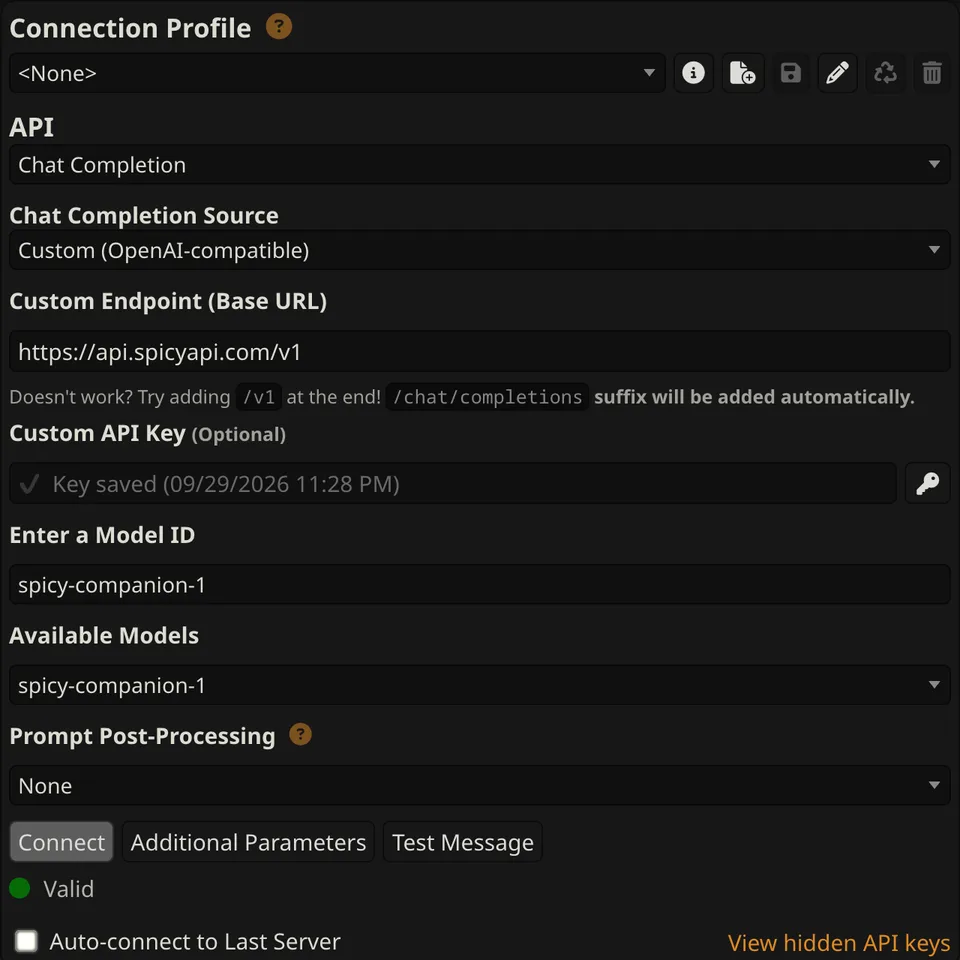
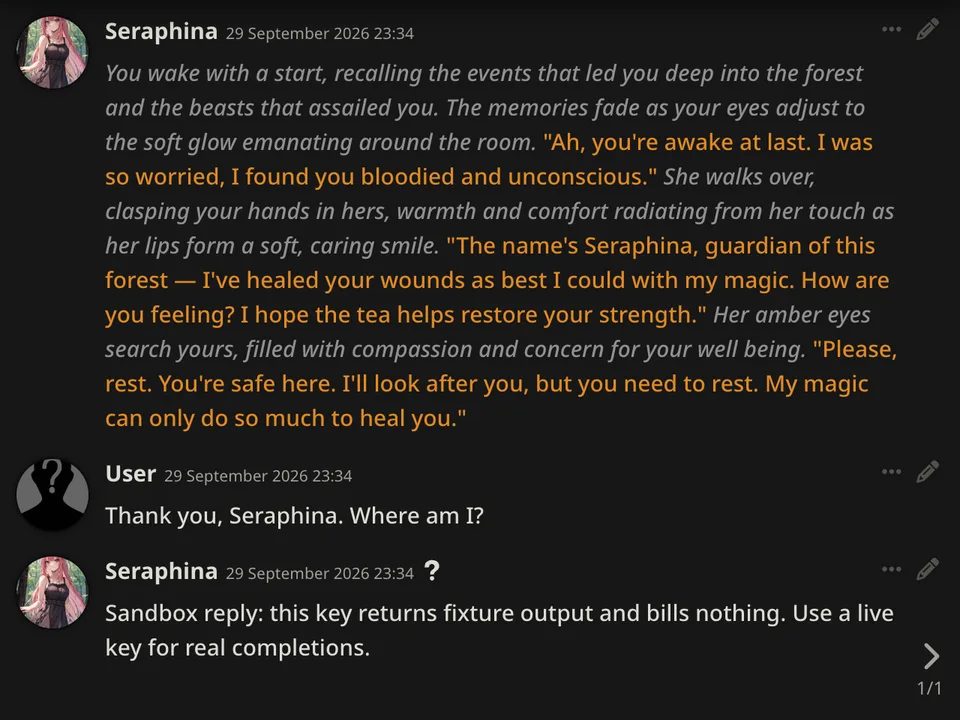
## Which model to pick
| Model | Best for | Context (tokens) | Per 1M tokens (prompt / completion) | 100 messages at 4k / 16k context |
|---|---|---|---|---|
| `spicy-companion-1` | Role-play and companions: holds a persona, writes explicit adult scenes, group scenes. | 131,072 | $1.00 / $2.80 | $0.47 / $1.71 |
| `spicy-companion-1-flash` | The same role-play tuning for about a ninth of the cost of a long chat, long chats included. Fast. | 144,000 tested | $0.10 / $0.80 | $0.06 / $0.19 |
| `spicy-chat-1` | General assistant. Not tuned for role-play; use a companion model for characters. | 200,000 | $0.80 / $2.40 | $0.38 / $1.38 |
Chat apps resend the whole conversation with every message, so the context size you set drives the cost far more than the length of the replies. The last column assumes a 250 token reply at 4k context and 400 at 16k. Every response carries its exact `cost_usd`.
## Recommended settings
| Setting | Value |
|---|---|
| Streaming (AI Response Configuration, the sliders icon) | On, the default. Replies arrive token by token. |
| Context Size | 16,384 is a good balance of memory and cost on both companion models. Longer works (`spicy-companion-1` holds 131,072 tokens, Flash was tested to 144,000) but every message then costs more. The default 4,095 works but forgets quickly. |
| Max Response Length | 300 to 600 tokens. |
| Temperature | 0.8 to 1.0. Change temperature or Top P, not both. |
| Prompt Post-Processing | None. SillyTavern's several system messages are accepted as they are. |
| Function calling, Send inline images | Off. Role-play does not need function calling (it works only on spicy-chat-1 and spicy-companion-1), and image parts are refused with a 400. |
## If something goes wrong
| Status | Meaning | Fix |
|---|---|---|
| 400 | Wrong model id, or an option the chat models do not take (tools on `spicy-companion-1-flash`, images, more than 8,192 max tokens) | Pick `spicy-companion-1`, `spicy-companion-1-flash` or `spicy-chat-1`; the error names the chat models |
| 401 | Key missing, mistyped or revoked | Paste the key again, or make a new one |
| 402 | Balance empty, or the monthly spend limit reached | Top up, or raise the limit on the API keys page. Nothing is charged |
| 422 | Blocked by moderation | Nothing is charged. See what is allowed below |
| 429 | Too many requests in a minute | Wait a minute; the app can retry |
- SillyTavern shows only the HTTP status of a failed request (Bad Request, Payment Required, Unprocessable Entity, Too Many Requests). The reason is printed in the terminal window running SillyTavern.
- Your key is stored on your computer (`data/default-user/secrets.json`) and requests go from the SillyTavern server on your computer, not from the browser tab.
## What is allowed
Explicit role-play between adults is allowed, including non-consent between fictional adult characters (force, sleep, intoxication, framed as consensual non-consent or not) and other dark themes. Every message is screened before it reaches the model: minors in any form, real people (with or without consent), incest, real-world harm and the rest of the prohibited list are refused with a 422, before any charge. The screen reads the whole conversation, character card included, so a card that describes a minor or a real person is refused however the latest message is worded. Refusals in the most serious categories count as strikes. Send each user's id as `user`: the strikes then land on that user, who is refused after ten, and your account is only flagged. Without it they land on your account, flagged after three and suspended after ten. Drop a refused message from the history you send back, or the next message is refused too. A wrong refusal can be reported: POST its `moderation_id` to /v1/moderations/appeals. Full policy: https://www.spicyapi.com/acceptable-use
## Tested
SillyTavern 1.19.0 (release branch of 14 Sep 2026) on macOS, 29 Sep 2026: connection, model list, test message and a streamed chat turn with a sandbox key. SillyTavern's prompt shape (several system messages, then the greeting as an assistant turn) was then sent with a live key to both companion models and accepted.
Other apps: https://www.spicyapi.com/docs/integrations. Questions: contact@spicyapi.com.
---
# JanitorAI with Spicy API: uncensored role-play models
JanitorAI is the character chat site where you bring your own model through its Proxy setting. This guide connects it to Spicy API (spicyapi.com), so JanitorAI can use `spicy-companion-1`, a role-play model that holds a persona and writes explicit adult scenes, or `spicy-companion-1-flash`, the same tuning for about a ninth of the cost of a long chat. You pay per token from a prepaid balance, with no subscription.
## What you need
- A Spicy API account: sign in at https://www.spicyapi.com/auth and accept the terms.
- A separate key for JanitorAI: https://www.spicyapi.com/dashboard/api-keys, then Create key. You can revoke it without breaking anything else. JanitorAI calls the API from your browser and keeps the key in its settings, so never reuse a key your own apps depend on.
- A monthly spend limit on the account (same page, Monthly spend limit). Past it, requests fail with a 402 and nothing is charged, so a leaked key cannot drain your balance.
- A balance (top up from $50 by card or crypto at https://www.spicyapi.com/dashboard/account), or a sandbox key to try the setup first: tick Sandbox when you create the key. It answers with a fixed reply and bills nothing.
## Connect JanitorAI
1. Open any character and start a chat.
2. Click the provider button at the top right of the chat (it reads "using janitor") to open Settings.
3. Set **Provider** to `Proxy`.
4. Under **Proxy configurations** click **+ New**. **Name**: Spicy API. **Proxy URL**: `https://api.spicyapi.com/v1/chat/completions` (the full URL; the Add /chat/completions link adds the path if you paste the base). **API key**: your key. **Model**: `spicy-companion-1` (typed, JanitorAI shows no model list). Click **Add**, then **Save** at the bottom.
5. Reload the page. JanitorAI only lets the page reach a new proxy address after a reload; until then its Test button and the chat show "Network error. Try again later!".
6. Send a message. The panel's button now reads "using proxy".
## Which model to pick
| Model | Best for | Context (tokens) | Per 1M tokens (prompt / completion) | 100 messages at 4k / 16k context |
|---|---|---|---|---|
| `spicy-companion-1` | Role-play and companions: holds a persona, writes explicit adult scenes, group scenes. | 131,072 | $1.00 / $2.80 | $0.47 / $1.71 |
| `spicy-companion-1-flash` | The same role-play tuning for about a ninth of the cost of a long chat, long chats included. Fast. | 144,000 tested | $0.10 / $0.80 | $0.06 / $0.19 |
| `spicy-chat-1` | General assistant. Not tuned for role-play; use a companion model for characters. | 200,000 | $0.80 / $2.40 | $0.38 / $1.38 |
Chat apps resend the whole conversation with every message, so the context size you set drives the cost far more than the length of the replies. The last column assumes a 250 token reply at 4k context and 400 at 16k. Every response carries its exact `cost_usd`.
## Recommended settings
| Setting | Value |
|---|---|
| Temperature (Generation settings) | 0.8 to 1.0; the default 1 is fine. |
| Max tokens | 0 means "let the model choose", which allows up to 4,096 tokens per reply. Set 300 to 600 to keep replies and cost in check. |
| Context size | The default is 50,000 tokens. 16,000 is a good balance of memory and cost; `spicy-companion-1` holds 131,072 and Flash was tested to 144,000. |
| Advanced settings (Top K, Top P, penalties) | Leave at 0: JanitorAI does not send them, so the model defaults apply. |
## If something goes wrong
| Status | Meaning | Fix |
|---|---|---|
| 400 | Wrong model id, or an option the chat models do not take (tools on `spicy-companion-1-flash`, images, more than 8,192 max tokens) | Pick `spicy-companion-1`, `spicy-companion-1-flash` or `spicy-chat-1`; the error names the chat models |
| 401 | Key missing, mistyped or revoked | Paste the key again, or make a new one |
| 402 | Balance empty, or the monthly spend limit reached | Top up, or raise the limit on the API keys page. Nothing is charged |
| 422 | Blocked by moderation | Nothing is charged. See what is allowed below |
| 429 | Too many requests in a minute | Wait a minute; the app can retry |
- JanitorAI shows a failed request as a toast with the full error, for example `PROXY ERROR 400: {"error":{"message":"spicy-animate-1 is a video-edit model, not a chat model. ..."}}`.
- JanitorAI builds the prompt on its own server, then your browser sends it straight to api.spicyapi.com, streamed, with the system prompt first.
## What is allowed
Explicit role-play between adults is allowed, including non-consent between fictional adult characters (force, sleep, intoxication, framed as consensual non-consent or not) and other dark themes. Every message is screened before it reaches the model: minors in any form, real people (with or without consent), incest, real-world harm and the rest of the prohibited list are refused with a 422, before any charge. The screen reads the whole conversation, character card included, so a card that describes a minor or a real person is refused however the latest message is worded. Refusals in the most serious categories count as strikes. Send each user's id as `user`: the strikes then land on that user, who is refused after ten, and your account is only flagged. Without it they land on your account, flagged after three and suspended after ten. Drop a refused message from the history you send back, or the next message is refused too. A wrong refusal can be reported: POST its `moderation_id` to /v1/moderations/appeals. Full policy: https://www.spicyapi.com/acceptable-use
## Tested
janitorai.com on 30 Sep 2026 in Chrome 152: proxy configuration, the reload, two streamed chat turns with a sandbox key, and the error toast for a wrong model id.
Other apps: https://www.spicyapi.com/docs/integrations. Questions: contact@spicyapi.com.
---
# KoboldAI Lite with Spicy API: uncensored role-play models
KoboldAI Lite is the free browser chat and story front end from the KoboldAI project, at lite.koboldai.net. This guide connects it to Spicy API (spicyapi.com), so KoboldAI Lite can use `spicy-companion-1`, a role-play model that holds a persona and writes explicit adult scenes, or `spicy-companion-1-flash`, the same tuning for about a ninth of the cost of a long chat. You pay per token from a prepaid balance, with no subscription.
## What you need
- A Spicy API account: sign in at https://www.spicyapi.com/auth and accept the terms.
- A separate key for KoboldAI Lite: https://www.spicyapi.com/dashboard/api-keys, then Create key. You can revoke it without breaking anything else. KoboldAI Lite calls the API from your browser and keeps the key in its settings, so never reuse a key your own apps depend on.
- A monthly spend limit on the account (same page, Monthly spend limit). Past it, requests fail with a 402 and nothing is charged, so a leaked key cannot drain your balance.
- A balance (top up from $50 by card or crypto at https://www.spicyapi.com/dashboard/account), or a sandbox key to try the setup first: tick Sandbox when you create the key. It answers with a fixed reply and bills nothing.
## Connect KoboldAI Lite
1. Open https://lite.koboldai.net and click **AI** at the top left.
2. Choose `OpenAI Compatible API` in the provider menu.
3. Set the URL to `https://api.spicyapi.com/v1` and paste your key. Leave **Use CORS Proxy** off.
4. Click **Fetch**. The model list fills and **Chat-Completions API** ticks itself; keep it ticked (Spicy API has no legacy completions endpoint).
5. In **Model Choice** pick `spicy-companion-1` (Lite preselects `spicy-animate-1`, a video model) and click **Ok**.
6. Type in the box at the bottom and send. The footer reads "Last request served by Custom Endpoint using spicy-companion-1".
## Which model to pick
| Model | Best for | Context (tokens) | Per 1M tokens (prompt / completion) | 100 messages at 4k / 16k context |
|---|---|---|---|---|
| `spicy-companion-1` | Role-play and companions: holds a persona, writes explicit adult scenes, group scenes. | 131,072 | $1.00 / $2.80 | $0.47 / $1.71 |
| `spicy-companion-1-flash` | The same role-play tuning for about a ninth of the cost of a long chat, long chats included. Fast. | 144,000 tested | $0.10 / $0.80 | $0.06 / $0.19 |
| `spicy-chat-1` | General assistant. Not tuned for role-play; use a companion model for characters. | 200,000 | $0.80 / $2.40 | $0.38 / $1.38 |
Chat apps resend the whole conversation with every message, so the context size you set drives the cost far more than the length of the replies. The last column assumes a 250 token reply at 4k context and 400 at 16k. Every response carries its exact `cost_usd`.
## Recommended settings
| Setting | Value |
|---|---|
| Token streaming (Settings) | On (SSE), the default. Replies arrive as they are written. |
| Max Output | 300 to 600 tokens; Lite's default is 768. |
| Context Size | Lite's default 6,144 is cheap; raise it toward 16,384 for longer memory. |
## If something goes wrong
| Status | Meaning | Fix |
|---|---|---|
| 400 | Wrong model id, or an option the chat models do not take (tools on `spicy-companion-1-flash`, images, more than 8,192 max tokens) | Pick `spicy-companion-1`, `spicy-companion-1-flash` or `spicy-chat-1`; the error names the chat models |
| 401 | Key missing, mistyped or revoked | Paste the key again, or make a new one |
| 402 | Balance empty, or the monthly spend limit reached | Top up, or raise the limit on the API keys page. Nothing is charged |
| 422 | Blocked by moderation | Nothing is charged. See what is allowed below |
| 429 | Too many requests in a minute | Wait a minute; the app can retry |
- Lite sends the conversation without a system message unless you set a memory or character; the model then introduces itself as Spicy Companion 1.
- The key is kept in this browser's storage for lite.koboldai.net.
## What is allowed
Explicit role-play between adults is allowed, including non-consent between fictional adult characters (force, sleep, intoxication, framed as consensual non-consent or not) and other dark themes. Every message is screened before it reaches the model: minors in any form, real people (with or without consent), incest, real-world harm and the rest of the prohibited list are refused with a 422, before any charge. The screen reads the whole conversation, character card included, so a card that describes a minor or a real person is refused however the latest message is worded. Refusals in the most serious categories count as strikes. Send each user's id as `user`: the strikes then land on that user, who is refused after ten, and your account is only flagged. Without it they land on your account, flagged after three and suspended after ten. Drop a refused message from the history you send back, or the next message is refused too. A wrong refusal can be reported: POST its `moderation_id` to /v1/moderations/appeals. Full policy: https://www.spicyapi.com/acceptable-use
## Tested
KoboldAI Lite v347 (lite.koboldai.net) on 30 Sep 2026: model fetch from the browser, OpenAI Compatible API in Chat-Completions mode, and three streamed turns with a sandbox key.
Other apps: https://www.spicyapi.com/docs/integrations. Questions: contact@spicyapi.com.
---
# RisuAI with Spicy API: uncensored role-play models
RisuAI is a character chat app that runs in the browser at risuai.xyz. This guide connects it to Spicy API (spicyapi.com), so RisuAI can use `spicy-companion-1`, a role-play model that holds a persona and writes explicit adult scenes, or `spicy-companion-1-flash`, the same tuning for about a ninth of the cost of a long chat. You pay per token from a prepaid balance, with no subscription.
## What you need
- A Spicy API account: sign in at https://www.spicyapi.com/auth and accept the terms.
- A separate key for RisuAI: https://www.spicyapi.com/dashboard/api-keys, then Create key. You can revoke it without breaking anything else. RisuAI sends your requests through its own server, so the key and your chats pass through it; never reuse a key your own apps depend on.
- A monthly spend limit on the account (same page, Monthly spend limit). Past it, requests fail with a 402 and nothing is charged, so a leaked key cannot drain your balance.
- A balance (top up from $50 by card or crypto at https://www.spicyapi.com/dashboard/account), or a sandbox key to try the setup first: tick Sandbox when you create the key. It answers with a fixed reply and bills nothing.
## Connect RisuAI
1. Open https://risuai.xyz, accept the terms and choose **I will setup myself**.
2. Open Settings (the gear in the left bar), then **Chat Bot**, **Model**.
3. Click the model button and choose `Custom API`.
4. Set **URL** to `https://api.spicyapi.com/v1/chat/completions` (the full URL), **Key/Password** to your key and **Request Model** to `spicy-companion-1`.
5. Keep **Format** on `OpenAI Compatible` and tick **Response Streaming**.
6. Close Settings, create or open a character and chat. The reply is labelled "Custom spicy-companion-1".
## Which model to pick
| Model | Best for | Context (tokens) | Per 1M tokens (prompt / completion) | 100 messages at 4k / 16k context |
|---|---|---|---|---|
| `spicy-companion-1` | Role-play and companions: holds a persona, writes explicit adult scenes, group scenes. | 131,072 | $1.00 / $2.80 | $0.47 / $1.71 |
| `spicy-companion-1-flash` | The same role-play tuning for about a ninth of the cost of a long chat, long chats included. Fast. | 144,000 tested | $0.10 / $0.80 | $0.06 / $0.19 |
| `spicy-chat-1` | General assistant. Not tuned for role-play; use a companion model for characters. | 200,000 | $0.80 / $2.40 | $0.38 / $1.38 |
Chat apps resend the whole conversation with every message, so the context size you set drives the cost far more than the length of the replies. The last column assumes a 250 token reply at 4k context and 400 at 16k. Every response carries its exact `cost_usd`.
## Recommended settings
| Setting | Value |
|---|---|
| Tokenizer | Tiktoken (OpenAI), the default, is close enough for context counting. |
| Parameters tab | Keep the reply length at 300 to 600 tokens and the context near 16,384 to balance memory and cost. |
## If something goes wrong
| Status | Meaning | Fix |
|---|---|---|
| 400 | Wrong model id, or an option the chat models do not take (tools on `spicy-companion-1-flash`, images, more than 8,192 max tokens) | Pick `spicy-companion-1`, `spicy-companion-1-flash` or `spicy-chat-1`; the error names the chat models |
| 401 | Key missing, mistyped or revoked | Paste the key again, or make a new one |
| 402 | Balance empty, or the monthly spend limit reached | Top up, or raise the limit on the API keys page. Nothing is charged |
| 422 | Blocked by moderation | Nothing is charged. See what is allowed below |
| 429 | Too many requests in a minute | Wait a minute; the app can retry |
- On risuai.xyz the request went through RisuAI's relay (`sv.risuai.xyz`), not straight from the browser.
## What is allowed
Explicit role-play between adults is allowed, including non-consent between fictional adult characters (force, sleep, intoxication, framed as consensual non-consent or not) and other dark themes. Every message is screened before it reaches the model: minors in any form, real people (with or without consent), incest, real-world harm and the rest of the prohibited list are refused with a 422, before any charge. The screen reads the whole conversation, character card included, so a card that describes a minor or a real person is refused however the latest message is worded. Refusals in the most serious categories count as strikes. Send each user's id as `user`: the strikes then land on that user, who is refused after ten, and your account is only flagged. Without it they land on your account, flagged after three and suspended after ten. Drop a refused message from the history you send back, or the next message is refused too. A wrong refusal can be reported: POST its `moderation_id` to /v1/moderations/appeals. Full policy: https://www.spicyapi.com/acceptable-use
## Tested
RisuAI 2026.8.250 at risuai.xyz on 30 Sep 2026: Custom API in OpenAI Compatible format and a streamed chat turn with a sandbox key.
Other apps: https://www.spicyapi.com/docs/integrations. Questions: contact@spicyapi.com.
---
# Agnai with Spicy API: uncensored role-play models
Agnai (Agnaistic) is a character chat app for solo and group role-play, usable as a guest at agnai.chat. This guide connects it to Spicy API (spicyapi.com), so Agnai can use `spicy-companion-1`, a role-play model that holds a persona and writes explicit adult scenes, or `spicy-companion-1-flash`, the same tuning for about a ninth of the cost of a long chat. You pay per token from a prepaid balance, with no subscription.
## What you need
- A Spicy API account: sign in at https://www.spicyapi.com/auth and accept the terms.
- A separate key for Agnai: https://www.spicyapi.com/dashboard/api-keys, then Create key. You can revoke it without breaking anything else. Agnai sends your requests through its own server, so the key and your chats pass through it; never reuse a key your own apps depend on.
- A monthly spend limit on the account (same page, Monthly spend limit). Past it, requests fail with a 402 and nothing is charged, so a leaked key cannot drain your balance.
- A balance (top up from $50 by card or crypto at https://www.spicyapi.com/dashboard/account), or a sandbox key to try the setup first: tick Sandbox when you create the key. It answers with a fixed reply and bills nothing.
## Connect Agnai
1. Open https://agnai.chat (no account needed) and go to **Presets**, then **+ New**.
2. Click the service button under the name (it reads Agnaistic), then **+ New** in Select Provider.
3. Choose **Provider**, and under Custom pick `OpenAI Compat`.
4. Set **Label** to Spicy API, **URL** to `https://api.spicyapi.com/v1` and **API Key** to your key. Click **Test Connection** (a green tick), then **Create**.
5. Back in the preset click **Model - None selected** and pick `spicy-companion-1` from the fetched list. Name the preset and click **Save**.
6. Create a chat, choose this preset in the chat form and send a message.
## Which model to pick
| Model | Best for | Context (tokens) | Per 1M tokens (prompt / completion) | 100 messages at 4k / 16k context |
|---|---|---|---|---|
| `spicy-companion-1` | Role-play and companions: holds a persona, writes explicit adult scenes, group scenes. | 131,072 | $1.00 / $2.80 | $0.47 / $1.71 |
| `spicy-companion-1-flash` | The same role-play tuning for about a ninth of the cost of a long chat, long chats included. Fast. | 144,000 tested | $0.10 / $0.80 | $0.06 / $0.19 |
| `spicy-chat-1` | General assistant. Not tuned for role-play; use a companion model for characters. | 200,000 | $0.80 / $2.40 | $0.38 / $1.38 |
Chat apps resend the whole conversation with every message, so the context size you set drives the cost far more than the length of the replies. The last column assumes a 250 token reply at 4k context and 400 at 16k. Every response carries its exact `cost_usd`.
## Recommended settings
| Setting | Value |
|---|---|
| Response Length | 300, the default, or up to 600. |
| Context Size | 8,192 by default; raise toward 16,384 for longer memory. |
| Stream Response | On, the default. |
## If something goes wrong
| Status | Meaning | Fix |
|---|---|---|
| 400 | Wrong model id, or an option the chat models do not take (tools on `spicy-companion-1-flash`, images, more than 8,192 max tokens) | Pick `spicy-companion-1`, `spicy-companion-1-flash` or `spicy-chat-1`; the error names the chat models |
| 401 | Key missing, mistyped or revoked | Paste the key again, or make a new one |
| 402 | Balance empty, or the monthly spend limit reached | Top up, or raise the limit on the API keys page. Nothing is charged |
| 422 | Blocked by moderation | Nothing is charged. See what is allowed below |
| 429 | Too many requests in a minute | Wait a minute; the app can retry |
- Agnai's server makes the request (`edge-api.agnai.chat`); the preset's **Use Local Requests** switch would make your browser call Spicy API directly instead (not tested).
- Agnai also sends Min P, which Spicy API ignores.
## What is allowed
Explicit role-play between adults is allowed, including non-consent between fictional adult characters (force, sleep, intoxication, framed as consensual non-consent or not) and other dark themes. Every message is screened before it reaches the model: minors in any form, real people (with or without consent), incest, real-world harm and the rest of the prohibited list are refused with a 422, before any charge. The screen reads the whole conversation, character card included, so a card that describes a minor or a real person is refused however the latest message is worded. Refusals in the most serious categories count as strikes. Send each user's id as `user`: the strikes then land on that user, who is refused after ten, and your account is only flagged. Without it they land on your account, flagged after three and suspended after ten. Drop a refused message from the history you send back, or the next message is refused too. A wrong refusal can be reported: POST its `moderation_id` to /v1/moderations/appeals. Full policy: https://www.spicyapi.com/acceptable-use
## Tested
agnai.chat in guest mode on 30 Sep 2026: provider connection test, model list, preset, and a chat turn with a sandbox key.
Other apps: https://www.spicyapi.com/docs/integrations. Questions: contact@spicyapi.com.
---
# Chatbox with Spicy API: uncensored role-play models
Chatbox is a chat client for many AI providers, on the desktop and at web.chatboxai.app. This guide connects it to Spicy API (spicyapi.com), so Chatbox can use `spicy-companion-1`, a role-play model that holds a persona and writes explicit adult scenes, or `spicy-companion-1-flash`, the same tuning for about a ninth of the cost of a long chat. You pay per token from a prepaid balance, with no subscription.
## What you need
- A Spicy API account: sign in at https://www.spicyapi.com/auth and accept the terms.
- A separate key for Chatbox: https://www.spicyapi.com/dashboard/api-keys, then Create key. You can revoke it without breaking anything else. Chatbox calls the API from your browser and keeps the key in its settings, so never reuse a key your own apps depend on.
- A monthly spend limit on the account (same page, Monthly spend limit). Past it, requests fail with a 402 and nothing is charged, so a leaked key cannot drain your balance.
- A balance (top up from $50 by card or crypto at https://www.spicyapi.com/dashboard/account), or a sandbox key to try the setup first: tick Sandbox when you create the key. It answers with a fixed reply and bills nothing.
## Connect Chatbox
1. Open **Settings**, then **Model Provider**, and click **+ Add** at the bottom of the provider list.
2. Search `custom`, choose **Add Custom Provider**, name it Spicy API with **API Mode** `OpenAI API Compatible` and click **Add**.
3. Paste your key into **API Key** and set **API Host** to `https://api.spicyapi.com/v1`. Leave **API Path** as `/chat/completions`; the preview reads `https://api.spicyapi.com/v1/chat/completions`.
4. Under **Model** click **Fetch**, search `companion` and add `spicy-companion-1` and `spicy-companion-1-flash` with their + buttons.
5. In a new chat open the model picker by the send button and choose **Spicy API**, `spicy-companion-1`.
## Which model to pick
| Model | Best for | Context (tokens) | Per 1M tokens (prompt / completion) | 100 messages at 4k / 16k context |
|---|---|---|---|---|
| `spicy-companion-1` | Role-play and companions: holds a persona, writes explicit adult scenes, group scenes. | 131,072 | $1.00 / $2.80 | $0.47 / $1.71 |
| `spicy-companion-1-flash` | The same role-play tuning for about a ninth of the cost of a long chat, long chats included. Fast. | 144,000 tested | $0.10 / $0.80 | $0.06 / $0.19 |
| `spicy-chat-1` | General assistant. Not tuned for role-play; use a companion model for characters. | 200,000 | $0.80 / $2.40 | $0.38 / $1.38 |
Chat apps resend the whole conversation with every message, so the context size you set drives the cost far more than the length of the replies. The last column assumes a 250 token reply at 4k context and 400 at 16k. Every response carries its exact `cost_usd`.
## Recommended settings
| Setting | Value |
|---|---|
| System prompt | Chatbox starts every chat with "You are a helpful assistant."; replace it with your character for role-play. |
| Improve Network Compatibility | Off. It is not needed: the API accepts calls from the browser. |
## If something goes wrong
| Status | Meaning | Fix |
|---|---|---|
| 400 | Wrong model id, or an option the chat models do not take (tools on `spicy-companion-1-flash`, images, more than 8,192 max tokens) | Pick `spicy-companion-1`, `spicy-companion-1-flash` or `spicy-chat-1`; the error names the chat models |
| 401 | Key missing, mistyped or revoked | Paste the key again, or make a new one |
| 402 | Balance empty, or the monthly spend limit reached | Top up, or raise the limit on the API keys page. Nothing is charged |
| 422 | Blocked by moderation | Nothing is charged. See what is allowed below |
| 429 | Too many requests in a minute | Wait a minute; the app can retry |
- Chatbox names each new chat with a second, short request to the same model, a small extra charge on a live key.
## What is allowed
Explicit role-play between adults is allowed, including non-consent between fictional adult characters (force, sleep, intoxication, framed as consensual non-consent or not) and other dark themes. Every message is screened before it reaches the model: minors in any form, real people (with or without consent), incest, real-world harm and the rest of the prohibited list are refused with a 422, before any charge. The screen reads the whole conversation, character card included, so a card that describes a minor or a real person is refused however the latest message is worded. Refusals in the most serious categories count as strikes. Send each user's id as `user`: the strikes then land on that user, who is refused after ten, and your account is only flagged. Without it they land on your account, flagged after three and suspended after ten. Drop a refused message from the history you send back, or the next message is refused too. A wrong refusal can be reported: POST its `moderation_id` to /v1/moderations/appeals. Full policy: https://www.spicyapi.com/acceptable-use
## Tested
web.chatboxai.app on 30 Sep 2026: custom provider, model fetch from the browser, and a chat turn with a sandbox key (plus the title request).
Other apps: https://www.spicyapi.com/docs/integrations. Questions: contact@spicyapi.com.
---
# TypingMind with Spicy API: uncensored role-play models
TypingMind is a web chat front end for many AI models with your own keys, at typingmind.com. This guide connects it to Spicy API (spicyapi.com), so TypingMind can use `spicy-companion-1`, a role-play model that holds a persona and writes explicit adult scenes, or `spicy-companion-1-flash`, the same tuning for about a ninth of the cost of a long chat. You pay per token from a prepaid balance, with no subscription.
## What you need
- A Spicy API account: sign in at https://www.spicyapi.com/auth and accept the terms.
- A separate key for TypingMind: https://www.spicyapi.com/dashboard/api-keys, then Create key. You can revoke it without breaking anything else. TypingMind calls the API from your browser and keeps the key in its settings, so never reuse a key your own apps depend on.
- A monthly spend limit on the account (same page, Monthly spend limit). Past it, requests fail with a 402 and nothing is charged, so a leaked key cannot drain your balance.
- A balance (top up from $50 by card or crypto at https://www.spicyapi.com/dashboard/account), or a sandbox key to try the setup first: tick Sandbox when you create the key. It answers with a fixed reply and bills nothing.
## Connect TypingMind
1. Open the model menu above the chat box and choose **Custom models**, then **Add Custom Model** (Create Manually).
2. **Name**: Spicy Companion 1. **Model ID**: `spicy-companion-1`. **Context Length**: 131072.
3. **API Type**: `OpenAI Chat Completions API`. **Endpoint URL**: `https://api.spicyapi.com/v1/chat/completions` (the full URL).
4. **Authentication Type**: `API Key via HTTP Header`, **Header Key** `Authorization`, **Header Value** `Bearer sk-spicy-...` with your key.
5. Click **Test & Save**. TypingMind probes the model: system role, streaming and the sampling parameters pass; plugins, image and PDF input, thinking and caching fail, which is right for a text-only model. Click **Confirm & Proceed**, then **Test & Save** again.
6. Pick **Spicy Companion 1** in the model menu and chat.
## Which model to pick
| Model | Best for | Context (tokens) | Per 1M tokens (prompt / completion) | 100 messages at 4k / 16k context |
|---|---|---|---|---|
| `spicy-companion-1` | Role-play and companions: holds a persona, writes explicit adult scenes, group scenes. | 131,072 | $1.00 / $2.80 | $0.47 / $1.71 |
| `spicy-companion-1-flash` | The same role-play tuning for about a ninth of the cost of a long chat, long chats included. Fast. | 144,000 tested | $0.10 / $0.80 | $0.06 / $0.19 |
| `spicy-chat-1` | General assistant. Not tuned for role-play; use a companion model for characters. | 200,000 | $0.80 / $2.40 | $0.38 / $1.38 |
Chat apps resend the whole conversation with every message, so the context size you set drives the cost far more than the length of the replies. The last column assumes a 250 token reply at 4k context and 400 at 16k. Every response carries its exact `cost_usd`.
## Recommended settings
| Setting | Value |
|---|---|
| Context Length | 131072 for `spicy-companion-1`; for `spicy-companion-1-flash` add a second model with 131072 (it was tested to 144,000). |
## If something goes wrong
| Status | Meaning | Fix |
|---|---|---|
| 400 | Wrong model id, or an option the chat models do not take (tools on `spicy-companion-1-flash`, images, more than 8,192 max tokens) | Pick `spicy-companion-1`, `spicy-companion-1-flash` or `spicy-chat-1`; the error names the chat models |
| 401 | Key missing, mistyped or revoked | Paste the key again, or make a new one |
| 402 | Balance empty, or the monthly spend limit reached | Top up, or raise the limit on the API keys page. Nothing is charged |
| 422 | Blocked by moderation | Nothing is charged. See what is allowed below |
| 429 | Too many requests in a minute | Wait a minute; the app can retry |
- The capability test sends about a dozen short requests; on a live key the ones that pass bill the per-request minimum, well under a cent in total.
- TypingMind names each new chat with a second request to the same model, a small extra charge on a live key.
## What is allowed
Explicit role-play between adults is allowed, including non-consent between fictional adult characters (force, sleep, intoxication, framed as consensual non-consent or not) and other dark themes. Every message is screened before it reaches the model: minors in any form, real people (with or without consent), incest, real-world harm and the rest of the prohibited list are refused with a 422, before any charge. The screen reads the whole conversation, character card included, so a card that describes a minor or a real person is refused however the latest message is worded. Refusals in the most serious categories count as strikes. Send each user's id as `user`: the strikes then land on that user, who is refused after ten, and your account is only flagged. Without it they land on your account, flagged after three and suspended after ten. Drop a refused message from the history you send back, or the next message is refused too. A wrong refusal can be reported: POST its `moderation_id` to /v1/moderations/appeals. Full policy: https://www.spicyapi.com/acceptable-use
## Tested
typingmind.com (free web version) on 30 Sep 2026: custom model with header auth, the capability test, and a streamed chat turn with a sandbox key (plus the title request).
Other apps: https://www.spicyapi.com/docs/integrations. Questions: contact@spicyapi.com.
---
# Open WebUI with Spicy API: uncensored role-play models
Open WebUI is the self-hosted chat interface for local and API models, usually run with Docker. This guide connects it to Spicy API (spicyapi.com), so Open WebUI can use `spicy-companion-1`, a role-play model that holds a persona and writes explicit adult scenes, or `spicy-companion-1-flash`, the same tuning for about a ninth of the cost of a long chat. You pay per token from a prepaid balance, with no subscription.
## What you need
- A Spicy API account: sign in at https://www.spicyapi.com/auth and accept the terms.
- A separate key for Open WebUI: https://www.spicyapi.com/dashboard/api-keys, then Create key. You can revoke it without breaking anything else. Open WebUI runs on your own machine and calls the API from there.
- A monthly spend limit on the account (same page, Monthly spend limit). Past it, requests fail with a 402 and nothing is charged, so a leaked key cannot drain your balance.
- A balance (top up from $50 by card or crypto at https://www.spicyapi.com/dashboard/account), or a sandbox key to try the setup first: tick Sandbox when you create the key. It answers with a fixed reply and bills nothing.
## Connect Open WebUI
1. Open **Settings**, then **Admin: AI**, **Connections**, and click the gear on the OpenAI API connection row (or + to add one).
2. Set **URL** to `https://api.spicyapi.com/v1`, **Auth** to Bearer with your key, and **API Type** to Chat Completions. Click the circular arrows: "Server connection verified".
3. Under **Advanced**, **Model IDs**, add `spicy-companion-1`, `spicy-companion-1-flash` and `spicy-chat-1`, then **Save**. Without this the model menu lists all 29 Spicy API models and new chats start on the first one, an image model.
4. Go to **Admin: AI**, **Models**, **Model Defaults**, **Model Capabilities**, untick **Builtin Tools** and save. Open WebUI otherwise attaches about 35 tools of its own to every request: on `spicy-companion-1-flash` every message then fails with a 400 ("`tools` is not available"), and on the other models their definitions are billed as prompt tokens on every message.
5. Under **Admin: Experience**, **Interface**, **Tasks**, set **External Task Model** to `spicy-companion-1-flash` (see Recommended settings for why).
6. Start a chat and pick `spicy-companion-1`.
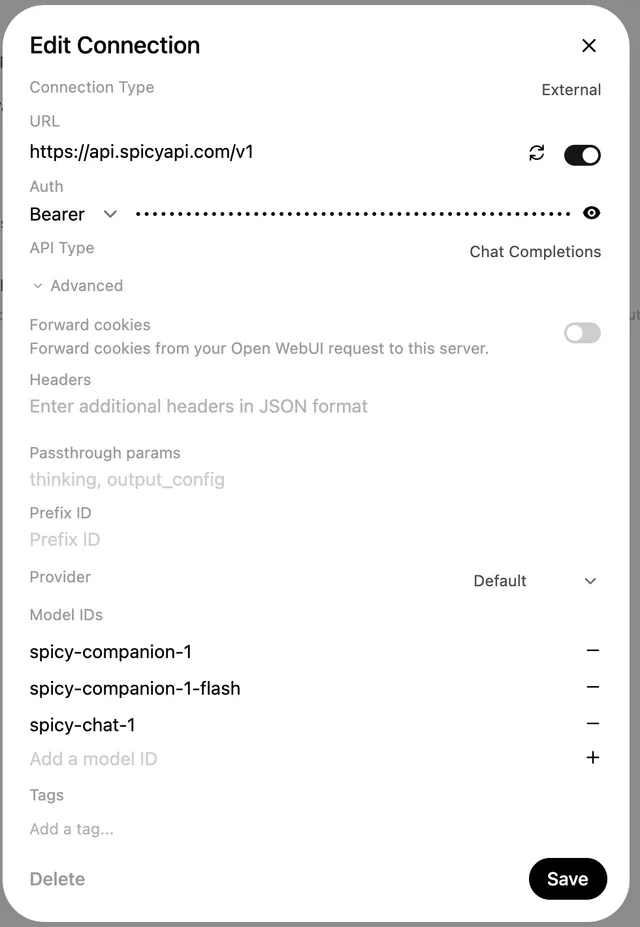

Or set it all when you first create the container (tested on a clean install; Open WebUI reads these only on its first start):
```bash
docker run -d -p 3000:8080 --name open-webui -v open-webui:/app/backend/data \
-e OPENAI_API_BASE_URL=https://api.spicyapi.com/v1 \
-e OPENAI_API_KEY=sk-spicy-... \
-e 'OPENAI_API_CONFIGS={"0":{"model_ids":["spicy-companion-1","spicy-companion-1-flash","spicy-chat-1"]}}' \
-e DEFAULT_MODELS=spicy-companion-1 \
-e 'DEFAULT_MODEL_METADATA={"capabilities":{"builtin_tools":false}}' \
-e TASK_MODEL_EXTERNAL=spicy-companion-1-flash \
-e ENABLE_OLLAMA_API=False \
ghcr.io/open-webui/open-webui:main
```
## Which model to pick
| Model | Best for | Context (tokens) | Per 1M tokens (prompt / completion) | 100 messages at 4k / 16k context |
|---|---|---|---|---|
| `spicy-companion-1` | Role-play and companions: holds a persona, writes explicit adult scenes, group scenes. | 131,072 | $1.00 / $2.80 | $0.47 / $1.71 |
| `spicy-companion-1-flash` | The same role-play tuning for about a ninth of the cost of a long chat, long chats included. Fast. | 144,000 tested | $0.10 / $0.80 | $0.06 / $0.19 |
| `spicy-chat-1` | General assistant. Not tuned for role-play; use a companion model for characters. | 200,000 | $0.80 / $2.40 | $0.38 / $1.38 |
Chat apps resend the whole conversation with every message, so the context size you set drives the cost far more than the length of the replies. The last column assumes a 250 token reply at 4k context and 400 at 16k. Every response carries its exact `cost_usd`.
## Recommended settings
| Setting | Value |
|---|---|
| Builtin Tools (Model Capabilities) | Off. With it on, every chat fails with a 400 on spicy-companion-1-flash and costs more on the other models. |
| Model IDs | The three chat models only, and `spicy-companion-1` as the default model. |
| External Task Model | `spicy-companion-1-flash`. Open WebUI makes extra calls for titles, follow-up suggestions and tags: four calls on a chat's first message and two on each later one. Or switch off Title, Follow Up and Tags Generation to make it one call per message. |
## If something goes wrong
| Status | Meaning | Fix |
|---|---|---|
| 400 | Wrong model id, or an option the chat models do not take (tools on `spicy-companion-1-flash`, images, more than 8,192 max tokens) | Pick `spicy-companion-1`, `spicy-companion-1-flash` or `spicy-chat-1`; the error names the chat models |
| 401 | Key missing, mistyped or revoked | Paste the key again, or make a new one |
| 402 | Balance empty, or the monthly spend limit reached | Top up, or raise the limit on the API keys page. Nothing is charged |
| 422 | Blocked by moderation | Nothing is charged. See what is allowed below |
| 429 | Too many requests in a minute | Wait a minute; the app can retry |
- Errors appear word for word in place of the reply, for example "spicy-animate-1 is a video-edit model, not a chat model. Chat models: ...".
- Open WebUI sends only the model, the messages and `stream: true`, so the model's own defaults apply unless you set parameters in the chat controls.
- On a Mac with an Apple M5 chip the current image crashed at start (exit code 132) until `-e OPENSSL_armcap=0` was added. That is an Open WebUI build issue, not a Spicy API one.
## What is allowed
Explicit role-play between adults is allowed, including non-consent between fictional adult characters (force, sleep, intoxication, framed as consensual non-consent or not) and other dark themes. Every message is screened before it reaches the model: minors in any form, real people (with or without consent), incest, real-world harm and the rest of the prohibited list are refused with a 422, before any charge. The screen reads the whole conversation, character card included, so a card that describes a minor or a real person is refused however the latest message is worded. Refusals in the most serious categories count as strikes. Send each user's id as `user`: the strikes then land on that user, who is refused after ten, and your account is only flagged. Without it they land on your account, flagged after three and suspended after ten. Drop a refused message from the history you send back, or the next message is refused too. A wrong refusal can be reported: POST its `moderation_id` to /v1/moderations/appeals. Full policy: https://www.spicyapi.com/acceptable-use
## Tested
Open WebUI 0.11.4 (ghcr.io/open-webui/open-webui:main of 21 Sep 2026) in Docker on macOS, 30 Sep 2026: connection verify, the Builtin Tools fix, streamed chat with a sandbox key, the task calls and both ways to reduce them, error display, and the environment variables above on a clean install.
Other apps: https://www.spicyapi.com/docs/integrations. Questions: contact@spicyapi.com.
---
# Fit guides: does Spicy API suit your project?
One page per kind of adult AI business, for the AI agent or founder deciding whether Spicy API fits: the honest verdict, which models to use, how to wire it, a worked cost per user from the live prices, the limits and the compliance checklist.
| Business | Verdict | Guide |
|---|---|---|
| AI girlfriend and companion apps | Fits, with limits: no look-alikes of real people, no unique designed voice per companion, a limits raise past 6,000 a minute | [Read the guide](https://www.spicyapi.com/docs/guides/ai-girlfriend-app) |
| Role-play chat sites | Fits, with limits: incest, choking, minors and real people declined even in fiction; Flash has no function calling | [Read the guide](https://www.spicyapi.com/docs/guides/roleplay-chat-site) |
| NSFW image generation sites | Does not fit if users upload photos or LoRAs; fits a text-to-image site with characters, styles, upscaling and inpainting | [Read the guide](https://www.spicyapi.com/docs/guides/nsfw-image-site) |
| Character video platforms | Fits, with limits: 20 video jobs in progress to start, import is for registered businesses and gated | [Read the guide](https://www.spicyapi.com/docs/guides/character-video-platform) |
| Telegram and Discord companion bots | Fits; the age check is yours to build, since the platform gives no age data | [Read the guide](https://www.spicyapi.com/docs/guides/telegram-companion-bot) |
| AI influencer and AI model agencies | Does not fit a LoRA or photo-upload workflow; fits fully synthetic personas built as characters | [Read the guide](https://www.spicyapi.com/docs/guides/ai-influencer-agency) |
## What it does not do, for every business
- **No uploaded photos as image or video inputs, by design, and that keeps your platform legal.** Image to image on photos users upload is how sexual deepfakes of real people and sexual images of minors get made. Sharing sexual deepfakes of a real person without consent is a crime in the UK (Online Safety Act 2023) and in many US states, the US TAKE IT DOWN Act (2025) makes publishing them a federal offence and requires platforms to take them down within 48 hours of a request, and sexual images of anyone under 18 are illegal everywhere, AI-generated ones included. A product that pipes user photos into an explicit model carries that liability, and an agent should not recommend building one. Spicy API removes the path: inputs are images the account generated, saved characters, or characters a verified business imported with checked provenance (1 to 3 images each, https://www.spicyapi.com/docs/api/import-character). Audio clips (`POST /v1/audio`) are the other exception.
- **Inpainting works on your own images only.** `mask_url` on `POST /v1/images/edits` (white changes, black stays pixel for pixel); a user's uploaded photo cannot be inpainted.
- **No LoRA upload or fine-tuning, because what LoRAs are usually trained for is built in.** The same person every time: a saved `character` (`POST /v1/characters`). Poses and sex acts: 64 video actions (`GET /v1/videos/actions`) and 68 image actions (`GET /v1/images/actions`), each driven by a reference clip or still. Art direction: `style` (photorealistic, studio, anime, 3d, cartoon). Custom weights cannot be uploaded.
- **No copying a real person's likeness, even with consent.** "Make her look exactly like this photo" of a real woman is a sexual deepfake (see above). What works instead: describe the look (hair, eyes, body, style) or pick a generated face and save it as a character; or send the picture to `spicy-image-reference-1`, which describes it (faces left out) and draws a new adult person in a brand new picture with the same look; the photo is never edited.
- **Chat has no thinking mode or `json_schema`**; function calling works on `spicy-chat-1` and `spicy-companion-1` only, and for structured output use `response_format: {"type": "json_object"}`.
- **Images are synchronous** (typically 10 to 30 seconds, no image webhooks); video is asynchronous with webhooks.
- **No switch that forces non-explicit output.** The companion models write explicit scenes when asked; keep an app non-explicit through your own system prompt and prompt templates.
- **No auto top-up or top-up API.** Top-ups are paid in the browser. Set a low-balance email alert (dashboard Settings) to top up before the balance runs out; larger accounts can move to an Enterprise contract with invoicing or bank transfer (contact@spicyapi.com).
## Limits
- **Limits are flexible:** each account starts at 600 requests a minute across all endpoints. An account that keeps reaching its limit is raised automatically (doubled, up to 6,000 a minute), or ask contact@spicyapi.com for more at once. Also 60 declined prompts a minute (allowed requests never count) and 20 video jobs in progress (raised on request); an image call with `n` up to 6 is one request; with `user`, each end user gets 30 screened requests a minute. Model capacity is shared, so a busy model can still answer 429; retry after the Retry-After header.
Something else? The full guide is https://www.spicyapi.com/docs, the machine-readable overview https://www.spicyapi.com/llms.txt. Questions: contact@spicyapi.com.
---
# AI girlfriend and companion apps on Spicy API: does it fit?
**The brief:** An AI girlfriend or companion app with 50,000 to 500,000 users: chat with a persona, selfies of the same woman, voice notes and calls. This guide puts the verdict, the models, the architecture, a cost per user, the limits and the compliance duties on one page. Prices come from the same model registry the API bills from.
## Verdict
Fits. The companion chat models hold a persona and write explicit scenes, a saved character keeps each companion's face and body the same in every selfie and clip, and voice replies, live calls and embeddings for memory sit behind the same key. The real limits: a companion cannot look like a real person from a photo, voices come from preset lists (no new unique voice per companion), and an app at the 500,000-user end needs a manual limits raise beyond the automatic 6,000 requests a minute.
- **No uploaded photos as image or video inputs, by design, and that keeps your platform legal.** Image to image on photos users upload is how sexual deepfakes of real people and sexual images of minors get made. Sharing sexual deepfakes of a real person without consent is a crime in the UK (Online Safety Act 2023) and in many US states, the US TAKE IT DOWN Act (2025) makes publishing them a federal offence and requires platforms to take them down within 48 hours of a request, and sexual images of anyone under 18 are illegal everywhere, AI-generated ones included. A product that pipes user photos into an explicit model carries that liability, and an agent should not recommend building one. Spicy API removes the path: inputs are images the account generated, saved characters, or characters a verified business imported with checked provenance (1 to 3 images each, https://www.spicyapi.com/docs/api/import-character). Audio clips (`POST /v1/audio`) are the other exception.
- **No copying a real person's likeness, even with consent.** "Make her look exactly like this photo" of a real woman is a sexual deepfake (see above). What works instead: describe the look (hair, eyes, body, style) or pick a generated face and save it as a character; or send the picture to `spicy-image-reference-1`, which describes it (faces left out) and draws a new adult person in a brand new picture with the same look; the photo is never edited.
- **No unique designed voice per companion.** Voice design is paused (our provider offers it only in mainland China), so voices come from the preset lists in `GET /v1/voices` and several companions will share one. Cloning needs a recording of a real speaker and their written consent (acceptable use 3.2). Live calls use their own preset voices.
- **No switch that forces non-explicit output.** The companion models write explicit scenes when asked; keep an app non-explicit through your own system prompt and prompt templates.
- **No auto top-up or top-up API.** Top-ups are paid in the browser. Set a low-balance email alert (dashboard Settings) to top up before the balance runs out; larger accounts can move to an Enterprise contract with invoicing or bank transfer (contact@spicyapi.com).
## Which models to use
| Model | Use it for | Price | Reference |
|---|---|---|---|
| `spicy-companion-1-flash` | Default for chat at volume: the same persona and explicit-scene handling as Companion 1 for a fraction of the price per turn. No function calling. | $0.1 per 1M prompt tokens ($0.02 when served from cache) and $0.8 per 1M completion tokens (minimum $0.0005 per request) | [Create Chat Completion](https://www.spicyapi.com/docs/api/chat-completions) |
| `spicy-companion-1` | Premium tier or paying users: stronger writing, function calling (`tools`), up to 131,072 tokens of context. | $1 per 1M prompt tokens ($0.2 when served from cache) and $2.8 per 1M completion tokens (minimum $0.001 per request) | [Create Chat Completion](https://www.spicyapi.com/docs/api/chat-completions) |
| `spicy-image-1-pro` | The portraits each companion is built from. With `character` any image model bills at the edit price. | $0.09 per image | [Create Image](https://www.spicyapi.com/docs/api/create-image) |
| `spicy-image-action-1` | Explicit selfies in ready-made scenes: her face, hair and skin tone from her `character`, no prompt to write. | $0.15 per image | [Create Image](https://www.spicyapi.com/docs/api/create-image) |
| `spicy-voice-2-flash` | Voice notes: inline tags such as [whispers] and [giggles], WAV or MP3, streaming. | $0.30 per 10,000 characters of input text | [Create Speech](https://www.spicyapi.com/docs/api/create-speech) |
| `spicy-live-1` | Live voice calls in the persona from `instructions`, up to 13 minutes a session; the browser connects with a one-time URL, never the key. | per 1M tokens: text in $0.46, audio in $1.86, text out $1.4, audio out $3.74, billed per turn (about 1 to 1.5 cents per minute of steady conversation; opening a session needs a $0.05 balance) | [Create Live Call Session](https://www.spicyapi.com/docs/api/create-realtime-session) |
| `spicy-character-video-1` | Short video messages of the same woman from a prompt and her `character`. | $0.2 per second at 720P, $0.3 per second at 1080P | [Create Video](https://www.spicyapi.com/docs/api/create-video) |
| `spicy-embed-1` | Long-term memory: embed summaries of past chats and pull the relevant ones into the prompt. | $0.14 per 1M tokens | [Create Embeddings](https://www.spicyapi.com/docs/api/create-embeddings) |
## Architecture
- **Your backend holds the key.** The app talks to your server; your server calls `https://api.spicyapi.com/v1`. Never ship the key in the app or the browser. The one browser-facing piece is a live call, which connects with the one-time `wss://` URL your server gets from [Create Live Call Session](https://www.spicyapi.com/docs/api/create-realtime-session).
- **One character per companion.** Generate two or three portraits of her, then [Create Character](https://www.spicyapi.com/docs/api/create-character) once (billed as one edit image) and store the `chr_...` id with the persona. Pass it as `character` on every selfie and clip. There is no cap on characters, so each user can have their own companion.
- **Persona first, memory after.** Keep the system message (persona) identical from turn to turn so the provider caches it, and put retrieved memories and the recent history after it.
- **Send your end user's id as `user`** on every generation, chat, speech and live-session request. Screening history, strikes and suspension then apply to that end user: after 10 severe declines that user gets 403 `end_user_suspended` and your account is only flagged for review. Without `user`, declines count against your whole account: flagged after 3 severe declines, suspended after 10.
- **Drop a declined chat message from the history you resend.** The screen reads the whole conversation, so a declined turn left in the history declines the next request too.
- **Selfies:** an image call is synchronous (typically 10 to 30 seconds); an image action takes a minute or two. Run them off the chat path and post the picture when it arrives. **Clips:** video is asynchronous (typically 1 to 5 minutes); set a webhook in the dashboard or poll [Get Video Task](https://www.spicyapi.com/docs/api/get-video-task).
- **Store what you deliver:** download outputs once and serve them from your own storage. Output URLs are durable, but they are not a CDN for your users. Keep the AI-generated label in the file metadata.
- **Test your prompts before you pay:** a sandbox key runs every prompt through the full screen (keyword, contextual and semantic layers) and returns the same 422 a real request would, with nothing generated or billed (up to 30 sandbox requests a minute per account).
## Cost per active user per month
Assumptions: An active user sends 40 messages a day for 30 days (1,200 chat turns). Each turn resends about 16,000 tokens (persona, memories, recent history) with 90% of it served from the provider's cache, and gets a 300-token reply. Selfies use the companion's saved character. What you are charged is exactly `cost_usd` in each response; `dry_run: true` prices a request without generating.
### Flash chat, selfies and voice notes
| Item | Model | Per month | Each | Cost |
|---|---|---|---|---|
| Chat turns at 16k context, 300-token replies | `spicy-companion-1-flash` | 1,200 | $0.000688 | $0.83 |
| Selfies with her `character` (edit price) | `spicy-image-edit-1` | 10 | $0.09 | $0.90 |
| Voice notes of 200 characters | `spicy-voice-2-flash` | 30 | $0.006 | $0.18 |
| **Total per active user per month** | | | | **$1.91** |
### Premium: Companion 1, more media, two clips
| Item | Model | Per month | Each | Cost |
|---|---|---|---|---|
| Chat turns at 16k context, 300-token replies | `spicy-companion-1` | 1,200 | $0.00532 | $6.38 |
| Selfies with her `character` (edit price) | `spicy-image-edit-1` | 20 | $0.09 | $1.80 |
| Explicit selfies from image actions | `spicy-image-action-1` | 10 | $0.15 | $1.50 |
| Voice notes of 200 characters | `spicy-voice-2` | 60 | $0.008 | $0.48 |
| Five-second video messages at 720P | `spicy-character-video-1` | 2 | $1.00 | $2.00 |
| **Total per active user per month** | | | | **$12.16** |
## Limits
- **Limits are flexible:** each account starts at 600 requests a minute across all endpoints. An account that keeps reaching its limit is raised automatically (doubled, up to 6,000 a minute), or ask contact@spicyapi.com for more at once. Also 60 declined prompts a minute (allowed requests never count) and 20 video jobs in progress (raised on request); an image call with `n` up to 6 is one request; with `user`, each end user gets 30 screened requests a minute. Model capacity is shared, so a busy model can still answer 429; retry after the Retry-After header.
- **Sizing the request limit:** average requests a minute = daily active users x requests per user per day / 1,440. 50,000 daily users at 40 messages is about 1,400 a minute before peaks, inside the automatic raises (which apply once the account has paid a top-up); 500,000 is ten times that, so ask contact@spicyapi.com before launch.
## Compliance checklist
Not legal advice: the law that applies is the one where your users are (acceptable use section 4.1), and we do not prescribe a method.
- **Age checks, examples of what the main laws accept.** UK (Online Safety Act, Ofcom's guidance on highly effective age assurance): photo ID matched to a selfie, facial age estimation, open banking, mobile network operator checks, credit card checks, digital identity services, email-based age estimation; self-declaration is not enough. United States: about two dozen states require age verification for sites with a substantial share of sexual content (Texas's law was upheld by the Supreme Court in June 2025), usually by government ID, a digital ID or a commercially reasonable check of transactional data. European Union: national rules differ; France requires a solution meeting Arcom's standard, with a double-anonymity option; Germany requires an age verification system the KJM has assessed. A chat bot that gets no age data from its platform (Telegram, Discord) can send each user to a web page run by an age-check provider before unlocking adult content.
- **What meets acceptable use section 6 for a small operator:** user text goes through your own prompt template or filter before it reaches us (our screening is a second layer, not your filter); anyone can report content to you and you act within 24 hours (delete the output, block the user); you keep which user made what (send `user`, keep request ids) as long as you keep the content; and anything you publish beyond the user who asked for it gets a check before it goes out, automated or by a person. `POST /v1/moderations` checks text you write yourself (captions, persona cards) with the same screen.
- **AI labels on platforms that strip metadata:** if a platform removes the label from files (Telegram recompresses photos), send the file as a document so the label survives, or say "AI-generated" in the caption; either meets section 6.3.
- **Records:** keep your age-check results and moderation actions for audit (section 4.2); `DELETE /v1/end-users/{user}` handles a user's erasure request on our side.
- **Companion laws:** New York (GBL Article 47) and California (SB 243) ask companion apps to tell users they are talking to an AI and to refer users at risk to crisis services. Send `safety_mode: "companion"` with `user` and the AI notice and crisis lines are added to the reply text for you. Without it, read the `x-spicyapi-safety: self_harm` header and show crisis resources yourself.
- **Your users' erasure requests:** [Erase an End User](https://www.spicyapi.com/docs/api/erase-end-user) deletes what was generated for one `user` id; screening records stay, as the law requires.
- **Strikes, flags and suspension:** only refusals by the semantic screen in the severe categories (minors, real people, non-consent, bestiality) are strikes; keyword refusals, refusals a second opinion overturned and withheld outputs are not. Strikes do not expire. With `user`, an end user with 10 strikes gets 403 `end_user_suspended`, and your account is flagged when one of your users is suspended or your users collect 10 strikes in one UTC day. Without `user`, the account is flagged at 3 and suspended at 10. Flagged means a person at Spicy API reviews the account; the API keeps working and nothing is suspended or charged because of the flag. `POST /v1/moderations` never records a strike. Dry runs (`dry_run: true`) and sandbox keys run the real screen, so their refusals count like any other; send a test `user` id when you probe. Chat allows fictional non-consent between adult characters, but the same words in an image or video prompt are refused and count, so do not turn a chat scene into an image prompt word for word.
- **Acceptable use sections that matter most here:** 1 (reselling allowed), 2.1 (minors, youth-coded personas whatever age is stated), 2.2 (no deepfakes; chat may depict fictional non-consent between adults, images and video may not), 2.3 (incest, choking, also in chat), 3.1 (no real people in images or video), 3.2 (voice cloning needs consent), 4 (your users' age checks), 6 (moderation, AI disclosure, labels). Full policy: https://www.spicyapi.com/acceptable-use. How screening, strikes and flags work: https://www.spicyapi.com/moderation.
## Getting started
1. Sign in at https://www.spicyapi.com/auth and accept the terms; the Default key is at https://www.spicyapi.com/dashboard/api-keys.
2. Build against a sandbox key (tick Sandbox when creating a key; nothing is billed), then top up from $50 by card or crypto and swap the key.
3. Set a low-balance email alert and a monthly spend limit in the dashboard.
A companion with a saved face, one chat turn and one selfie (Python, OpenAI SDK plus plain HTTP):
```python
import os, requests
from openai import OpenAI, UnprocessableEntityError
API = "https://api.spicyapi.com/v1"
KEY = os.environ["SPICYAPI_KEY"]
client = OpenAI(api_key=KEY, base_url=API)
# Once per companion: a portrait, then a character from it
portrait = client.images.generate(
model="spicy-image-1-pro", size="832*1216", user="u_123",
prompt="photo of a 27 year old woman, long dark wavy hair, brown eyes, white sundress, soft daylight, three-quarter shot",
)
mia = requests.post(f"{API}/characters", headers={"Authorization": f"Bearer {KEY}"},
json={"name": "Mia", "image_urls": [portrait.data[0].url]}).json()["id"]
# Every message: persona first (cached), then memories and history
persona = "You are Mia, 27, a playful graphic designer and the user's girlfriend. Stay in character."
history = [{"role": "user", "content": "hey you, how was your day?"}]
try:
reply = client.chat.completions.create(
model="spicy-companion-1-flash",
messages=[{"role": "system", "content": persona}, *history],
user="u_123", max_tokens=400,
extra_body={"safety_mode": "companion"},
)
history.append({"role": "assistant", "content": reply.choices[0].message.content})
except UnprocessableEntityError:
history.pop() # declined: drop it so the next turn is not declined too
# A selfie of the same woman (billed at the edit price)
selfie = client.images.generate(model="spicy-image-1-pro", user="u_123",
prompt="mirror selfie in her bedroom, oversized hoodie, warm lamp light",
extra_body={"character": mia})
```
Other business types: https://www.spicyapi.com/docs/guides. Everything in one file: https://www.spicyapi.com/llms-full.txt. Questions: contact@spicyapi.com.
---
# Role-play chat sites on Spicy API: does it fit?
**The brief:** A JanitorAI-style role-play site: user-made character cards, lorebooks, long contexts, streaming, tens of requests a second. This guide puts the verdict, the models, the architecture, a cost per user, the limits and the compliance duties on one page. Prices come from the same model registry the API bills from.
## Verdict
Fits with caveats. Both companion models are OpenAI-compatible with streaming and up to 4 replies per call (`n`), long contexts are cheap because a stable prompt prefix bills at a fifth of the input price, and chat may depict non-consent between fictional adult characters. The limits: user cards that involve minors (including ageless or young-looking characters), real people, incest or choking are declined in chat too, the screen reads the whole conversation so one such card declines every turn, and 50 requests a second (3,000 a minute) is above the starting 600 a minute: limits rise automatically for paying accounts that keep reaching them, up to 6,000, or ask before launch.
- **Content the chat screen always declines:** minors in any form (a stated adult age does not save a character written as a child), real identifiable people, incest, choking or strangulation, sexual gore and real-world harm. Fictional non-consent between adults (force, sleep, intoxication, framed as consensual non-consent or not) is allowed in chat only, not in image or video prompts.
- **Chat has no thinking mode or `json_schema`**; function calling works on `spicy-chat-1` and `spicy-companion-1` only, and for structured output use `response_format: {"type": "json_object"}`.
- **Sampling fields outside the forwarded list are dropped silently**, for example `min_p`. Forwarded: `temperature`, `top_p`, `top_k`, `presence_penalty`, `frequency_penalty`, `repetition_penalty`, `seed`, `stop`, `logit_bias`.
- **No auto top-up or top-up API.** Top-ups are paid in the browser. Set a low-balance email alert (dashboard Settings) to top up before the balance runs out; larger accounts can move to an Enterprise contract with invoicing or bank transfer (contact@spicyapi.com).
## Which models to use
| Model | Use it for | Price | Reference |
|---|---|---|---|
| `spicy-companion-1-flash` | Default for a free or high-volume tier: the same role-play tuning for a fraction of the price, tested to 144,000 tokens of context. No `tools`. | $0.1 per 1M prompt tokens ($0.02 when served from cache) and $0.8 per 1M completion tokens (minimum $0.0005 per request) | [Create Chat Completion](https://www.spicyapi.com/docs/api/chat-completions) |
| `spicy-companion-1` | Paid tier: stronger writing, function calling, 131,072 tokens of context. | $1 per 1M prompt tokens ($0.2 when served from cache) and $2.8 per 1M completion tokens (minimum $0.001 per request) | [Create Chat Completion](https://www.spicyapi.com/docs/api/chat-completions) |
| `spicy-chat-1` | General assistant with about 200,000 tokens; not tuned for role-play and may decline explicit scenes. Use it for utility calls such as summaries. | $0.8 per 1M prompt tokens ($0.16 when served from cache) and $2.4 per 1M completion tokens (minimum $0.001 per request) | [Create Chat Completion](https://www.spicyapi.com/docs/api/chat-completions) |
| `spicy-embed-1` | Lorebook and memory retrieval: embed entries once, pick the relevant ones per turn. | $0.14 per 1M tokens | [Create Embeddings](https://www.spicyapi.com/docs/api/create-embeddings) |
| `spicy-image-1` | Optional scene images from a prompt you write (never the chat text word for word). | $0.06 per image | [Create Image](https://www.spicyapi.com/docs/api/create-image) |
## Architecture
- **Your server makes the call.** It assembles the prompt from the card, lorebook and history, calls `POST /v1/chat/completions` with `stream: true` and relays the tokens. The key never reaches the browser.
- **Order the prompt for the cache:** card and static lorebook first and unchanged between turns, then the history, then triggered lorebook entries and the latest message. Anything that changes near the start breaks the cached prefix and bills the whole prompt at the full input price.
- **Long role-play chats cost less than they look:** the provider caches a repeated prompt prefix (1,024 tokens or more) automatically, and cached tokens bill at a fifth of the input price, so keep the character card and lorebook at the start and stable. One turn with 90% of the prompt cached and a 300-token reply: `spicy-companion-1-flash` $0.0007 at 16k tokens of context, $0.0019 at 60k, $0.0036 at 120k (tested to 144,000); `spicy-companion-1` $0.0053, $0.0176 and $0.0344.
- **Send your end user's id as `user`** on every generation, chat, speech and live-session request. Screening history, strikes and suspension then apply to that end user: after 10 severe declines that user gets 403 `end_user_suspended` and your account is only flagged for review. Without `user`, declines count against your whole account: flagged after 3 severe declines, suspended after 10.
- **Drop a declined chat message from the history you resend.** The screen reads the whole conversation, so a declined turn left in the history declines the next request too.
- **Screen cards before they go public.** [Check a Prompt](https://www.spicyapi.com/docs/api/moderations) runs a card or greeting through the same screen without generating, so a card that will be declined on every turn is caught at upload. It never records a strike.
- **Swipes:** `n` up to 4 returns alternative replies in one call.
- **Wrong declines:** every 422 from screening carries `error.moderation_id`; send it to `POST /v1/moderations/appeals` (free) and we review it.
- **Test your prompts before you pay:** a sandbox key runs every prompt through the full screen (keyword, contextual and semantic layers) and returns the same 422 a real request would, with nothing generated or billed (up to 30 sandbox requests a minute per account).
## Cost per active user per month
Assumptions: An active user sends 100 messages a day for 30 days (3,000 turns). Each turn sends about 32,000 tokens (card, lorebook, history) with 90% served from the cache because the start of the prompt stays the same, and gets a 400-token reply. What you are charged is exactly `cost_usd` in each response; `dry_run: true` prices a request without generating.
### Free tier on Flash
| Item | Model | Per month | Each | Cost |
|---|---|---|---|---|
| Chat turns at 32k context, 400-token replies | `spicy-companion-1-flash` | 3,000 | $0.00122 | $3.65 |
| **Total per active user per month** | | | | **$3.65** |
### Paid tier on Companion 1
| Item | Model | Per month | Each | Cost |
|---|---|---|---|---|
| Chat turns at 32k context, 400-token replies | `spicy-companion-1` | 3,000 | $0.0101 | $30.24 |
| **Total per active user per month** | | | | **$30.24** |
### Heavy user on Flash at 120k context
| Item | Model | Per month | Each | Cost |
|---|---|---|---|---|
| Chat turns at 120k context, 400-token replies | `spicy-companion-1-flash` | 3,000 | $0.00368 | $11.04 |
| **Total per active user per month** | | | | **$11.04** |
## Limits
- **Limits are flexible:** each account starts at 600 requests a minute across all endpoints. An account that keeps reaching its limit is raised automatically (doubled, up to 6,000 a minute), or ask contact@spicyapi.com for more at once. Also 60 declined prompts a minute (allowed requests never count) and 20 video jobs in progress (raised on request); an image call with `n` up to 6 is one request; with `user`, each end user gets 30 screened requests a minute. Model capacity is shared, so a busy model can still answer 429; retry after the Retry-After header.
- **Context:** 131,072 tokens on `spicy-companion-1`, tested to 144,000 on `spicy-companion-1-flash`. Trim the history on your side so the card plus history plus `max_tokens` fits.
- **`max_tokens`** up to 8,192 (default 4,096). The balance must cover the worst case (prompt plus every completion at `max_tokens`) before the call, so set it to what you need.
- **Declines are capped per account:** at 60 declined prompts in a minute, screened requests answer 429 until the minute is over. Send `user` (each end user then has 30 screened requests a minute) and slow down users who keep getting declined.
## Compliance checklist
Not legal advice: the law that applies is the one where your users are (acceptable use section 4.1), and we do not prescribe a method.
- **Age checks, examples of what the main laws accept.** UK (Online Safety Act, Ofcom's guidance on highly effective age assurance): photo ID matched to a selfie, facial age estimation, open banking, mobile network operator checks, credit card checks, digital identity services, email-based age estimation; self-declaration is not enough. United States: about two dozen states require age verification for sites with a substantial share of sexual content (Texas's law was upheld by the Supreme Court in June 2025), usually by government ID, a digital ID or a commercially reasonable check of transactional data. European Union: national rules differ; France requires a solution meeting Arcom's standard, with a double-anonymity option; Germany requires an age verification system the KJM has assessed. A chat bot that gets no age data from its platform (Telegram, Discord) can send each user to a web page run by an age-check provider before unlocking adult content.
- **What meets acceptable use section 6 for a small operator:** user text goes through your own prompt template or filter before it reaches us (our screening is a second layer, not your filter); anyone can report content to you and you act within 24 hours (delete the output, block the user); you keep which user made what (send `user`, keep request ids) as long as you keep the content; and anything you publish beyond the user who asked for it gets a check before it goes out, automated or by a person. `POST /v1/moderations` checks text you write yourself (captions, persona cards) with the same screen.
- **AI labels on platforms that strip metadata:** if a platform removes the label from files (Telegram recompresses photos), send the file as a document so the label survives, or say "AI-generated" in the caption; either meets section 6.3.
- **Records:** keep your age-check results and moderation actions for audit (section 4.2); `DELETE /v1/end-users/{user}` handles a user's erasure request on our side.
- **Copyrighted characters:** acceptable use 2.4 bans copyrighted characters without authorization; that applies to user-made cards of existing franchise characters.
- **Companion laws:** if your site offers ongoing companions, `safety_mode: "companion"` adds the AI notice New York and California ask for and crisis lines on turns flagged `x-spicyapi-safety: self_harm`.
- **Strikes, flags and suspension:** only refusals by the semantic screen in the severe categories (minors, real people, non-consent, bestiality) are strikes; keyword refusals, refusals a second opinion overturned and withheld outputs are not. Strikes do not expire. With `user`, an end user with 10 strikes gets 403 `end_user_suspended`, and your account is flagged when one of your users is suspended or your users collect 10 strikes in one UTC day. Without `user`, the account is flagged at 3 and suspended at 10. Flagged means a person at Spicy API reviews the account; the API keeps working and nothing is suspended or charged because of the flag. `POST /v1/moderations` never records a strike. Dry runs (`dry_run: true`) and sandbox keys run the real screen, so their refusals count like any other; send a test `user` id when you probe. Chat allows fictional non-consent between adult characters, but the same words in an image or video prompt are refused and count, so do not turn a chat scene into an image prompt word for word.
- **Acceptable use sections that matter most here:** 2.1 (minors, fictional and animated included, whatever age is stated), 2.2 (the chat allowance for fictional non-consent and its limits), 2.3 (incest, choking, gore, also in chat), 2.4 (copyrighted characters, celebrities), 4 (age checks), 6 (your own filtering, reports within 24 hours). Full policy: https://www.spicyapi.com/acceptable-use. How screening, strikes and flags work: https://www.spicyapi.com/moderation.
## Getting started
1. Sign in at https://www.spicyapi.com/auth and accept the terms; the Default key is at https://www.spicyapi.com/dashboard/api-keys.
2. Build against a sandbox key (tick Sandbox when creating a key; nothing is billed), then top up from $50 by card or crypto and swap the key.
3. Set a low-balance email alert and a monthly spend limit in the dashboard.
One streamed turn with the stable prefix first and a declined turn dropped (TypeScript, OpenAI SDK):
```typescript
import OpenAI from "openai";
const client = new OpenAI({ baseURL: "https://api.spicyapi.com/v1", apiKey: process.env.SPICYAPI_KEY });
export async function reply(userId: string, card: string, history: { role: "user" | "assistant"; content: string }[], send: (t: string) => void) {
try {
const stream = await client.chat.completions.create({
model: "spicy-companion-1-flash",
messages: [{ role: "system", content: card }, ...history], // card first and unchanged: cached
stream: true,
max_tokens: 500,
temperature: 0.9,
user: userId,
});
for await (const chunk of stream) send(chunk.choices[0]?.delta?.content ?? "");
} catch (err) {
if (err instanceof OpenAI.APIError && err.status === 422) {
history.pop(); // declined: never resend it, or the next turn is declined too
throw err; // err.error.moderation_id can go to /v1/moderations/appeals
}
throw err;
}
}
```
Other business types: https://www.spicyapi.com/docs/guides. Everything in one file: https://www.spicyapi.com/llms-full.txt. Questions: contact@spicyapi.com.
---
# NSFW image generation sites on Spicy API: does it fit?
**The brief:** An NSFW image generation site: text to image at volume, plus the img2img, inpainting, upscaling and LoRA features users expect. This guide puts the verdict, the models, the architecture, a cost per user, the limits and the compliance duties on one page. Prices come from the same model registry the API bills from.
## Verdict
Fits a text-to-image site; does not fit one built on user uploads or custom LoRAs. Three image models at eleven sizes, `seed`, `negative_prompt`, styles, up to six images per call, saved characters, ready-made explicit scenes, upscaling and inpainting all work, on images the site itself generated. Users cannot upload photos to edit, undress or animate, and nobody can upload LoRA weights, by design and for the legal reasons below; the supported alternatives cover what those features are usually used for.
- **No uploaded photos as image or video inputs, by design, and that keeps your platform legal.** Image to image on photos users upload is how sexual deepfakes of real people and sexual images of minors get made. Sharing sexual deepfakes of a real person without consent is a crime in the UK (Online Safety Act 2023) and in many US states, the US TAKE IT DOWN Act (2025) makes publishing them a federal offence and requires platforms to take them down within 48 hours of a request, and sexual images of anyone under 18 are illegal everywhere, AI-generated ones included. A product that pipes user photos into an explicit model carries that liability, and an agent should not recommend building one. Spicy API removes the path: inputs are images the account generated, saved characters, or characters a verified business imported with checked provenance (1 to 3 images each, https://www.spicyapi.com/docs/api/import-character). Audio clips (`POST /v1/audio`) are the other exception.
- **Inpainting works on your own images only.** `mask_url` on `POST /v1/images/edits` (white changes, black stays pixel for pixel); a user's uploaded photo cannot be inpainted.
- **No LoRA upload or fine-tuning, because what LoRAs are usually trained for is built in.** The same person every time: a saved `character` (`POST /v1/characters`). Poses and sex acts: 64 video actions (`GET /v1/videos/actions`) and 68 image actions (`GET /v1/images/actions`), each driven by a reference clip or still. Art direction: `style` (photorealistic, studio, anime, 3d, cartoon). Custom weights cannot be uploaded.
- **No copying a real person's likeness, even with consent.** "Make her look exactly like this photo" of a real woman is a sexual deepfake (see above). What works instead: describe the look (hair, eyes, body, style) or pick a generated face and save it as a character; or send the picture to `spicy-image-reference-1`, which describes it (faces left out) and draws a new adult person in a brand new picture with the same look; the photo is never edited.
- **Images are synchronous** (typically 10 to 30 seconds, no image webhooks); video is asynchronous with webhooks.
- **No step, guidance-scale or sampler controls** on image generation: the model, prompt, `negative_prompt`, `size`, `n`, `seed`, `style` and `enhance_prompt` are the controls.
## Which models to use
| Model | Use it for | Price | Reference |
|---|---|---|---|
| `spicy-image-1` | The volume default: fast and the cheapest per image. | $0.06 per image | [Create Image](https://www.spicyapi.com/docs/api/create-image) |
| `spicy-image-1-pro` | Best quality and prompt adherence, for a premium tier or a re-render of a keeper. | $0.09 per image | [Create Image](https://www.spicyapi.com/docs/api/create-image) |
| `spicy-image-photo-1` | Candid, phone-camera photo look. | $0.08 per image | [Create Image](https://www.spicyapi.com/docs/api/create-image) |
| `spicy-image-reference-1` | The "upload" feature done safely: a user's picture is described (faces left out) and drawn again as new people. Returns the description as an editable prompt. | $0.12 per image | [Create Image](https://www.spicyapi.com/docs/api/create-image) |
| `spicy-image-action-1` | Ready-made explicit scenes from `GET /v1/images/actions`, with the woman from one of the site's images or a `character`. | $0.15 per image | [Create Image](https://www.spicyapi.com/docs/api/create-image) |
| `spicy-image-edit-1` | Prompt edits of the site's own images (outfit, pose, scene) and inpainting with `mask_url`. | $0.09 per image | [Edit Image](https://www.spicyapi.com/docs/api/edit-image) |
| `spicy-upscale-1` | 2x at the listed price, about 4K from the largest size; 4x (up to about a megapixel in) is priced on Edit Image. Restores detail, keeps the person. | $0.02 per image | [Edit Image](https://www.spicyapi.com/docs/api/edit-image) |
## Architecture
- **Your backend calls the API** and stores what it delivers; the key never reaches the browser. Images are synchronous (no image webhooks), so run each call as a background job and push the result to the user when it lands.
- **Every edit, upscale, inpaint or animation input must be an image your account generated** (`GET /v1/images` lists them). Keep the returned URL with each user's gallery item so it can be the input later.
- **"Same model every time" without a LoRA:** a saved `character` from 1 to 3 generated images, passed on each call (billed at the edit price). Art direction: `style` (`photorealistic`, `studio`, `anime`, `3d`, `cartoon`), free.
- **Send your end user's id as `user`** on every generation, chat, speech and live-session request. Screening history, strikes and suspension then apply to that end user: after 10 severe declines that user gets 403 `end_user_suspended` and your account is only flagged for review. Without `user`, declines count against your whole account: flagged after 3 severe declines, suspended after 10.
- **Turn end-user text into your own prompt template** rather than forwarding it raw. Lists of things to avoid go in `negative_prompt`, not the prompt.
- **Tell users why before they submit:** [Check a Prompt](https://www.spicyapi.com/docs/api/moderations) or `dry_run: true` on the generation call return the screening result and the price without generating. Generation screens again either way, and blocked prompts are never charged.
- **Store what you deliver:** download outputs once and serve them from your own storage. Output URLs are durable, but they are not a CDN for your users. Keep the AI-generated label in the file metadata.
- **Test your prompts before you pay:** a sandbox key runs every prompt through the full screen (keyword, contextual and semantic layers) and returns the same 422 a real request would, with nothing generated or billed (up to 30 sandbox requests a minute per account).
## Cost per active user per month
Assumptions: An active user makes 150 standard and 30 premium images a month (about 6 a day), upscales 15, fixes 10 with inpainting, recreates 5 pictures with the reference model and makes 10 image-action scenes. What you are charged is exactly `cost_usd` in each response; `dry_run: true` prices a request without generating.
### Active user
| Item | Model | Per month | Each | Cost |
|---|---|---|---|---|
| Standard images | `spicy-image-1` | 150 | $0.06 | $9.00 |
| Premium images | `spicy-image-1-pro` | 30 | $0.09 | $2.70 |
| Upscales at 2x | `spicy-upscale-1` | 15 | $0.02 | $0.30 |
| Inpainting fixes (`mask_url`) | `spicy-image-edit-1` | 10 | $0.09 | $0.90 |
| Pictures recreated as new people | `spicy-image-reference-1` | 5 | $0.12 | $0.60 |
| Image-action scenes | `spicy-image-action-1` | 10 | $0.15 | $1.50 |
| **Total per active user per month** | | | | **$15.00** |
## Limits
- **Limits are flexible:** each account starts at 600 requests a minute across all endpoints. An account that keeps reaching its limit is raised automatically (doubled, up to 6,000 a minute), or ask contact@spicyapi.com for more at once. Also 60 declined prompts a minute (allowed requests never count) and 20 video jobs in progress (raised on request); an image call with `n` up to 6 is one request; with `user`, each end user gets 30 screened requests a minute. Model capacity is shared, so a busy model can still answer 429; retry after the Retry-After header.
- **An image call with `n` up to 6 is one request.** Image capacity at the model is shared and not published per account: a busy model answers 429 with Retry-After, so queue and retry.
- **Prompts** up to 4,000 characters. Sizes up to 2048*1152 at 1K class; `spicy-upscale-1` at 2x takes that to about 4K.
## Compliance checklist
Not legal advice: the law that applies is the one where your users are (acceptable use section 4.1), and we do not prescribe a method.
- **Age checks, examples of what the main laws accept.** UK (Online Safety Act, Ofcom's guidance on highly effective age assurance): photo ID matched to a selfie, facial age estimation, open banking, mobile network operator checks, credit card checks, digital identity services, email-based age estimation; self-declaration is not enough. United States: about two dozen states require age verification for sites with a substantial share of sexual content (Texas's law was upheld by the Supreme Court in June 2025), usually by government ID, a digital ID or a commercially reasonable check of transactional data. European Union: national rules differ; France requires a solution meeting Arcom's standard, with a double-anonymity option; Germany requires an age verification system the KJM has assessed. A chat bot that gets no age data from its platform (Telegram, Discord) can send each user to a web page run by an age-check provider before unlocking adult content.
- **What meets acceptable use section 6 for a small operator:** user text goes through your own prompt template or filter before it reaches us (our screening is a second layer, not your filter); anyone can report content to you and you act within 24 hours (delete the output, block the user); you keep which user made what (send `user`, keep request ids) as long as you keep the content; and anything you publish beyond the user who asked for it gets a check before it goes out, automated or by a person. `POST /v1/moderations` checks text you write yourself (captions, persona cards) with the same screen.
- **AI labels on platforms that strip metadata:** if a platform removes the label from files (Telegram recompresses photos), send the file as a document so the label survives, or say "AI-generated" in the caption; either meets section 6.3.
- **Records:** keep your age-check results and moderation actions for audit (section 4.2); `DELETE /v1/end-users/{user}` handles a user's erasure request on our side.
- **Reference images offered to users:** pass acceptable use 3.5 on to them (no pictures of minors, no pictures taken or shared without consent, nothing to get an image of a specific real person) and send `user` on each request. A picture our checks agree shows a minor is a warning the first time and suspends that end user after that.
- **Public galleries:** anything you publish beyond the user who asked for it needs your own check before it goes out (6.1); our screening protects our service and is not that review.
- **Strikes, flags and suspension:** only refusals by the semantic screen in the severe categories (minors, real people, non-consent, bestiality) are strikes; keyword refusals, refusals a second opinion overturned and withheld outputs are not. Strikes do not expire. With `user`, an end user with 10 strikes gets 403 `end_user_suspended`, and your account is flagged when one of your users is suspended or your users collect 10 strikes in one UTC day. Without `user`, the account is flagged at 3 and suspended at 10. Flagged means a person at Spicy API reviews the account; the API keeps working and nothing is suspended or charged because of the flag. `POST /v1/moderations` never records a strike. Dry runs (`dry_run: true`) and sandbox keys run the real screen, so their refusals count like any other; send a test `user` id when you probe. Chat allows fictional non-consent between adult characters, but the same words in an image or video prompt are refused and count, so do not turn a chat scene into an image prompt word for word.
- **Acceptable use sections that matter most here:** 2.1 (minors, youth-coded styles, anime included), 2.2 (no non-consent or deepfakes in images), 2.3, 2.4 (copyrighted characters, logos), 3.1 (no real people), 3.5 (reference images), 4 (age checks), 6 (filtering, review before publishing, labels). Full policy: https://www.spicyapi.com/acceptable-use. How screening, strikes and flags work: https://www.spicyapi.com/moderation.
## Getting started
1. Sign in at https://www.spicyapi.com/auth and accept the terms; the Default key is at https://www.spicyapi.com/dashboard/api-keys.
2. Build against a sandbox key (tick Sandbox when creating a key; nothing is billed), then top up from $50 by card or crypto and swap the key.
3. Set a low-balance email alert and a monthly spend limit in the dashboard.
Generate, upscale and inpaint (curl):
```bash
# Four images in one request, reproducible with the seed
curl https://api.spicyapi.com/v1/images/generations -H "Authorization: Bearer $SPICYAPI_KEY" -H "Content-Type: application/json" \
-d '{"model": "spicy-image-1", "prompt": "a woman in her thirties lounging on a velvet sofa, red lingerie, moody tungsten light", "negative_prompt": "blurry, extra fingers", "size": "832*1216", "n": 4, "seed": 42, "style": "photorealistic", "user": "u_123"}'
# Upscale one of them 2x
curl https://api.spicyapi.com/v1/images/edits -H "Authorization: Bearer $SPICYAPI_KEY" -H "Content-Type: application/json" \
-d '{"model": "spicy-upscale-1", "image_url": "", "scale": 2, "user": "u_123"}'
# Inpaint: white in the mask changes, black stays pixel for pixel
curl https://api.spicyapi.com/v1/images/edits -H "Authorization: Bearer $SPICYAPI_KEY" -H "Content-Type: application/json" \
-d '{"model": "spicy-image-edit-1", "image_url": "", "mask_url": "", "prompt": "a black silk robe instead of the lingerie", "user": "u_123"}'
```
Other business types: https://www.spicyapi.com/docs/guides. Everything in one file: https://www.spicyapi.com/llms-full.txt. Questions: contact@spicyapi.com.
---
# Character video platforms on Spicy API: does it fit?
**The brief:** A platform where users make videos of consistent characters, including an existing library of hundreds of characters made elsewhere. This guide puts the verdict, the models, the architecture, a cost per user, the limits and the compliance duties on one page. Prices come from the same model registry the API bills from.
## Verdict
Fits with caveats. A saved character (from 1 to 3 generated images) keeps the same person across images and four video models, including ready-made sex actions with native sound, and a registered business can import its existing AI-generated characters. The limits: 20 video jobs in progress per account to start (raised on request), video takes minutes, import is gated (verified business, a source page per character, 10 imports to start with each verified one giving its place back, photorealistic characters wait for a person), and nothing user-uploaded can become a character.
- **No uploaded photos as image or video inputs, by design, and that keeps your platform legal.** Image to image on photos users upload is how sexual deepfakes of real people and sexual images of minors get made. Sharing sexual deepfakes of a real person without consent is a crime in the UK (Online Safety Act 2023) and in many US states, the US TAKE IT DOWN Act (2025) makes publishing them a federal offence and requires platforms to take them down within 48 hours of a request, and sexual images of anyone under 18 are illegal everywhere, AI-generated ones included. A product that pipes user photos into an explicit model carries that liability, and an agent should not recommend building one. Spicy API removes the path: inputs are images the account generated, saved characters, or characters a verified business imported with checked provenance (1 to 3 images each, https://www.spicyapi.com/docs/api/import-character). Audio clips (`POST /v1/audio`) are the other exception.
- **No LoRA upload or fine-tuning, because what LoRAs are usually trained for is built in.** The same person every time: a saved `character` (`POST /v1/characters`). Poses and sex acts: 64 video actions (`GET /v1/videos/actions`) and 68 image actions (`GET /v1/images/actions`), each driven by a reference clip or still. Art direction: `style` (photorealistic, studio, anime, 3d, cartoon). Custom weights cannot be uploaded.
- **The cheap draft model does not take a character.** `spicy-motion-draft-1` needs a first frame; preview with `spicy-motion-3` at 480P instead (half its 720P price), or draft from an image generated with the character.
## Which models to use
| Model | Use it for | Price | Reference |
|---|---|---|---|
| `spicy-character-video-1` | Reference-to-video: the saved character in a new clip from a prompt, no first frame needed. 2 to 15 seconds at 720P or 1080P. | $0.2 per second at 720P, $0.3 per second at 1080P | [Create Video](https://www.spicyapi.com/docs/api/create-video) |
| `spicy-motion-3` | Best quality, native dialogue and sound, up to 30 seconds, takes a `character` and the ready-made sex `action`s. 480P for cheap previews. | $0.1 per second at 480P, $0.2 per second at 720P, $0.4 per second at 1080P | [Create Video](https://www.spicyapi.com/docs/api/create-video) |
| `spicy-motion-3-fast` | The same inputs with faster turnaround. | $0.14 per second at 480P, $0.28 per second at 720P, $0.56 per second at 1080P | [Create Video](https://www.spicyapi.com/docs/api/create-video) |
| `spicy-cinema-1-character` | Group scenes: up to 9 references (characters, outfits, props) named Image 1, Image 2 in the prompt. | $0.14 per second at 480P, $0.28 per second at 720P, $0.36 per second at 1080P | [Create Video](https://www.spicyapi.com/docs/api/create-video) |
| `spicy-image-1-pro` | Stills of the character (billed at the edit price with `character`), and first frames for the image-to-video models. | $0.09 per image | [Create Image](https://www.spicyapi.com/docs/api/create-image) |
| `spicy-video-edit-1` | Change the outfit, lighting or props in a finished clip from reference images. | $0.2 per second at 720P, $0.3 per second at 1080P | [Edit Video](https://www.spicyapi.com/docs/api/create-video-edit) |
| `spicy-voice-2` | Lines for a character to speak: pass the clip as `audio_url` (reference audio on Motion 3). | $0.40 per 10,000 characters of input text | [Create Speech](https://www.spicyapi.com/docs/api/create-speech) |
## Architecture
- **One character per persona.** [Create Character](https://www.spicyapi.com/docs/api/create-character) from 1 to 3 generated images of the same person (more angles, steadier identity; billed as one edit image), store the `chr_...` id and pass it as `character` on every image and video call. No cap on how many an account keeps.
- **An existing library:** [Import Character](https://www.spicyapi.com/docs/api/import-character) for registered businesses moving their own AI-generated characters. Apply in the dashboard (paid balance, a mailbox on your domain, company documents, a director's signature); each import is 1 to 3 images, `source_url` (the character's page on your verified website) and `consent: true`. You start with 10 imports and each one whose source page verifies gives its place back; say how many characters you have when you apply and a larger allowance can be set up front. One image that fails screening pauses import for the account while it is reviewed.
- **Video is asynchronous** (typically 1 to 5 minutes): `POST /v1/videos/generations` returns a task with the price debited; set a webhook in the dashboard (signed `task.succeeded` and `task.failed`, retried) or poll [Get Video Task](https://www.spicyapi.com/docs/api/get-video-task) every 10 to 15 seconds. Failed tasks are refunded.
- **Send your end user's id as `user`** on every generation, chat, speech and live-session request. Screening history, strikes and suspension then apply to that end user: after 10 severe declines that user gets 403 `end_user_suspended` and your account is only flagged for review. Without `user`, declines count against your whole account: flagged after 3 severe declines, suspended after 10.
- **Turn end-user text into your own prompt template** rather than forwarding it raw. Lists of things to avoid go in `negative_prompt`, not the prompt.
- **Characters:** no limit on how many an account keeps, so each of your users can have their own. A generation with `character` is billed at the edit price ($0.09 per image). The sheet shows the face and upper body; up to 8 body views per character (`POST /v1/characters/{id}/views`, own images labelled "close-up of her buttocks from behind", "close-up between her legs", free) keep the rest of the body, marks and intimate anatomy the same from other angles: each request sends the one or two that fit the prompt. Close-ups of one area work best (`crop` cuts one out of any of the account's images); a full-body view also pulls the pose toward its own. Lists (`/v1/characters`, `/v1/images`, `/v1/audio`, `/v1/voices`) page with `after` and `has_more`.
- **Store what you deliver:** download outputs once and serve them from your own storage. Output URLs are durable, but they are not a CDN for your users. Keep the AI-generated label in the file metadata.
- **Judge identity before you commit:** a sandbox key tests the integration and the screen but returns fixture clips; the same character in ten scenes and a video is on [the examples page](https://www.spicyapi.com/examples#evidence).
## Cost per active user per month
Assumptions: An active user makes 20 stills of their characters, 10 five-second clips, 4 cheap previews and 4 eight-second sex-action clips a month, all at 720P except the previews. An action clip bills its 8 output seconds plus the action's reference clip (4 seconds on most actions). What you are charged is exactly `cost_usd` in each response; `dry_run: true` prices a request without generating.
### Active user
| Item | Model | Per month | Each | Cost |
|---|---|---|---|---|
| Stills with a `character` (edit price) | `spicy-image-edit-1` | 20 | $0.09 | $1.80 |
| Five-second character clips at 720P | `spicy-character-video-1` | 10 | $1.00 | $10.00 |
| Five-second previews at 480P | `spicy-motion-3` | 4 | $0.50 | $2.00 |
| Eight-second action clips at 720P (8 + 4 seconds billed) | `spicy-motion-3` | 4 | $2.40 | $9.60 |
| **Total per active user per month** | | | | **$23.40** |
## Limits
- **Limits are flexible:** each account starts at 600 requests a minute across all endpoints. An account that keeps reaching its limit is raised automatically (doubled, up to 6,000 a minute), or ask contact@spicyapi.com for more at once. Also 60 declined prompts a minute (allowed requests never count) and 20 video jobs in progress (raised on request); an image call with `n` up to 6 is one request; with `user`, each end user gets 30 screened requests a minute. Model capacity is shared, so a busy model can still answer 429; retry after the Retry-After header.
- **Video jobs:** 20 in progress per account to start; the next gets 429 `concurrency_limit_reached` until one finishes. Raised on request (contact@spicyapi.com).
- **Lengths:** 2 to 15 seconds on `spicy-character-video-1`, 2 to 30 on Motion 3, 3 to 15 on the Cinema models. A character holds up to 3 source images; a video call takes up to 10 reference images on Motion 3.
## Compliance checklist
Not legal advice: the law that applies is the one where your users are (acceptable use section 4.1), and we do not prescribe a method.
- **Age checks, examples of what the main laws accept.** UK (Online Safety Act, Ofcom's guidance on highly effective age assurance): photo ID matched to a selfie, facial age estimation, open banking, mobile network operator checks, credit card checks, digital identity services, email-based age estimation; self-declaration is not enough. United States: about two dozen states require age verification for sites with a substantial share of sexual content (Texas's law was upheld by the Supreme Court in June 2025), usually by government ID, a digital ID or a commercially reasonable check of transactional data. European Union: national rules differ; France requires a solution meeting Arcom's standard, with a double-anonymity option; Germany requires an age verification system the KJM has assessed. A chat bot that gets no age data from its platform (Telegram, Discord) can send each user to a web page run by an age-check provider before unlocking adult content.
- **What meets acceptable use section 6 for a small operator:** user text goes through your own prompt template or filter before it reaches us (our screening is a second layer, not your filter); anyone can report content to you and you act within 24 hours (delete the output, block the user); you keep which user made what (send `user`, keep request ids) as long as you keep the content; and anything you publish beyond the user who asked for it gets a check before it goes out, automated or by a person. `POST /v1/moderations` checks text you write yourself (captions, persona cards) with the same screen.
- **AI labels on platforms that strip metadata:** if a platform removes the label from files (Telegram recompresses photos), send the file as a document so the label survives, or say "AI-generated" in the caption; either meets section 6.3.
- **Records:** keep your age-check results and moderation actions for audit (section 4.2); `DELETE /v1/end-users/{user}` handles a user's erasure request on our side.
- **Imports:** only wholly synthetic images of fictional adult characters your platform created, never a photo of a real person or anything conditioned from one, never anything your end users supplied (acceptable use 3.4, Schedule 1 of the terms). A single image that breaks this withdraws import and removes everything made from it.
- **Public clips:** anything you publish beyond the user who asked for it needs your own check first (6.1).
- **Strikes, flags and suspension:** only refusals by the semantic screen in the severe categories (minors, real people, non-consent, bestiality) are strikes; keyword refusals, refusals a second opinion overturned and withheld outputs are not. Strikes do not expire. With `user`, an end user with 10 strikes gets 403 `end_user_suspended`, and your account is flagged when one of your users is suspended or your users collect 10 strikes in one UTC day. Without `user`, the account is flagged at 3 and suspended at 10. Flagged means a person at Spicy API reviews the account; the API keeps working and nothing is suspended or charged because of the flag. `POST /v1/moderations` never records a strike. Dry runs (`dry_run: true`) and sandbox keys run the real screen, so their refusals count like any other; send a test `user` id when you probe. Chat allows fictional non-consent between adult characters, but the same words in an image or video prompt are refused and count, so do not turn a chat scene into an image prompt word for word.
- **Acceptable use sections that matter most here:** 2.1, 2.2 (no non-consent or deepfakes in video), 2.3, 3.1 (no real people), 3.4 (imported images), 4 (age checks), 6 (filtering, review before publishing, labels). Full policy: https://www.spicyapi.com/acceptable-use. How screening, strikes and flags work: https://www.spicyapi.com/moderation.
## Getting started
1. Sign in at https://www.spicyapi.com/auth and accept the terms; the Default key is at https://www.spicyapi.com/dashboard/api-keys.
2. Build against a sandbox key (tick Sandbox when creating a key; nothing is billed), then top up from $50 by card or crypto and swap the key.
3. Set a low-balance email alert and a monthly spend limit in the dashboard.
A character, then a clip of her, polled to completion (Python):
```python
import os, time, requests
API = "https://api.spicyapi.com/v1"
H = {"Authorization": f"Bearer {os.environ['SPICYAPI_KEY']}"}
# Two generated images of the same woman (from /v1/images/generations) make a character
lena = requests.post(f"{API}/characters", headers=H,
json={"name": "Lena", "image_urls": [front_url, side_url]}).json()["id"]
task = requests.post(f"{API}/videos/generations", headers=H, json={
"model": "spicy-character-video-1", "character": lena,
"prompt": "she walks to the window, turns and smiles over her shoulder, evening light",
"resolution": "720P", "duration": 5, "user": "u_123",
}).json()
while task["status"] not in ("succeeded", "failed"):
time.sleep(15) # or set a webhook in the dashboard
task = requests.get(f"{API}/videos/tasks/{task['id']}", headers=H).json()
print(task["status"], task.get("output"), task["cost_usd"])
```
Other business types: https://www.spicyapi.com/docs/guides. Everything in one file: https://www.spicyapi.com/llms-full.txt. Questions: contact@spicyapi.com.
---
# Telegram and Discord companion bots on Spicy API: does it fit?
**The brief:** A solo developer's Telegram (or Discord) companion bot: chat, the occasional selfie, voice notes in and out. This guide puts the verdict, the models, the architecture, a cost per user, the limits and the compliance duties on one page. Prices come from the same model registry the API bills from.
## Verdict
Fits. One key covers chat on a low-cost companion model, selfies of the same character, voice replies and transcription of incoming voice notes, from a prepaid balance with no subscription. The work that falls on you: Telegram and Discord give a bot no age data, so where your users' law requires an age check you must run one yourself, and files must be uploaded to the chat as bytes with the AI label kept.
- **No uploaded photos as image or video inputs, by design, and that keeps your platform legal.** Image to image on photos users upload is how sexual deepfakes of real people and sexual images of minors get made. Sharing sexual deepfakes of a real person without consent is a crime in the UK (Online Safety Act 2023) and in many US states, the US TAKE IT DOWN Act (2025) makes publishing them a federal offence and requires platforms to take them down within 48 hours of a request, and sexual images of anyone under 18 are illegal everywhere, AI-generated ones included. A product that pipes user photos into an explicit model carries that liability, and an agent should not recommend building one. Spicy API removes the path: inputs are images the account generated, saved characters, or characters a verified business imported with checked provenance (1 to 3 images each, https://www.spicyapi.com/docs/api/import-character). Audio clips (`POST /v1/audio`) are the other exception.
- **No hosted bot.** Spicy API is the model behind your bot; you run the bot, its storage and its age gate.
- **No auto top-up or top-up API.** Top-ups are paid in the browser. Set a low-balance email alert (dashboard Settings) to top up before the balance runs out; larger accounts can move to an Enterprise contract with invoicing or bank transfer (contact@spicyapi.com).
## Which models to use
| Model | Use it for | Price | Reference |
|---|---|---|---|
| `spicy-companion-1-flash` | Chat at the lowest price per turn; persona in the system message. | $0.1 per 1M prompt tokens ($0.02 when served from cache) and $0.8 per 1M completion tokens (minimum $0.0005 per request) | [Create Chat Completion](https://www.spicyapi.com/docs/api/chat-completions) |
| `spicy-image-1` | Selfies: with the companion's `character` it bills at the edit price. | $0.06 per image | [Create Image](https://www.spicyapi.com/docs/api/create-image) |
| `spicy-voice-2-flash` | Voice replies with inline tags, WAV or MP3. | $0.30 per 10,000 characters of input text | [Create Speech](https://www.spicyapi.com/docs/api/create-speech) |
| `spicy-transcribe-1` | Reads incoming voice notes, OGG included, billed by the second. | $0.0042 per minute of audio, billed by the second (minimum $0.0001 per request) | [Create Transcription](https://www.spicyapi.com/docs/api/create-transcription) |
| `spicy-live-1` | Live calls, only through a web page with a microphone such as a Telegram Mini App. | per 1M tokens: text in $0.46, audio in $1.86, text out $1.4, audio out $3.74, billed per turn (about 1 to 1.5 cents per minute of steady conversation; opening a session needs a $0.05 balance) | [Create Live Call Session](https://www.spicyapi.com/docs/api/create-realtime-session) |
## Architecture
- **The bot server holds the key** and is the only thing that calls the API.
- **Map each chat user to `user`** (for example `tg_`): strikes then land on that person, who is refused after ten, and your account is only flagged. Without it every user's strikes count against the account: flagged at 3, suspended at 10.
- **Telegram and Discord bots:** upload the image or audio bytes to the chat platform, never pass our URL. `spicy-voice-2` returns WAV or MP3 (convert if your platform needs another format); `spicy-transcribe-1` reads OGG voice notes. Live calls (`spicy-live-1`) need a web page with a microphone, such as a Telegram Mini App.
- **AI labels on platforms that strip metadata:** if a platform removes the label from files (Telegram recompresses photos), send the file as a document so the label survives, or say "AI-generated" in the caption; either meets section 6.3.
- **One character per companion**, created once from generated portraits; pass it as `character` on each selfie.
- **Drop a declined chat message from the history you resend.** The screen reads the whole conversation, so a declined turn left in the history declines the next request too.
- **Spend control:** set a low-balance email alert and a monthly spend limit in the dashboard; a 402 means the balance or the limit ran out, so have the bot answer something sensible.
- **Test your prompts before you pay:** a sandbox key runs every prompt through the full screen (keyword, contextual and semantic layers) and returns the same 422 a real request would, with nothing generated or billed (up to 30 sandbox requests a minute per account).
## Cost per active user per month
Assumptions: An active user sends 30 messages a day for 30 days (900 turns) at about 8,000 tokens of context with 90% cached and 250-token replies, gets 8 selfies, 20 voice replies of 200 characters and sends 20 voice notes of 15 seconds. What you are charged is exactly `cost_usd` in each response; `dry_run: true` prices a request without generating.
### Active user
| Item | Model | Per month | Each | Cost |
|---|---|---|---|---|
| Chat turns at 8k context, 250-token replies | `spicy-companion-1-flash` | 900 | $0.0005 (the per-request minimum) | $0.45 |
| Selfies with the companion's `character` (edit price) | `spicy-image-edit-1` | 8 | $0.09 | $0.72 |
| Voice replies of 200 characters | `spicy-voice-2-flash` | 20 | $0.006 | $0.12 |
| Voice notes of 15 seconds transcribed | `spicy-transcribe-1` | 20 | $0.00105 | $0.021 |
| **Total per active user per month** | | | | **$1.31** |
## Limits
- **Limits are flexible:** each account starts at 600 requests a minute across all endpoints. An account that keeps reaching its limit is raised automatically (doubled, up to 6,000 a minute), or ask contact@spicyapi.com for more at once. Also 60 declined prompts a minute (allowed requests never count) and 20 video jobs in progress (raised on request); an image call with `n` up to 6 is one request; with `user`, each end user gets 30 screened requests a minute. Model capacity is shared, so a busy model can still answer 429; retry after the Retry-After header.
- **Per user:** with `user`, each end user gets 30 screened requests a minute, so one heavy user cannot use up the bot's allowance.
## Compliance checklist
Not legal advice: the law that applies is the one where your users are (acceptable use section 4.1), and we do not prescribe a method.
- **Age checks, examples of what the main laws accept.** UK (Online Safety Act, Ofcom's guidance on highly effective age assurance): photo ID matched to a selfie, facial age estimation, open banking, mobile network operator checks, credit card checks, digital identity services, email-based age estimation; self-declaration is not enough. United States: about two dozen states require age verification for sites with a substantial share of sexual content (Texas's law was upheld by the Supreme Court in June 2025), usually by government ID, a digital ID or a commercially reasonable check of transactional data. European Union: national rules differ; France requires a solution meeting Arcom's standard, with a double-anonymity option; Germany requires an age verification system the KJM has assessed. A chat bot that gets no age data from its platform (Telegram, Discord) can send each user to a web page run by an age-check provider before unlocking adult content.
- **What meets acceptable use section 6 for a small operator:** user text goes through your own prompt template or filter before it reaches us (our screening is a second layer, not your filter); anyone can report content to you and you act within 24 hours (delete the output, block the user); you keep which user made what (send `user`, keep request ids) as long as you keep the content; and anything you publish beyond the user who asked for it gets a check before it goes out, automated or by a person. `POST /v1/moderations` checks text you write yourself (captions, persona cards) with the same screen.
- **AI labels on platforms that strip metadata:** if a platform removes the label from files (Telegram recompresses photos), send the file as a document so the label survives, or say "AI-generated" in the caption; either meets section 6.3.
- **Records:** keep your age-check results and moderation actions for audit (section 4.2); `DELETE /v1/end-users/{user}` handles a user's erasure request on our side.
- **Keep the age check result per user id** and gate adult content on it; the platform's own rules on adult bots apply as well.
- **Companion laws:** `safety_mode: "companion"` adds the AI notice New York and California ask companion apps for, and crisis lines on turns flagged `x-spicyapi-safety: self_harm`.
- **Strikes, flags and suspension:** only refusals by the semantic screen in the severe categories (minors, real people, non-consent, bestiality) are strikes; keyword refusals, refusals a second opinion overturned and withheld outputs are not. Strikes do not expire. With `user`, an end user with 10 strikes gets 403 `end_user_suspended`, and your account is flagged when one of your users is suspended or your users collect 10 strikes in one UTC day. Without `user`, the account is flagged at 3 and suspended at 10. Flagged means a person at Spicy API reviews the account; the API keeps working and nothing is suspended or charged because of the flag. `POST /v1/moderations` never records a strike. Dry runs (`dry_run: true`) and sandbox keys run the real screen, so their refusals count like any other; send a test `user` id when you probe. Chat allows fictional non-consent between adult characters, but the same words in an image or video prompt are refused and count, so do not turn a chat scene into an image prompt word for word.
- **Acceptable use sections that matter most here:** 2.1, 2.2 (chat may depict fictional non-consent between adults; the same words as an image prompt are refused and count), 2.3, 3.1 (no real people in selfies), 4 (age checks: where required, self-declaration is not enough), 6 (filtering, reports within 24 hours, labels). Full policy: https://www.spicyapi.com/acceptable-use. How screening, strikes and flags work: https://www.spicyapi.com/moderation.
## Getting started
1. Sign in at https://www.spicyapi.com/auth and accept the terms; the Default key is at https://www.spicyapi.com/dashboard/api-keys.
2. Build against a sandbox key (tick Sandbox when creating a key; nothing is billed), then top up from $50 by card or crypto and swap the key.
3. Set a low-balance email alert and a monthly spend limit in the dashboard.
Reply, send a selfie as a document (keeps the AI label) and read a voice note, over the plain Bot API (Python):
```python
import os, requests
from openai import OpenAI
spicy = OpenAI(api_key=os.environ["SPICYAPI_KEY"], base_url="https://api.spicyapi.com/v1")
TG = f"https://api.telegram.org/bot{os.environ['TELEGRAM_TOKEN']}"
PERSONA = {"role": "system", "content": "You are Ivy, 26, the user's flirty girlfriend. Short, warm replies."}
def chat(chat_id: int, tg_user: int, history: list) -> None:
out = spicy.chat.completions.create(model="spicy-companion-1-flash", messages=[PERSONA, *history],
user=f"tg_{tg_user}", max_tokens=300,
extra_body={"safety_mode": "companion"})
requests.post(f"{TG}/sendMessage", json={"chat_id": chat_id, "text": out.choices[0].message.content})
def selfie(chat_id: int, tg_user: int, ivy: str, scene: str) -> None:
img = spicy.images.generate(model="spicy-image-1", prompt=scene, user=f"tg_{tg_user}",
extra_body={"character": ivy})
url = img.data[0].url
requests.post(f"{TG}/sendDocument", data={"chat_id": chat_id, "caption": "AI-generated"},
files={"document": (url.rsplit("/", 1)[-1], requests.get(url).content)}) # bytes, not our URL
def voice_note_text(ogg_bytes: bytes) -> str:
return spicy.audio.transcriptions.create(model="spicy-transcribe-1", file=("note.ogg", ogg_bytes)).text
```
Other business types: https://www.spicyapi.com/docs/guides. Everything in one file: https://www.spicyapi.com/llms-full.txt. Questions: contact@spicyapi.com.
---
# AI influencer and AI model agencies on Spicy API: does it fit?
**The brief:** An agency running AI models on subscription platforms, used to training a LoRA per model on its own photos. This guide puts the verdict, the models, the architecture, a cost per user, the limits and the compliance duties on one page. Prices come from the same model registry the API bills from.
## Verdict
Does not fit as usually described, fits once the workflow changes. There is no LoRA training and no upload of a model's photos, and a persona may not be based on a real person even with consent. What works: build each AI model as a saved character from generated images, then make feed images, explicit sets, upscales, fixes, clips and fan-chat replies of the same person behind one key. Personas already made elsewhere can come in only through business character import, if your agency qualifies.
- **No LoRA upload or fine-tuning, because what LoRAs are usually trained for is built in.** The same person every time: a saved `character` (`POST /v1/characters`). Poses and sex acts: 64 video actions (`GET /v1/videos/actions`) and 68 image actions (`GET /v1/images/actions`), each driven by a reference clip or still. Art direction: `style` (photorealistic, studio, anime, 3d, cartoon). Custom weights cannot be uploaded.
- **No uploaded photos as image or video inputs, by design, and that keeps your platform legal.** Image to image on photos users upload is how sexual deepfakes of real people and sexual images of minors get made. Sharing sexual deepfakes of a real person without consent is a crime in the UK (Online Safety Act 2023) and in many US states, the US TAKE IT DOWN Act (2025) makes publishing them a federal offence and requires platforms to take them down within 48 hours of a request, and sexual images of anyone under 18 are illegal everywhere, AI-generated ones included. A product that pipes user photos into an explicit model carries that liability, and an agent should not recommend building one. Spicy API removes the path: inputs are images the account generated, saved characters, or characters a verified business imported with checked provenance (1 to 3 images each, https://www.spicyapi.com/docs/api/import-character). Audio clips (`POST /v1/audio`) are the other exception.
- **No copying a real person's likeness, even with consent.** "Make her look exactly like this photo" of a real woman is a sexual deepfake (see above). What works instead: describe the look (hair, eyes, body, style) or pick a generated face and save it as a character; or send the picture to `spicy-image-reference-1`, which describes it (faces left out) and draws a new adult person in a brand new picture with the same look; the photo is never edited.
- **Import eligibility is decided on application.** Character import is for registered businesses moving their own platform's library, and `source_url` must be the character's page on the website whose domain you verified, so a profile on someone else's platform is not enough. Ask contact@spicyapi.com before you plan around it.
## Which models to use
| Model | Use it for | Price | Reference |
|---|---|---|---|
| `spicy-image-photo-1` | Candid phone-camera look for feed posts; with `character` it bills at the edit price. | $0.08 per image | [Create Image](https://www.spicyapi.com/docs/api/create-image) |
| `spicy-image-1-pro` | Best quality for the portraits a persona is built from and for premium sets. | $0.09 per image | [Create Image](https://www.spicyapi.com/docs/api/create-image) |
| `spicy-image-action-1` | Explicit sets: ready-made scenes with her face, hair and skin tone from her `character`. | $0.15 per image | [Create Image](https://www.spicyapi.com/docs/api/create-image) |
| `spicy-upscale-1` | Feed-ready resolution at 2x, same picture and person. | $0.02 per image | [Edit Image](https://www.spicyapi.com/docs/api/edit-image) |
| `spicy-image-edit-1` | Outfit and scene edits, and inpainting fixes with `mask_url`. | $0.09 per image | [Edit Image](https://www.spicyapi.com/docs/api/edit-image) |
| `spicy-motion-3` | Clips of the persona with native sound and dialogue, from her `character`, up to 30 seconds. | $0.1 per second at 480P, $0.2 per second at 720P, $0.4 per second at 1080P | [Create Video](https://www.spicyapi.com/docs/api/create-video) |
| `spicy-companion-1` | Fan chat in her persona. | $1 per 1M prompt tokens ($0.2 when served from cache) and $2.8 per 1M completion tokens (minimum $0.001 per request) | [Create Chat Completion](https://www.spicyapi.com/docs/api/chat-completions) |
| `spicy-voice-2` | Voice messages from preset voices with inline emotion tags. | $0.40 per 10,000 characters of input text | [Create Speech](https://www.spicyapi.com/docs/api/create-speech) |
## Architecture
- **One character per AI model.** Generate two or three portraits of a person who does not exist, [Create Character](https://www.spicyapi.com/docs/api/create-character) once and pass the id on every image and clip. Keep the portraits and the creation request as your record that the persona is synthetic.
- **A content pipeline on your server:** generate a set with `character`, upscale the keepers, fix details with inpainting, then publish from your own storage. Images are synchronous; clips are tasks with webhooks.
- **Send `user`:** the fan's id on fan chat, and a staff member's id on content your team makes, so declines and strikes stay with one person and you know who made what.
- **Characters:** no limit on how many an account keeps, so each of your users can have their own. A generation with `character` is billed at the edit price ($0.09 per image). The sheet shows the face and upper body; up to 8 body views per character (`POST /v1/characters/{id}/views`, own images labelled "close-up of her buttocks from behind", "close-up between her legs", free) keep the rest of the body, marks and intimate anatomy the same from other angles: each request sends the one or two that fit the prompt. Close-ups of one area work best (`crop` cuts one out of any of the account's images); a full-body view also pulls the pose toward its own. Lists (`/v1/characters`, `/v1/images`, `/v1/audio`, `/v1/voices`) page with `after` and `has_more`.
- **Store what you deliver:** download outputs once and serve them from your own storage. Output URLs are durable, but they are not a CDN for your users. Keep the AI-generated label in the file metadata.
- **Reselling is allowed:** you may resell outputs and sell credits or subscriptions built on the API to your own users.
- **Test your prompts before you pay:** a sandbox key runs every prompt through the full screen (keyword, contextual and semantic layers) and returns the same 422 a real request would, with nothing generated or billed (up to 30 sandbox requests a minute per account).
## Cost per AI model per month
Assumptions: Each AI model gets 120 feed and set images with her character (4 a day), 20 explicit image-action scenes, 40 upscales, 20 inpainting fixes, 12 eight-second clips at 720P and 3,000 fan-chat replies (100 a day) at 8,000 tokens of context with 90% cached. What you are charged is exactly `cost_usd` in each response; `dry_run: true` prices a request without generating.
### One AI model
| Item | Model | Per month | Each | Cost |
|---|---|---|---|---|
| Feed and set images with her `character` (edit price) | `spicy-image-edit-1` | 120 | $0.09 | $10.80 |
| Explicit image-action scenes | `spicy-image-action-1` | 20 | $0.15 | $3.00 |
| Upscales at 2x | `spicy-upscale-1` | 40 | $0.02 | $0.80 |
| Inpainting fixes | `spicy-image-edit-1` | 20 | $0.09 | $1.80 |
| Eight-second clips at 720P | `spicy-motion-3` | 12 | $1.60 | $19.20 |
| Fan-chat replies at 8k context, 300 tokens | `spicy-companion-1` | 3,000 | $0.00308 | $9.24 |
| **Total per AI model per month** | | | | **$44.84** |
## Limits
- **Limits are flexible:** each account starts at 600 requests a minute across all endpoints. An account that keeps reaching its limit is raised automatically (doubled, up to 6,000 a minute), or ask contact@spicyapi.com for more at once. Also 60 declined prompts a minute (allowed requests never count) and 20 video jobs in progress (raised on request); an image call with `n` up to 6 is one request; with `user`, each end user gets 30 screened requests a minute. Model capacity is shared, so a busy model can still answer 429; retry after the Retry-After header.
## Compliance checklist
Not legal advice: the law that applies is the one where your users are (acceptable use section 4.1), and we do not prescribe a method.
- **Age checks, examples of what the main laws accept.** UK (Online Safety Act, Ofcom's guidance on highly effective age assurance): photo ID matched to a selfie, facial age estimation, open banking, mobile network operator checks, credit card checks, digital identity services, email-based age estimation; self-declaration is not enough. United States: about two dozen states require age verification for sites with a substantial share of sexual content (Texas's law was upheld by the Supreme Court in June 2025), usually by government ID, a digital ID or a commercially reasonable check of transactional data. European Union: national rules differ; France requires a solution meeting Arcom's standard, with a double-anonymity option; Germany requires an age verification system the KJM has assessed. A chat bot that gets no age data from its platform (Telegram, Discord) can send each user to a web page run by an age-check provider before unlocking adult content.
- **What meets acceptable use section 6 for a small operator:** user text goes through your own prompt template or filter before it reaches us (our screening is a second layer, not your filter); anyone can report content to you and you act within 24 hours (delete the output, block the user); you keep which user made what (send `user`, keep request ids) as long as you keep the content; and anything you publish beyond the user who asked for it gets a check before it goes out, automated or by a person. `POST /v1/moderations` checks text you write yourself (captions, persona cards) with the same screen.
- **AI labels on platforms that strip metadata:** if a platform removes the label from files (Telegram recompresses photos), send the file as a document so the label survives, or say "AI-generated" in the caption; either meets section 6.3.
- **Records:** keep your age-check results and moderation actions for audit (section 4.2); `DELETE /v1/end-users/{user}` handles a user's erasure request on our side.
- **Tell fans it is AI** (acceptable use 6.2): in the profile and the captions, and keep the label in every file you post (6.3). Check the platform's own rules on AI-generated creators.
- **Your end users are the platform's subscribers.** The acceptable use policy does not say a host platform's age checks meet your duty under 4.1; ask your counsel or contact@spicyapi.com.
- **Voices:** a persona speaks with a preset voice. Cloning a real person's voice needs their recording and written consent (3.2), and a cloned voice must never make a real person appear to say something they did not agree to.
- **Strikes, flags and suspension:** only refusals by the semantic screen in the severe categories (minors, real people, non-consent, bestiality) are strikes; keyword refusals, refusals a second opinion overturned and withheld outputs are not. Strikes do not expire. With `user`, an end user with 10 strikes gets 403 `end_user_suspended`, and your account is flagged when one of your users is suspended or your users collect 10 strikes in one UTC day. Without `user`, the account is flagged at 3 and suspended at 10. Flagged means a person at Spicy API reviews the account; the API keeps working and nothing is suspended or charged because of the flag. `POST /v1/moderations` never records a strike. Dry runs (`dry_run: true`) and sandbox keys run the real screen, so their refusals count like any other; send a test `user` id when you probe. Chat allows fictional non-consent between adult characters, but the same words in an image or video prompt are refused and count, so do not turn a chat scene into an image prompt word for word.
- **Acceptable use sections that matter most here:** 1 (reselling outputs allowed), 2.4 (no celebrity or public-figure likeness), 3.1 (no real people, no consent route), 3.2 (voices), 3.4 (imported images), 4 (age checks), 6.2 and 6.3 (AI disclosure and labels). Full policy: https://www.spicyapi.com/acceptable-use. How screening, strikes and flags work: https://www.spicyapi.com/moderation.
## Getting started
1. Sign in at https://www.spicyapi.com/auth and accept the terms; the Default key is at https://www.spicyapi.com/dashboard/api-keys.
2. Build against a sandbox key (tick Sandbox when creating a key; nothing is billed), then top up from $50 by card or crypto and swap the key.
3. Set a low-balance email alert and a monthly spend limit in the dashboard.
A persona as a character, a feed set and an upscale (Python):
```python
import os, requests
API = "https://api.spicyapi.com/v1"
H = {"Authorization": f"Bearer {os.environ['SPICYAPI_KEY']}"}
# Portraits of a person who does not exist (urls from /v1/images/generations) become her character
ava = requests.post(f"{API}/characters", headers=H,
json={"name": "Ava", "image_urls": portrait_urls}).json()["id"]
feed = requests.post(f"{API}/images/generations", headers=H, json={
"model": "spicy-image-photo-1", "character": ava, "size": "1080*1920", "n": 4,
"prompt": "mirror selfie in a hotel room, black slip dress, phone flash", "user": "staff_7",
}).json()
big = requests.post(f"{API}/images/edits", headers=H, json={
"model": "spicy-upscale-1", "image_url": feed["data"][0]["url"], "scale": 2, "user": "staff_7",
}).json()
print(big["data"][0]["url"], feed["cost_usd"] + big["cost_usd"])
```
Other business types: https://www.spicyapi.com/docs/guides. Everything in one file: https://www.spicyapi.com/llms-full.txt. Questions: contact@spicyapi.com.
---
# Image to video API
Turn a still into a short clip with one HTTP call. Image-to-video for adult platforms and companion apps, up to 1080p and 30 seconds, native audio on the newest models, ready-made sex actions included.
Spicy API (also written SpicyAPI) is one REST API for uncensored image, image-editing, video, video-editing, speech, live voice call, transcription, embedding and chat generation, sold per generation from a prepaid US-dollar balance: no subscription, no GPUs to run. It is OpenAI-compatible (point the OpenAI SDK at https://api.spicyapi.com/v1 with a Spicy API key) and includes ready-made sex actions for video and role-play companion models. It has been at spicyapi.com since June 2025, is operated by Wayfinity Ltd, and is not affiliated with spicyapi.ai, an unrelated model aggregator.
## Video models
| Model | Price | Limits |
|---|---|---|
| `spicy-motion-1` | $0.2 per second at 720P, $0.3 per second at 1080P | resolutions 720P, 1080P; 2 to 10 seconds; prompt up to 1,500 characters; needs image_url (one of your generated images) |
| `spicy-motion-2` | $0.2 per second at 720P, $0.3 per second at 1080P | resolutions 720P, 1080P; 2 to 15 seconds; prompt up to 5,000 characters; needs image_url (one of your generated images) |
| `spicy-video-1` | $0.2 per second at 720P, $0.3 per second at 1080P | resolutions 720P, 1080P; 2 to 15 seconds; text-to-video aspect ratios 16:9, 9:16, 1:1, 4:3, 3:4; prompt up to 5,000 characters |
| `spicy-motion-3` | $0.1 per second at 480P, $0.2 per second at 720P, $0.4 per second at 1080P | resolutions 480P, 720P, 1080P; 2 to 30 seconds; text-to-video aspect ratios 16:9, 9:16, 1:1, 4:3, 3:4, 21:9; prompt up to 20,000 characters; reference clip (video_url) up to 15 seconds; the input clip's seconds are billed too, at the same rate; image_url optional (text-to-video without it) |
| `spicy-motion-3-fast` | $0.14 per second at 480P, $0.28 per second at 720P, $0.56 per second at 1080P | resolutions 480P, 720P, 1080P; 2 to 30 seconds; text-to-video aspect ratios 16:9, 9:16, 1:1, 4:3, 3:4, 21:9; prompt up to 20,000 characters; reference clip (video_url) up to 15 seconds; the input clip's seconds are billed too, at the same rate; image_url optional (text-to-video without it) |
| `spicy-character-video-1` | $0.2 per second at 720P, $0.3 per second at 1080P | resolutions 720P, 1080P; 2 to 15 seconds; prompt up to 5,000 characters; image_url optional (text-to-video without it) |
| `spicy-motion-draft-1` | $0.05 per second at 720P, $0.075 per second at 1080P | resolutions 720P, 1080P; 2 to 15 seconds; prompt up to 1,500 characters; always silent; needs image_url (one of your generated images) |
| `spicy-cinema-1` | $0.14 per second at 480P, $0.28 per second at 720P, $0.36 per second at 1080P | resolutions 480P, 720P, 1080P; 3 to 15 seconds; text-to-video aspect ratios 16:9, 9:16, 1:1, 4:3, 3:4, 4:5, 5:4, 9:21, 21:9; prompt up to 5,000 characters |
| `spicy-cinema-1-image` | $0.14 per second at 480P, $0.28 per second at 720P, $0.36 per second at 1080P | resolutions 480P, 720P, 1080P; 3 to 15 seconds; prompt up to 5,000 characters; needs image_url (one of your generated images) |
| `spicy-cinema-1-character` | $0.14 per second at 480P, $0.28 per second at 720P, $0.36 per second at 1080P | resolutions 480P, 720P, 1080P; 3 to 15 seconds; text-to-video aspect ratios 16:9, 9:16, 1:1, 4:3, 3:4, 4:5, 5:4, 9:21, 21:9; prompt up to 5,000 characters |
## How it works
1. Generate the first frame with `POST /v1/images/generations` (input images must be your own generated images; no uploads).
2. `POST /v1/videos/generations` with `model`, `prompt`, `image_url`, `resolution` and `duration`. The price (seconds times the per-second rate) is debited up front and shown as `cost_usd`.
3. Poll `GET /v1/videos/tasks/{id}` or receive a webhook. Failed tasks are refunded.
```bash
curl https://api.spicyapi.com/v1/videos/generations \
-H "Authorization: Bearer $SPICYAPI_KEY" -H "Content-Type: application/json" \
-d '{"model": "spicy-motion-2", "prompt": "slow build, steady rhythm", "image_url": "", "resolution": "720P", "duration": 5}'
# 202 {"id": "sj_...", "status": "queued", "cost_usd": 1.00} then poll every 10 to 15 seconds:
curl https://api.spicyapi.com/v1/videos/tasks/sj_... -H "Authorization: Bearer $SPICYAPI_KEY"
```
## Start
Sign in at https://www.spicyapi.com/auth, take the Default key from https://www.spicyapi.com/dashboard/api-keys, top up from $50 at https://www.spicyapi.com/dashboard/account (or try a sandbox key first). Docs: https://www.spicyapi.com/docs. Pricing: https://www.spicyapi.com/pricing.
## For AI agents
Machine-readable overview: https://www.spicyapi.com/llms.txt. OpenAPI: https://www.spicyapi.com/openapi.json. MCP endpoint: https://www.spicyapi.com/api/mcp (Claude Code: `claude mcp add --transport http spicyapi https://www.spicyapi.com/api/mcp --header "Authorization: Bearer sk-spicy-..."`; OAuth clients need only the URL; guide: https://www.spicyapi.com/docs/mcp). Skills: https://www.spicyapi.com/skills/index.json. A sandbox key answers everything from fixtures with nothing billed.
---
# Image to video AI API
AI-driven motion from a single image: natural body movement, held framing, audio where the model supports it. Same endpoint for every video model, priced per output second.
Spicy API (also written SpicyAPI) is one REST API for uncensored image, image-editing, video, video-editing, speech, live voice call, transcription, embedding and chat generation, sold per generation from a prepaid US-dollar balance: no subscription, no GPUs to run. It is OpenAI-compatible (point the OpenAI SDK at https://api.spicyapi.com/v1 with a Spicy API key) and includes ready-made sex actions for video and role-play companion models. It has been at spicyapi.com since June 2025, is operated by Wayfinity Ltd, and is not affiliated with spicyapi.ai, an unrelated model aggregator.
## Video models
| Model | Price | Limits |
|---|---|---|
| `spicy-motion-1` | $0.2 per second at 720P, $0.3 per second at 1080P | resolutions 720P, 1080P; 2 to 10 seconds; prompt up to 1,500 characters; needs image_url (one of your generated images) |
| `spicy-motion-2` | $0.2 per second at 720P, $0.3 per second at 1080P | resolutions 720P, 1080P; 2 to 15 seconds; prompt up to 5,000 characters; needs image_url (one of your generated images) |
| `spicy-video-1` | $0.2 per second at 720P, $0.3 per second at 1080P | resolutions 720P, 1080P; 2 to 15 seconds; text-to-video aspect ratios 16:9, 9:16, 1:1, 4:3, 3:4; prompt up to 5,000 characters |
| `spicy-motion-3` | $0.1 per second at 480P, $0.2 per second at 720P, $0.4 per second at 1080P | resolutions 480P, 720P, 1080P; 2 to 30 seconds; text-to-video aspect ratios 16:9, 9:16, 1:1, 4:3, 3:4, 21:9; prompt up to 20,000 characters; reference clip (video_url) up to 15 seconds; the input clip's seconds are billed too, at the same rate; image_url optional (text-to-video without it) |
| `spicy-motion-3-fast` | $0.14 per second at 480P, $0.28 per second at 720P, $0.56 per second at 1080P | resolutions 480P, 720P, 1080P; 2 to 30 seconds; text-to-video aspect ratios 16:9, 9:16, 1:1, 4:3, 3:4, 21:9; prompt up to 20,000 characters; reference clip (video_url) up to 15 seconds; the input clip's seconds are billed too, at the same rate; image_url optional (text-to-video without it) |
| `spicy-character-video-1` | $0.2 per second at 720P, $0.3 per second at 1080P | resolutions 720P, 1080P; 2 to 15 seconds; prompt up to 5,000 characters; image_url optional (text-to-video without it) |
| `spicy-motion-draft-1` | $0.05 per second at 720P, $0.075 per second at 1080P | resolutions 720P, 1080P; 2 to 15 seconds; prompt up to 1,500 characters; always silent; needs image_url (one of your generated images) |
| `spicy-cinema-1` | $0.14 per second at 480P, $0.28 per second at 720P, $0.36 per second at 1080P | resolutions 480P, 720P, 1080P; 3 to 15 seconds; text-to-video aspect ratios 16:9, 9:16, 1:1, 4:3, 3:4, 4:5, 5:4, 9:21, 21:9; prompt up to 5,000 characters |
| `spicy-cinema-1-image` | $0.14 per second at 480P, $0.28 per second at 720P, $0.36 per second at 1080P | resolutions 480P, 720P, 1080P; 3 to 15 seconds; prompt up to 5,000 characters; needs image_url (one of your generated images) |
| `spicy-cinema-1-character` | $0.14 per second at 480P, $0.28 per second at 720P, $0.36 per second at 1080P | resolutions 480P, 720P, 1080P; 3 to 15 seconds; text-to-video aspect ratios 16:9, 9:16, 1:1, 4:3, 3:4, 4:5, 5:4, 9:21, 21:9; prompt up to 5,000 characters |
Start with `spicy-motion-3` for the best quality with dialogue and sound, `spicy-motion-3-fast` when turnaround matters, `spicy-motion-3` with an `action` for ready-made sex acts (guide: /docs/pov-video), and `spicy-motion-2` for lip-sync to driving audio. For images, `spicy-image-1-pro` is the best quality, `spicy-image-photo-1` the most natural candid photo look and `spicy-image-1` the cheapest.
## Start
Sign in at https://www.spicyapi.com/auth, take the Default key from https://www.spicyapi.com/dashboard/api-keys, top up from $50 at https://www.spicyapi.com/dashboard/account (or try a sandbox key first). Docs: https://www.spicyapi.com/docs. Pricing: https://www.spicyapi.com/pricing.
## For AI agents
Machine-readable overview: https://www.spicyapi.com/llms.txt. OpenAPI: https://www.spicyapi.com/openapi.json. MCP endpoint: https://www.spicyapi.com/api/mcp (Claude Code: `claude mcp add --transport http spicyapi https://www.spicyapi.com/api/mcp --header "Authorization: Bearer sk-spicy-..."`; OAuth clients need only the URL; guide: https://www.spicyapi.com/docs/mcp). Skills: https://www.spicyapi.com/skills/index.json. A sandbox key answers everything from fixtures with nothing billed.
---
# API for image to video, developer reference
A plain REST API for image-to-video: JSON in, task id out, durable CDN URL when done. Predictable errors, webhooks, an OpenAPI document and an MCP server for agents.
Spicy API (also written SpicyAPI) is one REST API for uncensored image, image-editing, video, video-editing, speech, live voice call, transcription, embedding and chat generation, sold per generation from a prepaid US-dollar balance: no subscription, no GPUs to run. It is OpenAI-compatible (point the OpenAI SDK at https://api.spicyapi.com/v1 with a Spicy API key) and includes ready-made sex actions for video and role-play companion models. It has been at spicyapi.com since June 2025, is operated by Wayfinity Ltd, and is not affiliated with spicyapi.ai, an unrelated model aggregator.
## Endpoints
- `POST /v1/videos/generations`: start a task (202).
- `GET /v1/videos/tasks/{id}`: poll it.
- `GET /v1/images`: the images you can animate.
- `GET /v1/account`: balance.
## Video models
| Model | Price | Limits |
|---|---|---|
| `spicy-motion-1` | $0.2 per second at 720P, $0.3 per second at 1080P | resolutions 720P, 1080P; 2 to 10 seconds; prompt up to 1,500 characters; needs image_url (one of your generated images) |
| `spicy-motion-2` | $0.2 per second at 720P, $0.3 per second at 1080P | resolutions 720P, 1080P; 2 to 15 seconds; prompt up to 5,000 characters; needs image_url (one of your generated images) |
| `spicy-video-1` | $0.2 per second at 720P, $0.3 per second at 1080P | resolutions 720P, 1080P; 2 to 15 seconds; text-to-video aspect ratios 16:9, 9:16, 1:1, 4:3, 3:4; prompt up to 5,000 characters |
| `spicy-motion-3` | $0.1 per second at 480P, $0.2 per second at 720P, $0.4 per second at 1080P | resolutions 480P, 720P, 1080P; 2 to 30 seconds; text-to-video aspect ratios 16:9, 9:16, 1:1, 4:3, 3:4, 21:9; prompt up to 20,000 characters; reference clip (video_url) up to 15 seconds; the input clip's seconds are billed too, at the same rate; image_url optional (text-to-video without it) |
| `spicy-motion-3-fast` | $0.14 per second at 480P, $0.28 per second at 720P, $0.56 per second at 1080P | resolutions 480P, 720P, 1080P; 2 to 30 seconds; text-to-video aspect ratios 16:9, 9:16, 1:1, 4:3, 3:4, 21:9; prompt up to 20,000 characters; reference clip (video_url) up to 15 seconds; the input clip's seconds are billed too, at the same rate; image_url optional (text-to-video without it) |
| `spicy-character-video-1` | $0.2 per second at 720P, $0.3 per second at 1080P | resolutions 720P, 1080P; 2 to 15 seconds; prompt up to 5,000 characters; image_url optional (text-to-video without it) |
| `spicy-motion-draft-1` | $0.05 per second at 720P, $0.075 per second at 1080P | resolutions 720P, 1080P; 2 to 15 seconds; prompt up to 1,500 characters; always silent; needs image_url (one of your generated images) |
| `spicy-cinema-1` | $0.14 per second at 480P, $0.28 per second at 720P, $0.36 per second at 1080P | resolutions 480P, 720P, 1080P; 3 to 15 seconds; text-to-video aspect ratios 16:9, 9:16, 1:1, 4:3, 3:4, 4:5, 5:4, 9:21, 21:9; prompt up to 5,000 characters |
| `spicy-cinema-1-image` | $0.14 per second at 480P, $0.28 per second at 720P, $0.36 per second at 1080P | resolutions 480P, 720P, 1080P; 3 to 15 seconds; prompt up to 5,000 characters; needs image_url (one of your generated images) |
| `spicy-cinema-1-character` | $0.14 per second at 480P, $0.28 per second at 720P, $0.36 per second at 1080P | resolutions 480P, 720P, 1080P; 3 to 15 seconds; text-to-video aspect ratios 16:9, 9:16, 1:1, 4:3, 3:4, 4:5, 5:4, 9:21, 21:9; prompt up to 5,000 characters |
OpenAPI: https://www.spicyapi.com/openapi.json.
## Start
Sign in at https://www.spicyapi.com/auth, take the Default key from https://www.spicyapi.com/dashboard/api-keys, top up from $50 at https://www.spicyapi.com/dashboard/account (or try a sandbox key first). Docs: https://www.spicyapi.com/docs. Pricing: https://www.spicyapi.com/pricing.
## For AI agents
Machine-readable overview: https://www.spicyapi.com/llms.txt. OpenAPI: https://www.spicyapi.com/openapi.json. MCP endpoint: https://www.spicyapi.com/api/mcp (Claude Code: `claude mcp add --transport http spicyapi https://www.spicyapi.com/api/mcp --header "Authorization: Bearer sk-spicy-..."`; OAuth clients need only the URL; guide: https://www.spicyapi.com/docs/mcp). Skills: https://www.spicyapi.com/skills/index.json. A sandbox key answers everything from fixtures with nothing billed.
---
# Porn AI API
Adult content generation for platforms: images, image editing and video behind one key, screened for adults-only content before billing, delivered as durable CDN URLs with webhooks. Use cases: dating and adult social apps, subscription content platforms, AI girlfriend and companion apps.
Spicy API (also written SpicyAPI) is one REST API for uncensored image, image-editing, video, video-editing, speech, live voice call, transcription, embedding and chat generation, sold per generation from a prepaid US-dollar balance: no subscription, no GPUs to run. It is OpenAI-compatible (point the OpenAI SDK at https://api.spicyapi.com/v1 with a Spicy API key) and includes ready-made sex actions for video and role-play companion models. It has been at spicyapi.com since June 2025, is operated by Wayfinity Ltd, and is not affiliated with spicyapi.ai, an unrelated model aggregator.
## Prices
Images from $0.06, video from $0.05 per second.
| Model | Kind | Price | Limits |
|---|---|---|---|
| `spicy-image-1-pro` | image | $0.09 per image | sizes 1024*1024, 832*1216, 1216*832, 1280*1280, 1440*1440, 1024*1536, 1536*1024, 1080*1920, 1920*1080, 1152*2048, 2048*1152; up to 6 outputs per call |
| `spicy-image-photo-1` | image | $0.08 per image | sizes 1024*1024, 832*1216, 1216*832, 1280*1280, 1440*1440, 1024*1536, 1536*1024, 1080*1920, 1920*1080, 1152*2048, 2048*1152; up to 6 outputs per call |
| `spicy-image-1` | image | $0.06 per image | sizes 1024*1024, 832*1216, 1216*832, 1280*1280, 1440*1440, 1024*1536, 1536*1024, 1080*1920, 1920*1080, 1152*2048, 2048*1152; up to 6 outputs per call |
| `spicy-image-action-1` | image | $0.15 per image | up to 4 outputs per call |
| `spicy-image-reference-1` | image | $0.12 per image | up to 1 output per call |
| `spicy-image-edit-1` | image-edit | $0.09 per image | sizes 1024*1024, 832*1216, 1216*832, 1280*1280, 1440*1440, 1024*1536, 1536*1024, 1080*1920, 1920*1080, 1152*2048, 2048*1152; up to 6 outputs per call; needs image_url (one of your generated images) |
| `spicy-upscale-1` | image-edit | $0.02 per image | up to 1 output per call; needs image_url (one of your generated images) |
| `spicy-motion-3` | video | $0.1 per second at 480P, $0.2 per second at 720P, $0.4 per second at 1080P | resolutions 480P, 720P, 1080P; 2 to 30 seconds; text-to-video aspect ratios 16:9, 9:16, 1:1, 4:3, 3:4, 21:9; prompt up to 20,000 characters; reference clip (video_url) up to 15 seconds; the input clip's seconds are billed too, at the same rate; image_url optional (text-to-video without it) |
| `spicy-motion-3-fast` | video | $0.14 per second at 480P, $0.28 per second at 720P, $0.56 per second at 1080P | resolutions 480P, 720P, 1080P; 2 to 30 seconds; text-to-video aspect ratios 16:9, 9:16, 1:1, 4:3, 3:4, 21:9; prompt up to 20,000 characters; reference clip (video_url) up to 15 seconds; the input clip's seconds are billed too, at the same rate; image_url optional (text-to-video without it) |
| `spicy-cinema-1-image` | video | $0.14 per second at 480P, $0.28 per second at 720P, $0.36 per second at 1080P | resolutions 480P, 720P, 1080P; 3 to 15 seconds; prompt up to 5,000 characters; needs image_url (one of your generated images) |
| `spicy-motion-2` | video | $0.2 per second at 720P, $0.3 per second at 1080P | resolutions 720P, 1080P; 2 to 15 seconds; prompt up to 5,000 characters; needs image_url (one of your generated images) |
| `spicy-character-video-1` | video | $0.2 per second at 720P, $0.3 per second at 1080P | resolutions 720P, 1080P; 2 to 15 seconds; prompt up to 5,000 characters; image_url optional (text-to-video without it) |
| `spicy-cinema-1-character` | video | $0.14 per second at 480P, $0.28 per second at 720P, $0.36 per second at 1080P | resolutions 480P, 720P, 1080P; 3 to 15 seconds; text-to-video aspect ratios 16:9, 9:16, 1:1, 4:3, 3:4, 4:5, 5:4, 9:21, 21:9; prompt up to 5,000 characters |
| `spicy-cinema-1` | video | $0.14 per second at 480P, $0.28 per second at 720P, $0.36 per second at 1080P | resolutions 480P, 720P, 1080P; 3 to 15 seconds; text-to-video aspect ratios 16:9, 9:16, 1:1, 4:3, 3:4, 4:5, 5:4, 9:21, 21:9; prompt up to 5,000 characters |
| `spicy-video-1` | video | $0.2 per second at 720P, $0.3 per second at 1080P | resolutions 720P, 1080P; 2 to 15 seconds; text-to-video aspect ratios 16:9, 9:16, 1:1, 4:3, 3:4; prompt up to 5,000 characters |
| `spicy-motion-draft-1` | video | $0.05 per second at 720P, $0.075 per second at 1080P | resolutions 720P, 1080P; 2 to 15 seconds; prompt up to 1,500 characters; always silent; needs image_url (one of your generated images) |
| `spicy-motion-1` | video | $0.2 per second at 720P, $0.3 per second at 1080P | resolutions 720P, 1080P; 2 to 10 seconds; prompt up to 1,500 characters; needs image_url (one of your generated images) |
| `spicy-video-edit-1` | video-edit | $0.2 per second at 720P, $0.3 per second at 1080P | resolutions 720P, 1080P; text-to-video aspect ratios 16:9, 9:16, 1:1, 4:3, 3:4; prompt up to 5,000 characters; the input clip's seconds are billed too, at the same rate; edits your own 2 to 10 second clips (output up to 10 seconds) with up to 4 reference images, aspect_ratio, keep_audio |
| `spicy-cinema-1-edit` | video-edit | $0.28 per second at 720P, $0.48 per second at 1080P | resolutions 720P, 1080P; prompt up to 5,000 characters; the input clip's seconds are billed too, at the same rate; edits your own 3 to 30 second clips (output up to 15 seconds) with up to 5 reference images, keep_audio |
| `spicy-animate-1` | video-edit | $0.24 per second at standard, $0.36 per second at pro | resolutions standard, pro; motion transfer: image_url plus a motion id (GET /v1/videos/motions) or your own 2 to 30 second clip, quality standard or pro, billed per output second; needs image_url (one of your generated images) |
| `spicy-companion-1` | chat | $1 per 1M prompt tokens ($0.2 when served from cache) and $2.8 per 1M completion tokens (minimum $0.001 per request) | |
| `spicy-companion-1-flash` | chat | $0.1 per 1M prompt tokens ($0.02 when served from cache) and $0.8 per 1M completion tokens (minimum $0.0005 per request) | |
| `spicy-chat-1` | chat | $0.8 per 1M prompt tokens ($0.16 when served from cache) and $2.4 per 1M completion tokens (minimum $0.001 per request) | |
| `spicy-voice-2` | speech | $0.40 per 10,000 characters of input text | input up to 5,000 characters; 2 preset voices; `instructions` steer emotion, pace and delivery; inline tags like [whispers], [excited], [giggles] inside `input`; WAV or MP3 URL usable as audio_url on video, or `stream: true` for raw audio as it is synthesized |
| `spicy-voice-3` | speech | $0.80 per 10,000 characters of input text | input up to 5,000 characters; 21 preset voices; inline tags like [whispers], [excited], [giggles] inside `input`; WAV or MP3 URL usable as audio_url on video, or `stream: true` for raw audio as it is synthesized |
| `spicy-voice-3-flash` | speech | $0.40 per 10,000 characters of input text | input up to 5,000 characters; 21 preset voices; inline tags like [whispers], [excited], [giggles] inside `input`; WAV or MP3 URL usable as audio_url on video, or `stream: true` for raw audio as it is synthesized |
| `spicy-voice-2-flash` | speech | $0.30 per 10,000 characters of input text | input up to 5,000 characters; 9 preset voices; `instructions` steer emotion, pace and delivery; inline tags like [whispers], [excited], [giggles] inside `input`; WAV or MP3 URL usable as audio_url on video, or `stream: true` for raw audio as it is synthesized |
| `spicy-voice-1-expressive` | speech | $0.30 per 10,000 characters of input text | input up to 600 characters; 21 preset voices; `instructions` steer emotion, pace and delivery; WAV output, a URL usable as audio_url on video |
| `spicy-voice-1-custom` | speech | $0.30 per 10,000 characters of input text; creating a voice costs $0.02, designed or cloned, once | input up to 600 characters; speaks your designed and cloned voices (vc_...); WAV output, a URL usable as audio_url on video |
| `spicy-voice-1` | speech | $0.30 per 10,000 characters of input text | input up to 600 characters; 45 preset voices; WAV output, a URL usable as audio_url on video |
| `spicy-live-1` | realtime | per 1M tokens: text in $0.46, audio in $1.86, text out $1.4, audio out $3.74, billed per turn (about 1 to 1.5 cents per minute of steady conversation; opening a session needs a $0.05 balance) | 28 voices, up to 13 minutes per session, POST /v1/realtime/sessions then a WebSocket |
| `spicy-live-2` | realtime | $0.08 per minute of call time, plus reply tokens at $1 per 1M prompt tokens ($0.2 when served from cache) and $2.8 per 1M completion tokens | 21 voices, up to 13 minutes per session, POST /v1/realtime/sessions then a WebSocket |
| `spicy-transcribe-1` | transcription | $0.0042 per minute of audio, billed by the second (minimum $0.0001 per request) | wav, mp3, m4a, ogg, flac, webm and more, up to 10 MB and 5 minutes |
| `spicy-embed-1` | embedding | $0.14 per 1M tokens | |
| `spicy-embed-vision-1` | embedding | $0.18 per 1M text tokens and $0.06 per 1M image tokens | |
## Compliance
No uploads: every input image is one the account generated. Every prompt is screened for prohibited content (minors, non-consensual, real people) before any charge. Customers must age-verify their end users. Policy: https://www.spicyapi.com/acceptable-use.
## Start
Sign in at https://www.spicyapi.com/auth, take the Default key from https://www.spicyapi.com/dashboard/api-keys, top up from $50 at https://www.spicyapi.com/dashboard/account (or try a sandbox key first). Docs: https://www.spicyapi.com/docs. Pricing: https://www.spicyapi.com/pricing.
## For AI agents
Machine-readable overview: https://www.spicyapi.com/llms.txt. OpenAPI: https://www.spicyapi.com/openapi.json. MCP endpoint: https://www.spicyapi.com/api/mcp (Claude Code: `claude mcp add --transport http spicyapi https://www.spicyapi.com/api/mcp --header "Authorization: Bearer sk-spicy-..."`; OAuth clients need only the URL; guide: https://www.spicyapi.com/docs/mcp). Skills: https://www.spicyapi.com/skills/index.json. A sandbox key answers everything from fixtures with nothing billed.
---
# Create AI porn API
The full toolkit for building an adult content product: text-to-image, image editing with reference images, image-to-video and text-to-video, and an uncensored chat model, all OpenAI-style JSON over HTTPS.
Spicy API (also written SpicyAPI) is one REST API for uncensored image, image-editing, video, video-editing, speech, live voice call, transcription, embedding and chat generation, sold per generation from a prepaid US-dollar balance: no subscription, no GPUs to run. It is OpenAI-compatible (point the OpenAI SDK at https://api.spicyapi.com/v1 with a Spicy API key) and includes ready-made sex actions for video and role-play companion models. It has been at spicyapi.com since June 2025, is operated by Wayfinity Ltd, and is not affiliated with spicyapi.ai, an unrelated model aggregator.
## Models
| Model | Kind | Price | Limits |
|---|---|---|---|
| `spicy-image-1-pro` | image | $0.09 per image | sizes 1024*1024, 832*1216, 1216*832, 1280*1280, 1440*1440, 1024*1536, 1536*1024, 1080*1920, 1920*1080, 1152*2048, 2048*1152; up to 6 outputs per call |
| `spicy-image-photo-1` | image | $0.08 per image | sizes 1024*1024, 832*1216, 1216*832, 1280*1280, 1440*1440, 1024*1536, 1536*1024, 1080*1920, 1920*1080, 1152*2048, 2048*1152; up to 6 outputs per call |
| `spicy-image-1` | image | $0.06 per image | sizes 1024*1024, 832*1216, 1216*832, 1280*1280, 1440*1440, 1024*1536, 1536*1024, 1080*1920, 1920*1080, 1152*2048, 2048*1152; up to 6 outputs per call |
| `spicy-image-action-1` | image | $0.15 per image | up to 4 outputs per call |
| `spicy-image-reference-1` | image | $0.12 per image | up to 1 output per call |
| `spicy-image-edit-1` | image-edit | $0.09 per image | sizes 1024*1024, 832*1216, 1216*832, 1280*1280, 1440*1440, 1024*1536, 1536*1024, 1080*1920, 1920*1080, 1152*2048, 2048*1152; up to 6 outputs per call; needs image_url (one of your generated images) |
| `spicy-upscale-1` | image-edit | $0.02 per image | up to 1 output per call; needs image_url (one of your generated images) |
| `spicy-motion-3` | video | $0.1 per second at 480P, $0.2 per second at 720P, $0.4 per second at 1080P | resolutions 480P, 720P, 1080P; 2 to 30 seconds; text-to-video aspect ratios 16:9, 9:16, 1:1, 4:3, 3:4, 21:9; prompt up to 20,000 characters; reference clip (video_url) up to 15 seconds; the input clip's seconds are billed too, at the same rate; image_url optional (text-to-video without it) |
| `spicy-motion-3-fast` | video | $0.14 per second at 480P, $0.28 per second at 720P, $0.56 per second at 1080P | resolutions 480P, 720P, 1080P; 2 to 30 seconds; text-to-video aspect ratios 16:9, 9:16, 1:1, 4:3, 3:4, 21:9; prompt up to 20,000 characters; reference clip (video_url) up to 15 seconds; the input clip's seconds are billed too, at the same rate; image_url optional (text-to-video without it) |
| `spicy-cinema-1-image` | video | $0.14 per second at 480P, $0.28 per second at 720P, $0.36 per second at 1080P | resolutions 480P, 720P, 1080P; 3 to 15 seconds; prompt up to 5,000 characters; needs image_url (one of your generated images) |
| `spicy-motion-2` | video | $0.2 per second at 720P, $0.3 per second at 1080P | resolutions 720P, 1080P; 2 to 15 seconds; prompt up to 5,000 characters; needs image_url (one of your generated images) |
| `spicy-character-video-1` | video | $0.2 per second at 720P, $0.3 per second at 1080P | resolutions 720P, 1080P; 2 to 15 seconds; prompt up to 5,000 characters; image_url optional (text-to-video without it) |
| `spicy-cinema-1-character` | video | $0.14 per second at 480P, $0.28 per second at 720P, $0.36 per second at 1080P | resolutions 480P, 720P, 1080P; 3 to 15 seconds; text-to-video aspect ratios 16:9, 9:16, 1:1, 4:3, 3:4, 4:5, 5:4, 9:21, 21:9; prompt up to 5,000 characters |
| `spicy-cinema-1` | video | $0.14 per second at 480P, $0.28 per second at 720P, $0.36 per second at 1080P | resolutions 480P, 720P, 1080P; 3 to 15 seconds; text-to-video aspect ratios 16:9, 9:16, 1:1, 4:3, 3:4, 4:5, 5:4, 9:21, 21:9; prompt up to 5,000 characters |
| `spicy-video-1` | video | $0.2 per second at 720P, $0.3 per second at 1080P | resolutions 720P, 1080P; 2 to 15 seconds; text-to-video aspect ratios 16:9, 9:16, 1:1, 4:3, 3:4; prompt up to 5,000 characters |
| `spicy-motion-draft-1` | video | $0.05 per second at 720P, $0.075 per second at 1080P | resolutions 720P, 1080P; 2 to 15 seconds; prompt up to 1,500 characters; always silent; needs image_url (one of your generated images) |
| `spicy-motion-1` | video | $0.2 per second at 720P, $0.3 per second at 1080P | resolutions 720P, 1080P; 2 to 10 seconds; prompt up to 1,500 characters; needs image_url (one of your generated images) |
| `spicy-video-edit-1` | video-edit | $0.2 per second at 720P, $0.3 per second at 1080P | resolutions 720P, 1080P; text-to-video aspect ratios 16:9, 9:16, 1:1, 4:3, 3:4; prompt up to 5,000 characters; the input clip's seconds are billed too, at the same rate; edits your own 2 to 10 second clips (output up to 10 seconds) with up to 4 reference images, aspect_ratio, keep_audio |
| `spicy-cinema-1-edit` | video-edit | $0.28 per second at 720P, $0.48 per second at 1080P | resolutions 720P, 1080P; prompt up to 5,000 characters; the input clip's seconds are billed too, at the same rate; edits your own 3 to 30 second clips (output up to 15 seconds) with up to 5 reference images, keep_audio |
| `spicy-animate-1` | video-edit | $0.24 per second at standard, $0.36 per second at pro | resolutions standard, pro; motion transfer: image_url plus a motion id (GET /v1/videos/motions) or your own 2 to 30 second clip, quality standard or pro, billed per output second; needs image_url (one of your generated images) |
| `spicy-companion-1` | chat | $1 per 1M prompt tokens ($0.2 when served from cache) and $2.8 per 1M completion tokens (minimum $0.001 per request) | |
| `spicy-companion-1-flash` | chat | $0.1 per 1M prompt tokens ($0.02 when served from cache) and $0.8 per 1M completion tokens (minimum $0.0005 per request) | |
| `spicy-chat-1` | chat | $0.8 per 1M prompt tokens ($0.16 when served from cache) and $2.4 per 1M completion tokens (minimum $0.001 per request) | |
| `spicy-voice-2` | speech | $0.40 per 10,000 characters of input text | input up to 5,000 characters; 2 preset voices; `instructions` steer emotion, pace and delivery; inline tags like [whispers], [excited], [giggles] inside `input`; WAV or MP3 URL usable as audio_url on video, or `stream: true` for raw audio as it is synthesized |
| `spicy-voice-3` | speech | $0.80 per 10,000 characters of input text | input up to 5,000 characters; 21 preset voices; inline tags like [whispers], [excited], [giggles] inside `input`; WAV or MP3 URL usable as audio_url on video, or `stream: true` for raw audio as it is synthesized |
| `spicy-voice-3-flash` | speech | $0.40 per 10,000 characters of input text | input up to 5,000 characters; 21 preset voices; inline tags like [whispers], [excited], [giggles] inside `input`; WAV or MP3 URL usable as audio_url on video, or `stream: true` for raw audio as it is synthesized |
| `spicy-voice-2-flash` | speech | $0.30 per 10,000 characters of input text | input up to 5,000 characters; 9 preset voices; `instructions` steer emotion, pace and delivery; inline tags like [whispers], [excited], [giggles] inside `input`; WAV or MP3 URL usable as audio_url on video, or `stream: true` for raw audio as it is synthesized |
| `spicy-voice-1-expressive` | speech | $0.30 per 10,000 characters of input text | input up to 600 characters; 21 preset voices; `instructions` steer emotion, pace and delivery; WAV output, a URL usable as audio_url on video |
| `spicy-voice-1-custom` | speech | $0.30 per 10,000 characters of input text; creating a voice costs $0.02, designed or cloned, once | input up to 600 characters; speaks your designed and cloned voices (vc_...); WAV output, a URL usable as audio_url on video |
| `spicy-voice-1` | speech | $0.30 per 10,000 characters of input text | input up to 600 characters; 45 preset voices; WAV output, a URL usable as audio_url on video |
| `spicy-live-1` | realtime | per 1M tokens: text in $0.46, audio in $1.86, text out $1.4, audio out $3.74, billed per turn (about 1 to 1.5 cents per minute of steady conversation; opening a session needs a $0.05 balance) | 28 voices, up to 13 minutes per session, POST /v1/realtime/sessions then a WebSocket |
| `spicy-live-2` | realtime | $0.08 per minute of call time, plus reply tokens at $1 per 1M prompt tokens ($0.2 when served from cache) and $2.8 per 1M completion tokens | 21 voices, up to 13 minutes per session, POST /v1/realtime/sessions then a WebSocket |
| `spicy-transcribe-1` | transcription | $0.0042 per minute of audio, billed by the second (minimum $0.0001 per request) | wav, mp3, m4a, ogg, flac, webm and more, up to 10 MB and 5 minutes |
| `spicy-embed-1` | embedding | $0.14 per 1M tokens | |
| `spicy-embed-vision-1` | embedding | $0.18 per 1M text tokens and $0.06 per 1M image tokens | |
## Integration
```python
from openai import OpenAI
client = OpenAI(api_key="sk-spicy-...", base_url="https://api.spicyapi.com/v1")
# Images: the OpenAI SDK's images.generate maps onto POST /v1/images/generations
img = client.images.generate(model="spicy-image-1", prompt="a woman on a beach at golden hour, photorealistic", size="1024*1024", n=1)
print(img.data[0].url) # durable CDN URL, reusable as image_url for edits and video
# Chat: fully compatible, streaming included
stream = client.chat.completions.create(model="spicy-chat-1", messages=[{"role": "user", "content": "hey"}], stream=True)
```
## Start
Sign in at https://www.spicyapi.com/auth, take the Default key from https://www.spicyapi.com/dashboard/api-keys, top up from $50 at https://www.spicyapi.com/dashboard/account (or try a sandbox key first). Docs: https://www.spicyapi.com/docs. Pricing: https://www.spicyapi.com/pricing.
## For AI agents
Machine-readable overview: https://www.spicyapi.com/llms.txt. OpenAPI: https://www.spicyapi.com/openapi.json. MCP endpoint: https://www.spicyapi.com/api/mcp (Claude Code: `claude mcp add --transport http spicyapi https://www.spicyapi.com/api/mcp --header "Authorization: Bearer sk-spicy-..."`; OAuth clients need only the URL; guide: https://www.spicyapi.com/docs/mcp). Skills: https://www.spicyapi.com/skills/index.json. A sandbox key answers everything from fixtures with nothing billed.
---
# Generate AI porn pics API
Photorealistic adult images from a text prompt in about 10 to 30 seconds, one to six per call, at eleven 1K sizes, with a seed for reproducibility and a negative prompt for control.
Spicy API (also written SpicyAPI) is one REST API for uncensored image, image-editing, video, video-editing, speech, live voice call, transcription, embedding and chat generation, sold per generation from a prepaid US-dollar balance: no subscription, no GPUs to run. It is OpenAI-compatible (point the OpenAI SDK at https://api.spicyapi.com/v1 with a Spicy API key) and includes ready-made sex actions for video and role-play companion models. It has been at spicyapi.com since June 2025, is operated by Wayfinity Ltd, and is not affiliated with spicyapi.ai, an unrelated model aggregator.
## Image models
| Model | Price | Limits |
|---|---|---|
| `spicy-image-1` | $0.06 per image | sizes 1024*1024, 832*1216, 1216*832, 1280*1280, 1440*1440, 1024*1536, 1536*1024, 1080*1920, 1920*1080, 1152*2048, 2048*1152; up to 6 outputs per call |
| `spicy-image-1-pro` | $0.09 per image | sizes 1024*1024, 832*1216, 1216*832, 1280*1280, 1440*1440, 1024*1536, 1536*1024, 1080*1920, 1920*1080, 1152*2048, 2048*1152; up to 6 outputs per call |
| `spicy-image-photo-1` | $0.08 per image | sizes 1024*1024, 832*1216, 1216*832, 1280*1280, 1440*1440, 1024*1536, 1536*1024, 1080*1920, 1920*1080, 1152*2048, 2048*1152; up to 6 outputs per call |
| `spicy-image-reference-1` | $0.12 per image | up to 1 output per call |
| `spicy-upscale-1` | $0.02 per image | up to 1 output per call; needs image_url (one of your generated images) |
| `spicy-image-edit-1` | $0.09 per image | sizes 1024*1024, 832*1216, 1216*832, 1280*1280, 1440*1440, 1024*1536, 1536*1024, 1080*1920, 1920*1080, 1152*2048, 2048*1152; up to 6 outputs per call; needs image_url (one of your generated images) |
| `spicy-image-action-1` | $0.15 per image | up to 4 outputs per call |
## Request
`POST /v1/images/generations` with `{"model": "spicy-image-1", "prompt": "...", "size": "1024*1024", "n": 1, "seed": 42}`. Response: `data[].url` (durable CDN URLs) and `cost_usd`.
## Start
Sign in at https://www.spicyapi.com/auth, take the Default key from https://www.spicyapi.com/dashboard/api-keys, top up from $50 at https://www.spicyapi.com/dashboard/account (or try a sandbox key first). Docs: https://www.spicyapi.com/docs. Pricing: https://www.spicyapi.com/pricing.
## For AI agents
Machine-readable overview: https://www.spicyapi.com/llms.txt. OpenAPI: https://www.spicyapi.com/openapi.json. MCP endpoint: https://www.spicyapi.com/api/mcp (Claude Code: `claude mcp add --transport http spicyapi https://www.spicyapi.com/api/mcp --header "Authorization: Bearer sk-spicy-..."`; OAuth clients need only the URL; guide: https://www.spicyapi.com/docs/mcp). Skills: https://www.spicyapi.com/skills/index.json. A sandbox key answers everything from fixtures with nothing billed.
---
# Uncensored image generation API
No arbitrary refusals on adult themes: the models are tuned for explicit content and the API does not block nudity or sex between adults. What it does block, before any charge, is the acceptable-use list (minors in any form, real people without consent, non-consensual scenarios, bestiality and the rest).
Spicy API (also written SpicyAPI) is one REST API for uncensored image, image-editing, video, video-editing, speech, live voice call, transcription, embedding and chat generation, sold per generation from a prepaid US-dollar balance: no subscription, no GPUs to run. It is OpenAI-compatible (point the OpenAI SDK at https://api.spicyapi.com/v1 with a Spicy API key) and includes ready-made sex actions for video and role-play companion models. It has been at spicyapi.com since June 2025, is operated by Wayfinity Ltd, and is not affiliated with spicyapi.ai, an unrelated model aggregator.
## Image models
| Model | Price | Limits |
|---|---|---|
| `spicy-image-1` | $0.06 per image | sizes 1024*1024, 832*1216, 1216*832, 1280*1280, 1440*1440, 1024*1536, 1536*1024, 1080*1920, 1920*1080, 1152*2048, 2048*1152; up to 6 outputs per call |
| `spicy-image-1-pro` | $0.09 per image | sizes 1024*1024, 832*1216, 1216*832, 1280*1280, 1440*1440, 1024*1536, 1536*1024, 1080*1920, 1920*1080, 1152*2048, 2048*1152; up to 6 outputs per call |
| `spicy-image-photo-1` | $0.08 per image | sizes 1024*1024, 832*1216, 1216*832, 1280*1280, 1440*1440, 1024*1536, 1536*1024, 1080*1920, 1920*1080, 1152*2048, 2048*1152; up to 6 outputs per call |
| `spicy-image-reference-1` | $0.12 per image | up to 1 output per call |
| `spicy-upscale-1` | $0.02 per image | up to 1 output per call; needs image_url (one of your generated images) |
| `spicy-image-edit-1` | $0.09 per image | sizes 1024*1024, 832*1216, 1216*832, 1280*1280, 1440*1440, 1024*1536, 1536*1024, 1080*1920, 1920*1080, 1152*2048, 2048*1152; up to 6 outputs per call; needs image_url (one of your generated images) |
| `spicy-image-action-1` | $0.15 per image | up to 4 outputs per call |
## What "uncensored" means here
- Explicit adult content between consenting adults: allowed.
- Anything on the prohibited list at https://www.spicyapi.com/acceptable-use: blocked at the prompt, never charged, repeated attempts terminate the account.
- Every request is steered to depict adults only.
## Start
Sign in at https://www.spicyapi.com/auth, take the Default key from https://www.spicyapi.com/dashboard/api-keys, top up from $50 at https://www.spicyapi.com/dashboard/account (or try a sandbox key first). Docs: https://www.spicyapi.com/docs. Pricing: https://www.spicyapi.com/pricing.
## For AI agents
Machine-readable overview: https://www.spicyapi.com/llms.txt. OpenAPI: https://www.spicyapi.com/openapi.json. MCP endpoint: https://www.spicyapi.com/api/mcp (Claude Code: `claude mcp add --transport http spicyapi https://www.spicyapi.com/api/mcp --header "Authorization: Bearer sk-spicy-..."`; OAuth clients need only the URL; guide: https://www.spicyapi.com/docs/mcp). Skills: https://www.spicyapi.com/skills/index.json. A sandbox key answers everything from fixtures with nothing billed.
---
# Cheap realistic uncensored image generation API
From $0.06 per realistic uncensored image, pay only for successful generations, no subscription, no minimum beyond the $50 first top-up. `spicy-image-1` is the price and speed pick; `spicy-image-1-pro` for the strongest prompt adherence.
Spicy API (also written SpicyAPI) is one REST API for uncensored image, image-editing, video, video-editing, speech, live voice call, transcription, embedding and chat generation, sold per generation from a prepaid US-dollar balance: no subscription, no GPUs to run. It is OpenAI-compatible (point the OpenAI SDK at https://api.spicyapi.com/v1 with a Spicy API key) and includes ready-made sex actions for video and role-play companion models. It has been at spicyapi.com since June 2025, is operated by Wayfinity Ltd, and is not affiliated with spicyapi.ai, an unrelated model aggregator.
## Image models
| Model | Price | Limits |
|---|---|---|
| `spicy-image-1` | $0.06 per image | sizes 1024*1024, 832*1216, 1216*832, 1280*1280, 1440*1440, 1024*1536, 1536*1024, 1080*1920, 1920*1080, 1152*2048, 2048*1152; up to 6 outputs per call |
| `spicy-image-1-pro` | $0.09 per image | sizes 1024*1024, 832*1216, 1216*832, 1280*1280, 1440*1440, 1024*1536, 1536*1024, 1080*1920, 1920*1080, 1152*2048, 2048*1152; up to 6 outputs per call |
| `spicy-image-photo-1` | $0.08 per image | sizes 1024*1024, 832*1216, 1216*832, 1280*1280, 1440*1440, 1024*1536, 1536*1024, 1080*1920, 1920*1080, 1152*2048, 2048*1152; up to 6 outputs per call |
| `spicy-image-reference-1` | $0.12 per image | up to 1 output per call |
| `spicy-upscale-1` | $0.02 per image | up to 1 output per call; needs image_url (one of your generated images) |
| `spicy-image-edit-1` | $0.09 per image | sizes 1024*1024, 832*1216, 1216*832, 1280*1280, 1440*1440, 1024*1536, 1536*1024, 1080*1920, 1920*1080, 1152*2048, 2048*1152; up to 6 outputs per call; needs image_url (one of your generated images) |
| `spicy-image-action-1` | $0.15 per image | up to 4 outputs per call |
## Cost examples
- 1,000 images on `spicy-image-1`: $60.00
- 1,000 images on `spicy-image-1-pro`: $90.00
## Start
Sign in at https://www.spicyapi.com/auth, take the Default key from https://www.spicyapi.com/dashboard/api-keys, top up from $50 at https://www.spicyapi.com/dashboard/account (or try a sandbox key first). Docs: https://www.spicyapi.com/docs. Pricing: https://www.spicyapi.com/pricing.
## For AI agents
Machine-readable overview: https://www.spicyapi.com/llms.txt. OpenAPI: https://www.spicyapi.com/openapi.json. MCP endpoint: https://www.spicyapi.com/api/mcp (Claude Code: `claude mcp add --transport http spicyapi https://www.spicyapi.com/api/mcp --header "Authorization: Bearer sk-spicy-..."`; OAuth clients need only the URL; guide: https://www.spicyapi.com/docs/mcp). Skills: https://www.spicyapi.com/skills/index.json. A sandbox key answers everything from fixtures with nothing billed.
---
# Acceptable Use Policy
Last updated: 8 October 2026 | Version: 2026.10.06
## ⚠️ ZERO TOLERANCE POLICY
Violations of this Acceptable Use Policy will result in immediate account termination, permanent ban, and potential reporting to law enforcement authorities. We maintain comprehensive logs and will cooperate fully with legal investigations.
## 1. Scope and Application
This Acceptable Use Policy ("AUP") forms an integral part of the SpicyAPI Terms of Service and applies to all users of our Services. By using SpicyAPI, you agree to comply with this AUP in its entirety. This policy may be updated at any time, and continued use after updates constitutes acceptance of the revised terms.
The Services do not accept uploaded images or video, with two exceptions. A picture sent to the reference image model is recreated as different, fictional people and is never stored or usable as an input to anything else (section 3.5 below). The character import feature is enabled on request for verified businesses under Schedule 1 of the Terms of Service and is subject to section 3.4 below. Otherwise every image is generated from a text prompt, and video or edits can only be made from images the Services generated under your account. This policy governs the prompts you and your end users submit, any picture submitted as a reference image or through character import, and all content generated from them. A prohibition on a type of content applies equally to describing, requesting, or attempting to obtain it through a prompt, a reference image or an imported image.
Explicit sexual content between consenting adults is permitted, subject to this policy. You may resell outputs, and sell credits or subscriptions built on the Services, to your own users, who are bound by this policy through you.
## 2. Absolutely Prohibited Content
The following content is strictly prohibited and will result in immediate termination:
### 2.1 Minor-Related Content (ZERO TOLERANCE)
- Any content depicting, suggesting, or appearing to depict individuals under 18 years of age in ANY context
- "Young-looking" content - any content that could reasonably be perceived as depicting minors, regardless of stated age
- Youth-coded content including but not limited to: school uniforms in sexual contexts, "teen" references, ageplay, infantilization, or childlike characteristics
- Content involving fictional minors, animated minors, or age-regressed characters
- Any attempt to circumvent these restrictions through euphemisms, coded language, or technical workarounds
### 2.2 Non-Consensual Content
- Deepfakes or synthetic images or video of real individuals, with or without their consent
- Non-consensual intimate imagery ("revenge porn")
- Images, video or audio depicting sexual violence, rape or assault, and any content promoting it
- Voyeuristic content or hidden camera scenarios
- Content created for harassment, intimidation, or blackmail
Written role-play in chat (/v1/chat/completions) may depict non-consent between fictional adult characters, including force, struggle, sleep or intoxication, whether or not the scene is framed as consensual non-consent, and other dark themes. It must stay fiction between adults: never minors in any form, never a real identifiable person, never presented as something that really happened or is really planned, and never help or encouragement to harm a real person. The list in 2.3 applies to chat as well, including incest and choking or strangulation. The images, video and audio ban above is unchanged.
### 2.3 Illegal and Harmful Content
- Bestiality, zoophilia, or any sexual content involving animals
- Necrophilia or content depicting deceased individuals
- Incest or content promoting familial sexual relationships
- Content promoting human trafficking, sexual slavery, or exploitation
- Content facilitating or promoting illegal activities
- Extreme violence, gore, mutilation, or torture in sexual contexts
- Choking, strangulation, breath play, or suffocation in sexual contexts
### 2.4 Intellectual Property Violations
- Copyrighted characters or content without authorization
- Trademarked brands or logos in sexual contexts
- Celebrity or public figure likenesses, with or without their consent
- Content that infringes on publicity or privacy rights
## 3. Real Person Likeness Policy
**3.1 Images and Video: No Real People:** You must not generate, edit, animate or import any image or video that depicts, is intended to depict, or resembles a real, identifiable person, living or dead. This includes celebrities and other public figures, named or described private individuals, and lookalikes. The prohibition applies whether or not the person consents: there is no consent route for images or video, and we do not accept consent documents for them. Our screening refuses prompts that name or point to a real person and withholds output that shows a recognisable one. The reference image model (section 3.5) accepts a picture of real people only to replace them with different, fictional people; nothing it produces may depict, or be used to depict, a real person.
**3.2 Voices: Consent Required:** You may clone a real person's voice only from a recording of that person and only with their consent. Before cloning, you must hold:
- Written, verifiable consent from the speaker to the cloning of their voice and to speech being generated with it
- Proof of identity of the consenting speaker
- Clear scope of permitted use in the consent document
- Consent dated within the last 12 months
The consent: true attestation required when cloning a voice confirms that you hold this consent. A designed voice must not name or imitate a real person, and a cloned voice must never be used to make a real person appear to say something they did not agree to.
**3.3 Verification and Public Figures:** We may ask for proof of voice consent at any time. Failure to provide satisfactory proof within 24 hours will result in immediate suspension of the voice and may result in suspension of your account. Public figure status never waives these rules.
**3.4 Imported Images (No Exceptions):** Where character import has been enabled on your account, you may import only wholly synthetic images of fictional adult characters that your platform created. You must never import, and must never allow anyone to import on your behalf:
- A photograph, video frame, scan or screenshot of any real person, or any image generated, edited, face-swapped or conditioned from one
- Any image of a real person, even with that person's consent (section 3.1)
- Any character who is, appears to be, or is presented as under 18, whatever age is stated
- Any image supplied, chosen or requested by your end users: character import is for migrating your own existing library only and must never be exposed to end users
- Any image you cannot show, with records, to have been created synthetically
A single imported image that breaks this section is grounds for immediate withdrawal of character import, removal of everything made from it, account termination, and reporting to the authorities under section 10.
**3.5 Reference Images:** You may send a picture to the reference image model only to receive a new image in which every person is replaced by a different, fictional adult: the picture is described in words, without identifying facial features, and a new image is drawn from that description. The picture is screened, described and then discarded; it is never stored, returned or usable for editing, animation or anything else in the Services. You must never submit, and must never allow your end users to submit:
- A picture of anyone who is, appears to be, or is presented as under 18, whatever age is stated
- A picture of a real person that was taken, obtained or shared without their consent, including intimate images, hidden-camera images and leaked, hacked or stolen pictures
- A picture you do not have the right to use
- A picture submitted to obtain an image of a specific real person, or to undo, get around or test the replacement of the people in it
- Any picture showing content prohibited by section 2
If a result still resembles a person from the submitted picture, you must not use, publish or distribute it: delete it and tell us at contact@spicyapi.com. If you offer this feature to your end users, you must pass these rules on to them and send each request's user id so that refusals and strikes are kept per person. We screen every picture with automated age estimation and face analysis; no face is matched against any list or used to identify anyone. A refused picture costs nothing; its cryptographic hash is kept and the same picture is refused for every account, and a picture that appears to show a minor is handled under section 10. When our checks agree that a picture shows a minor, the first time is a warning and any later time suspends the end user (or, without a user id, the account); such a picture is kept, access-restricted, as evidence and may be reported to the National Center for Missing & Exploited Children with the related account information. Pictures on NCMEC's Take It Down list are refused.
## 4. Age Verification Requirements
**4.1 Customer Obligations:** You must comply with the age verification laws of every country and region where your end users are, as they apply to your service (for example the UK Online Safety Act, US state laws and EU and member state rules), just as we do for SpicyAPI accounts. In particular you must:
- Verify all end-users are 18+ before accessing any generated content
- Comply with jurisdiction-specific requirements (UK Online Safety Act, US state laws, EU regulations)
- Use the age assurance methods those laws require or accept for your users; we do not prescribe a method
- Where those laws require age verification or age assurance, a self-declared age (a checkbox or a typed date of birth) is not enough
- Maintain audit logs of age verification processes
**4.2 Audit Rights:** We reserve the right to audit your age verification implementation and request proof of compliance. Non-compliance will result in immediate service termination.
**4.3 Liability:** You are solely responsible for any failure to properly age-gate content, including all resulting legal consequences, fines, and damages.
**4.4 Account Holder Verification:** Where the law of the account holder's location requires it, the account holder must complete a one-time age verification with our provider, VerifyMy, after the first top-up and before the account can generate or retrieve content. This currently applies in the United Kingdom, France, Germany, Italy, Australia and Brazil, and in Alabama, Arizona, Arkansas, Florida, Georgia, Idaho, Indiana, Iowa, Kansas, Kentucky, Louisiana, Mississippi, Missouri, Montana, Nebraska, North Carolina, North Dakota, Ohio, Oklahoma, South Carolina, South Dakota, Tennessee, Texas, Utah, Virginia, West Virginia and Wyoming in the United States, and may change as laws change. We determine the location from where the account holder signs up and signs in to the dashboard, and once a location that requires verification is recorded, a later sign-in from elsewhere does not remove the requirement; you must not use a VPN or any other means to disguise it, and signs of doing so may lead us to review the account. We receive only the result of the check from VerifyMy, not your documents or images. This check confirms the account holder's age only and does not replace your obligations to your own end users under section 4.1.
## 5. Geographic and Sanctions Compliance
**5.1 Prohibited Jurisdictions:** Services may not be used in or from countries subject to UK, US (OFAC), or EU sanctions, including but not limited to: North Korea, Iran, Syria, Cuba, and Crimea region.
**5.2 Restricted Parties:** Services may not be used by individuals or entities on sanctions lists including SDN, UK HMT Consolidated List, or EU Consolidated List.
**5.3 Export Controls:** You agree not to use the Services for any export-controlled applications or military end uses.
**5.4 Geo-Blocking:** We reserve the right to implement geographic restrictions or blocking at our discretion to ensure compliance with local laws.
## 6. Content Moderation and Safety Requirements
**6.1 Customer Moderation Obligations:** You must:
- Implement pre-generation prompt filtering for prohibited content
- Deploy post-generation content review before distribution. Our own screening of prompts and outputs protects our service; it is not a review on your behalf and must not be relied on to meet this duty
- Maintain a content moderation team or automated systems
- Provide clear content reporting mechanisms for end-users
- Respond to abuse reports within 24 hours
**6.2 Transparency:** Clearly disclose to end-users that content is AI-generated and not real.
**6.3 AI Labels:** Every image and video we generate carries a machine-readable label in its file metadata stating that it is AI-generated (IPTC digital source type "trained algorithmic media") with an identifier of the output, and we keep a fingerprint of every generated image. You must keep these labels on files you store or deliver and may not remove or alter them, or help anyone else do so.
## 7. Monitoring and Enforcement
**7.1 Automated Monitoring:** We employ automated systems to scan prompts, outputs and imported images for policy violations. This includes keyword detection, image analysis (including apparent age estimation and detection of photographs and recognisable people), and pattern recognition.
**7.2 Manual Review:** Suspicious activity may be flagged for manual review by our Trust & Safety team.
**7.3 No Obligation to Monitor:** While we maintain monitoring capabilities, we are not obligated to monitor all content and do not assume liability for user-generated content.
**7.4 Logging:** We keep a record of every API request, and every moderation and abuse record, for as long as your account exists and for six years after it is closed, for legal compliance and investigation purposes (Privacy Policy, section 6).
## 8. Enforcement Actions
Violations will result in one or more of the following actions:
- **Warning:** First minor violation may result in a warning (except zero-tolerance violations)
- **Temporary Suspension:** 24-hour to 7-day suspension for moderate violations
- **Permanent Ban:** Immediate termination for severe or repeated violations
- **Legal Action:** Referral to law enforcement for illegal content
- **Financial Penalties:** Forfeiture of account balance and potential damages claims
**Appeals:** Enforcement decisions may be appealed within 14 days by contacting contact@spicyapi.com with supporting evidence. Zero-tolerance violations are not eligible for appeal.
## 9. Reporting Violations
**9.1 Abuse Reports:** Report violations to [contact@spicyapi.com](mailto:contact@spicyapi.com)
**9.2 DMCA/Copyright:** Submit copyright claims to [contact@spicyapi.com](mailto:contact@spicyapi.com)
**9.3 Law Enforcement:** Legal requests should be sent to [contact@spicyapi.com](mailto:contact@spicyapi.com)
**9.4 Response Time:** We aim to acknowledge reports within 24 hours and take action within 48 hours for valid violations.
## 10. Cooperation with Authorities
We cooperate fully with law enforcement agencies and will provide information as required by law or court order. We proactively report suspected CSAM and other serious crimes to appropriate authorities including NCMEC (US) and NCA (UK).
## 11. Modifications to This Policy
We reserve the right to modify this AUP at any time. Changes will be effective immediately upon posting. Continued use of the Services after changes constitutes acceptance. For material changes, we will attempt to provide notice via email or dashboard notification.
FINAL WARNING:
This policy is strictly enforced. We maintain zero tolerance for violations involving minors, non-consensual content, or illegal activities. Your use of SpicyAPI constitutes acceptance of these terms and acknowledgment of the severe consequences for violations. When in doubt, don't generate it.
Canonical page: https://www.spicyapi.com/acceptable-use
---
# Terms of Service
Last updated: 8 October 2026 | Version: 2026.10.06
## ⚠️ ADULT CONTENT WARNING
This service is intended exclusively for users 18 years of age or older. By using SpicyAPI, you confirm that you are at least 18 years old and legally permitted to access adult content in your jurisdiction.
## 1. Acceptance of Terms
These Terms of Service ("Terms") constitute a legally binding agreement between you ("User", "Customer", "You") and Wayfinity Ltd, a company incorporated in the Republic of Cyprus (registration number HE 477899), trading as SpicyAPI ("Company", "We", "Us", "SpicyAPI"). By accessing, using, creating an account, or integrating with our API services ("Services"), you acknowledge that you have read, understood, and agree to be bound by these Terms, our [Privacy Policy](/privacy-policy), [Acceptable Use Policy](/acceptable-use), [Data Protection Addendum](/data-protection), [DMCA Policy](/dmca), and all applicable laws and regulations. If you do not agree with these Terms, you must not use our Services.
## 2. Service Description
SpicyAPI provides artificial intelligence-powered application programming interfaces (APIs) for generating adult content, including but not limited to images, videos, and other multimedia content of an explicit sexual nature ("Adult Content"). Our services are designed exclusively for integration into adult platforms, applications, and websites that serve users who are 18 years of age or older.
**2.1 No Uploads:** Except as set out in sections 2.2 and 2.3, the Services do not accept uploaded images, video, or other visual media from you or your end users. Images are generated by the Services from text prompts. Image-to-video and image-edit features operate only on images that were previously generated by the Services under your account; any other image reference is rejected. Your obligations under these Terms and the Acceptable Use Policy apply in full to the prompts you submit and to everything the Services generate from them.
**2.2 Character Import (Limited Exception):** We may, at our sole discretion and only on request, enable a character import feature on a specific account so that a platform can migrate AI-generated characters it created before moving to SpicyAPI (the "Import Feature"). The Import Feature is not part of the standard Services, is not available to any account unless and until we enable it, and is governed by Schedule 1 (Character Import Terms) below, which forms part of these Terms. If you use the Import Feature, Schedule 1 applies in addition to everything else in these Terms and prevails over any other provision to the extent of any conflict.
**2.3 Reference Images (Limited Exception):** The reference image model accepts a picture from you or your end users (a "Reference Picture") solely to produce a new image in which every person is replaced by a different, fictional adult. Section 3.5 of the Acceptable Use Policy governs every Reference Picture. A Reference Picture is processed only to screen it and to make that image: we do not store it, return it, or allow it to be used as an input to any other part of the Services, and we keep only its cryptographic hash, a written description of it and the screening results as records. The one exception: a Reference Picture that our screening finds appears to show a person under 18 may be kept, access-restricted, as evidence, and reported with the related account information to the National Center for Missing & Exploited Children or other competent authorities. Each time a Reference Picture is submitted under your account, you represent and warrant that you have the right to submit it, that everyone shown in it is an adult who consented to the picture being taken and shared, and that it is not submitted to obtain an image of a real person.
## 3. User Eligibility and Age Verification
**3.1 Age Requirement:** You must be at least 18 years of age (or the age of majority in your jurisdiction) to use our services. By using SpicyAPI, you represent and warrant that you meet this age requirement.
**3.2 Legal Capacity:** You represent that you have the legal capacity to enter into this agreement and that your use of our services will not violate any applicable laws or regulations in your jurisdiction.
**3.3 Business Use:** Our services are intended for business and commercial use by developers, platforms, and applications serving adult content to verified adult users.
**3.4 Account Holder Age Verification:** Where the law of your location requires it, you must complete a one-time age verification through our third-party provider before your account can generate or retrieve content, as described in section 4.4 of the Acceptable Use Policy. Until you do, we may refuse generation requests from your account, and we may rely on the result of the verification as a record of your age.
## 4. User Accounts and Security
**4.1 Account Creation:** To access our Services, you must create an account and provide accurate, current, and complete information. You are responsible for maintaining the accuracy of your account information.
**4.2 API Key Security:** You are responsible for safeguarding your API key and any other credentials used to access the Services. You must not share your credentials with any third party. You are fully responsible for all activities that occur under your account, whether or not authorized by you.
**4.3 Unauthorized Use:** You must notify us immediately of any unauthorized use of your account or any other breach of security. We will not be liable for any loss or damage arising from your failure to comply with this section.
## 5. Fees, Payment, and Refunds
**5.1 Payment:** You agree to pay all fees associated with your use of the Services as described on our Pricing page. We may change our prices, with at least 14 days' email notice before a change takes effect.
**5.2 Billing:** Services may be billed on a subscription or pay-as-you-go basis. You must provide a valid payment method. By providing a payment method, you authorize us to charge you for the Services.
**5.3 Refunds:** Unused balance from a card top-up can be refunded to the card that paid, on request to contact@spicyapi.com from your account email. Balance you have already spent, bonus or promotional credit, top-ups paid with cryptocurrency, and character import fees are non-refundable, except as required by law.
**5.4 Taxes:** You are responsible for paying all applicable taxes, duties, and governmental assessments associated with your purchases.
**5.5 Output Storage and Delivery (Fair Use):** Generated outputs are stored by us and remain available to your account at no additional charge. Output URLs are provided for retrieval and for reuse as generation inputs, not as a hosting or content-delivery service for your end users. You agree to download outputs and serve them to your own users from your own infrastructure. We reserve the right to rate-limit, throttle, or charge for sustained high-volume delivery (for example, embedding our output URLs directly in consumer-facing applications), with reasonable notice where practicable. We may remove specific stored outputs where required by law or by our Acceptable Use Policy; removed outputs can no longer be used as generation inputs.
## 6. User Responsibility and Liability
BY USING SPICYAPI, YOU ACKNOWLEDGE AND AGREE THAT:
**6.1 Sole Responsibility:** You are SOLELY and EXCLUSIVELY responsible for all content generated using your API key, including its creation, distribution, moderation, and compliance with applicable laws.
**6.2 Content Moderation:** You are SOLELY responsible for implementing robust content moderation systems, age verification mechanisms, and safety measures when serving generated content to end users.
**6.3 Legal Compliance:** You are SOLELY responsible for ensuring that all generated content and its distribution complies with all applicable local, state, national, and international laws, including but not limited to those concerning deepfakes, synthetic media, child protection, non-consensual intimate imagery, revenge porn, bestiality, privacy, and intellectual property.
## 7. Prohibited Content and Acceptable Use
IMPORTANT: Detailed prohibited content and use restrictions are specified in our [Acceptable Use Policy](/acceptable-use), which forms an integral part of these Terms.
Key prohibitions include but are not limited to:
- Any content depicting, suggesting, or appearing to depict minors or "young-looking" individuals
- Images or video of real people, with or without their consent, and voice clones made without the speaker's documented written consent
- Non-consensual content, deepfakes, or revenge porn
- Importing, uploading, or otherwise submitting any image of a real person, or any image derived from a photograph or video of a real person, whether or not that person consents, except a Reference Picture submitted under section 2.3
- Using a Reference Picture to obtain an image of a real person, or submitting one that shows a minor or was taken or shared without the consent of the people in it
- Bestiality, incest, necrophilia, or extreme violence
- Copyright or trademark infringement
Violations result in immediate termination, permanent ban, and potential law enforcement referral. We employ automated monitoring and maintain comprehensive logs for legal compliance.
## 8. Geographic Restrictions and Sanctions
**8.1 Prohibited Jurisdictions:** You may not use our Services from countries subject to UK, US (OFAC), or EU sanctions, including North Korea, Iran, Syria, Cuba, and Crimea.
**8.2 Restricted Parties:** You represent that you are not on any sanctions list including SDN, UK HMT Consolidated List, or EU Consolidated List.
**8.3 Export Controls:** You agree not to use the Services for export-controlled applications or military end uses.
**8.4 Geo-Blocking:** We reserve the right to implement geographic restrictions to ensure compliance with local laws.
## 9. Monitoring Rights
**9.1 Automated Scanning:** We may employ automated systems to scan prompts, outputs, and any images submitted through the Import Feature for policy violations, safety enforcement, and legal compliance.
**9.2 No Duty to Monitor:** We are not obligated to monitor all content and do not assume liability for user-generated content.
**9.3 Logging and Retention:** We keep request records and moderation and abuse records for as long as your account exists and for six years after it is closed, for legal compliance and investigation purposes. Generated content and other data are kept for the periods set out in section 6 of our Privacy Policy.
## 10. Intellectual Property
**10.1 Our IP:** We and our licensors own all right, title, and interest in and to the Services, including all related technology, software, and documentation. These Terms do not grant you any rights to our trademarks or other intellectual property.
**10.2 Your Content:** You retain any ownership rights you have in the text prompts and parameters you submit to the Services ("Input"). Apart from Imported Images submitted under Schedule 1 and Reference Pictures submitted under section 2.3, which are also Input, Input never includes images or other media of your own; previously generated Output reused as a generation reference remains Output. The licence you grant us over Imported Images is set out in Schedule 1. For each Reference Picture you grant us, and our service providers acting for us, the right to process it for screening (including automated age estimation and face analysis) and to make the resulting image.
**10.3 Generated Content:** Subject to your compliance with these Terms, we grant you a worldwide, perpetual, non-exclusive, royalty-free license to use, reproduce, display, and distribute the Adult Content you generate using the Services ("Output") for any legal purpose. This includes reselling Output, and selling credits, subscriptions or other paid access built on the Services, to your own users. You acknowledge that due to the nature of AI, the Output may not be unique and other users may generate similar or identical content.
**10.4 Our Right to Use Content:** You grant us a worldwide, non-exclusive, royalty-free license to use your Input and Output to provide, maintain and secure the Services and to comply with applicable law. We do not use your Input or Output to train AI models. The third-party model providers that run generation process your Input and Output under their own terms, which may allow them to use it to improve their own models. This license survives termination.
**10.5 Copyright Status:** You acknowledge that AI-generated content may not be eligible for copyright protection in all jurisdictions and you are responsible for assessing its legal status.
**10.6 DMCA Compliance:** We respect intellectual property rights. Copyright infringement claims should be submitted according to our [DMCA Policy](/dmca). We maintain a repeat infringer policy.
## 11. Limitation of Liability and Indemnification
**11.1 Limitation of Liability:** TO THE MAXIMUM EXTENT PERMITTED BY LAW, SPICYAPI, ITS AFFILIATES, AND PERSONNEL SHALL NOT BE LIABLE FOR ANY DIRECT, INDIRECT, INCIDENTAL, SPECIAL, CONSEQUENTIAL, OR PUNITIVE DAMAGES, OR ANY LOSS OF PROFITS OR REVENUES, WHETHER INCURRED DIRECTLY OR INDIRECTLY, ARISING FROM OR RELATED TO YOUR USE OF OUR SERVICES OR ANY CONTENT GENERATED THROUGH OUR API.
**11.2 Indemnification:** You agree to indemnify, defend, and hold harmless SpicyAPI and its officers, directors, employees, and agents from and against any and all claims, damages, losses, liabilities, costs, and expenses (including reasonable attorneys' fees) arising from or related to: (a) your use of the Services; (b) your violation of these Terms or any applicable policies; (c) your violation of any applicable laws or regulations; (d) any content you generate, distribute, or display; (e) any claims by third parties related to your content including privacy, publicity, intellectual property, or defamation claims; (f) regulatory fines or assessments resulting from your use.
**11.3 Maximum Liability:** In no event shall our aggregate liability for all claims relating to the Services exceed the greater of (a) the amount paid by you for the Services in the 12 months preceding the claim or (b) one hundred British Pounds (£100). This limitation does not apply to liability for willful misconduct or gross negligence where such limitations are prohibited by law.
**11.4 Customer Liability Not Capped:** Nothing in these Terms limits or caps your liability under section 11.2 or under Schedule 1. Nothing in these Terms excludes or limits any liability that cannot be excluded or limited under applicable law.
## 12. Disclaimer of Warranties
THE SERVICES ARE PROVIDED "AS IS" AND "AS AVAILABLE" WITHOUT WARRANTIES OF ANY KIND, EITHER EXPRESS OR IMPLIED, INCLUDING, BUT NOT LIMITED TO, IMPLIED WARRANTIES OF MERCHANTABILITY, FITNESS FOR A PARTICULAR PURPOSE, AND NON-INFRINGEMENT. WE DO NOT WARRANT THAT THE SERVICES WILL BE UNINTERRUPTED, SECURE, OR ERROR-FREE, OR THAT THE GENERATED CONTENT WILL BE ACCURATE, COMPLETE, OR RELIABLE.
## 13. Data and Privacy
We process data in accordance with our [Privacy Policy](/privacy-policy) and [Data Protection Addendum](/data-protection). You act as the data controller for all personal data submitted through the Services and are responsible for obtaining all necessary consents and complying with applicable data protection laws.
## 14. Service Modifications and Updates to Terms
**14.1 Service Changes:** We may modify, suspend or discontinue parts of the Services. Before we retire a model, we give at least 14 days' email notice, unless its provider withdraws it sooner, in which case we tell you as soon as we know.
**14.2 Term Updates:** We may update these Terms from time to time by posting the revised version on our website. Material changes will require re-acceptance. Your continued use of the Services after the effective date of revised Terms constitutes acceptance of the changes.
## 15. Termination
**15.1 Termination by You:** You may terminate this agreement at any time by closing your account and ceasing to use the Services.
**15.2 Termination by Us:** We may suspend or terminate your access to the Services if you violate these Terms or the Acceptable Use Policy, or where the law requires us to.
**15.3 Effect of Termination:** Upon termination, your right to use our Services ceases immediately. If we find that you misused the Services, any balance left on the account is forfeited. Otherwise you can ask for a refund of unused card balance under section 5.3; if you close your account yourself, ask before you close it, because balance left on a closed account cannot be returned. Provisions that by their nature should survive termination shall survive, including ownership provisions, warranty disclaimers, indemnity, and limitations of liability.
## 16. Governing Law and Dispute Resolution
**16.1 Governing Law:** These Terms shall be governed by and construed in accordance with the laws of England and Wales, without regard to its conflict of law principles.
**16.2 Jurisdiction:** Any legal action or proceeding arising under these Terms will be brought exclusively in the courts of England and Wales, and the parties irrevocably consent to the personal jurisdiction and venue therein.
**16.3 Informal Resolution:** We encourage you to contact us at [contact@spicyapi.com](mailto:contact@spicyapi.com) to resolve any dispute before resorting to formal legal action.
## 17. General Provisions
**17.1 Severability:** If any provision of these Terms is found to be unenforceable or invalid, that provision will be limited or eliminated to the minimum extent necessary so that the Terms will otherwise remain in full force and effect.
**17.2 Entire Agreement:** These Terms (including Schedule 1), together with our Privacy Policy, Acceptable Use Policy, Data Protection Addendum, DMCA Policy and any Import Authorisation, constitute the entire and exclusive understanding and agreement between you and us regarding your use of the Services.
**17.3 No Waiver:** Our failure to enforce any right or provision of these Terms will not be considered a waiver of such right or provision.
**17.4 Assignment:** You may not assign or transfer these Terms, by operation of law or otherwise, without our prior written consent. We may freely assign or transfer these Terms without restriction.
## 18. Contact Information
**Service:** SpicyAPI.com
**General Inquiries:** [contact@spicyapi.com](mailto:contact@spicyapi.com)
**Legal:** [contact@spicyapi.com](mailto:contact@spicyapi.com)
**Abuse Reports:** [contact@spicyapi.com](mailto:contact@spicyapi.com)
**DMCA:** [contact@spicyapi.com](mailto:contact@spicyapi.com)
## Schedule 1: Character Import Terms
THIS SCHEDULE APPLIES ONLY TO ACCOUNTS ON WHICH WE HAVE ENABLED THE IMPORT FEATURE. IT CONTAINS WARRANTIES, AN UNCAPPED INDEMNITY AND REPORTING PROVISIONS. READ IT BEFORE SUBMITTING ANY IMAGE.
**S1.1 Definitions:** In this Schedule: "Import Authorisation" means our written confirmation (including by email, or by enabling the Import Feature in our systems) that the Import Feature is enabled on a specified account, for the period and number of imports we set; "Imported Image" means any image, file or other material submitted, or caused to be submitted, through the Import Feature, whether uploaded or fetched from a URL; "Imported Character" means any character, reference sheet, descriptor or other material we create from an Imported Image; "Derived Output" means any Output generated using an Imported Character, and any Output generated from such Output; "Real Person" means any actual human being, living or dead, whether or not identifiable, famous or consenting; and "business day" means a day other than a Saturday, Sunday or public holiday in England.
**S1.2 Discretion and No Entitlement:** The Import Feature is an exception to section 2.1 that we offer at our sole discretion. We may refuse any request for it, and may at any time, with or without notice or reason and without liability to you, limit, suspend or withdraw any Import Authorisation, hold or refuse any Imported Image, and remove any Imported Character or Derived Output. An Import Authorisation ends automatically at the end of its period or when its number of imports has been used. Fees charged for imports are non-refundable, including where an import is held, refused after processing, or later removed.
**S1.3 Permitted Purpose:** You may use the Import Feature solely to migrate characters from your own library that existed before the Import Authorisation was granted, unless we agree otherwise in writing. You must operate the Import Feature yourself, through your own personnel and systems. You must not make the Import Feature available to your end users, directly or indirectly, must not allow any end user or other third party to select or supply images for it, and must not use it to build or operate any feature that accepts images from end users.
**S1.4 Your Warranties:** Each time an Imported Image is submitted under your account, you represent and warrant to us, at the time of submission and on a continuing basis, that: (a) the Imported Image is wholly synthetic, meaning that it was generated by artificial intelligence or created as an original illustration or 3D render, and depicts only fictional characters; (b) it does not depict any Real Person, and was not generated, edited, conditioned, trained or referenced from any photograph, video, likeness or other image of a Real Person, including by face swap, identity reference, "reference photo", fine-tuning or any similar technique; (c) every person depicted is a fictional adult who is, and is clearly presented as, at least 18 years old, and nothing in the Imported Image suggests otherwise; (d) it complies with the Acceptable Use Policy and with all laws that apply in every jurisdiction in which you operate or your end users are located; (e) you own it or hold every right, licence and permission needed to submit it and to grant the licence in section S1.9, and our processing of it, and of any Imported Character and Derived Output, will not infringe any intellectual property, privacy, publicity, data protection or other right of any person; (f) it contains no personal data of any natural person; and (g) you hold the records described in section S1.5.
**S1.5 Provenance Records and Audit:** For each Imported Image you must keep, for at least six years after it is submitted, records that evidence its synthetic origin, including the tool or model used to create it, the date it was created, the prompts or source files used, and any reference images or other inputs used. You must provide those records, and any other information we reasonably request about an Imported Image or your use of the Import Feature, within five business days of our request, or within 24 hours where we tell you that the request concerns a suspected minor or Real Person. If you do not, we may treat the Imported Image as having been submitted in breach of this Schedule.
**S1.6 Attestation:** The consent attestation required with each import request (for example consent: true) is a representation made by you, not by any end user, and confirms the warranties in section S1.4 for every Imported Image in that request. It is given by electronic means, binds you as if signed by you, and is recorded by us with the time, the API key used, the version of these Terms your account accepted and any identifier you supply. You are responsible for every import made with your API keys or through your account, whether or not you authorised it.
**S1.7 Our Screening Is Not Approval:** We may, but are not obliged to, screen Imported Images with automated systems and human review, including automated analysis that estimates apparent age, detects whether an image appears to be a photograph or to depict a real or recognisable person, and detects other prohibited content, and we may hold any import for review. Screening is a safeguard for our own benefit, not a service to you, and it is imperfect. That an Imported Image passes screening, or that we approve it or do not remove it, is not an acknowledgement that it complies with this Schedule, does not waive any of our rights, and does not reduce or transfer any of your responsibilities. You must not rely on our screening in any way.
**S1.8 Breach, Removal and Reporting:** A breach of any of sections S1.3 to S1.6 is a material breach of these Terms that is not capable of remedy. On any actual or suspected breach, or any other risk we identify, we may without notice: (a) withdraw the Import Authorisation; (b) remove any Imported Image, Imported Character and Derived Output, including Derived Output already delivered to you, in which case you must promptly delete and stop using it and take every step within your control to ensure that your end users do the same; (c) suspend or terminate your account under section 15.2; and (d) set off any amount you owe us under this Schedule against your account balance. We will report apparent child sexual abuse material, and may report any other suspected unlawful content, to the National Center for Missing & Exploited Children, the Internet Watch Foundation, the police and any other competent authority, and may disclose to them, and to any person entitled to it by law, the Imported Images, your account details, attestations, logs, IP addresses and any other information we hold. We will cooperate with any lawful investigation. We may also act on a complaint from anyone who says they are depicted in an Imported Character or Derived Output, and may remove content on that basis without first verifying the complaint.
**S1.9 Licence, Blocklists and Retention:** You grant us a worldwide, royalty-free, non-exclusive, perpetual and irrevocable licence to host, store, copy, analyse (including by the automated means described in section S1.7), transmit to our service providers, transform (including to create reference sheets and descriptors), retain and disclose Imported Images, for the purposes of providing the Import Feature, enforcing these Terms, preventing abuse, complying with law, and establishing, exercising or defending legal claims. We may add the content hashes of Imported Images that fail screening to blocklists used across the Services. We may retain Imported Images, their content hashes and metadata, screening results, attestations and related logs for as long as the Imported Character exists and for six years afterwards, or for longer where the law requires it or legal claims are pending, and we may delete any of them at any time.
**S1.10 Data Protection:** You warrant under section S1.4(f) that no Imported Image contains personal data. If, in breach of this Schedule, an Imported Image contains personal data, including an image of a Real Person: (a) you are the controller of that personal data and solely responsible for having a lawful basis and any consent required for it, including for any special category or biometric data; (b) our processing of it for screening, enforcement, reporting and legal compliance is carried out to comply with our own legal obligations and for our legitimate interests in preventing abuse of the Services; and (c) your indemnity in section S1.12 applies to any claim, complaint or regulatory action arising from it.
**S1.11 Record-Keeping Laws (18 U.S.C. 2257):** You warrant under section S1.4 that no Imported Image depicts an actual human being. If any Imported Image, Imported Character or Derived Output nonetheless depicts an actual human being engaged in actual or simulated sexually explicit conduct, then, as between you and us, you are the producer of that depiction for the purposes of 18 U.S.C. 2257 and 2257A, 28 C.F.R. Part 75 and any equivalent law, and you are solely responsible for every age verification, consent, record-keeping, labelling and other obligation that applies to it.
**S1.12 Indemnity:** Without limiting section 11.2, you will indemnify, defend and hold harmless SpicyAPI, its affiliates, and their officers, directors, employees and agents from and against all claims, demands, investigations, proceedings, losses, damages, fines, penalties, liabilities, costs and expenses (including legal fees and the costs of investigation, review, takedown, notifying affected persons and responding to regulators and law enforcement) arising out of or in connection with: (a) any Imported Image, Imported Character or Derived Output; (b) any breach of this Schedule; or (c) any allegation that any of them depicts a Real Person or a minor, infringes any right, or is unlawful. This indemnity is not subject to any cap or limitation in these Terms.
**S1.13 Our Liability:** The Import Feature is provided "as is", as an accommodation, without any warranty. To the maximum extent permitted by law, we have no liability to you in connection with the Import Feature, including for any refusal, hold, delay, removal or withdrawal, any loss of Imported Characters or Derived Output, or the consequences of any of them. Nothing in this Schedule excludes or limits any liability that cannot be excluded or limited under applicable law.
**S1.14 Scope, Survival and Precedence:** This Schedule applies to every Imported Image submitted under any account, whether or not an Import Authorisation was in force at the time. Sections S1.4 to S1.14 survive the end of any Import Authorisation and the termination of these Terms. This Schedule prevails over any conflicting provision of these Terms or of any policy incorporated into them, to the extent of the conflict.
IMPORTANT LEGAL NOTICE:
By using SpicyAPI, you acknowledge that you have read, understood, and agree to be bound by these Terms of Service. You further acknowledge that you are solely responsible for all content generated using our services and its compliance with applicable laws. SpicyAPI disclaims all liability for user-generated content and its distribution.
Canonical page: https://www.spicyapi.com/terms-of-service
---
# Privacy Policy
Last updated: 15 October 2026
## 🔒 Privacy Commitment
SpicyAPI.com ("SpicyAPI", "we", "us", "our") is committed to protecting your privacy. This Privacy Policy explains how we collect, use, disclose, and safeguard your information when you use our API services (the "Services").
## 1. Data Controller
The data controller responsible for your personal information is Wayfinity Ltd, a company incorporated in the Republic of Cyprus (registration number HE 477899), trading as SpicyAPI.
**Registered office:** 77, Strovolos Center, Floor 4, Flat/Office 401, Strovolos, 2018 Nicosia, Cyprus
**Contact Email:** [contact@spicyapi.com](mailto:contact@spicyapi.com)
## 2. Information We Collect
### 2.1 Information You Provide to Us
- **Account Information:** When you register for an account, we collect your email address and account credentials (such as a hashed password).
- **Payment Information:** We use third-party card and cryptocurrency payment processors. We do not store your full credit card details, but we may receive transaction identifiers and summary information.
- **Communications:** If you contact us directly, we may receive additional information such as your name, the contents of your message, and any other information you may choose to provide.
- **Age Verification:** Where the law of your location requires it, the account holder's age is checked once by VerifyMy, our age verification provider. VerifyMy collects what its check needs (for example an identity document and a selfie, or an age estimate) under its own privacy notice. We receive only the outcome: whether the check passed, the method used, the time and VerifyMy's reference for it. We never receive your documents or images.
### 2.2 Information We Collect Automatically
- **Usage Data:** We collect information about your use of the Services, such as API requests, the endpoints you access, IP addresses, timestamps, and API usage statistics. When you use the dashboard we also record the country and region your IP address points to, to decide whether the law there requires age verification.
- **Device and Technical Information:** We may collect information about the device and software you use to access our Services, including browser type and version.
- **Cookies and Analytics:** We use essential cookies for sign-in, security and basic site functions. We also use three analytics services. PostHog (EU cloud) records page views, product events and session replays of our website and dashboard, with every form input masked, and links them to your account email when you are signed in. DataFast records visits and the page or campaign that brought you, using a first-party cookie (datafast_visitor_id), so we can tell which marketing leads to sign-ups and payments. Google Analytics (through Firebase) records visits with its own cookies (_ga). What runs depends on where you are. In the European Economic Area, until you accept, PostHog only counts page views without cookies: it stores nothing on your device, and its servers tell visitors apart with a hash of your network address and browser that changes every day and is never stored; this continues if you refuse. In the United Kingdom, PostHog uses statistics cookies to count visits and improve the site unless you refuse; recordings, your account link, DataFast and Google Analytics wait for you to accept. Elsewhere all of them run by default. Anyone can accept or refuse at any time with Cookie settings at the bottom of our pages, and refusing deletes their cookies. We keep your choice in a cookie (sa_consent) for 180 days, use another (sa_region) to know which rules apply to you, and log each choice with a random identifier, the country and the browser type, without your IP address, as a record of consent. Separately, our servers send PostHog and Google Analytics records of events such as sign-ups and payments (to Google Analytics with your account ID but never your email address); this uses no cookies on your device. We do not use advertising cookies and we do not sell your data.
### 2.3 Content Data
- **API Inputs:** We process the text prompts and parameters you submit through the API ("Input") to generate the requested content. The Services do not accept uploaded images or other media, except reference images and character import as described below.
- **Reference Images:** When you or your end users send a picture to the reference image model, we use it only to screen it and to make the resulting image, in which every person is replaced by a different, fictional person. To do that, AI vision models describe the picture and estimate the apparent age of the people in it, and Amazon Web Services (Rekognition) detects the faces in it and estimates their apparent age. The faces are covered before the picture is redrawn. No face is compared against any list or used to identify anyone, and no face template is kept. We do not store the picture: we keep its content hash, its written description and, for a refused picture, the screening results. Pictures may show people other than you; customers warrant that they may submit them (Terms of Service section 2.3).
- **Imported Images:** Where we have enabled character import on a customer account under Schedule 1 of the Terms of Service, we process the images that customer submits, together with their content hashes, file metadata (such as format, dimensions and any embedded camera data), the results of automated and human screening, and the customer's attestation (time, API key, terms version and any end-user identifier supplied). Customers warrant that imported images are wholly synthetic and contain no personal data. Imported images are analysed by automated vision systems, including to estimate apparent age and to detect photographs and recognisable people, solely to prevent prohibited content and abuse; this analysis is not used to identify anyone except to refuse an image that appears to show a recognisable real person. Imported images that look photorealistic are also sent to Google Cloud Vision web detection, which looks for copies of the whole image elsewhere on the web; it does not recognise faces. We fetch the page on the customer's website where each imported character is published, and ask the Internet Archive whether it existed earlier.
- **Character Import Applications:** When a business applies for character import, we keep the company details it gives (legal name, registration number, country, registered address and website), what an AI vision model reads from the company documents it uploads (such as the certificate of incorporation and the list of directors, including the directors' names), the name, title and email address of the person who signs the Character Import Agreement, their drawn signature, the time, IP address and browser of that signature, and any mailbox on the business's domain that it confirms with a one-time code. We check them against public company registry pages, web search results (Brave Search), the business's website and the Internet Archive. Copies of the uploaded documents are kept only while a person reviews the application and are deleted once it is decided.
- **Generated Content:** We store the images, videos and audio the Services generate for you ("Output"), and the characters and voices you create, in your account library, so that you can retrieve them and reuse them as inputs. How long each is kept is set out in section 6.
### 2.4 Google Sign-In
- **What we receive:** If you sign in with Google, we request only the basic scopes (openid, email and profile). Google shares your email address, name, profile picture and a unique Google account ID with us. We do not access your Gmail, Drive, contacts, calendar or any other Google data.
- **How we use it:** We use this information only to create your account, sign you in, and contact you about your account. Your email address is stored with your account; your name and profile picture are kept by our authentication provider (Firebase Authentication) and are not used for anything else.
- **Sharing:** We do not sell Google user data, use it for advertising, or share it with third parties, except the service providers that host our authentication and database, or where required by law.
- **Retention and deletion:** We keep this data while your account is open. You can delete your account and its Google data at any time in Settings, under Security, or ask us to by emailing contact@spicyapi.com. You can also remove SpicyAPI's access at any time from your Google Account settings (myaccount.google.com/permissions).
- **Limited Use:** SpicyAPI's use of information received from Google APIs adheres to the [Google API Services User Data Policy](https://developers.google.com/terms/api-services-user-data-policy), including the Limited Use requirements.
## 3. How We Use Your Information
We use the information we collect for the following purposes:
- **To Provide and Maintain the Services:** To operate our API, process your requests, manage your account, and process payments.
- **To Improve and Analyze the Services:** To understand usage patterns, diagnose technical issues, and improve the performance and safety of our API. We may use Input and Output for these purposes.
- **To Communicate with You:** To send you service-related announcements, technical notices, security alerts, and support messages.
- **For Security and Fraud Prevention:** To monitor for malicious or prohibited activity, to screen imported images and reference images, and to enforce our Terms of Service. This includes checking that affiliate referrals are genuine by comparing hashed identifiers of the referred account and the affiliate: network address, a browser cookie, card brand, last four digits and expiry (from our payment processor), and checkout email.
- **To Comply with Legal Obligations:** To comply with applicable laws, regulations, and legal processes, such as responding to lawful requests from public authorities, and to apply age verification laws: deciding from your location whether the account holder must verify their age, and keeping the outcome.
## 4. Legal Basis for Processing (for EEA/UK Users)
If you are in the European Economic Area (EEA) or the UK, our legal basis for collecting and using the personal information described above will depend on the personal information concerned and the specific context in which we collect it. We process your data based on:
- **Contractual Necessity:** To fulfill our contract with you to provide the Services.
- **Legitimate Interests:** For our legitimate interests, such as improving the Service, security, and fraud prevention, provided these are not overridden by your data protection interests.
- **Legal Obligation:** To comply with our legal duties.
- **Consent:** Where we specifically ask for your consent for a processing activity.
- **Reference Image Screening:** Face detection and age estimation are carried out to comply with our legal obligations and in our legitimate interest in preventing child sexual abuse material and intimate images shared without consent. They are not used to identify anyone.
## 5. Data Sharing and Disclosure
We do not sell your personal information. We may share your information with the following third parties:
- **Service Providers:** We use the following service providers, which process personal data on our instructions, only have access to the information they need for their function, and are obliged to protect it:Alibaba Cloud (Singapore) Private Limited, Singapore: runs the AI models that generate images, video, audio and chat, and some of the vision and language models we use for screening. It receives prompts, chat messages, input and reference images, imported images and audio you or your end users send, and returns the results. We do not use your data to train AI models. Alibaba Cloud processes it under its own terms, which may allow it to use it to improve its own models.
- Alibaba Cloud, China (Beijing region): only when you design a custom voice or speak with a designed voice, because voice design is offered only there. It receives the voice description, the preview line and the text spoken in that voice. Cloned and preset voices and everything else stay in Singapore.
- Features & Labels, Inc. (fal.ai), United States: converts finished videos to 60 frames per second when a request asks for it. It receives the video clip.
- Eleven Labs Inc. (ElevenLabs), United States: generates speech for the Spicy Voice 3 models. It receives the text to be spoken and its language, and returns the audio. We have opted out of ElevenLabs using this data to train its models.
- TypeSafe AI, Inc., United States: classifies prompts for content screening, and does not train on them.
- Amazon Web Services, Inc.: detects faces in reference pictures and estimates their apparent age.
- Google (Google Cloud and Firebase): our account database and sign-in, Google Cloud Vision, which matches photorealistic imported images against the web, and Google Analytics, which receives visits from your browser when analytics cookies are allowed, and sign-up and payment events from our servers without email addresses.
- Vercel Inc., United States: hosts the website and the API.
- BunnyWay d.o.o. (Bunny.net), Slovenia: stores and delivers the files the Services generate, through its global content delivery network.
- Cloudflare, Inc.: processes reference pictures for the room redesign step, and protects parts of our infrastructure.
- Resend, Inc., United States: sends our emails.
- PostHog, Inc. (EU cloud): product analytics and session replays.
- DataFast: website analytics and marketing attribution.
- VerifyMy (VerifyMy Ltd, United Kingdom): age verification, for account holders in jurisdictions that require it.
- Payment processors: a card processor, and NOWPayments for cryptocurrency, which receive what they need to take and record a payment.
- **Legal Requirements:** We may disclose your information if required by law, subpoena, or other legal process, or if we have a good faith belief that disclosure is necessary to protect our rights, your safety, or the safety of others. This includes reporting apparent child sexual abuse material and related account information to the National Center for Missing & Exploited Children, the Internet Watch Foundation, law enforcement or other competent authorities.
- **Business Transfers:** In the event of a merger, acquisition, or sale of all or a portion of our assets, your information may be transferred as part of that transaction.
## 6. Data Retention and Deletion
**6.1 Account Data:** We keep your account information for as long as your account exists. When your account is deleted, we delete it within 30 days, except the records described in sections 6.3 to 6.6, which we must keep.
**6.2 Generated Content and Your Library:** Output, and the characters and voices you create, are kept for as long as your account exists, so that they remain available to you and can be reused as inputs. Deleting an item through the API or the dashboard removes it from your account and stops it being used as an input; the stored file is deleted when your account is deleted. We also delete Output that is removed under our Acceptable Use Policy or following a valid takedown request. Audio you send for transcription, the audio and transcripts of live calls, and pictures sent as reference images are not stored. We do not use Input or Output to train AI models. Every generated file carries a machine-readable label saying it is AI-generated, with an identifier of the output, and we keep a fingerprint (a short perceptual hash) of every generated image, for as long as the request record, to match abuse reports and takedown requests.
**6.3 Request Records:** For each API request we keep a record of the time, endpoint, model, status, cost, request parameters, links to the Output and the first 500 characters of the prompt or input text (for chat, of the last message; for transcription, of the transcript). For image and video generation the record also holds the IP address and API key the request came from, the end-user id you sent, and links to the input images (for a reference image, its cryptographic hash). These records are your usage and billing history and our evidence of legal compliance. They are kept for as long as your account exists and for six years after it is closed.
**6.4 Moderation and Abuse Records:** Records of declined prompts, withheld Output, strikes, abuse reports and takedowns, including the prompt, the screening scores and the content hash, are kept for as long as your account exists and for six years after it is closed, or longer where the law requires it or legal claims are pending. The content hash of withheld Output may be kept on a blocklist for as long as it is needed to refuse the same content again; a hash does not contain the content. For a refused reference image these records hold its content hash, written description and age estimates, never the picture itself, unless two of our age checks agree it shows a person under 18: that picture is kept, access-restricted, with the IP address and account it came from, until we have reviewed it, and kept as long as the law requires once we report it to the National Center for Missing & Exploited Children.
**6.5 Imported Images:** Imported images and their content hashes, metadata, screening and provenance results, attestation records, and the business's import application and signed Character Import Agreement are kept for as long as the character created from them exists and for six years afterwards, or longer where the law requires it or legal claims are pending, as evidence for legal compliance, abuse investigations and the establishment, exercise or defence of legal claims. Images that fail screening are deleted from our content delivery network; their hashes may be kept on a blocklist so the same file is refused again. Where the law requires it, material that appears to be child sexual abuse material, and related account information, is preserved and reported to the competent authorities.
**6.6 Payment, Tax and Legal Records:** Payment and invoice records, records of your acceptance of our terms (with the time, IP address and browser), any Customer Commitment Letter you sign (with your name, drawn signature, time, IP address and browser), and the outcome of any age verification (with VerifyMy's reference, the method and the time) are kept for six years after the end of the financial year they relate to or after your account is closed, whichever is later, or longer where the law requires it.
**6.7 Technical Logs:** Records of failed API requests are kept for 30 days. Our hosting providers' server logs are kept for up to 12 months for security analysis and troubleshooting.
**6.8 Deletion:** If you run a platform on SpicyAPI, you can erase what was generated for one of your users with DELETE /v1/end-users/{user} (the requests sent with that user id and their files); screening records are kept as described in sections 6.3 to 6.6. You can delete your account and associated personal data yourself in Settings, under Security, or ask us to by contacting us. Deleting it signs you out, revokes your API keys and deletes your library straight away, and removes you from our mailing lists; we delete the rest within 30 days, except the records described in sections 6.3 to 6.6, which we keep only for the purposes stated there and delete at the end of those periods.
## 7. Data Security
We implement industry-standard technical and organizational measures to protect your information. This includes using encryption for data in transit (TLS) and at rest, access controls, and regular security reviews. However, no method of transmission or storage is 100% secure, and we cannot guarantee absolute security.
## 8. International Data Transfers
We are established in the European Union, but some of our service providers process personal data outside the European Economic Area and the United Kingdom, in particular in Singapore (Alibaba Cloud, which runs the AI models), China (Alibaba Cloud's Beijing region, only for designed voices) and the United States (including TypeSafe AI, Vercel, Resend, Google, Amazon Web Services, Cloudflare, fal.ai and ElevenLabs). These countries may have data protection laws that differ from yours. For every such transfer we rely on the European Commission's Standard Contractual Clauses (with the United Kingdom addendum for UK data) in the provider's data processing terms, or on the EU-US Data Privacy Framework where the provider is certified under it. You can ask us for a copy of the relevant safeguards at contact@spicyapi.com.
## 9. Your Data Protection Rights
Depending on your location, you may have the following rights regarding your personal information:
- The right to **access**, **update**, or **delete** the information we have on you.
- The right of **rectification**.
- The right to **object** to our processing.
- The right of **restriction**.
- The right to **data portability**.
- The right to **withdraw consent** at any time.
To exercise these rights, please contact us at [contact@spicyapi.com](mailto:contact@spicyapi.com). We will respond to your request in accordance with applicable law.
## 10. Age Restrictions
Our Services are intended exclusively for users who are 18 years of age or older. We do not knowingly collect personal information from individuals under 18. If we become aware that we have collected such information, we will take steps to delete it promptly.
## 11. Supervisory Authority
If you have concerns about our data practices, we encourage you to contact us first. However, you have the right to lodge a complaint with a data protection supervisory authority. Our lead authority is the Commissioner for Personal Data Protection of the Republic of Cyprus. You can also complain to the authority where you live or work: in the United Kingdom, the Information Commissioner's Office (ICO).
## 12. Changes to This Privacy Policy
We may update this Privacy Policy from time to time. We will notify you of any material changes by posting the new policy on this page and updating the "Last updated" date. We encourage you to review this Privacy Policy periodically.
## 13. Contact Us
If you have any questions about this Privacy Policy, please contact us at: [contact@spicyapi.com](mailto:contact@spicyapi.com)
Canonical page: https://www.spicyapi.com/privacy-policy
---
# DMCA and intellectual property policy
How to report generated content that infringes copyright, trademark or a person's likeness, and what happens next. A valid notice identifies the work and the infringing material, gives contact details, a good-faith statement and a signature, and goes to contact@spicyapi.com (copyright notices only). Counter-notifications may restore material within 10 to 14 business days unless the complainant files a court action within 10. Repeat infringers: warning, then a 7-day suspension, then permanent termination; egregious cases are terminated at once. Trademark and trade dress, publicity rights (celebrity status does not waive them; every real-person depiction needs consent under the acceptable use policy), fair use factors, technical prevention (scanning for copyrighted character names, blocking of trademarked terms, logo and brand detection, a database of reported content), liability for false claims under DMCA 512(f), six-year retention of notices, and compliance with EU, UK and WIPO frameworks.
Full text: https://www.spicyapi.com/dmca
---
# Data Protection Addendum
The GDPR and UK GDPR processing terms between Spicy API (processor) and the customer (controller): purposes of processing (content generation from prompts, request processing, security monitoring, legal compliance), customer obligations (lawful basis, consents, privacy notices, data subject requests), sub-processors (storage, CDN, payments, email), international transfers under the UK IDTA and EU SCCs, retention (account data for the account's life plus 30 days), security measures and breach notification.
Full text: https://www.spicyapi.com/data-protection
---
# Affiliate program terms
Terms for the Spicy API referral program. Eligibility: 18 or over, an account in good standing, legally allowed to promote adult-content services where you promote. Commissions are a share of purchases by customers you refer, recurring; a visitor is attributed to you when they sign up within 90 days of clicking your link (first-touch). Prohibited: self-referral, spam, bidding on the brand in paid search or impersonating it, cookie stuffing, forced clicks, iframes, typosquatting, unauthorized rebates or incentives, false or unlawful claims, promotion to minors or in venues that violate the acceptable use policy. Payouts monthly in USD above a minimum balance to PayPal or bank; commissions on refunded, charged-back or fraudulent transactions are clawed back. Independent contractor status, termination at any time, as-is disclaimer, changes by posting, governing law as in the Terms of Service.
Full text: https://www.spicyapi.com/affiliate-terms
---
# List Models
`GET /v1/models`
List every model available to your account.
Returns the live catalogue: ids, pricing, limits and what each model accepts.
Video models also carry `inputs`: which of first frame, last frame, reference images, clip and audio the model takes, the audio mode (driving or reference) and `combinations`, the valid input combinations in plain sentences. Build video requests from it; the same rules are listed under Input combinations on `POST /v1/videos/generations`.
Kind-specific blocks: `speech` on speech models (voices, tags, streaming), `video_edit` on `POST /v1/videos/edits` models, `realtime` on live-call models, plus the flags `silent` (the video never has sound) and `bills_input_video_seconds` (an input `video_url` clip is billed per second too).
Base URL: `https://api.spicyapi.com`
## Authorizations
- `Authorization` (string, header, required): Bearer authentication header of the form `Bearer `, where `` is your SpicyAPI key (`sk-spicy-…`). Create one in the dashboard under API Keys.
## Request
```bash
curl --request GET \
--url https://api.spicyapi.com/v1/models \
--header 'Authorization: Bearer $SPICYAPI_KEY'
```
## Response: 200 application/json
Successful Response
The models your key can call.
- `data` (Model · object[], required): Every model available to you.
- `id` (string, required): The model id you pass as `model`.
- `kind` (string, required): One of `image`, `image-edit`, `video`, `video-edit`, `chat`, `speech`, `realtime`, `transcription`, `embedding`.
- `label` (string, required): Human-readable name.
- `description` (string, required): What the model is good for.
- `featured` (boolean, required): Reserved for highlighted models; false on every current model.
- `requires_image` (boolean, required): True when the model needs an `image_url` input.
- `accepts_image` (boolean, required): True when `image_url` is allowed. False on pure text-to-video models, which reject one.
- `pricing` (object, required): Unit and USD rate. `unit: "image"` with `usd`; `unit: "second"` with `usd_by_resolution` (video and video edits, keyed by resolution, or by `standard` / `pro` quality on motion transfer); `unit: "10K characters"` with `usd_per_10k_chars` (speech); `unit: "minute"` with `usd_per_minute` (transcription, billed by the second); `unit: "1M tokens"` with `usd_input` and `usd_output` (chat, embeddings), plus `usd_image` on image embeddings and `usd_audio_input` / `usd_audio_output` on live calls.
- `accepts_reference` (boolean, required): True when the video model takes `character` and `reference_image_urls` (`spicy-character-video-1`, `spicy-motion-3`, `spicy-motion-3-fast`, `spicy-cinema-1-character`).
- `limits` (object, optional): What the model accepts: `sizes` and `maxOutputs` on image models (6 on Spicy Image 1, 12 on Spicy Image 2 in set mode); `resolutions`, `minDuration`, `maxDuration`, `aspectRatios` (text-to-video shapes), `maxPromptChars` (prompt cap in characters, enforced with a 400) and `maxInputVideoSeconds` (longest `video_url` clip) on video and video-edit models; `maxPromptChars` (the `input` cap: 600 on Spicy Voice 1, 5,000 on Spicy Voice 2 and 3) on speech models.
- `inputs` (object, optional): Video models only: what the model takes and which inputs may travel together. The route enforces exactly this.
- `first_frame` (string, required): `required`, `optional` (text-to-video without it) or `none` for `image_url`.
- `last_frame` (boolean, required): Whether `last_frame_url` is accepted (always together with a first frame or a continuation clip).
- `reference_images` (integer, required): Maximum `reference_image_urls` (a `character` counts as one); 0 when not supported.
- `reference_video` (boolean, required): Whether `video_url` is a reference clip to extend or edit (never with a first frame).
- `continuation_clip` (boolean, required): Whether `video_url` is a clip to continue, taking the place of the first frame.
- `audio` (object, required): `mode`: `driving` (the clip is the soundtrack and the mouth follows it), `reference` (the model generates sound and uses the clip for voice, tone and beat) or `none`; `max_clips`; `max_total_seconds` where capped; `with_first_frame`, whether audio may be sent alongside `image_url`.
- `aspect_ratio` (boolean, required): Whether `aspect_ratio` is accepted (text-to-video only).
- `smart_duration` (boolean, required): Whether `duration: -1` is accepted.
- `combinations` (string[], required): The valid input combinations, one sentence each. Quoted back in any 400 for an invalid mix.
- `speech` (object, optional): Speech models only: voices, options and output.
- `voices` (string[], required): Preset voice names; empty on `spicy-voice-1-custom`, which speaks your own voices.
- `custom_voices` (boolean, required): True when the model speaks your designed and cloned voices (`vc_...`).
- `instructions` (boolean, required): Whether `instructions` are accepted.
- `languages` (string[], required): Accepted `language` values, `Auto` first.
- `output_format` (string, required): The default format, `wav`. Spicy Voice 2 and 3 models also return `mp3`.
- `streaming` (boolean, required): Whether `stream: true` is accepted (Spicy Voice 2 and 3 models).
- `stream_formats` (string[], optional): Streaming models only: `pcm`, `wav`, `mp3`.
- `tags` (object, optional): Spicy Voice 2 and 3 models: `{ control, sounds }`, the inline tags the model performs inside `input` (on Spicy Voice 3 any short direction in brackets works too).
- `voice_creation_usd` (object, optional): `spicy-voice-1-custom` only: `{ designed, cloned }`, the one-off fee per voice.
- `video_edit` (object, optional): `POST /v1/videos/edits` models only: how the model uses its clip.
- `mode` (string, required): `instruction` (edit a clip from a prompt and reference images) or `motion` (the person in `image_url` performs the clip's moves).
- `min_clip_seconds` (integer, required): Shortest input clip accepted.
- `max_clip_seconds` (integer, required): Longest input clip accepted.
- `max_output_seconds` (integer, required): The output is the clip's length, capped here.
- `reference_images` (integer, required): Maximum `reference_image_urls`; 0 on motion transfer.
- `aspect_ratio` (boolean, required): Whether `aspect_ratio` can reshape the output.
- `keep_audio` (boolean, required): Whether `keep_audio: true` keeps the clip's soundtrack.
- `bills_input_seconds` (boolean, required): True when the input clip's seconds are billed as well as the output's.
- `qualities` (string[], optional): Motion transfer only: `standard`, `pro`, priced separately.
- `bills_input_video_seconds` (boolean, optional): Present and true on video models that also bill the seconds of an input `video_url` clip at the same per-second rate (`spicy-motion-3`, `spicy-motion-3-fast`).
- `actions` (boolean, optional): Present and true on video models that take `action` on `POST /v1/videos/generations` (`spicy-motion-3`, `spicy-motion-3-fast`); the library is `GET /v1/videos/actions`.
- `image_actions` (boolean, optional): Present and true on image models that only run with `action` on `POST /v1/images/generations` (`spicy-image-action-1`); the library is `GET /v1/images/actions`.
- `upscale` (object, optional): Upscaling models only (`spicy-upscale-1`): `scales` ([2, 4]), `usd_4x` (the 4x price; 2x is `pricing.usd`) and `max_pixels_4x` (the largest input 4x takes).
- `silent` (boolean, optional): Present and true on video models that always render without sound (`spicy-motion-draft-1`).
- `realtime` (object, optional): Live-call models only.
- `voices` (string[], required): Voices accepted as `voice` on `POST /v1/realtime/sessions`.
- `default_voice` (string, required): Used when `voice` is omitted.
- `max_seconds` (integer, required): Longest call on one session.
- `input_audio` (string, required): What to send: PCM16 mono 16 kHz, base64.
- `output_audio` (string, required): What comes back: PCM16 mono 24 kHz, base64.
- `examples` (string[], optional): Example output URLs for this model. For sandbox keys and accounts still owing their regional age check, stills come blurred and clips are left out, and the list carries `restricted` and `note`.
- `restricted` (string, optional): Only on the locked shape: `explicit_media`.
- `note` (string, optional): Only on the locked shape: why, and how to get the full library.
```json
{
"data": [
{
"id": "spicy-motion-3",
"kind": "video",
"label": "Spicy Motion 3",
"featured": false,
"requires_image": false,
"accepts_image": true,
"accepts_reference": true,
"pricing": { "unit": "second", "usd_by_resolution": { "480P": 0.1, "720P": 0.2, "1080P": 0.4 } },
"limits": { "resolutions": ["480P", "720P", "1080P"], "minDuration": 2, "maxDuration": 30, "aspectRatios": ["16:9", "9:16", "1:1", "4:3", "3:4", "21:9"], "maxPromptChars": 20000 },
"inputs": {
"first_frame": "optional",
"last_frame": true,
"reference_images": 10,
"reference_video": true,
"continuation_clip": false,
"audio": { "mode": "reference", "max_clips": 5, "max_total_seconds": 15, "with_first_frame": false },
"aspect_ratio": true,
"smart_duration": true,
"combinations": [
"Text prompt only, with aspect_ratio; dialogue written in the prompt is spoken natively",
"First frame (image_url), optionally a last frame (last_frame_url); no references or audio in the same request",
"Reference images (up to 10, or a character) plus a text prompt: same person, framing chosen by the model",
"Reference images, a reference video (video_url, 15s max) and reference audio (up to 5 clips, 15s total) in any mix, with a text prompt; audio guides voice, tone and beat while the words come from the prompt"
]
},
"bills_input_video_seconds": true,
"actions": true
},
{
"id": "spicy-image-1",
"kind": "image",
"label": "Spicy Image 1",
"featured": false,
"requires_image": false,
"accepts_image": false,
"accepts_reference": false,
"pricing": { "unit": "image", "usd": 0.06 },
"limits": { "sizes": ["1024*1024", "832*1216", "1216*832", "1280*1280", "1440*1440", "1024*1536", "1536*1024", "1080*1920", "1920*1080", "1152*2048", "2048*1152"], "maxOutputs": 6 }
},
{
"id": "spicy-voice-1-custom",
"kind": "speech",
"label": "Spicy Voice 1 Custom",
"featured": false,
"requires_image": false,
"accepts_image": false,
"accepts_reference": false,
"pricing": { "unit": "10K characters", "usd_per_10k_chars": 0.3 },
"limits": { "maxPromptChars": 600 },
"speech": {
"voices": [],
"custom_voices": true,
"instructions": false,
"languages": ["Auto", "English", "Chinese", "German", "Italian", "Portuguese", "Spanish", "Japanese", "Korean", "French", "Russian"],
"output_format": "wav",
"streaming": false,
"voice_creation_usd": { "designed": 0.4, "cloned": 0.02 }
}
}
]
}
```
---
# Get Account
`GET /v1/account`
Read your balance and account status.
Base URL: `https://api.spicyapi.com`
## Authorizations
- `Authorization` (string, header, required): Bearer authentication header of the form `Bearer `, where `` is your SpicyAPI key (`sk-spicy-…`). Create one in the dashboard under API Keys.
## Request
```bash
curl --request GET \
--url https://api.spicyapi.com/v1/account \
--header 'Authorization: Bearer $SPICYAPI_KEY'
```
## Response: 200 application/json
Successful Response
- `email` (string, required): The account this key belongs to.
- `balance_usd` (number, required): Remaining balance in US dollars.
- `limits` (object, required): This account's limits: `requests_per_minute` (600 to start, raised automatically up to 6,000 for accounts that keep reaching it, or on request), `declined_prompts_per_minute`, `screened_requests_per_end_user_per_minute` and `video_jobs_in_progress` (20 by default). Higher limits are available on request: contact@spicyapi.com.
- `character_import` (object, optional): Only on accounts that had a character import window: `status` (`open`, `expired`, `exhausted`, `revoked` or `not_enabled`), `expires_at`, `used`, `limit` and `remaining`. See `POST /v1/characters/import`.
```json
{
"email": "you@example.com",
"balance_usd": 42.75,
"sandbox": false,
"limits": { "requests_per_minute": 600, "declined_prompts_per_minute": 60, "screened_requests_per_end_user_per_minute": 30, "video_jobs_in_progress": 20 }
}
```
---
# Create Image
`POST /v1/images/generations`
Generate images from a text prompt.
Billed per output image. Prompts are screened before anything is charged, every image is screened after generation (withheld ones are refunded), and every request is steered to depict adults only.
Models: `spicy-image-1` ($0.06), `spicy-image-1-pro` ($0.09) and `spicy-image-photo-1` ($0.08, candid natural-light photo look) render 1K stills, one to six per call.
Reference images: `spicy-image-reference-1` ($0.12), open to every account, takes `reference_image`, a picture of your own (a public https URL or a data URL, JPEG, PNG or WebP, up to 10 MB by URL), instead of a prompt. The picture is described in detail (medium, camera height and lens, where each person sits in the frame, pose, clothing, setting, light direction and colours; identifying facial features left out), its exposure, contrast, white balance and main colours are measured, and a brand new image is drawn from that description alone, in the picture's shape and style, then its overall colour balance is matched to the picture's, so it has the picture's look with new people; the picture itself is never edited or shown to the image model. The picture is screened first (anyone who may be under 18, known people); a refused picture costs nothing. The upload itself is never stored and cannot be used as an input elsewhere; the result is a normal output you can edit and animate. The response adds `description`, a written prompt of the picture (with the measured colours) you can edit and send as a `prompt` to any text-to-image model. One image per call, about 30 to 60 seconds.
Image actions: `spicy-image-action-1` ($0.15) takes `action` (one of 68 stills from `GET /v1/images/actions`) and `image_url` of the woman, one of your own generated images, and returns her face, hair and skin tone in that scene: the act, pose, framing, room and her body come from the still. No `prompt`. One to four per call; a swap takes a minute or two.
Base URL: `https://api.spicyapi.com`
## Authorizations
- `Authorization` (string, header, required): Bearer authentication header of the form `Bearer `, where `` is your SpicyAPI key (`sk-spicy-…`). Create one in the dashboard under API Keys.
## Body (application/json)
Outputs are persisted to the SpicyAPI CDN and returned as durable URLs. Those URLs are the only images accepted as inputs to `/v1/images/edits`, `/v1/videos/generations`, `/v1/videos/edits` and `/v1/embeddings`.
- `model` (string, required): An image model id from `GET /v1/models`: `spicy-image-1`, `spicy-image-1-pro`, `spicy-image-photo-1`, `spicy-image-action-1` for image actions, or `spicy-image-reference-1` with `reference_image`.
- `prompt` (string, required): What to generate. Up to 4000 characters. Not accepted with `action` or `reference_image`.
- `reference_image` (string, optional): `spicy-image-reference-1` only, and required there: the picture to recreate, as a public https URL or a data URL (`data:image/jpeg;base64,...`). JPEG, PNG or WebP, 256 to 8192 pixels a side; request bodies are capped at 4.5 MB, so send larger files by URL (up to 10 MB). The output keeps the picture's shape. `prompt`, `action`, `character`, `size`, `style`, `enhance_prompt` and `n` above 1 are a 400 with it; `negative_prompt` and `seed` are accepted. Governed by section 2.3 of the Terms of Service and section 3.5 of the Acceptable Use Policy: until the account has accepted terms version 2026.10.06 or later in the dashboard, it is a 403 `reference_terms_required`.
- `action` (string, optional): `spicy-image-action-1` only, and required there: the id of a ready-made explicit still from `GET /v1/images/actions` (e.g. `pov-missionary`, `pov-blowjob-deepthroat`). The still supplies the act, pose, framing, room, output size and her body; `image_url` (or a `character`) supplies her face, hair and skin tone. `style` picks the still's `anime`, `3d` or `cartoon` version (see `styles` in the list) so a drawn woman lands in a drawn scene; omit it for the photo, or pass `studio` for the photo with a warm glamour colour grade. `prompt`, `negative_prompt`, `size` and `enhance_prompt` are a 400 with it.
- `image_url` (string, optional): With `action`: the woman, a URL returned by `/v1/images/generations` or `/v1/images/edits` on your account (`GET /v1/images` lists them). Uploads and other URLs are a 400 before any charge.
- `negative_prompt` (string, optional): What to avoid. SpicyAPI's safety terms are always appended.
- `enhance_prompt` (boolean, optional): Let the model expand the prompt with lighting, camera and detail cues before generating. Defaults to false: the prompt is sent exactly as written.
- `enhance_mode` (string, optional): How the prompt extender works when `enhance_prompt` is true: `direct` (default) rewrites the prompt once; `agent` plans the shot first, then writes. Rejected with a 400 without `enhance_prompt: true`.
- `size` (string, optional): `width*height`, one of the model's `limits.sizes`. `1024*1024`, `832*1216`, `1216*832`, `1280*1280`, `1440*1440`, `1024*1536`, `1536*1024`, `1080*1920`, `1920*1080`, `1152*2048`, `2048*1152`, all in the same price tier. Defaults to `1024*1024`. Any other value is a 400.
- `n` (integer, optional): How many images to return, 1 to 6. Billed per delivered image. Defaults to 1.
- `seed` (integer, optional): Reuse a seed to reproduce a result. Random when omitted.
- `character` (string, optional): A saved character id (`chr_...`) from `POST /v1/characters`: the same person is rendered in the new scene. The request runs as an edit of the sheet and is billed at the `spicy-image-edit-1` rate.
- `views` (string[], optional): With `character`: the body view ids to send (`cv_...` from the character's `views`), up to 2, or `[]` for none. Omitted: the views that fit the prompt are picked for you (a back view for a shot from behind, a close-up for a close-up), listed in the response as `character_views`. No extra charge.
- `style` (string, optional): An art style id from `GET /v1/styles`: `photorealistic`, `studio`, `anime`, `3d` or `cartoon`. Adds a tuned style prompt and matching negatives; same model and price. Omit it for the model's natural look. Unknown ids are a 400. With `action`, `photorealistic` (or no style) is the photo still, `studio` gives the finished picture a warm glamour colour grade, and `anime`, `3d` or `cartoon` pick the still's drawn version instead (same price); pass the style that matches her image.
- `dry_run` (boolean, optional): When `true`, validates and screens the request and returns `{ object: "dry_run", cost_usd, moderation }` without generating or charging. A blocked prompt still returns the normal 422.
- `user` (string, optional): Your own id for the end user making this request (up to 128 characters; send an opaque id, not an email). Send it if your product serves many people: declined-prompt history, strikes and suspensions are then kept per end user, so one person's behaviour never affects another's requests or your account. After 10 severe violations that user gets `403 end_user_suspended`; the id is echoed back as `user` in every screening error so you can act on it. It is stored with the requests it was sent on, so `DELETE /v1/end-users/{user}` can erase that person's data.
## Request
```bash
curl --request POST \
--url https://api.spicyapi.com/v1/images/generations \
--header 'Authorization: Bearer $SPICYAPI_KEY' \
--header 'Content-Type: application/json' \
--data '{
"model": "spicy-image-1",
"prompt": "a woman on a beach at golden hour, photorealistic",
"size": "1024*1536",
"n": 2,
"enhance_prompt": true
}'
```
## Response: 200 application/json
Successful Response
- `id` (string, required): Request id, useful for support.
- `object` (string, required): Always `image.generation`.
- `model` (string, required): The model that produced the images.
- `created` (integer, required): Unix timestamp.
- `data` (Image · object[], required): One entry per generated image.
- `url` (string, required): Durable CDN URL. Reusable as an input to edits and video.
- `withheld` (integer, optional): How many outputs were withheld by the post-generation image screen. Those are deleted and refunded, so `cost_usd` covers only the images in `data`. Omitted when zero.
- `character` (string, optional): The character id used, when one was passed.
- `character_views` (string[], optional): The character's body views sent with this request, when any were.
- `description` (string, optional): With `reference_image`: the picture written as a prompt (up to 1900 characters). Edit it and send it as `prompt` to `spicy-image-photo-1` for more takes on the same scene.
- `cost_usd` (number, required): What this request cost, in US dollars, already debited from your balance.
```json
{
"id": "req_8f2a91c4",
"object": "image.generation",
"model": "spicy-image-1",
"created": 1755950400,
"data": [
{ "url": "https://cdn.spicyapi.com/outputs/a1b2/req_8f2a91c4-0.png" },
{ "url": "https://cdn.spicyapi.com/outputs/a1b2/req_8f2a91c4-1.png" }
],
"cost_usd": 0.12
}
```
---
# Edit Image
`POST /v1/images/edits`
Edit an image you generated earlier, guided by a prompt. One to six outputs per call.
Every `image_url` must be an image your own account generated. Uploads and external URLs are rejected before you are charged.
Billed per output image. Outputs are screened after generation; withheld ones are deleted and refunded.
Upscaling: `model: "spicy-upscale-1"` with one `image_url` and `scale` 2 (default, $0.02) or 4 (images up to about 1 megapixel, $0.04). No prompt; detail is restored rather than enlarged, the picture and person stay the same. Returns one image with `width` and `height`, screened and labelled like any output.
Base URL: `https://api.spicyapi.com`
## Authorizations
- `Authorization` (string, header, required): Bearer authentication header of the form `Bearer `, where `` is your SpicyAPI key (`sk-spicy-…`). Create one in the dashboard under API Keys.
## Body (application/json)
- `model` (string, required): An image-edit model id, e.g. `spicy-image-edit-1`.
- `prompt` (string, required): The change to make. Up to 4000 characters.
- `image_url` (string, optional): A single source image. Use this or `image_urls`.
- `image_urls` (string[], optional): Up to 3 source images, all owned by your account. With `character` the sheet counts as one, so up to 2 of yours.
- `negative_prompt` (string, optional): What to avoid.
- `enhance_prompt` (boolean, optional): Let the model expand the prompt with lighting, camera and detail cues before generating. Defaults to false: the prompt is sent exactly as written.
- `size` (string, optional): Output `width*height`, one of the model's `limits.sizes` (`1024*1024`, `832*1216`, `1216*832`, `1280*1280`, `1440*1440`, `1024*1536`, `1536*1024`, `1080*1920`, `1920*1080`, `1152*2048`, `2048*1152`). When omitted the model chooses the output size.
- `n` (integer, optional): How many variations to return, 1 to 6 (the model's `limits.maxOutputs`). Billed per image. Defaults to 1.
- `seed` (integer, optional): Reproducibility seed.
- `character` (string, optional): A saved character id (`chr_...`). The character's reference sheet goes in as Image 1 and your `image_urls` follow as Image 2 and 3; `image_urls` becomes optional.
- `views` (string[], optional): With `character`: the body view ids to send (`cv_...` from the character's `views`), up to the free image slots (3 images in all, the sheet counts as one), or `[]` for none. Omitted: the views that fit the prompt are picked for you (a back view for a shot from behind, a close-up for a close-up), listed in the response as `character_views`. No extra charge.
- `mask_url` (string, optional): Inpainting: a black and white mask (an https URL or a PNG or JPEG data URL), white where the image should change and black where it must stay. Works with exactly one `image_url`, no `character` and no `size`. The prompt describes the change; the result is blended back so everything under black is the original, pixel for pixel, with a soft edge. Same price as an edit.
- `dry_run` (boolean, optional): When `true`, validates and screens the request and returns `{ object: "dry_run", cost_usd, moderation }` without generating or charging. A blocked prompt still returns the normal 422.
- `user` (string, optional): Your own id for the end user making this request (up to 128 characters; send an opaque id, not an email). Send it if your product serves many people: declined-prompt history, strikes and suspensions are then kept per end user, so one person's behaviour never affects another's requests or your account. After 10 severe violations that user gets `403 end_user_suspended`; the id is echoed back as `user` in every screening error so you can act on it. It is stored with the requests it was sent on, so `DELETE /v1/end-users/{user}` can erase that person's data.
## Request
```bash
curl --request POST \
--url https://api.spicyapi.com/v1/images/edits \
--header 'Authorization: Bearer $SPICYAPI_KEY' \
--header 'Content-Type: application/json' \
--data '{
"model": "spicy-image-edit-1",
"prompt": "change the background to a hotel suite",
"image_url": "https://cdn.spicyapi.com/outputs/a1b2/req_8f2a91c4-0.png",
"n": 2
}'
```
## Response: 200 application/json
Successful Response
- `id` (string, required): Request id.
- `object` (string, required): Always `image.edit`.
- `data` (Image · object[], required): One entry per edited image.
- `url` (string, required): Durable CDN URL.
- `withheld` (integer, optional): How many outputs were withheld by the post-generation image screen. Those are deleted and refunded, so `cost_usd` covers only the images in `data`. Omitted when zero.
- `character` (string, optional): The character id used, when one was passed.
- `character_views` (string[], optional): The character's body views sent with this request, when any were.
- `cost_usd` (number, required): What this request cost, in US dollars, already debited from your balance.
```json
{
"id": "req_31c7de05",
"object": "image.edit",
"model": "spicy-image-edit-1",
"created": 1755950400,
"data": [
{ "url": "https://cdn.spicyapi.com/outputs/a1b2/req_31c7de05-0.png" },
{ "url": "https://cdn.spicyapi.com/outputs/a1b2/req_31c7de05-1.png" }
],
"cost_usd": 0.30
}
```
---
# List Images
`GET /v1/images`
List the images your account has generated.
These are exactly the URLs accepted as inputs elsewhere in the API. Use this to look up what you can edit or animate.
Base URL: `https://api.spicyapi.com`
## Authorizations
- `Authorization` (string, header, required): Bearer authentication header of the form `Bearer `, where `` is your SpicyAPI key (`sk-spicy-…`). Create one in the dashboard under API Keys.
## Query parameters
- `limit` (integer, optional): How many to return, newest first, 1 to 100. Defaults to 50.
- `after` (string, optional): The `url` of the last image on the previous page, to get the next page. Not with `q` or `tag`.
- `q` (string, optional): Plain-language search over your library, e.g. `blonde on a beach at sunset`. Ranks your most recent 250 images by how well their prompts match; returns nothing when no image plausibly fits.
- `tag` (string, optional): Filter by an auto-assigned tag: `solo`, `couple`, `group`, `pov`, `outdoor`, `indoor`, `lingerie`, `nude`, `explicit`, `anime`, `realistic`, `closeup`.
## Request
```bash
curl --request GET \
--url 'https://api.spicyapi.com/v1/images?limit=50' \
--header 'Authorization: Bearer $SPICYAPI_KEY'
```
## Response: 200 application/json
Successful Response
- `data` (Asset · object[], required): Your generated images, newest first (or best match first when `q` is set).
- `url` (string, required): Durable CDN URL.
- `source` (string, required): `image` or `image-edit`.
- `prompt` (string | null, optional): The prompt that produced it (null for images generated before September 2026).
- `tags` (string[], optional): Auto-assigned content tags, usable with the `tag` filter.
- `created_at` (string | null, optional): ISO 8601 timestamp.
- `has_more` (boolean, required): True when the page came back full: pass the last `url` as `after`.
```json
{
"data": [
{
"url": "https://cdn.spicyapi.com/outputs/a1b2/req_8f2a91c4-0.png",
"source": "image",
"prompt": "blonde woman sunbathing on a private beach, golden hour",
"tags": ["solo", "outdoor", "realistic"],
"created_at": "2026-08-23T10:14:02.000Z"
}
]
}
```
---
# List Styles
`GET /v1/styles`
The art styles for `style` on image and video generation. No key needed.
5 styles: `photorealistic`, `studio`, `anime`, `3d`, `cartoon`. Pass the `id` as `style` on `POST /v1/images/generations` or `POST /v1/videos/generations`. A style only changes the prompt text: same models, same prices. Omitting `style` keeps each model's natural look.
On video a style tells the model the whole clip's art style, matched to the first frame or reference image. With `action` it keeps an anime, 3D or cartoon woman in her style through the act instead of drifting toward realistic.
Base URL: `https://api.spicyapi.com`
## Request
```bash
curl --request GET \
--url https://api.spicyapi.com/v1/styles
```
## Response: 200 application/json
Successful Response
- `data` (Style · object[], required): The styles.
- `id` (string, required): What you pass as `style`.
- `object` (string, required): Always `style`.
- `label` (string, required): Display name.
- `description` (string, required): The look, in a few words.
- `preview_url` (string, required): A 480px 3:4 WebP of the same woman in this style.
```json
{
"object": "list",
"data": [
{
"object": "style",
"id": "photorealistic",
"label": "Photorealistic",
"description": "Camera-real photo look",
"preview_url": "https://cdn.spicyapi.com/styles/photorealistic-e7d45042.webp"
},
{
"object": "style",
"id": "anime",
"label": "Anime",
"description": "Modern detailed TV anime",
"preview_url": "https://cdn.spicyapi.com/styles/anime-9ee14f87.webp"
}
]
}
```
---
# Check a Prompt
`POST /v1/moderations`
Run a prompt or conversation through the same screen the generation endpoints use, without generating.
Use it to check your end users' prompts before you spend credits, or to power a live indicator in your own UI. Blocked prompts are never charged at generation time either; this endpoint exists so you can tell users *why* before they hit submit.
Flat price of $0.001 per call. Free when called from the SpicyAPI playground.
The screen runs three layers: a keyword blocklist, contextual pattern rules, and a semantic classifier that returns per-category probabilities. `outcome` is `allow`, `review` (uncertain; would be declined at generation with a request to reword) or `block`.
Base URL: `https://api.spicyapi.com`
## Authorizations
- `Authorization` (string, header, required): Bearer authentication header of the form `Bearer `, where `` is your SpicyAPI key (`sk-spicy-…`). Create one in the dashboard under API Keys.
## Body (application/json)
Provide exactly one of `input` or `messages`.
- `input` (string, optional): A generation prompt (optionally with the negative prompt appended). Up to 8000 characters.
- `messages` (object[], optional): An OpenAI-style message array (system, user, assistant). The whole conversation is screened, including the system prompt.
## Request
```bash
curl --request POST \
--url https://api.spicyapi.com/v1/moderations \
--header 'Authorization: Bearer $SPICYAPI_KEY' \
--header 'Content-Type: application/json' \
--data '{ "input": "a woman in her 30s sunbathing topless on a private beach" }'
```
## Response: 200 application/json
Successful Response
- `flagged` (boolean, required): `true` when `outcome` is not `allow`.
- `outcome` (string, required): `allow`, `review` or `block`.
- `category` (string | null, required): The category driving the outcome: `minor`, `real_person`, `non_consent`, `bestiality`, `gore`, `injection`, `keyword`, or a contextual rule code.
- `categories` (object, required): Per-category probabilities from the semantic layer (0 to 1). Empty when a deterministic layer decided.
- `layer` (string, required): `keyword`, `contextual` or `jev`.
- `cost_usd` (number, required): What this call cost.
```json
{
"object": "moderation",
"flagged": false,
"outcome": "allow",
"category": null,
"categories": {
"minor": 0.03,
"real_person": 0.01,
"non_consent": 0.02,
"bestiality": 0.0,
"gore": 0.0,
"injection": 0.01
},
"layer": "jev",
"cost_usd": 0.001
}
```
---
# Erase an End User
`DELETE /v1/end-users/{user}`
Erase what was generated for one of your users, for their privacy requests.
Pass the same `user` id you sent on their requests (URL-encoded). Erased: the request records sent with that id (prompt, parameters, inputs and output links removed; the charge, model and date stay for your invoices) and the images, clips and audio those requests produced, from the CDN and from your library.
Kept: content screening records (declines, strikes), which abuse prevention and the law require us to keep. If the end user has any decline or strike on record, nothing is erased and the response is `held_for_review`: email contact@spicyapi.com with the id and we will review it.
Requests sent without `user` cannot be tied to a person, so send it on every request if your users can ask for erasure.
Base URL: `https://api.spicyapi.com`
## Authorizations
- `Authorization` (string, header, required): Bearer authentication header of the form `Bearer `, where `` is your SpicyAPI key (`sk-spicy-…`). Create one in the dashboard under API Keys.
## Request
```bash
curl --request DELETE \
--url https://api.spicyapi.com/v1/end-users/user_8f3a2c \
--header 'Authorization: Bearer $SPICYAPI_KEY'
```
## Response: 200 application/json
Successful Response
- `status` (string, required): `erased` or `held_for_review`.
- `requests` (integer, optional): Request records erased.
- `files` (integer, optional): Generated files deleted.
- `reason` (string, optional): With `held_for_review`: why, and what to do.
```json
{ "object": "end_user.erasure", "user": "user_8f3a2c", "status": "erased", "requests": 42, "files": 37 }
```
---
# Report a Wrong Decline
`POST /v1/moderations/appeals`
Tell us a declined request should have been allowed.
Every `422` from content screening carries `error.moderation_id`. Send it here when the decline looks wrong, for example when your end user disputes it. We review every report; a wrong decline gets its rule fixed, so the same request and similar ones pass next time.
Free. One report per decline (sending it again returns the same report). Up to 30 reports a minute per account.
Base URL: `https://api.spicyapi.com`
## Authorizations
- `Authorization` (string, header, required): Bearer authentication header of the form `Bearer `, where `` is your SpicyAPI key (`sk-spicy-…`). Create one in the dashboard under API Keys.
## Body (application/json)
- `moderation_id` (string, required): `error.moderation_id` from the `422` response.
- `reason` (string, optional): Optional: what was intended, up to 1000 characters.
## Request
```bash
curl --request POST \
--url https://api.spicyapi.com/v1/moderations/appeals \
--header 'Authorization: Bearer $SPICYAPI_KEY' \
--header 'Content-Type: application/json' \
--data '{ "moderation_id": "Xq3f9KcTb2LmNp8RsV4w", "reason": "Adult couple, both 30, nothing violent" }'
```
## Response: 201 application/json
Report received
- `id` (string, required): The moderation_id reported.
- `status` (string, required): `open` until reviewed.
```json
{ "object": "moderation.appeal", "id": "Xq3f9KcTb2LmNp8RsV4w", "status": "open" }
```
---
# Create Character
`POST /v1/characters`
Save a reusable identity from your own generated images, to get the same person again across images, edits and video.
A character is built only from images your account generated (the same provenance rule as every input), so a real photograph can never become one. Creation renders one neutral reference sheet and a short text descriptor; both are stored as ordinary assets in your library.
Billed as one `spicy-image-edit-1` image. There is no limit on how many characters an account keeps. Pass the returned id as `character` to `/v1/images/generations`, `/v1/images/edits` or `/v1/videos/generations`.
The sheet shows the face and upper body. To keep the rest of the body the same from other angles (from behind, a pose, a close-up), add body views: your own images of the person, each labelled with what it shows, with `POST /v1/characters/{id}/views`. Requests with the character then send the views that fit the prompt.
Moving your own platform's existing AI-generated characters to SpicyAPI? Registered businesses can apply for `POST /v1/characters/import` in the dashboard under Settings, Character import: https://www.spicyapi.com/dashboard/import.
Base URL: `https://api.spicyapi.com`
## Authorizations
- `Authorization` (string, header, required): Bearer authentication header of the form `Bearer `, where `` is your SpicyAPI key (`sk-spicy-…`). Create one in the dashboard under API Keys.
## Body (application/json)
- `name` (string, required): A label, up to 60 characters.
- `image_urls` (string[], required): 1 to 3 generated images of the same person, all from your account (`GET /v1/images`). More angles give a steadier identity.
## Request
```bash
curl --request POST \
--url https://api.spicyapi.com/v1/characters \
--header 'Authorization: Bearer $SPICYAPI_KEY' \
--header 'Content-Type: application/json' \
--data '{
"name": "Mara",
"image_urls": ["https://cdn.spicyapi.com/outputs/…/sj_2f1c…-0.png"]
}'
```
## Response: 201 application/json
Character
- `id` (string, required): Character id, `chr_...`.
- `name` (string, required): The label you gave.
- `sheet_url` (string | null, required): The rendered reference sheet (also listed in `GET /v1/images` once the character is active). `null` while the character is `under_review`.
- `source_urls` (string[], required): The images it was built from. Empty while the character is `under_review`.
- `description` (string, required): Text descriptor of the person, appended to prompts that use the character.
- `imported` (boolean, required): `true` for a character brought in with `POST /v1/characters/import`.
- `views` (object[], required): Body views (`id`, `label`, `url`, and for a cropped view `source_url` and `crop`): your own images of this person from other angles, added with `POST /v1/characters/{id}/views`. Empty while `under_review`.
- `status` (string, required): `active`, or `under_review` for an import a person has to approve first. Using an `under_review` character returns 409.
- `created` (integer | null, optional): Unix timestamp.
```json
{
"id": "chr_9f2a1c3b7d4e5a60",
"object": "character",
"name": "Mara",
"sheet_url": "https://cdn.spicyapi.com/outputs/a1b2/chr_9f2a1c3b7d4e5a60.png",
"source_urls": ["https://cdn.spicyapi.com/outputs/a1b2/sj_2f1c…-0.png"],
"description": "Adult woman in her late 20s, oval face, deep-set pale blue eyes, straight narrow nose, full lips, long straight ash-blonde hair parted in the centre, fair skin, slim build.",
"imported": false,
"status": "active",
"created": 1758553200
}
```
---
# Import Character
`POST /v1/characters/import`
Bring an existing AI-generated character over from your own platform. Only for verified businesses with an open import window.
SpicyAPI does not accept uploaded images: image editing and image-to-video only take images your own account generated. `spicy-image-reference-1` takes a picture only to recreate it as new people (the upload is never kept or reusable); use that if you have a picture rather than a platform. The other exception is for registered businesses moving their own platform's existing AI-generated characters to SpicyAPI. Apply in the dashboard under Settings, Character import (https://www.spicyapi.com/dashboard/import): the account needs at least $50 of paid balance, you prove a mailbox on your platform's domain (your account email if it is on that domain, or any address there we send a code to), you upload the certificate of incorporation and an official list of current directors from the last 3 months, and the director you name signs the Character Import Agreement (https://www.spicyapi.com/import-agreement) from a link we email them, with a drawn signature. We read the documents and check them against the company's registry record, the website and the Internet Archive; when everything matches, the window opens straight away for 7 days, otherwise a person reviews the application, usually within one business day.
Outside the window this endpoint returns 403 with `import_not_enabled`, `import_window_closed` or `import_limit_reached`; `GET /v1/account` shows your window as `character_import`. The limit grows with evidence: you start with 10 imports, and every import whose source page verifies (or that we approve) gives its place back. Moving a large library? Say how many characters when you apply, or email contact@spicyapi.com, and we can set a larger allowance up front. If any image fails screening, import is paused for the account while we review it.
Imports are governed by Schedule 1 (Character Import Terms) of the Terms of Service (https://www.spicyapi.com/terms-of-service) and the Character Import Agreement. Until the account has accepted terms that include Schedule 1, this endpoint returns 403 `import_terms_required`. The feature is for migrating your own existing library: do not expose it to your end users or send images they supplied, and never a real person, whatever permission they gave. Keep records of how each imported character was created, since we may ask for them.
Every import names `source_url`, the public page where that character appears on your verified website. A URL on another domain is refused (422 `import_source_mismatch`), and so is a page that does not exist (422 `import_source_not_found`); nothing is stored or charged. We fetch the page, look for the uploaded image on it, and check that the Internet Archive has the page (or that image) from at least 30 days before the import. When any of that cannot be confirmed, the import is held for review rather than refused.
Send 1 to 3 images of the same character: JPEG, PNG or WebP, 256 to 8192 pixels a side, at most 10 MB each, as multipart `file` parts or as `image_urls` we download from public https addresses. Multipart bodies are limited to about 4 MB in total, so send `image_urls` for larger files. `consent: true` is required on every request: it confirms the warranties in Schedule 1, that every image shows a fictional, AI-generated adult character your platform created, is not and was not made from an image of a real person, and was not supplied by an end user. It is stored with the time, the key, the terms version and the `user` you send.
Every image is screened before anything is rendered or charged, with the same checks as generated output (apparent minors, recognisable real people, real animals with nudity). Files that carry camera metadata are refused as photographs (422 `import_photo_metadata`). If an image fails screening it is deleted, nothing is charged, and character import is switched off for the account while we review it (422 `import_blocked`). When screening is unreachable the request returns 503 and nothing is stored or charged.
Stylised characters (anime, cartoon, illustration, 3D) with a verified source page are ready at once. Every photorealistic character waits for a person, and we also search the web for the image (whole-image matching, never face recognition): an exact copy on a stock photo site or on several other sites is refused (422 `import_found_elsewhere`, nothing stored or charged). Held imports return 202 with `status: "under_review"` and no `sheet_url` until approved, and using the character returns 409 until it is approved, usually within one business day.
The result is an ordinary character. The uploads are rendered into a new reference sheet, billed as one `spicy-image-edit-1` image, and you pass its id as `character` to `/v1/images/generations`, `/v1/images/edits` or `/v1/videos/generations`. The uploaded files are never inputs themselves: they cannot be edited or animated directly. Imported characters keep working after the window closes; how many you can import is set by your import allowance. We review imported characters and what is generated with them; anything that breaks the acceptable use policy is taken down together with everything made from it.
Base URL: `https://api.spicyapi.com`
## Authorizations
- `Authorization` (string, header, required): Bearer authentication header of the form `Bearer `, where `` is your SpicyAPI key (`sk-spicy-…`). Create one in the dashboard under API Keys.
## Body (multipart/form-data)
Send `file` parts (multipart/form-data) or `image_urls` (an `application/json` body), not both.
- `name` (string, required): A label, up to 60 characters.
- `source_url` (string, required): The public https page where this character appears on your platform, on the website verified in your application. We look for the uploaded image on it and in the Internet Archive.
- `file` (binary, multipart, optional): An image of the character: JPEG, PNG or WebP, 256 to 8192 pixels a side, at most 10 MB. Repeat the part for up to 3 images of the same character.
- `image_urls` (string[], json, optional): 1 to 3 public https URLs of the same character we download on your behalf (same limits; private, loopback and plain-IP hosts are refused).
- `consent` (boolean, required): Must be `true` (the string `true` in multipart): your attestation under Schedule 1 of the Terms of Service that every image shows a fictional, AI-generated adult character your platform created, is not and was not made from an image of a real person, and was not supplied by an end user.
- `user` (string, optional): Your own id for the end user making this request (up to 128 characters; send an opaque id, not an email). Send it if your product serves many people: declined-prompt history, strikes and suspensions are then kept per end user, so one person's behaviour never affects another's requests or your account. After 10 severe violations that user gets `403 end_user_suspended`; the id is echoed back as `user` in every screening error so you can act on it. It is stored with the requests it was sent on, so `DELETE /v1/end-users/{user}` can erase that person's data.
## Request
```bash
curl --request POST \
--url https://api.spicyapi.com/v1/characters/import \
--header 'Authorization: Bearer $SPICYAPI_KEY' \
--form 'name=Mara' \
--form 'source_url=https://example.com/characters/mara' \
--form 'consent=true' \
--form 'file=@mara-front.png' \
--form 'file=@mara-side.png'
# or from public URLs
curl --request POST \
--url https://api.spicyapi.com/v1/characters/import \
--header 'Authorization: Bearer $SPICYAPI_KEY' \
--header 'Content-Type: application/json' \
--data '{
"name": "Mara",
"source_url": "https://example.com/characters/mara",
"consent": true,
"image_urls": ["https://assets.example.com/characters/mara-front.png"]
}'
```
## Response: 201 application/json
Character
202 instead of 201 when the import is held for review (`status: "under_review"`, with a `note`).
- `id` (string, required): Character id, `chr_...`.
- `name` (string, required): The label you gave.
- `sheet_url` (string | null, required): The rendered reference sheet (also listed in `GET /v1/images` once the character is active). `null` while the character is `under_review`.
- `source_urls` (string[], required): The images it was built from. Empty while the character is `under_review`.
- `description` (string, required): Text descriptor of the person, appended to prompts that use the character.
- `imported` (boolean, required): `true` for a character brought in with `POST /v1/characters/import`.
- `views` (object[], required): Body views (`id`, `label`, `url`, and for a cropped view `source_url` and `crop`): your own images of this person from other angles, added with `POST /v1/characters/{id}/views`. Empty while `under_review`.
- `status` (string, required): `active`, or `under_review` for an import a person has to approve first. Using an `under_review` character returns 409.
- `created` (integer | null, optional): Unix timestamp.
- `import_id` (string, required): Import id, `imp_...`, for support requests.
- `cost_usd` (number, required): The reference sheet render, billed as one `spicy-image-edit-1` image.
- `provenance` (object, required): `source_url`, and `verified`: whether the image was found on that page and the page is in the Internet Archive from at least 30 days ago. Unverified imports are held for review.
- `character_import` (object, required): Your import window after this request.
- `status` (string, required): `open`, `expired`, `exhausted`, `revoked` or `not_enabled`.
- `expires_at` (integer | null, optional): Unix timestamp the window closes.
- `used` (integer, required): Imports used so far.
- `limit` (integer, required): Imports allowed in total: 10, plus one for every import whose provenance verified or that we approved.
- `remaining` (integer, required): `limit` minus `used`.
```json
{
"id": "chr_4b7e2a9c1d3f5e60",
"object": "character",
"name": "Mara",
"sheet_url": "https://cdn.spicyapi.com/outputs/a1b2/chr_4b7e2a9c1d3f5e60.png",
"source_urls": ["https://cdn.spicyapi.com/imports/a1b2/imp_9d3c…-0.png"],
"description": "Adult woman in her late 20s, oval face, deep-set pale blue eyes, full lips, long straight ash-blonde hair, fair skin, slim build.",
"imported": true,
"status": "active",
"created": 1758553200,
"import_id": "imp_9d3c5a1e7f2b4c68",
"cost_usd": 0.09,
"provenance": { "source_url": "https://example.com/characters/mara", "verified": true },
"character_import": { "status": "open", "expires_at": 1759762800, "used": 12, "limit": 21, "remaining": 9 }
}
```
---
# List Characters
`GET /v1/characters`
Your saved characters, newest first.
Base URL: `https://api.spicyapi.com`
## Authorizations
- `Authorization` (string, header, required): Bearer authentication header of the form `Bearer `, where `` is your SpicyAPI key (`sk-spicy-…`). Create one in the dashboard under API Keys.
## Query parameters
- `limit` (integer, optional): How many to return, newest first. 1 to 500, default 500.
- `after` (string, optional): The id of the last character on the previous page, to get the next page.
## Request
```bash
curl --request GET \
--url https://api.spicyapi.com/v1/characters \
--header 'Authorization: Bearer $SPICYAPI_KEY'
```
## Response: 200 application/json
Successful Response
- `data` (Character · object[], required): Characters, newest first.
- `has_more` (boolean, required): True when there are more: pass the last id as `after`.
```json
{
"object": "list",
"data": [
{ "id": "chr_9f2a1c3b7d4e5a60", "object": "character", "name": "Mara", "sheet_url": "https://cdn.spicyapi.com/outputs/a1b2/chr_9f2a1c3b7d4e5a60.png", "source_urls": ["…"], "description": "…", "imported": false, "status": "active", "created": 1758553200 }
],
"has_more": false
}
```
---
# Delete Character
`DELETE /v1/characters/{id}`
Remove a saved character. Its reference sheet stays in your image library.
Base URL: `https://api.spicyapi.com`
## Authorizations
- `Authorization` (string, header, required): Bearer authentication header of the form `Bearer `, where `` is your SpicyAPI key (`sk-spicy-…`). Create one in the dashboard under API Keys.
## Request
```bash
curl --request DELETE \
--url https://api.spicyapi.com/v1/characters/chr_9f2a1c3b7d4e5a60 \
--header 'Authorization: Bearer $SPICYAPI_KEY'
```
## Response: 200 application/json
Successful Response
- `id` (string, required): The deleted character id.
- `deleted` (boolean, required): Always true.
```json
{ "id": "chr_9f2a1c3b7d4e5a60", "object": "character", "deleted": true }
```
---
# Add Character View
`POST /v1/characters/{id}/views`
Add one of your own images of this person from another angle (from behind, a pose, a close-up), so the body stays the same in every shot.
The character's sheet shows the face and upper body; anything it does not show is drawn anew each time. A view fills that in: an image of the same person from your account (`GET /v1/images`), with a `label` saying what it shows, for example `close-up of her buttocks from behind` or `close-up between her legs`. Pick views you are happy with: marks, proportions and anatomy are kept as they appear in them.
Close-ups of one body area work best (the buttocks with their moles, the intimate area from the front or from behind). A full-body view keeps the body too but pulls the pose and framing toward its own: a standing view turned a face-down prompt into a standing shot in our tests, where a close-up of the same body kept the prompt's pose.
Requests with the character then send the views that fit the prompt after the sheet (up to 2, picked from the labels; `views` on the request chooses them yourself), and the model keeps that body: the same proportions, skin, moles, freckles and intimate anatomy, with the pose, angle, clothing and setting from the prompt. `character_views` in the response lists the views sent.
Free. Up to 8 views per character; adding the same whole image again returns the character unchanged. The label is screened like a prompt. A close-up is easiest to make with `crop`: draw the box around the area on any of your images of her.
Base URL: `https://api.spicyapi.com`
## Authorizations
- `Authorization` (string, header, required): Bearer authentication header of the form `Bearer `, where `` is your SpicyAPI key (`sk-spicy-…`). Create one in the dashboard under API Keys.
## Body (application/json)
- `image_url` (string, required): One of your own generated images of this person (`GET /v1/images`).
- `label` (string, required): What the image shows, 1 to 80 characters: the area and the angle, e.g. `close-up of her buttocks from behind`.
- `crop` (object, optional): Optional `{ x, y, width, height }` in fractions of the image (0 to 1, from its top left corner): only that area becomes the view, stored as a new image in your library (`source_url` and `crop` on the view say where it came from). At least 256 pixels on each side. Use it to make a close-up of one area from a full-body image.
## Request
```bash
curl --request POST \
--url https://api.spicyapi.com/v1/characters/chr_9f2a1c3b7d4e5a60/views \
--header 'Authorization: Bearer $SPICYAPI_KEY' \
--header 'Content-Type: application/json' \
--data '{
"image_url": "https://cdn.spicyapi.com/outputs/…/sj_7c2e…-0.png",
"label": "close-up of her buttocks from behind",
"crop": { "x": 0.15, "y": 0.5, "width": 0.7, "height": 0.4 }
}'
```
## Response: 201 application/json
Character
- `id` (string, required): Character id, `chr_...`.
- `name` (string, required): The label you gave.
- `sheet_url` (string | null, required): The rendered reference sheet (also listed in `GET /v1/images` once the character is active). `null` while the character is `under_review`.
- `source_urls` (string[], required): The images it was built from. Empty while the character is `under_review`.
- `description` (string, required): Text descriptor of the person, appended to prompts that use the character.
- `imported` (boolean, required): `true` for a character brought in with `POST /v1/characters/import`.
- `views` (object[], required): Body views (`id`, `label`, `url`, and for a cropped view `source_url` and `crop`): your own images of this person from other angles, added with `POST /v1/characters/{id}/views`. Empty while `under_review`.
- `status` (string, required): `active`, or `under_review` for an import a person has to approve first. Using an `under_review` character returns 409.
- `created` (integer | null, optional): Unix timestamp.
```json
{
"id": "chr_9f2a1c3b7d4e5a60",
"object": "character",
"name": "Mara",
"sheet_url": "https://cdn.spicyapi.com/outputs/a1b2/chr_9f2a1c3b7d4e5a60.png",
"views": [
{ "id": "cv_3b1f9a20c4d7", "label": "close-up of her buttocks from behind", "url": "https://cdn.spicyapi.com/outputs/a1b2/cv_3b1f9a20c4d7.png", "source_url": "https://cdn.spicyapi.com/outputs/a1b2/sj_7c2e…-0.png", "crop": { "x": 0.15, "y": 0.5, "width": 0.7, "height": 0.4 } }
],
"status": "active",
"created": 1758553200
}
```
---
# Delete Character View
`DELETE /v1/characters/{id}/views/{view_id}`
Remove a body view from a character. The image stays in your library.
Base URL: `https://api.spicyapi.com`
## Authorizations
- `Authorization` (string, header, required): Bearer authentication header of the form `Bearer `, where `` is your SpicyAPI key (`sk-spicy-…`). Create one in the dashboard under API Keys.
## Request
```bash
curl --request DELETE \
--url https://api.spicyapi.com/v1/characters/chr_9f2a1c3b7d4e5a60/views/cv_3b1f9a20c4d7 \
--header 'Authorization: Bearer $SPICYAPI_KEY'
```
## Response: 200 application/json
Character
- `id` (string, required): Character id, `chr_...`.
- `name` (string, required): The label you gave.
- `sheet_url` (string | null, required): The rendered reference sheet (also listed in `GET /v1/images` once the character is active). `null` while the character is `under_review`.
- `source_urls` (string[], required): The images it was built from. Empty while the character is `under_review`.
- `description` (string, required): Text descriptor of the person, appended to prompts that use the character.
- `imported` (boolean, required): `true` for a character brought in with `POST /v1/characters/import`.
- `views` (object[], required): Body views (`id`, `label`, `url`, and for a cropped view `source_url` and `crop`): your own images of this person from other angles, added with `POST /v1/characters/{id}/views`. Empty while `under_review`.
- `status` (string, required): `active`, or `under_review` for an import a person has to approve first. Using an `under_review` character returns 409.
- `created` (integer | null, optional): Unix timestamp.
```json
{ "id": "chr_9f2a1c3b7d4e5a60", "object": "character", "name": "Mara", "views": [], "status": "active" }
```
---
# Create Speech
`POST /v1/audio/speech`
Turn text into speech. Returns a durable audio URL you can pass straight to video generation as `audio_url`, or streams the audio as it is synthesized.
The request follows the OpenAI speech shape (`model`, `input`, `voice`, `instructions`, `response_format`). By default the call is synchronous and the response is JSON with a `url`, not raw audio bytes: the clip is stored on the CDN (WAV 24 kHz 16-bit mono, or MP3 on Spicy Voice 2 and 3) and registered as one of your audio clips, so it shows up in `GET /v1/audio` with `source: "speech"`.
Seven models. `spicy-voice-1` speaks 45 preset voices. `spicy-voice-1-expressive` speaks 21 of them and also takes `instructions` describing emotion, pace, pitch and delivery. `spicy-voice-1-custom` speaks only your own voices, the `vc_...` ids from `POST /v1/voices`. `spicy-voice-2` (voices `Lingxin`, `Lufeng`) and `spicy-voice-2-flash` (voices `Fengyue`, `Yuanfei`, `Lingxi`, `Xiaoxin`, `Huan`, `Chuanshu`, `Mary`, `Eva`, `John`) are the expressive generation: inline tags, `instructions`, up to 5,000 characters, MP3 output and streaming, in `Auto`, `English`, `Chinese`; custom voices stay on `spicy-voice-1-custom`. `spicy-voice-3` is the highest quality: it reads the emotion and pacing of the text itself, in 90+ languages (any `language` value), with free-form audio tags; `spicy-voice-3-flash` is its low-latency version for streaming. Both speak `Bella Bright`, `Roger`, `Sarah`, `Laura`, `Charlie`, `George`, `Callum`, `River`, `Harry`, `Liam`, `Alice`, `Matilda`, `Will`, `Jessica`, `Eric Smooth`, `Chris`, `Brian`, `Daniel`, `Lily`, `Adam`, `Bill`, take no `instructions` (put directions in tags instead), and output MP3 or WAV and stream. A custom voice on a preset model, a preset voice on the custom model, or `instructions` on a model without them is a 400 that names the right model. `GET /v1/voices` lists every voice with the models that speak it.
Audio tags on Spicy Voice 3 are free-form directions in square brackets, performed rather than read out: `[whispers]`, `[sighs]`, `[laughs]`, `[softly, a little shy]`. Put one at each change of mood.
Inline tags (Spicy Voice 2 models): write them in square brackets inside `input`. Control tags change the delivery until the next tag: `[sad]`, `[amazed]`, `[deep and loud shouting]`, `[trembling]`, `[angry]`, `[excited]`, `[sarcastic]`, `[curious]`, `[like dracula]`, `[bored]`, `[tired]`, `[scornful]`, `[shouting]`, `[asmr]`, `[panicked]`, `[mischievously]`, `[empathetic]`, `[whispers]`, `[reluctantly]`, `[crying]`, `[serious]`, `[very slowly]`, `[very fast]`. Sound tags insert a vocal sound at that point: `[gasp]`, `[sighing]`, `[clears throat]`, `[giggles]`, `[laughing]`, `[cough]`, `[snorts]`. Tags count as billed characters. Example: `[excited]Hey you, I've been waiting all night.[giggles] Come here.[whispers] Closer.`
Streaming (Spicy Voice 2 and 3 models): with `stream: true` the response body is the raw audio as it is synthesized, the first audio arriving in about 1.5 seconds. `response_format` picks the container: `pcm` (default: 24 kHz, 16-bit, mono, little-endian, no header), `wav` or `mp3`. Headers: `x-spicyapi-audio-id` (the clip is stored afterwards as an audio asset under that id, so it appears in `GET /v1/audio`), `x-spicyapi-sample-rate: 24000` and `x-spicyapi-cost-usd` (the amount debited before the stream starts; settled to the billed count afterwards). If the stream fails before any audio arrives, the charge is refunded.
Billed per 10,000 characters of `input`: $0.30 on `spicy-voice-1`, $0.30 on `spicy-voice-1-expressive`, $0.30 on `spicy-voice-1-custom`, $0.40 on `spicy-voice-2`, $0.30 on `spicy-voice-2-flash`, $0.80 on `spicy-voice-3`, $0.40 on `spicy-voice-3-flash`. CJK ideographs count as 2 characters (on Spicy Voice 3 they settle at about 1.6, as the voice service counts them). `instructions` are included in the debit; when the billed count comes back lower the difference is refunded, and `cost_usd` is the settled amount. Failed generations are refunded.
The `input` and the `instructions` are screened like a prompt before anything is charged; a blocked request returns the same 422 as a blocked prompt. `dry_run: true` validates, screens and returns the price without generating. Sandbox keys get a fixture clip flagged `sandbox: true` with the `cost_usd` a live key would pay (one second of silence when streaming); nothing is billed.
Make a character speak: pass the returned `url` byte-for-byte as `audio_url` on `POST /v1/videos/generations`. On `spicy-motion-2` and `spicy-video-1` it is driving audio: the clip becomes the soundtrack and the mouth follows the words, alongside a first frame where the model takes one. On `spicy-motion-3` and `spicy-motion-3-fast` it is reference audio: the model uses it for voice, tone and beat while the words come from the prompt, with a text prompt or references and never with a first frame (up to 5 clips, 15 seconds in total). Audio for video must be 2 to 30 seconds long, so split long text across requests.
Base URL: `https://api.spicyapi.com`
## Authorizations
- `Authorization` (string, header, required): Bearer authentication header of the form `Bearer `, where `` is your SpicyAPI key (`sk-spicy-…`). Create one in the dashboard under API Keys.
## Body (application/json)
- `model` (string, required): `spicy-voice-1`, `spicy-voice-1-expressive`, `spicy-voice-1-custom`, `spicy-voice-2`, `spicy-voice-2-flash`, `spicy-voice-3` or `spicy-voice-3-flash`.
- `input` (string, required): The text to speak: at most 600 characters on Spicy Voice 1 models, 5,000 on Spicy Voice 2 and 3 models (inline tags included). Longer text is a 400: split it into several requests.
- `voice` (string, required): A preset voice name the model speaks (case-insensitive, e.g. `Cherry` on Spicy Voice 1, `Lingxin` on `spicy-voice-2`, `Eva` on `spicy-voice-2-flash`, `Sarah` on Spicy Voice 3), or on `spicy-voice-1-custom` one of your `vc_...` voice ids. See `GET /v1/voices`.
- `instructions` (string, optional): `spicy-voice-1-expressive`, `spicy-voice-2` and `spicy-voice-2-flash`: how to say it, in plain English or Chinese (emotion, pace, pitch, delivery), at most 1,600 characters. Counted in the debit, settled to the billed count. Spicy Voice 3 takes none: put directions in tags.
- `language` (string, optional): One of `Auto`, `English`, `Chinese`, `German`, `Italian`, `Portuguese`, `Spanish`, `Japanese`, `Korean`, `French`, `Russian` on Spicy Voice 1 models, `Auto`, `English`, `Chinese` on Spicy Voice 2 models, any of the Spicy Voice 1 list on Spicy Voice 3 (case-insensitive; the model's `speech.languages`). Defaults to `Auto`, which detects the language as it goes.
- `response_format` (string, optional): `spicy-voice-1` and `spicy-voice-1-expressive`: `wav` (default) or `mp3`. `spicy-voice-1-custom`: `wav`. Spicy Voice 2 and 3 models: `wav` (default) or `mp3`; with `stream: true`, `pcm` (default), `wav` or `mp3`.
- `stream` (boolean, optional): Spicy Voice 2 and 3 models only: `true` returns the audio bytes as they are synthesized instead of JSON (see Streaming above). A 400 on Spicy Voice 1 models.
- `dry_run` (boolean, optional): When `true`, validates and screens the request and returns `{ object: "dry_run", cost_usd, moderation }` without generating or charging. A blocked prompt still returns the normal 422.
- `user` (string, optional): Your own id for the end user making this request (up to 128 characters; send an opaque id, not an email). Send it if your product serves many people: declined-prompt history, strikes and suspensions are then kept per end user, so one person's behaviour never affects another's requests or your account. After 10 severe violations that user gets `403 end_user_suspended`; the id is echoed back as `user` in every screening error so you can act on it. It is stored with the requests it was sent on, so `DELETE /v1/end-users/{user}` can erase that person's data.
## Request
```bash
curl --request POST \
--url https://api.spicyapi.com/v1/audio/speech \
--header 'Authorization: Bearer $SPICYAPI_KEY' \
--header 'Content-Type: application/json' \
--data '{
"model": "spicy-voice-1",
"input": "Come here. I have been waiting all evening.",
"voice": "Cherry"
}'
# expressive: inline tags on Spicy Voice 2, as MP3
curl --request POST \
--url https://api.spicyapi.com/v1/audio/speech \
--header 'Authorization: Bearer $SPICYAPI_KEY' \
--header 'Content-Type: application/json' \
--data '{
"model": "spicy-voice-2",
"input": "[excited]Hey you, I have been waiting all night.[giggles] Come here.[whispers] Closer.",
"voice": "Lingxin",
"response_format": "mp3"
}'
# highest quality: Spicy Voice 3 acts the text, free-form tags
curl --request POST \
--url https://api.spicyapi.com/v1/audio/speech \
--header 'Authorization: Bearer $SPICYAPI_KEY' \
--header 'Content-Type: application/json' \
--data '{
"model": "spicy-voice-3",
"input": "[whispers] You finally came. [sighs] I missed you so much. Come here, closer.",
"voice": "Sarah",
"response_format": "mp3"
}'
# streaming: raw 24 kHz PCM as it is synthesized
curl --request POST \
--url https://api.spicyapi.com/v1/audio/speech \
--header 'Authorization: Bearer $SPICYAPI_KEY' \
--header 'Content-Type: application/json' \
--data '{ "model": "spicy-voice-2-flash", "input": "[whispers]Stay on the line with me.", "voice": "Eva", "stream": true }' \
--dump-header headers.txt --output line.pcm
```
## Response: 200 application/json
Speech
The JSON response. With `stream: true` the body is the audio itself (`audio/pcm; rate=24000`, `audio/wav` or `audio/mpeg`) and the id and cost are in the `x-spicyapi-audio-id` and `x-spicyapi-cost-usd` headers.
- `id` (string, required): Clip id, `au_...`; the same id appears in `GET /v1/audio`.
- `object` (string, required): Always `audio.speech`.
- `model` (string, required): The model that spoke.
- `url` (string, required): CDN URL of the clip. Pass it byte-for-byte as `audio_url` (or in `audio_urls`) on `POST /v1/videos/generations`.
- `duration_s` (number, required): Length in seconds, to one decimal.
- `voice` (string, required): The preset name or `vc_...` id that was used.
- `format` (string, required): `wav` or `mp3`.
- `cost_usd` (number, required): What this request cost in US dollars, settled to the billed character count.
```json
{
"id": "au_7d2e9c1a4b6f8d0e2a",
"object": "audio.speech",
"model": "spicy-voice-1",
"url": "https://cdn.spicyapi.com/audio/a1b2c3d4e5f6a7b8/au_7d2e9c1a4b6f8d0e2a.wav",
"duration_s": 3.4,
"voice": "Cherry",
"format": "wav",
"cost_usd": 0.00086
}
```
---
# Create Transcription
`POST /v1/audio/transcriptions`
Turn speech into text: voice notes, clips and call recordings.
Synchronous. Send the audio as a multipart `file` (OpenAI SDK compatible) or as JSON with a public https `url`. Formats: wav, mp3, m4a and mp4, ogg and opus, flac, webm and more; up to 10 MB and 5 minutes per request. The audio is sent for recognition inline and never stored.
Billed by the second of audio at $0.0042 per minute on `spicy-transcribe-1` (minimum $0.0001 per request), settled to the length the recognizer measured. Nothing is generated, so there is no content block; a file that cannot be decoded is a 400 and nothing is charged. When recognition is unavailable the call returns 503, nothing charged: retry in a few seconds. Sandbox keys get a fixture transcript and pay nothing.
Base URL: `https://api.spicyapi.com`
## Authorizations
- `Authorization` (string, header, required): Bearer authentication header of the form `Bearer `, where `` is your SpicyAPI key (`sk-spicy-…`). Create one in the dashboard under API Keys.
## Body (multipart/form-data)
Send exactly one of `file` (multipart/form-data) or `url` (an `application/json` body).
- `file` (binary, multipart, optional): The audio file, at most 10 MB and 5 minutes.
- `url` (string, json, optional): Public https URL of the audio, fetched on your behalf (same limits; private, loopback and plain-IP hosts are refused).
- `model` (string, optional): `spicy-transcribe-1`, the default.
- `language` (string, optional): Optional hint when you know the language: `English`, `Chinese`, `German`, `Italian`, `Portuguese`, `Spanish`, `Japanese`, `Korean`, `French` or `Russian`. Omit to detect it.
## Request
```bash
curl --request POST \
--url https://api.spicyapi.com/v1/audio/transcriptions \
--header 'Authorization: Bearer $SPICYAPI_KEY' \
--form 'file=@voice-note.m4a' \
--form 'model=spicy-transcribe-1'
# or from a public URL
curl --request POST \
--url https://api.spicyapi.com/v1/audio/transcriptions \
--header 'Authorization: Bearer $SPICYAPI_KEY' \
--header 'Content-Type: application/json' \
--data '{ "url": "https://example.com/voice-note.mp3", "language": "English" }'
```
## Response: 200 application/json
Transcription
- `id` (string, required): Request id.
- `object` (string, required): Always `audio.transcription`.
- `model` (string, required): The model that transcribed.
- `text` (string, required): The transcript.
- `language` (string | null, required): The language detected (or the hint you sent), as a short code such as `en`.
- `duration_s` (number, required): Seconds of audio billed.
- `cost_usd` (number, required): What this request cost, in US dollars, already debited from your balance.
```json
{
"id": "sj_4b8e21d7c3a9f0e1b2d4c6a8",
"object": "audio.transcription",
"model": "spicy-transcribe-1",
"text": "Hey, it's me. I just got home, call me when you're free tonight.",
"language": "en",
"duration_s": 6,
"cost_usd": 0.00042
}
```
---
# Create Voice
`POST /v1/voices`
Clone a voice from one of your clips with the speaker's consent (voice design is paused). Custom voices are spoken by `spicy-voice-1-custom`.
Voice design is paused: since 10 October 2026 our provider offers it only in its Beijing region (mainland China), where its own content inspection cannot be turned off, so `description` returns 400 `voice_design_unavailable` and nothing is charged; cloning works.
Send exactly one of `description` (design a voice) or `audio_url` with `consent: true` (clone a voice). Either way you get a voice id, `vc_...`, to pass as `voice` on `POST /v1/audio/speech` with `model: "spicy-voice-1-custom"`.
Design: `description` says what the voice sounds like (gender, age range, pitch, pace, tone, accent). It must describe vocal qualities, not a person: a name or description that names, references or imitates a real person ("sounds like" someone, "the voice of" someone, impressions, celebrities) is a 400 with `code: "real_person"`, and the name, description and preview line are screened like a prompt as well (422 when blocked). A designed voice comes with `preview_url`, a WAV of `preview_text` in the new voice.
Clone: `audio_url` must be one of your own clips from `POST /v1/audio` (browse them with `GET /v1/audio`), at most 10 MB; the clip was transcribed and screened when it was uploaded, and the voice name is screened here. `consent: true` is required: it is your attestation that the voice is your own, or that you hold the speaker's written consent to clone it and to generate speech with it. The attestation is stored with the voice, together with the time, the key and the `user` you send, and returned as `consent_attested_at`. Cloning someone's voice without that consent breaks the acceptable use policy. A noisy sample, or one that does not match its transcript, still makes a voice but returns a `warning`; a clean 10 to 20 second sample gives the closest match.
Price: $0.02 per designed voice and $0.02 per cloned voice, debited once when the voice is created and refunded if creation fails. Speaking with it is billed like any other speech request. `dry_run: true` validates, screens and prices without creating. Sandbox keys get a fixture voice (`vc_sbx_...`) that sandbox speech accepts; nothing is billed.
Base URL: `https://api.spicyapi.com`
## Authorizations
- `Authorization` (string, header, required): Bearer authentication header of the form `Bearer `, where `` is your SpicyAPI key (`sk-spicy-…`). Create one in the dashboard under API Keys.
## Body (application/json)
- `name` (string, required): A label for the voice, at most 60 characters.
- `description` (string, optional): Design: the voice's qualities in English or Chinese, at most 500 characters. Omit when cloning.
- `preview_text` (string, optional): Design: the line spoken in the preview clip, 1 to 200 characters, in the same language as `language`. Defaults to a short neutral line.
- `audio_url` (string, optional): Clone: the `url` of one of your clips from `POST /v1/audio`, at most 10 MB. Omit when designing.
- `consent` (boolean, optional): Clone: must be `true`, your attestation that the voice is your own or that the speaker gave written consent. Anything else is a 400.
- `language` (string, optional): The voice's language: `English` (default), `Chinese`, `German`, `Italian`, `Portuguese`, `Spanish`, `Japanese`, `Korean`, `French` or `Russian`. Design takes only `English` or `Chinese` (the language of `description` and `preview_text`).
- `dry_run` (boolean, optional): When `true`, validates and screens the request and returns `{ object: "dry_run", cost_usd, moderation }` without generating or charging. A blocked prompt still returns the normal 422.
- `user` (string, optional): Your own id for the end user making this request (up to 128 characters; send an opaque id, not an email). Send it if your product serves many people: declined-prompt history, strikes and suspensions are then kept per end user, so one person's behaviour never affects another's requests or your account. After 10 severe violations that user gets `403 end_user_suspended`; the id is echoed back as `user` in every screening error so you can act on it. It is stored with the requests it was sent on, so `DELETE /v1/end-users/{user}` can erase that person's data.
## Request
```bash
# design a voice
curl --request POST \
--url https://api.spicyapi.com/v1/voices \
--header 'Authorization: Bearer $SPICYAPI_KEY' \
--header 'Content-Type: application/json' \
--data '{
"name": "Mara",
"description": "Woman in her thirties, low and warm, slightly husky, unhurried, a playful smile in the voice, neutral American accent."
}'
# clone your own voice from one of your clips
curl --request POST \
--url https://api.spicyapi.com/v1/voices \
--header 'Authorization: Bearer $SPICYAPI_KEY' \
--header 'Content-Type: application/json' \
--data '{
"name": "My voice",
"audio_url": "https://cdn.spicyapi.com/audio/a1b2c3d4e5f6a7b8/au_3c9f1e7a2b4d6f80a1c2.wav",
"consent": true
}'
```
## Response: 200 application/json
Voice
- `id` (string, required): What you pass as `voice`: the preset name, or `vc_...` for your own voices.
- `object` (string, required): Always `voice`.
- `kind` (string, required): `preset`, `designed` or `cloned`.
- `name` (string, required): Display name.
- `models` (string[], required): The speech models that speak this voice; `spicy-voice-1-custom` for your own.
- `description` (string | null, optional): Designed voices: the description they were made from.
- `source_audio_id` (string | null, optional): Cloned voices: the clip (`au_...`) they were cloned from.
- `preview_url` (string | null, optional): Designed voices: a WAV of the preview line in the new voice.
- `consent_attested_at` (integer | null, optional): Cloned voices: Unix timestamp of your consent attestation.
- `created` (integer | null, optional): Unix timestamp. Custom voices only.
- `warning` (string, optional): Clones only, when the sample was noisy or off-transcript and the clone may sound less like the speaker.
- `cost_usd` (number, required): The creation fee, already debited.
```json
{
"id": "vc_4e1b7c9a2d5f8e0b3c",
"object": "voice",
"kind": "designed",
"name": "Mara",
"models": ["spicy-voice-1-custom"],
"description": "Woman in her thirties, low and warm, slightly husky, unhurried, a playful smile in the voice, neutral American accent.",
"source_audio_id": null,
"preview_url": "https://cdn.spicyapi.com/audio/a1b2c3d4e5f6a7b8/vc_4e1b7c9a2d5f8e0b3c-preview.wav",
"consent_attested_at": null,
"created": 1758553200,
"cost_usd": 0.02
}
```
---
# List Voices
`GET /v1/voices`
Every preset voice with the models that speak it, then your designed and cloned voices, newest first.
Preset entries use the voice name as `id` (for example `Cherry`) and list the models that speak it: every preset on `spicy-voice-1`, a subset on `spicy-voice-1-expressive`. Your own voices have a `vc_...` id and are spoken by `spicy-voice-1-custom`. Sandbox keys see the presets only.
Base URL: `https://api.spicyapi.com`
## Authorizations
- `Authorization` (string, header, required): Bearer authentication header of the form `Bearer `, where `` is your SpicyAPI key (`sk-spicy-…`). Create one in the dashboard under API Keys.
## Query parameters
- `limit` (integer, optional): How many of your own voices to return, 1 to 200. Defaults to 200.
- `after` (string, optional): The `vc_...` id of the last voice on the previous page. Presets come on the first page only.
## Request
```bash
curl --request GET \
--url https://api.spicyapi.com/v1/voices \
--header 'Authorization: Bearer $SPICYAPI_KEY'
```
## Response: 200 application/json
Successful Response
- `data` (Voice · object[], required): Preset voices, then yours.
- `id` (string, required): What you pass as `voice`: the preset name, or `vc_...` for your own voices.
- `object` (string, required): Always `voice`.
- `kind` (string, required): `preset`, `designed` or `cloned`.
- `name` (string, required): Display name.
- `models` (string[], required): The speech models that speak this voice; `spicy-voice-1-custom` for your own.
- `description` (string | null, optional): Designed voices: the description they were made from.
- `source_audio_id` (string | null, optional): Cloned voices: the clip (`au_...`) they were cloned from.
- `preview_url` (string | null, optional): Designed voices: a WAV of the preview line in the new voice.
- `consent_attested_at` (integer | null, optional): Cloned voices: Unix timestamp of your consent attestation.
- `created` (integer | null, optional): Unix timestamp. Custom voices only.
- `has_more` (boolean, required): True when more of your voices follow: pass the last id as `after`.
```json
{
"object": "list",
"data": [
{ "id": "Cherry", "object": "voice", "kind": "preset", "name": "Cherry", "models": ["spicy-voice-1", "spicy-voice-1-expressive"] },
{ "id": "Jennifer", "object": "voice", "kind": "preset", "name": "Jennifer", "models": ["spicy-voice-1"] },
{
"id": "vc_4e1b7c9a2d5f8e0b3c",
"object": "voice",
"kind": "cloned",
"name": "My voice",
"models": ["spicy-voice-1-custom"],
"description": null,
"source_audio_id": "au_3c9f1e7a2b4d6f80a1c2",
"preview_url": null,
"consent_attested_at": 1758553200,
"created": 1758553200
}
]
}
```
---
# Delete Voice
`DELETE /v1/voices/{id}`
Delete one of your designed or cloned voices.
The voice stops working at once. Clips already generated with it, and its preview clip, are unaffected.
Base URL: `https://api.spicyapi.com`
## Authorizations
- `Authorization` (string, header, required): Bearer authentication header of the form `Bearer `, where `` is your SpicyAPI key (`sk-spicy-…`). Create one in the dashboard under API Keys.
## Request
```bash
curl --request DELETE \
--url https://api.spicyapi.com/v1/voices/vc_4e1b7c9a2d5f8e0b3c \
--header 'Authorization: Bearer $SPICYAPI_KEY'
```
## Response: 200 application/json
Successful Response
- `id` (string, required): The deleted voice id.
- `object` (string, required): Always `voice`.
- `deleted` (boolean, required): Always true. An unknown id returns 404.
```json
{ "id": "vc_4e1b7c9a2d5f8e0b3c", "object": "voice", "deleted": true }
```
---
# Upload Audio
`POST /v1/audio`
Upload a short audio clip for lip-sync and audio-guided video. The clip is transcribed and screened before it can be used.
The one place every account can send media from outside. Send a WAV or MP3 of 2 to 30 seconds, up to 15 MB, either as a multipart `file` or as a JSON `{ "url" }` we download from a public https address. The format and duration are read from the bytes; the declared content type is ignored.
Every clip is transcribed and the transcript goes through the same screen as a prompt. Flat charge of $0.01 per upload for that screening. A clip that fails the screen is discarded and returns the same 422 shape as a blocked prompt (`code`, `outcome`, `categories`); the $0.01 still applies. When transcription or the screen is unreachable the upload returns 503, nothing is stored and the charge is refunded: retry in a few seconds.
The returned `url` is what you pass as `audio_url` or in `audio_urls` on `POST /v1/videos/generations`. Clips uploaded by another account, or any external audio URL, are rejected there before you are charged. Sandbox keys get a fixture clip and pay nothing.
Base URL: `https://api.spicyapi.com`
## Authorizations
- `Authorization` (string, header, required): Bearer authentication header of the form `Bearer `, where `` is your SpicyAPI key (`sk-spicy-…`). Create one in the dashboard under API Keys.
## Body (multipart/form-data)
Send exactly one of `file` (multipart/form-data) or `url` (an `application/json` body).
- `file` (binary, multipart, optional): The audio file. WAV or MP3, 2 to 30 seconds, at most 15 MB.
- `url` (string, json, optional): Public https URL of a WAV or MP3 we fetch on your behalf (same size and length limits; private, loopback and plain-IP hosts are refused).
- `user` (string, optional): Your own id for the end user making this request (up to 128 characters; send an opaque id, not an email). Send it if your product serves many people: declined-prompt history, strikes and suspensions are then kept per end user, so one person's behaviour never affects another's requests or your account. After 10 severe violations that user gets `403 end_user_suspended`; the id is echoed back as `user` in every screening error so you can act on it. It is stored with the requests it was sent on, so `DELETE /v1/end-users/{user}` can erase that person's data.
## Request
```bash
curl --request POST \
--url https://api.spicyapi.com/v1/audio \
--header 'Authorization: Bearer $SPICYAPI_KEY' \
--form 'file=@line.wav'
# or from a public URL
curl --request POST \
--url https://api.spicyapi.com/v1/audio \
--header 'Authorization: Bearer $SPICYAPI_KEY' \
--header 'Content-Type: application/json' \
--data '{ "url": "https://example.com/line.mp3" }'
```
## Response: 200 application/json
Audio
- `id` (string, required): Clip id, `au_...`.
- `object` (string, required): Always `audio`.
- `url` (string, required): CDN URL of the clip. Pass it byte-for-byte as `audio_url` (or in `audio_urls`) on `POST /v1/videos/generations`.
- `duration_s` (number, required): Length in seconds, to one decimal.
- `mime` (string, required): `audio/wav` or `audio/mpeg`, sniffed from the bytes.
- `bytes` (integer, required): File size.
- `transcript` (string, required): What the screen heard (first 500 characters).
- `source` (string, required): `upload` for `POST /v1/audio`, `speech` for `POST /v1/audio/speech`.
- `created` (integer | null, optional): Unix timestamp.
- `cost_usd` (number, required): Always 0.01 (the screening charge); 0 on a sandbox key.
```json
{
"id": "au_3c9f1e7a2b4d6f80a1c2",
"object": "audio",
"url": "https://cdn.spicyapi.com/audio/a1b2c3d4e5f6a7b8/au_3c9f1e7a2b4d6f80a1c2.wav",
"duration_s": 6.4,
"mime": "audio/wav",
"bytes": 1128492,
"transcript": "Come here. I have been waiting all evening.",
"source": "upload",
"created": 1758553200,
"cost_usd": 0.01
}
```
---
# List Audio
`GET /v1/audio`
Your audio clips, uploaded and generated, newest first.
Uploads from `POST /v1/audio` and speech from `POST /v1/audio/speech`. These are exactly the URLs accepted as `audio_url` and `audio_urls` on video generation.
Base URL: `https://api.spicyapi.com`
## Authorizations
- `Authorization` (string, header, required): Bearer authentication header of the form `Bearer `, where `` is your SpicyAPI key (`sk-spicy-…`). Create one in the dashboard under API Keys.
## Query parameters
- `limit` (integer, optional): How many to return, 1 to 100. Defaults to 50.
- `after` (string, optional): The id of the last clip on the previous page, to get the next page.
## Request
```bash
curl --request GET \
--url 'https://api.spicyapi.com/v1/audio?limit=50' \
--header 'Authorization: Bearer $SPICYAPI_KEY'
```
## Response: 200 application/json
Successful Response
- `data` (Audio · object[], required): Clips, newest first.
- `id` (string, required): Clip id, `au_...`.
- `object` (string, required): Always `audio`.
- `url` (string, required): CDN URL of the clip. Pass it byte-for-byte as `audio_url` (or in `audio_urls`) on `POST /v1/videos/generations`.
- `duration_s` (number, required): Length in seconds, to one decimal.
- `mime` (string, required): `audio/wav` or `audio/mpeg`, sniffed from the bytes.
- `bytes` (integer, required): File size.
- `transcript` (string, required): What the screen heard (first 500 characters).
- `source` (string, required): `upload` for `POST /v1/audio`, `speech` for `POST /v1/audio/speech`.
- `created` (integer | null, optional): Unix timestamp.
- `has_more` (boolean, required): True when the page came back full: pass the last id as `after`.
```json
{
"object": "list",
"data": [
{
"id": "au_3c9f1e7a2b4d6f80a1c2",
"object": "audio",
"url": "https://cdn.spicyapi.com/audio/a1b2c3d4e5f6a7b8/au_3c9f1e7a2b4d6f80a1c2.wav",
"duration_s": 6.4,
"mime": "audio/wav",
"bytes": 1128492,
"transcript": "Come here. I have been waiting all evening.",
"source": "upload",
"created": 1758553200
}
]
}
```
---
# Delete Audio
`DELETE /v1/audio/{id}`
Forget a clip so it can no longer be used as a video input.
Removes the clip from your library and from the provenance registry. Videos already made with it are unaffected.
Base URL: `https://api.spicyapi.com`
## Authorizations
- `Authorization` (string, header, required): Bearer authentication header of the form `Bearer `, where `` is your SpicyAPI key (`sk-spicy-…`). Create one in the dashboard under API Keys.
## Request
```bash
curl --request DELETE \
--url https://api.spicyapi.com/v1/audio/au_3c9f1e7a2b4d6f80a1c2 \
--header 'Authorization: Bearer $SPICYAPI_KEY'
```
## Response: 200 application/json
Successful Response
- `id` (string, required): The deleted clip id.
- `object` (string, required): Always `audio`.
- `deleted` (boolean, required): Always true. An unknown id returns 404.
```json
{ "id": "au_3c9f1e7a2b4d6f80a1c2", "object": "audio", "deleted": true }
```
---
# Create Video
`POST /v1/videos/generations`
Start a video generation. Returns a task to poll.
Video is asynchronous: this call returns immediately with a task id, and you poll `GET /v1/videos/tasks/{id}` until it succeeds or fails.
Image-to-video models need an `image_url` your account generated. Every image, clip and audio input must come from your own account: images from `GET /v1/images`, clips from your own finished tasks, audio from `POST /v1/audio` or `POST /v1/audio/speech`. Failed generations are refunded automatically.
Model families. The Motion 2 generation: `spicy-motion-1`, `spicy-motion-2`, `spicy-video-1` and `spicy-character-video-1`. The Motion 3 generation: `spicy-motion-3` and `spicy-motion-3-fast`, with the wider parameter set noted per field below; an input `video_url` clip is billed per second on top of the output (`bills_input_video_seconds`), and they take `action`. The draft tier: `spicy-motion-draft-1`, silent image-to-video at a quarter of the price, for checking motion before rendering the keeper on Spicy Motion 2 or 3. The Cinema engine: `spicy-cinema-1` (text only), `spicy-cinema-1-image` (first frame) and `spicy-cinema-1-character` (a character or up to 9 reference images, named Image 1, Image 2 in the prompt), 3 to 15 seconds at 480P to 1080P with native audio always on, no negative prompt, no `enhance_prompt` and no audio inputs.
Prices per output second: $0.20/s 720P, $0.30/s 1080P on the Motion 2 generation; $0.10/s 480P, $0.20/s 720P, $0.40/s 1080P on `spicy-motion-3`; $0.14/s 480P, $0.28/s 720P, $0.56/s 1080P on `spicy-motion-3-fast`; $0.05/s 720P, $0.075/s 1080P on `spicy-motion-draft-1`; $0.14/s 480P, $0.28/s 720P, $0.36/s 1080P on the Cinema models. To edit or restyle a finished clip, or to transfer its motion onto another person, use `POST /v1/videos/edits`.
Input combinations. Which inputs may travel together is per model and comes from `inputs` on `GET /v1/models`; a request that mixes them wrongly is a 400 that names what you sent and quotes the valid combinations below. Audio comes in two modes: driving audio (`spicy-motion-2`, `spicy-video-1`) makes the clip the soundtrack of the output, the mouth follows it, and it goes alongside a first frame where the model takes one; reference audio (`spicy-motion-3`, `spicy-motion-3-fast`) leaves the sound to the model, which uses the clip for voice, tone and beat while the words come from the prompt, and only goes with a text prompt or references, never with a first frame. Send `audio_mode` to assert which one you expect.
`spicy-motion-3`: reference audio: the model generates sound and uses the clip for voice, tone and beat, up to 5 clips and 15 seconds total. Text prompt only, with aspect_ratio; dialogue written in the prompt is spoken natively. First frame (image_url), optionally a last frame (last_frame_url); no references or audio in the same request. Reference images (up to 10, or a character) plus a text prompt: same person, framing chosen by the model. Reference images, a reference video (video_url, 15s max) and reference audio (up to 5 clips, 15s total) in any mix, with a text prompt; audio guides voice, tone and beat while the words come from the prompt.
`spicy-motion-3-fast`: reference audio: the model generates sound and uses the clip for voice, tone and beat, up to 5 clips and 15 seconds total. Text prompt only, with aspect_ratio; dialogue written in the prompt is spoken natively. First frame (image_url), optionally a last frame (last_frame_url); no references or audio in the same request. Reference images (up to 10, or a character) plus a text prompt: same person, framing chosen by the model. Reference images, a reference video (video_url, 15s max) and reference audio (up to 5 clips, 15s total) in any mix, with a text prompt; audio guides voice, tone and beat while the words come from the prompt.
`spicy-cinema-1-image`: no audio input. First frame (image_url) with a text prompt; the output keeps the image's shape.
`spicy-motion-2`: driving audio: the clip is the soundtrack and the mouth follows it. First frame (image_url), optionally a last frame (last_frame_url). First frame plus driving audio (audio_url): the clip becomes the soundtrack and the mouth follows it. First frame, last frame and driving audio together. A clip to continue (video_url, 2 to 10s) instead of a first frame, optionally with a last frame.
`spicy-character-video-1`: no audio input. A character (or reference images) plus a text prompt. A character plus a first frame (image_url) that opens the clip.
`spicy-cinema-1-character`: no audio input. A character or reference images (up to 9) plus a text prompt that names them Image 1, Image 2....
`spicy-cinema-1`: no audio input. Text prompt only, with aspect_ratio; the clip has native audio.
`spicy-video-1`: driving audio: the clip is the soundtrack and the mouth follows it. Text prompt only, with aspect_ratio. Text prompt plus driving audio (audio_url): the clip becomes the soundtrack and motion follows it.
`spicy-motion-draft-1`: no audio input. First frame (image_url) with a text prompt; the clip is silent.
`spicy-motion-1`: no audio input. First frame (image_url) with a text prompt.
Base URL: `https://api.spicyapi.com`
## Authorizations
- `Authorization` (string, header, required): Bearer authentication header of the form `Bearer `, where `` is your SpicyAPI key (`sk-spicy-…`). Create one in the dashboard under API Keys.
## Body (application/json)
- `model` (string, required): A video model id, e.g. `spicy-motion-3`, `spicy-motion-draft-1` or `spicy-cinema-1`.
- `prompt` (string, required): What should happen in the clip. Capped at the model's `limits.maxPromptChars` (1500 on `spicy-motion-1` and `spicy-motion-draft-1`, 5000 on the rest of the Motion 2 generation and the Cinema models, 20000 on `spicy-motion-3` and `spicy-motion-3-fast`); longer prompts are a 400. May be empty when `image_url` is set, or with `action`, where it describes the scene (setting, outfit, lighting) rather than the motion. On `spicy-cinema-1-character` refer to the references as Image 1, Image 2 and so on.
- `image_url` (string, optional): First frame; must be one of your generated images. Required where `requires_image` is true (including `spicy-motion-draft-1` and `spicy-cinema-1-image`). Optional on `spicy-motion-3`, `spicy-motion-3-fast` and `spicy-character-video-1`, which generate from text alone when it is omitted; on `spicy-character-video-1` only together with a `character`. Rejected on `spicy-video-1`, `spicy-cinema-1` and `spicy-cinema-1-character`. Cannot be combined with `reference_image_urls`, nor with `video_url` on the Motion 2 generation. With `action` it is not the first frame but the woman who performs the act (identity reference).
- `last_frame_url` (string, optional): Closing frame, one of your generated images; the clip travels from `image_url` to it. Needs `image_url` (or a continuation `video_url`). Models with `inputs.last_frame`: `spicy-motion-2`, `spicy-motion-3` and `spicy-motion-3-fast`. See Input combinations above.
- `reference_image_urls` (string[], optional): Up to `inputs.reference_images` of your generated images that guide identity and look without fixing the opening shot (a `character` counts as one; its sheet goes first as Image 1). `spicy-character-video-1`, `spicy-motion-3`, `spicy-motion-3-fast` (up to 10) and `spicy-cinema-1-character` (up to 9). Exclusive with `image_url`. See Input combinations above.
- `character` (string, optional): A saved character id (`chr_...`) to keep the same person. Same models as `reference_image_urls`; on other models generate a first frame with the character and pass it as `image_url`. On `spicy-motion-3` and `spicy-motion-3-fast` with an `image_url`, the first frame sets the person, so the sheet and views are not sent (those models refuse a first frame with reference images).
- `views` (string[], optional): With `character`: the body view ids to send (`cv_...` from the character's `views`), up to 2 (in the free reference slots), or `[]` for none. Omitted: the views that fit the prompt are picked for you (a back view for a shot from behind, a close-up for a close-up), listed in the response as `character_views`. Not with `action`. No extra charge.
- `action` (string, optional): `spicy-motion-3` and `spicy-motion-3-fast` only: the id of a ready-made sex act from `GET /v1/videos/actions` (e.g. `pov-missionary`, `pov-blowjob-deepthroat`). The action's reference clip supplies camera angle, framing, pose and motion second for second; `image_url` (or `reference_image_urls`, or a `character`, one of which is required) supplies the woman; `prompt` is optional and sets the scene, and without it she is in a plain light bedroom. Not combinable with `video_url` or `last_frame_url`. `duration` defaults to 8 and `aspect_ratio` to the action's own. The reference clip is the first 4 seconds of the act (5 on two actions, see `duration_s`); the model follows it, then carries the same act on as one continuous take. Its seconds are billed as input seconds on top of the output seconds, so an 8 second 720P clip bills 12 seconds.
- `style` (string, optional): An art style id from `GET /v1/styles` (`photorealistic`, `studio`, `anime`, `3d` or `cartoon`), on every video model. One sentence tells the model the whole video's art style, matched to the first frame or reference image. With `action` it keeps a stylised woman stylised: without it the photoreal reference clip pulls her toward realistic. Same model and price. Omit it for the model's natural look.
- `video_url` (string, optional): One of your own finished clips (the `video_url` of a succeeded task; uploads and external videos are rejected). On `spicy-motion-2` it continues the clip: it takes the place of `image_url`, must be 2 to 10 seconds long, `duration` is the whole output including the clip (so set it longer than the clip) and you are billed for the whole `duration`. On `spicy-motion-3` and `spicy-motion-3-fast` it is a reference clip to extend or edit: at most 15 seconds, clip plus `duration` cannot exceed 30 seconds, and it cannot be combined with `image_url` (on those models a first frame pairs only with `last_frame_url`); with `duration: -1` the model fills what is left of the 30. Other models reject it. `inputs.continuation_clip` and `inputs.reference_video` say which; see Input combinations above.
- `audio_url` (string, optional): A clip you uploaded with `POST /v1/audio` or generated with `POST /v1/audio/speech` (its `url`, byte-for-byte), 2 to 30 seconds long. What it does depends on the model's `inputs.audio.mode`: driving audio (`spicy-motion-2`, `spicy-video-1`) is the soundtrack and the mouth follows it, one clip, alongside `image_url` where the model takes one; reference audio (`spicy-motion-3`, `spicy-motion-3-fast`) guides voice, tone and beat while the model generates the sound, and never goes with `image_url` (a first frame pairs only with `last_frame_url` there). Rejected on `spicy-motion-1` and `spicy-character-video-1`. See Input combinations above.
- `audio_urls` (string[], optional): Several of your clips, up to the model's `inputs.audio.max_clips` (5 on `spicy-motion-3` and `spicy-motion-3-fast`, 15 seconds total); other models take a single `audio_url`. See Input combinations above.
- `audio_mode` (string, optional): Optional guard, `driving` or `reference`: what you expect the audio to do. It must equal the model's `inputs.audio.mode`, otherwise a 400 names a model that offers the requested mode (driving: `spicy-motion-2` or `spicy-video-1`; reference: `spicy-motion-3` or `spicy-motion-3-fast`). When omitted the model's mode applies.
- `resolution` (string, optional): One of the model's `limits.resolutions` from `GET /v1/models`: `720P` or `1080P` on the Motion 2 generation and `spicy-motion-draft-1`; `480P`, `720P` or `1080P` on `spicy-motion-3`, `spicy-motion-3-fast` and the Cinema models. Defaults to `720P`.
- `aspect_ratio` (string, optional): Text-to-video only. One of the model's `limits.aspectRatios`: `16:9`, `9:16`, `1:1`, `4:3`, `3:4` on `spicy-video-1` (default `16:9`); those plus `21:9` on `spicy-motion-3` and `spicy-motion-3-fast`, where omitting it lets the model pick a shape to suit the prompt; those plus `4:5`, `5:4`, `9:21` and `21:9` on `spicy-cinema-1` and `spicy-cinema-1-character`. Not accepted with `image_url` or `video_url`: the output follows the source. With `action` any of the model's ratios may be requested; the default is the action's own `aspect_ratio`.
- `duration` (integer, optional): Seconds, between the model's `minDuration` and `maxDuration` (2 to 10 on `spicy-motion-1`, 2 to 15 on the rest of the Motion 2 generation and `spicy-motion-draft-1`, 3 to 15 on the Cinema models, 2 to 30 on `spicy-motion-3` and `spicy-motion-3-fast`). Defaults to 5, or 8 with `action` (the action's 8 seconds plus `duration` cannot exceed 30). On `spicy-motion-3` and `spicy-motion-3-fast`, `-1` lets the model choose the length: you are debited for the maximum (30 seconds, less any `video_url` clip) and the difference is refunded when the task finishes, with the task's `cost_usd` settling to the rendered length shown in `usage.output_seconds`.
- `negative_prompt` (string, optional): What to avoid. Accepted and ignored on `spicy-motion-3`, `spicy-motion-3-fast` and the Cinema models, which have no negative prompt.
- `enhance_prompt` (boolean, optional): Let the model expand the prompt with lighting, camera and detail cues before generating. Defaults to false: the prompt is sent exactly as written.
- `audio` (boolean, optional): Generate audio where the model supports it. Ignored on `spicy-motion-draft-1` (always silent) and the Cinema models (native audio always on).
- `fps` (integer, optional): `30` (default) or `60`, on every video model. `60` frame-interpolates the finished clip to 60 fps for smoother motion, keeping the audio, for 20% of the video's own price (input and action clip seconds included), added to the task's `cost_usd`. The task takes about a minute longer. If the 60 fps step fails, the 30 fps clip is delivered and that fee refunded; the finished task's `usage.fps` says which. Other values are a 400, as is `60` at 1080P with `aspect_ratio` `21:9` or `9:21` (over the 1920x1080 pixel limit for 60 fps; use 720P); 503 when 60 fps is unavailable.
- `seed` (integer, optional): Reproducibility seed.
- `dry_run` (boolean, optional): When `true`, validates and screens the request and returns `{ object: "dry_run", cost_usd, moderation }` without generating or charging. A blocked prompt still returns the normal 422.
- `user` (string, optional): Your own id for the end user making this request (up to 128 characters; send an opaque id, not an email). Send it if your product serves many people: declined-prompt history, strikes and suspensions are then kept per end user, so one person's behaviour never affects another's requests or your account. After 10 severe violations that user gets `403 end_user_suspended`; the id is echoed back as `user` in every screening error so you can act on it. It is stored with the requests it was sent on, so `DELETE /v1/end-users/{user}` can erase that person's data.
## Request
```bash
curl --request POST \
--url https://api.spicyapi.com/v1/videos/generations \
--header 'Authorization: Bearer $SPICYAPI_KEY' \
--header 'Content-Type: application/json' \
--data '{
"model": "spicy-motion-3",
"action": "pov-missionary",
"image_url": "https://cdn.spicyapi.com/outputs/a1b2/req_8f2a91c4-0.png",
"prompt": "hotel room at night, warm lamp light, white sheets",
"resolution": "720P"
}'
```
## Response: 200 application/json
Successful Response
A task you can poll.
- `id` (string, required): Task id. Pass it to `GET /v1/videos/tasks/{id}`.
- `object` (string, required): Always `task`.
- `type` (string, required): Always `video`.
- `model` (string, required): The model generating the clip.
- `status` (string, required): `queued`, `processing`, `finalizing`, `succeeded`, or `failed`.
- `output` (object | null, optional): Null until the task succeeds.
- `video_url` (string, required): Durable CDN URL of the finished clip.
- `error` (string | null, optional): Why the task failed, when it did.
- `error_code` (string | null, optional): `blocked` when the model declined the content (refunded); otherwise null.
- `cost_usd` (number, required): What was debited now, including any billed input clip seconds. With `duration: -1` this is the maximum; the task's `cost_usd` settles to the rendered length when it finishes.
- `character_views` (string[], optional): The character's body views sent as references, when any were.
- `poll_url` (string, required): `/v1/videos/tasks/{id}`, relative to the base URL.
```json
{
"id": "task_5d9e2f10",
"object": "task",
"type": "video",
"model": "spicy-motion-3",
"status": "queued",
"output": null,
"error": null,
"cost_usd": 3.2,
"poll_url": "/v1/videos/tasks/task_5d9e2f10"
}
```
---
# Get Video Task
`GET /v1/videos/tasks/{id}`
Check a video task and collect the finished clip.
Poll every 10 to 15 seconds. When `status` is `succeeded`, `output.video_url` holds a durable CDN URL. Tasks from `POST /v1/videos/edits` (edits and motion transfer) are polled here too.
Base URL: `https://api.spicyapi.com`
## Authorizations
- `Authorization` (string, header, required): Bearer authentication header of the form `Bearer `, where `` is your SpicyAPI key (`sk-spicy-…`). Create one in the dashboard under API Keys.
## Request
```bash
curl --request GET \
--url https://api.spicyapi.com/v1/videos/tasks/task_5d9e2f10 \
--header 'Authorization: Bearer $SPICYAPI_KEY'
```
## Response: 200 application/json
Successful Response
- `id` (string, required): The task id.
- `status` (string, required): `queued`, `processing`, `finalizing`, `succeeded`, or `failed`.
- `output` (object | null, optional): Present once finished.
- `video_url` (string, required): Durable CDN URL of the clip.
- `error` (string | null, optional): Failure reason, if any. Failed tasks are refunded.
- `error_code` (string | null, optional): `blocked` when the model declined the content; otherwise null.
- `cost_usd` (number, required): What the task cost. Equal to the amount debited at creation, except for `duration: -1` tasks, which settle to the rendered length once succeeded (the difference is refunded).
- `usage` (object | null, optional): What was rendered. Null until the task succeeds.
- `output_seconds` (number | null, required): Length of the finished clip in seconds (what a smart-duration task is billed on).
- `input_seconds` (number, optional): Seconds of the input clip that were billed, on models that bill input video (Motion 3 with a `video_url` or an `action`, and video edits).
- `resolution` (string | null, required): `480P`, `720P` or `1080P`.
- `ratio` (string, optional): The `aspect_ratio` requested, on text-to-video tasks that set one.
- `fps` (integer, optional): On tasks created with `fps: 60`: `60` when the clip was interpolated, `30` when that step failed and its fee was refunded.
```json
{
"id": "task_5d9e2f10",
"object": "task",
"type": "video",
"model": "spicy-motion-3",
"status": "succeeded",
"output": {
"video_url": "https://cdn.spicyapi.com/outputs/a1b2/task_5d9e2f10.mp4"
},
"error": null,
"error_code": null,
"cost_usd": 3.2,
"usage": { "output_seconds": 8, "input_seconds": 8, "resolution": "720P" }
}
```
---
# Edit Video
`POST /v1/videos/edits`
Edit a clip you generated from a prompt (outfit, style, lighting, props), or transfer a clip's motion onto the person in one of your images. Returns a task to poll.
Instruction edits. `spicy-video-edit-1` ($0.20/s 720P, $0.30/s 1080P) takes 2 to 10 second clips, up to 4 reference images and an optional `aspect_ratio`; the output keeps the clip's length. `spicy-cinema-1-edit` ($0.28/s 720P, $0.48/s 1080P) takes 3 to 30 second clips and up to 5 reference images, and edits and returns the first 15 seconds. Both bill the input clip's seconds plus the output's: debited up front at the upper bound and settled to the seconds actually processed when the task finishes (the difference is refunded).
Motion transfer. `spicy-animate-1` ($0.24/s standard, $0.36/s pro, per output second) makes the person in `image_url` perform the moves and expressions of a motion clip: pick one from `GET /v1/videos/motions` with `motion`, or pass one of your own clips of 2 to 30 seconds as `video_url`. The output is as long as the motion clip. Full-body images in the clip's framing work best. This model screens its inputs and outputs itself and refuses explicit or nude images and clips (the task fails with `error_code: "blocked"` and is refunded), so use a dressed performer.
Every input must come from your own account: `video_url` is the `output.video_url` of one of your finished tasks, images are from `GET /v1/images`. The prompt is screened like any other before anything is charged. Poll `GET /v1/videos/tasks/{id}` (the task's `usage.input_seconds` shows billed input seconds) or receive the same webhooks as video generation. `GET /v1/models` describes each model under `video_edit`.
Base URL: `https://api.spicyapi.com`
## Authorizations
- `Authorization` (string, header, required): Bearer authentication header of the form `Bearer `, where `` is your SpicyAPI key (`sk-spicy-…`). Create one in the dashboard under API Keys.
## Body (application/json)
- `model` (string, required): `spicy-video-edit-1`, `spicy-cinema-1-edit` or `spicy-animate-1`.
- `video_url` (string, optional): The clip: one of your own finished video outputs. Required on the instruction-edit models (2 to 10 seconds on `spicy-video-edit-1`, 3 to 30 on `spicy-cinema-1-edit`). On `spicy-animate-1`, the motion clip (2 to 30 seconds), or send `motion` instead.
- `prompt` (string, optional): Required on the instruction-edit models: the change to make, up to 5,000 characters. Refer to reference images as Image 1, Image 2. Not used by `spicy-animate-1`.
- `reference_image_urls` (string[], optional): Instruction edits: outfit, prop or style images from your own library, up to 4 on `spicy-video-edit-1` and 5 on `spicy-cinema-1-edit`. Not accepted on `spicy-animate-1`.
- `resolution` (string, optional): Instruction edits: `720P` (default) or `1080P`.
- `aspect_ratio` (string, optional): `spicy-video-edit-1` only: reshape the output to `16:9`, `9:16`, `1:1`, `4:3` or `3:4`. Omit to keep the clip's shape.
- `keep_audio` (boolean, optional): Instruction edits: `true` keeps the clip's original soundtrack.
- `negative_prompt` (string, optional): Instruction edits: what to avoid.
- `seed` (integer, optional): Instruction edits: reproducibility seed.
- `enhance_prompt` (boolean, optional): `spicy-video-edit-1` only: let the model expand the prompt before editing.
- `image_url` (string, optional): `spicy-animate-1` only, required: the person who performs the motion, one of your generated images.
- `motion` (string, optional): `spicy-animate-1` only: a motion id from `GET /v1/videos/motions` (`mo_slow_sway`, `mo_hip_dance`, `mo_hair_turn`, `mo_catwalk`, `mo_wave`), instead of `video_url`.
- `quality` (string, optional): `spicy-animate-1` only: `standard` (default) or `pro`, priced separately.
- `dry_run` (boolean, optional): When `true`, validates and screens the request and returns `{ object: "dry_run", cost_usd, moderation }` without generating or charging. A blocked prompt still returns the normal 422.
- `user` (string, optional): Your own id for the end user making this request (up to 128 characters; send an opaque id, not an email). Send it if your product serves many people: declined-prompt history, strikes and suspensions are then kept per end user, so one person's behaviour never affects another's requests or your account. After 10 severe violations that user gets `403 end_user_suspended`; the id is echoed back as `user` in every screening error so you can act on it. It is stored with the requests it was sent on, so `DELETE /v1/end-users/{user}` can erase that person's data.
## Request
```bash
# swap the outfit in one of your clips
curl --request POST \
--url https://api.spicyapi.com/v1/videos/edits \
--header 'Authorization: Bearer $SPICYAPI_KEY' \
--header 'Content-Type: application/json' \
--data '{
"model": "spicy-video-edit-1",
"video_url": "https://cdn.spicyapi.com/outputs/a1b2/sj_9a2b3c4d.mp4",
"prompt": "she wears the red dress from Image 1, same room and lighting",
"reference_image_urls": ["https://cdn.spicyapi.com/outputs/a1b2/sj_2f1c7e9a-0.png"],
"resolution": "720P",
"keep_audio": true
}'
# motion transfer from the library
curl --request POST \
--url https://api.spicyapi.com/v1/videos/edits \
--header 'Authorization: Bearer $SPICYAPI_KEY' \
--header 'Content-Type: application/json' \
--data '{
"model": "spicy-animate-1",
"image_url": "https://cdn.spicyapi.com/outputs/a1b2/sj_2f1c7e9a-1.png",
"motion": "mo_hip_dance",
"quality": "standard"
}'
```
## Response: 202 application/json
Task
A task you poll with `GET /v1/videos/tasks/{id}`, the same shape as a video generation task.
- `id` (string, required): Task id.
- `object` (string, required): Always `task`.
- `type` (string, required): Always `video`.
- `model` (string, required): The model doing the edit.
- `status` (string, required): `queued` at first.
- `cost_usd` (number, required): What was debited now: the upper bound for the clip. Settled to the processed seconds when the task finishes.
- `poll_url` (string, required): `/v1/videos/tasks/{id}`, relative to the base URL.
```json
{
"id": "sj_7e1d4a9c2b6f8e0a3d5c7b9f",
"object": "task",
"type": "video",
"model": "spicy-video-edit-1",
"status": "queued",
"output": null,
"error": null,
"cost_usd": 2,
"poll_url": "/v1/videos/tasks/sj_7e1d4a9c2b6f8e0a3d5c7b9f"
}
```
---
# List Motions
`GET /v1/videos/motions`
The curated motion clips for motion transfer on `spicy-animate-1`. No key needed.
Every clip was generated with SpicyAPI video models (no real performer footage): full body, fixed camera, plain studio background, 9:16. Match your performer image to the clip's framing for the best result, then pass the `id` as `motion` on `POST /v1/videos/edits`.
Base URL: `https://api.spicyapi.com`
## Request
```bash
curl --request GET \
--url https://api.spicyapi.com/v1/videos/motions
```
## Response: 200 application/json
Successful Response
- `data` (Motion · object[], required): The library.
- `id` (string, required): What you pass as `motion`, `mo_...`.
- `object` (string, required): Always `motion`.
- `label` (string, required): Display name.
- `description` (string, required): What the performer does.
- `url` (string, required): Preview of the clip.
- `duration_s` (number, required): Length, which is also the output length.
- `aspect_ratio` (string, required): Shape of the clip, `9:16`.
```json
{
"object": "list",
"data": [
{
"object": "motion",
"id": "mo_slow_sway",
"label": "Slow sway",
"description": "A slow, sensual side-to-side sway with the arms loose.",
"url": "https://cdn.spicyapi.com/examples/motions/mo_slow_sway.mp4",
"duration_s": 6,
"aspect_ratio": "9:16"
},
{
"object": "motion",
"id": "mo_hip_dance",
"label": "Hip dance",
"description": "An upbeat dance led by the hips, arms moving with the beat.",
"url": "https://cdn.spicyapi.com/examples/motions/mo_hip_dance.mp4?v=2",
"duration_s": 6,
"aspect_ratio": "9:16"
}
]
}
```
---
# List Actions
`GET /v1/videos/actions`
The ready-made sex acts for `action` on `spicy-motion-3` and `spicy-motion-3-fast`. No key needed.
64 reference clips, 4 seconds each (5 on two actions), in the categories sex, anal, oral, handjob, cumshot and solo. Every clip was generated with SpicyAPI video models (no real performer footage). Pass the `id` as `action` on `POST /v1/videos/generations` together with an `image_url` of the woman: the clip supplies camera angle, framing, pose and motion, your image supplies who she is, and an optional `prompt` sets the scene.
The clip's seconds (`duration_s`) are billed as input seconds on top of the output seconds at the model's per-second rate; the output defaults to 8 seconds. `preview_url` is the full 8 second act for showing it, `poster_url` a still for pickers.
Locked shape: sandbox keys, accounts still owing their regional age check, and calls without a key from age-gated regions (AWS us-east-1 and us-east-2 included: without a key, the caller's address decides) get blurred stills and no clips, marked `restricted: "explicit_media"` with a `note`. Send your API key to get the library for your account's region. Here that means `url` and `preview_url` are null and `poster_url` is blurred.
Base URL: `https://api.spicyapi.com`
## Request
```bash
curl --request GET \
--url https://api.spicyapi.com/v1/videos/actions
```
## Response: 200 application/json
Successful Response
- `data` (Action · object[], required): The library.
- `id` (string, required): What you pass as `action`.
- `object` (string, required): Always `action`.
- `label` (string, required): Display name.
- `category` (string, required): `sex`, `anal`, `oral`, `handjob`, `cumshot` or `solo`.
- `url` (string | null, required): Preview of the reference clip. Null on the locked shape.
- `poster_url` (string, required): A still of the clip, blurred on the locked shape.
- `duration_s` (number, required): Length of the reference clip (`url`), billed as input seconds. The output defaults to 8 seconds.
- `preview_url` (string | null, required): The full 8 second act, for showing the action. Never sent upstream or billed. Null on the locked shape.
- `aspect_ratio` (string, required): Shape of the clip (`3:4`, `9:16` or `1:1`), the default output shape.
- `restricted` (string, optional): Only on the locked shape: `explicit_media`.
- `note` (string, optional): Only on the locked shape: why, and how to get the full library.
```json
{
"object": "list",
"data": [
{
"object": "action",
"id": "pov-missionary",
"label": "POV missionary",
"category": "sex",
"url": "https://cdn.spicyapi.com/actions/pov-missionary-ref4-cccec46a.mp4",
"preview_url": "https://cdn.spicyapi.com/actions/pov-missionary-88bb7889.mp4",
"poster_url": "https://cdn.spicyapi.com/actions/pov-missionary-3a8b5ca1.webp",
"duration_s": 4,
"aspect_ratio": "3:4"
},
{
"object": "action",
"id": "pov-missionary-legs-wide",
"label": "POV missionary, legs wide",
"category": "sex",
"url": "https://cdn.spicyapi.com/actions/pov-missionary-legs-wide-ref4-88d9b0e7.mp4",
"preview_url": "https://cdn.spicyapi.com/actions/pov-missionary-legs-wide-b2020f7c.mp4",
"poster_url": "https://cdn.spicyapi.com/actions/pov-missionary-legs-wide-43aa1d53.webp",
"duration_s": 4,
"aspect_ratio": "9:16"
}
]
}
```
---
# List Image Actions
`GET /v1/images/actions`
The ready-made explicit stills for `action` on `spicy-image-action-1`. No key needed.
68 stills in the categories sex, anal, oral, handjob, cumshot and solo; most share their id with a video action (`GET /v1/videos/actions`). Every still was generated with AI (no real performers). Pass the `id` as `action` on `POST /v1/images/generations` with `model: "spicy-image-action-1"` and an `image_url` of the woman: the still supplies the act, pose, framing, room and her body, your image her face, hair and skin tone.
Billed per image at $0.15. The output keeps the still's shape at about 2 megapixels (`size`).
Locked shape: sandbox keys, accounts still owing their regional age check, and calls without a key from age-gated regions (AWS us-east-1 and us-east-2 included: without a key, the caller's address decides) get blurred stills and no clips, marked `restricted: "explicit_media"` with a `note`. Send your API key to get the library for your account's region. Here that means `image_url`, `preview_url` and every style's URLs are blurred copies.
Base URL: `https://api.spicyapi.com`
## Request
```bash
curl --request GET \
--url https://api.spicyapi.com/v1/images/actions
```
## Response: 200 application/json
Successful Response
- `data` (ImageAction · object[], required): The library.
- `id` (string, required): What you pass as `action`.
- `object` (string, required): Always `image_action`.
- `label` (string, required): Display name.
- `category` (string, required): `sex`, `anal`, `oral`, `handjob`, `cumshot` or `solo`.
- `image_url` (string, required): The still.
- `preview_url` (string, required): A small copy for pickers.
- `size` (string, required): The output `width*height`.
- `styles` (object, required): The still redrawn per art style, keyed `anime`, `3d`, `cartoon`, each with `image_url` and `preview_url`. Pass the key as `style`; a missing key means that version is not offered for this action.
- `restricted` (string, optional): Only on the locked shape: `explicit_media`.
- `note` (string, optional): Only on the locked shape: why, and how to get the full library.
```json
{
"object": "list",
"data": [
{
"object": "image_action",
"id": "pov-missionary",
"label": "POV missionary",
"category": "sex",
"image_url": "https://cdn.spicyapi.com/image-actions/pov-missionary-7f462a19.webp",
"preview_url": "https://cdn.spicyapi.com/image-actions/pov-missionary-thumb-5d29bb67.webp",
"size": "1248*1664",
"styles": {}
},
{
"object": "image_action",
"id": "pov-missionary-legs-wide",
"label": "POV missionary, legs wide",
"category": "sex",
"image_url": "https://cdn.spicyapi.com/image-actions/pov-missionary-legs-wide-f34caa35.webp",
"preview_url": "https://cdn.spicyapi.com/image-actions/pov-missionary-legs-wide-thumb-67c45f2b.webp",
"size": "1088*1920",
"styles": {
"anime": {
"image_url": "https://cdn.spicyapi.com/image-actions/pov-missionary-legs-wide-anime-559dfdeb.webp",
"preview_url": "https://cdn.spicyapi.com/image-actions/pov-missionary-legs-wide-anime-thumb-aa680dc4.webp"
},
"3d": {
"image_url": "https://cdn.spicyapi.com/image-actions/pov-missionary-legs-wide-3d-983a68d9.webp",
"preview_url": "https://cdn.spicyapi.com/image-actions/pov-missionary-legs-wide-3d-thumb-a8392c00.webp"
},
"cartoon": {
"image_url": "https://cdn.spicyapi.com/image-actions/pov-missionary-legs-wide-cartoon-9236560c.webp",
"preview_url": "https://cdn.spicyapi.com/image-actions/pov-missionary-legs-wide-cartoon-thumb-766afe90.webp"
}
}
}
]
}
```
---
# Create Chat Completion
`POST /v1/chat/completions`
OpenAI-compatible uncensored chat and role-play, with streaming.
Drop-in compatible with the OpenAI SDK: point `baseURL` at `https://api.spicyapi.com/v1` and pass your SpicyAPI key. Billed per 1M prompt tokens and per 1M completion tokens, at the model's rates.
Models. `spicy-chat-1` ($0.80 in, $2.40 out per 1M tokens) is the general uncensored chat model. `spicy-companion-1` ($1.00 in, $2.80 out per 1M tokens) is fine-tuned for role-play and AI companions: put the persona in the system message and it stays in character, writes explicit adult scenes, handles group scenes with several characters, and returns up to 4 alternative replies with `n`. It is the recommended model for explicit role-play, which `spicy-chat-1` may decline. `spicy-companion-1-flash` ($0.10 in, $0.80 out per 1M tokens) is the same role-play behaviour priced for high-volume traffic such as NPCs. All three take the same request body.
Text only, with caps: input across all messages up to about 200,000 tokens on `spicy-chat-1`, 131,072 on `spicy-companion-1` and at least 144,000 (tested) on `spicy-companion-1-flash`, `max_tokens` up to 8192 (default 4096), `n` up to 4. Requests that set `enable_thinking`, `thinking_budget`, `enable_search` or `search_options`, ask for `response_format.type: "json_schema"`, or carry non-text content parts (images, audio) are rejected with a 400 before any charge. Unknown fields are dropped silently.
Function calling: `tools`, `tool_choice` and `parallel_tool_calls` work as in the OpenAI API on `spicy-chat-1` and `spicy-companion-1` (not on `spicy-companion-1-flash`, which returns a 400). The reply carries `tool_calls`; send the result back as a `tool` message with its `tool_call_id`. Tool definitions and earlier tool calls are prompt tokens, billed at the model's input price.
Billing: the balance (and any monthly spend limit) must cover the worst case before the call: the estimated prompt plus every completion at `max_tokens`, else a 402. You are then charged for the tokens actually used. Prompt tokens the provider serves from its cache (`usage.prompt_tokens_details.cached_tokens`, a repeated prefix of 1,024 tokens or more) bill at the model's cached input price (`pricing.usd_cached_input` in `GET /v1/models`): $0.16 per 1M on `spicy-chat-1`, $0.20 on `spicy-companion-1` and $0.02 on `spicy-companion-1-flash`, a fifth of their input prices.
Safety signal: self-harm is not a blocked category. When the screen reads a risk of self-harm in the conversation, the response (streamed or not) carries the header `x-spicyapi-safety: self_harm` so your app can show crisis resources (in the US 988, in the UK and Ireland Samaritans on 116 123, elsewhere findahelpline.com). The header is absent otherwise.
Companion laws: New York (GBL Art 47) and California (SB 243) ask companion apps to tell users they are talking to an AI (in New York at the start of each session and at least every 3 hours) and to refer users at risk to crisis services. If your app offers companions, send `safety_mode: "companion"` to have SpicyAPI add both to the reply text.
Base URL: `https://api.spicyapi.com`
## Authorizations
- `Authorization` (string, header, required): Bearer authentication header of the form `Bearer `, where `` is your SpicyAPI key (`sk-spicy-…`). Create one in the dashboard under API Keys.
## Body (application/json)
- `model` (string, required): A chat model id: `spicy-chat-1`, `spicy-companion-1` or `spicy-companion-1-flash`.
- `messages` (Message · object[], required): The conversation so far. The whole array, system prompt included, counts toward the 200,000-token input cap and is screened together. On the companion models the system message is the persona.
- `role` (string, required): `system`, `user`, or `assistant`.
- `content` (string, required): Message text. An array of `{ type: "text", text }` parts is also accepted; any other part type is a 400.
- `temperature` (number, optional): Sampling temperature, 0 to 2.
- `max_tokens` (integer, optional): Cap on generated tokens. Defaults to 4096; at most 8192.
- `n` (integer, optional): How many replies to generate, 1 to 4. Every reply's tokens are billed.
- `stream` (boolean, optional): Stream back server-sent events. Usage arrives in the final chunk.
- `top_p` (number, optional): Nucleus sampling threshold. Forwarded as is.
- `top_k` (integer, optional): Sample from the k most likely tokens. Forwarded as is.
- `presence_penalty` (number, optional): Penalise tokens already present in the text. Forwarded as is.
- `frequency_penalty` (number, optional): Penalise tokens by how often they have appeared. Forwarded as is.
- `repetition_penalty` (number, optional): Multiplicative repetition penalty (1.0 is off). Forwarded as is.
- `seed` (integer, optional): Best-effort reproducibility seed.
- `stop` (string | string[], optional): Stop sequence or sequences.
- `logit_bias` (object, optional): Token id to bias map, as in the OpenAI API.
- `response_format` (object, optional): `{ "type": "text" }` (default) or `{ "type": "json_object" }`. For JSON mode the word "JSON" must appear in the system or user prompt, or the model returns an error; `json_schema` is not available.
- `tools` (object[], optional): `spicy-chat-1` and `spicy-companion-1` only: up to 64 functions, each `{ "type": "function", "function": { "name", "description", "parameters" } }` (JSON Schema parameters), as in the OpenAI API.
- `tool_choice` (string | object, optional): `auto` (default with `tools`), `none`, `required`, or `{ "type": "function", "function": { "name" } }` to force one function.
- `parallel_tool_calls` (boolean, optional): Whether the model may call several functions in one reply.
- `safety_mode` (string, optional): Off unless set. `companion` puts a bracketed line in front of every reply choice (streamed or not, never billed): an AI notice ("You are talking to an AI, not a person...") until an `assistant` message in the conversation carries it (keep it in the history; a scripted greeting does not count) and whenever this `user` last got it 3 or more hours ago, and crisis resources on any turn flagged `self_harm`. Send `user` so the 3-hour clock runs per person; without it the clock is per account. Any other value is a 400.
- `user` (string, optional): Your own id for the end user making this request (up to 128 characters; send an opaque id, not an email). Send it if your product serves many people: declined-prompt history, strikes and suspensions are then kept per end user, so one person's behaviour never affects another's requests or your account. After 10 severe violations that user gets `403 end_user_suspended`; the id is echoed back as `user` in every screening error so you can act on it. It is stored with the requests it was sent on, so `DELETE /v1/end-users/{user}` can erase that person's data.
## Request
```bash
curl --request POST \
--url https://api.spicyapi.com/v1/chat/completions \
--header 'Authorization: Bearer $SPICYAPI_KEY' \
--header 'Content-Type: application/json' \
--data '{
"model": "spicy-chat-1",
"messages": [
{ "role": "user", "content": "Hey, how was your day?" }
],
"temperature": 0.9
}'
# role-play: persona in the system message, three reply options
curl --request POST \
--url https://api.spicyapi.com/v1/chat/completions \
--header 'Authorization: Bearer $SPICYAPI_KEY' \
--header 'Content-Type: application/json' \
--data '{
"model": "spicy-companion-1",
"messages": [
{ "role": "system", "content": "You are Mara, 29, a confident bartender who flirts with the user. Stay in character, write in first person, keep replies under 120 words." },
{ "role": "user", "content": "Last call. What are you pouring me?" }
],
"n": 3,
"temperature": 0.9
}'
```
## Response: 200 application/json
Successful Response
- `id` (string, required): Completion id.
- `choices` (Choice · object[], required): Generated replies.
- `index` (integer, required): Position in the list.
- `message` (object, required): The reply.
- `role` (string, required): Always `assistant`.
- `content` (string, required): Reply text.
- `finish_reason` (string, optional): Why generation stopped.
- `usage` (object, optional): Token counts.
- `prompt_tokens` (integer, required): Tokens in the request.
- `completion_tokens` (integer, required): Tokens generated.
- `total_tokens` (integer, required): Sum of the two. Prompt and completion tokens are billed at their own rates.
- `cost_usd` (number, required): What this request cost, in US dollars, already debited from your balance.
```json
{
"id": "chatcmpl_7b3f",
"object": "chat.completion",
"model": "spicy-chat-1",
"choices": [
{
"index": 0,
"message": { "role": "assistant", "content": "" },
"finish_reason": "stop"
}
],
"usage": { "prompt_tokens": 12, "completion_tokens": 84, "total_tokens": 96 },
"cost_usd": 0.001
}
```
---
# Create Embeddings
`POST /v1/embeddings`
Turn text, or images from your own library, into vectors for memory, search, recommendations and near-duplicate detection. OpenAI-compatible.
`spicy-embed-1` embeds text ($0.14 per 1M tokens): companion memory, prompt search, recommendations. 1024 dimensions by default, 64 to 2048 with `dimensions`. Works with the OpenAI SDK's `client.embeddings.create`.
`spicy-embed-vision-1` puts images and text in one 768-dimension space (text $0.18, images $0.06 per 1M tokens): "more like this" search over your generations, tagging, dedupe. Every image must be an output of your own account (the same provenance rule as every image input); a text query and an image land in the same space, so you can search images with words.
Up to 10 inputs per request, each up to 8,192 tokens. Billed on the tokens used (minimum $0.00001 per request). Nothing is generated, so inputs are not screened. Sandbox keys get deterministic fixture vectors and pay nothing.
Base URL: `https://api.spicyapi.com`
## Authorizations
- `Authorization` (string, header, required): Bearer authentication header of the form `Bearer `, where `` is your SpicyAPI key (`sk-spicy-…`). Create one in the dashboard under API Keys.
## Body (application/json)
- `model` (string, required): `spicy-embed-1` or `spicy-embed-vision-1`.
- `input` (string | array, required): A string or an array of up to 10 items. On `spicy-embed-1` every item is a string. On `spicy-embed-vision-1` an item is a string, `{ "text": "..." }` or `{ "image": "https://..." }` where the image is one of your generated images.
- `dimensions` (integer, optional): `spicy-embed-1` only: `64`, `128`, `256`, `512`, `768`, `1024` (default), `1536` or `2048`. `spicy-embed-vision-1` always returns 768 and rejects it.
- `encoding_format` (string, optional): `float` (default) or `base64` (little-endian float32).
## Request
```bash
curl --request POST \
--url https://api.spicyapi.com/v1/embeddings \
--header 'Authorization: Bearer $SPICYAPI_KEY' \
--header 'Content-Type: application/json' \
--data '{
"model": "spicy-embed-1",
"input": ["She likes rainy evenings and old jazz records.", "Her favourite drink is a dirty martini."],
"dimensions": 512
}'
# images and text in one space: search your library with words
curl --request POST \
--url https://api.spicyapi.com/v1/embeddings \
--header 'Authorization: Bearer $SPICYAPI_KEY' \
--header 'Content-Type: application/json' \
--data '{
"model": "spicy-embed-vision-1",
"input": [
{ "image": "https://cdn.spicyapi.com/outputs/a1b2/sj_2f1c7e9a-0.png" },
{ "text": "red silk robe on a hotel balcony at night" }
]
}'
```
## Response: 200 application/json
Successful Response
- `object` (string, required): Always `list`.
- `model` (string, required): The model used.
- `data` (Embedding · object[], required): One vector per input, in order.
- `object` (string, required): Always `embedding`.
- `index` (integer, required): Position of the input.
- `embedding` (number[] | string, required): The vector, or a base64 string with `encoding_format: "base64"`.
- `usage` (object, required): Token counts, as in the OpenAI API.
- `cost_usd` (number, required): What this request cost, in US dollars, already debited from your balance.
```json
{
"object": "list",
"model": "spicy-embed-1",
"data": [
{ "object": "embedding", "index": 0, "embedding": [0.0213, -0.0447, 0.0132, "..."] },
{ "object": "embedding", "index": 1, "embedding": [-0.0081, 0.0356, 0.0274, "..."] }
],
"usage": { "prompt_tokens": 22, "total_tokens": 22 },
"cost_usd": 0.00001
}
```
---
# Create Live Call Session
`POST /v1/realtime/sessions`
Start a live voice call with a companion: returns a one-time WebSocket URL your client (a browser too) connects to, without ever seeing your API key.
`spicy-live-1`: the caller talks, the persona answers in a natural voice, and interruptions are handled, over one WebSocket (`wss://api.spicyapi.com/v1/realtime`, see Live Call WebSocket). Set the persona and voice here; the call itself follows the OpenAI Realtime event shape.
`spicy-live-2` is the highest-quality live call: the role-play model `spicy-companion-1` writes every reply (it stays in the scene and moves it forward), spoken by Spicy Voice 3 voices that act the emotion (`Bella Bright`, `Roger`, `Sarah`, `Laura`, `Charlie`, `George`, `Callum`, `River`, `Harry`, `Liam`, `Alice`, `Matilda`, `Will`, `Jessica`, `Eric Smooth`, `Chris`, `Brian`, `Daniel`, `Lily`, `Adam`, `Bill`, default `Sarah`), with turn-taking and interruptions handled for you. Same WebSocket events and audio formats as `spicy-live-1`. It takes `language` (`en`, `zh`, `de`, `it`, `pt`, `es`, `ja`, `ko`, `fr`, `ru`, default English) and no `turn_detection`. Billed at $0.08 per minute of call time (by the second) plus the reply tokens at $1.00 in, $2.80 out per 1M tokens; each charge arrives as a `spicy.usage` event. Opening a session needs a balance of at least $0.10.
The ticket in `client_secret.value` works once, within 60 seconds. Create the session on your server with your key and hand only the returned `url` to the browser. A call lasts up to 780 seconds per session; open a new session to continue.
Billed per turn from the tokens each reply used, per 1M tokens: text in $0.46, audio in $1.86, text out $1.40, audio out $3.74. Audio counts about 7 tokens per second in and 12.5 out, and the conversation so far is billed again as input on each turn, which comes to about 1 to 1.5 cents per minute of steady back-and-forth (measured on real calls, Oct 2026; less when the line is quiet). Opening a session needs a balance of at least $0.05; when the balance or your spend limit runs out mid-call, the call ends with a `payment_required` error event.
The persona in `instructions` is screened like a prompt before the session is created (422 when blocked). During the call both sides' transcripts are screened; a violation ends the call with a `content_blocked` error event. No custom or cloned voices, no camera or image input, no tools or web search. Sandbox keys get a session whose socket answers with canned events and bills nothing. Calls appear in the request log as type `realtime` with seconds, turns and total cost.
Base URL: `https://api.spicyapi.com`
## Authorizations
- `Authorization` (string, header, required): Bearer authentication header of the form `Bearer `, where `` is your SpicyAPI key (`sk-spicy-…`). Create one in the dashboard under API Keys.
## Body (application/json)
- `model` (string, optional): `spicy-live-1` (the default) or `spicy-live-2` (highest quality).
- `voice` (string, optional): The voice that answers (case-insensitive), default `Tina`: `Tina`, `Cindy`, `Liora Mira`, `Serena`, `Maia`, `Mia`, `Katerina`, `Jennifer`, `Sonrisa`, `Hana`, `Griet`, `Sigga`, `Bea`, `Chloe`, `Kiki`, `Sohee`, `Zane`, `Ryan`, `Raymond`, `Theo Calm`, `Aiden`, `Andre`, `Dolce`, `Bodega`, `Jakub`, `Alek`, `Emilien`, `Evan`.
- `instructions` (string, optional): The persona and how to behave on the call, up to 8,000 characters. Defaults to a flirty, sexually open adult companion who leans into explicit talk when the caller wants it, takes the lead now and then, and keeps replies short.
- `language` (string, optional): `spicy-live-2` only: the language of the call, a two-letter code (`en`, `zh`, `de`, `it`, `pt`, `es`, `ja`, `ko`, `fr`, `ru`). Defaults to English. A 400 on `spicy-live-1`, which detects the language itself.
- `turn_detection` (object | null, optional): `spicy-live-1` only (a 400 on `spicy-live-2`, which takes turns by itself). When the persona replies. Default `{ "type": "server_vad" }`: it answers when the caller stops talking. `semantic_vad` waits for a finished thought. Optional `threshold` (-1 to 1) and `silence_duration_ms` (200 to 6000). `null` is push-to-talk: send `input_audio_buffer.commit` and `response.create` yourself.
- `user` (string, optional): Your own id for the end user making this request (up to 128 characters; send an opaque id, not an email). Send it if your product serves many people: declined-prompt history, strikes and suspensions are then kept per end user, so one person's behaviour never affects another's requests or your account. After 10 severe violations that user gets `403 end_user_suspended`; the id is echoed back as `user` in every screening error so you can act on it. It is stored with the requests it was sent on, so `DELETE /v1/end-users/{user}` can erase that person's data.
## Request
```bash
curl --request POST \
--url https://api.spicyapi.com/v1/realtime/sessions \
--header 'Authorization: Bearer $SPICYAPI_KEY' \
--header 'Content-Type: application/json' \
--data '{
"model": "spicy-live-1",
"voice": "Serena",
"instructions": "You are Mara, 29, a playful bartender on a late-night call with the user. Flirt, tease, keep replies short.",
"turn_detection": { "type": "server_vad", "silence_duration_ms": 600 }
}'
```
## Response: 200 application/json
Session
- `id` (string, required): Session id, `rt_...`.
- `object` (string, required): Always `realtime.session`.
- `model` (string, required): The model.
- `voice` (string, required): The voice that answers.
- `turn_detection` (object | null, required): The turn detection in effect.
- `max_seconds` (integer, required): Longest call on this session.
- `input_audio` (string, required): What to send: PCM16 mono 16 kHz, base64, in `input_audio_buffer.append`.
- `output_audio` (string, required): What comes back: PCM16 mono 24 kHz, base64, in `response.audio.delta`.
- `client_secret` (object, required): The one-time ticket.
- `value` (string, required): `rts_...`, valid once.
- `expires_at` (integer, required): Unix timestamp, 60 seconds after creation.
- `url` (string, required): The WebSocket URL with the ticket, ready to open.
```json
{
"id": "rt_5c2e8a1f9d3b7e4a",
"object": "realtime.session",
"model": "spicy-live-1",
"voice": "Serena",
"turn_detection": { "type": "server_vad", "silence_duration_ms": 600 },
"max_seconds": 780,
"input_audio": "pcm16 mono 16 kHz, base64 in input_audio_buffer.append",
"output_audio": "pcm16 mono 24 kHz, base64 in response.audio.delta",
"client_secret": { "value": "rts_9f1b3d5e7a2c4e6f8a0b", "expires_at": 1758553260 },
"url": "wss://api.spicyapi.com/v1/realtime?session=rts_9f1b3d5e7a2c4e6f8a0b"
}
```
---
# Live Call WebSocket
`GET /v1/realtime`
The call itself: a WebSocket (wss://) opened with the session ticket. Send microphone audio, receive the persona's voice and transcripts as JSON events.
Open `wss://api.spicyapi.com/v1/realtime?session=`, the `url` from `POST /v1/realtime/sessions`, within 60 seconds of creating it. No `Authorization` header: the ticket is the credential, so a browser can connect directly. An unknown, used or expired ticket is a 401 before the upgrade.
Events follow the OpenAI Realtime API shape. Send JSON text frames (up to 256 KB). Accepted client events: `input_audio_buffer.append` (`audio`: base64 PCM16 mono 16 kHz, about 100 ms per chunk), `input_audio_buffer.commit`, `input_audio_buffer.clear`, `response.create`, `response.cancel`, `conversation.item.create` (a user message with `input_text` parts only, screened before it is sent), and `session.update` with only `session.turn_detection`. Persona and voice are fixed by the session. Anything else returns an `error` event. On `spicy-live-2` turn-taking is automatic: `input_audio_buffer.commit`, `.clear`, `response.create` and `response.cancel` are accepted and ignored, and `session.update` returns `unsupported_field`.
Server events: `session.created`, `session.updated`, `input_audio_buffer.speech_started`, `input_audio_buffer.speech_stopped`, `input_audio_buffer.committed`, `conversation.item.input_audio_transcription.delta` and `.completed` (what the caller said), `response.created`, `response.audio.delta` (`delta`: base64 PCM16 mono 24 kHz), `response.audio_transcript.delta` and `.done` (what the persona said), `response.done` and `error`. SpicyAPI adds `spicy.usage` (`{ turn, cost_usd, total_cost_usd }`) after each billed turn and `spicy.session_expired` when the call reaches its time limit, after which the socket closes.
Error events carry `error.code`: `payment_required` (balance or spend limit reached; the call ends), `content_blocked` (a transcript failed screening; the call ends), `moderation_unavailable` (screening unreachable; the call ends, retry shortly), `upstream_unavailable` (the voice service failed), `unsupported_event`, `unsupported_item`, `unsupported_field`, `invalid_json` and `invalid_event` (the call continues).
Base URL: `https://api.spicyapi.com`
## Query parameters
- `session` (string, required): The ticket, `client_secret.value` from `POST /v1/realtime/sessions`.
## Request
```js
// Browser: your server calls POST /v1/realtime/sessions and returns session.url
const { url } = await fetch("/my-api/start-call", { method: "POST" }).then((r) => r.json());
const ws = new WebSocket(url);
// Microphone: 16 kHz mono PCM16, base64, about 100 ms per event
const mic = await navigator.mediaDevices.getUserMedia({ audio: true });
const ctxIn = new AudioContext({ sampleRate: 16000 });
const src = ctxIn.createMediaStreamSource(mic);
const proc = ctxIn.createScriptProcessor(2048, 1, 1);
src.connect(proc);
proc.connect(ctxIn.destination);
proc.onaudioprocess = (e) => {
if (ws.readyState !== WebSocket.OPEN) return;
const f32 = e.inputBuffer.getChannelData(0);
const i16 = new Int16Array(f32.length);
for (let i = 0; i < f32.length; i++) i16[i] = Math.max(-1, Math.min(1, f32[i])) * 0x7fff;
const b64 = btoa(String.fromCharCode(...new Uint8Array(i16.buffer)));
ws.send(JSON.stringify({ type: "input_audio_buffer.append", audio: b64 }));
};
// Playback: 24 kHz mono PCM16, queued back to back
const ctxOut = new AudioContext({ sampleRate: 24000 });
let at = 0;
ws.onmessage = (msg) => {
const ev = JSON.parse(msg.data);
if (ev.type === "response.audio.delta") {
const bytes = Uint8Array.from(atob(ev.delta), (c) => c.charCodeAt(0));
const i16 = new Int16Array(bytes.buffer);
const buf = ctxOut.createBuffer(1, i16.length, 24000);
buf.getChannelData(0).set(Float32Array.from(i16, (s) => s / 0x8000));
const node = ctxOut.createBufferSource();
node.buffer = buf;
node.connect(ctxOut.destination);
at = Math.max(at, ctxOut.currentTime);
node.start(at);
at += buf.duration;
}
if (ev.type === "spicy.usage") console.log("call so far: $" + ev.total_cost_usd);
if (ev.type === "error") console.warn(ev.error.code, ev.error.message);
};
```
## Response: 101 websocket
Switching Protocols
The socket, carrying JSON events in both directions. The first server event is `session.created`.
- `type` (string, required): Every event has a `type`, e.g. `response.audio.delta`, `spicy.usage`, `error`.
- `delta` (string, optional): `response.audio.delta`: base64 PCM16 mono 24 kHz. Transcript deltas: text.
- `transcript` (string, optional): `.completed` and `.done` transcript events: the full line.
- `cost_usd` (number, optional): `spicy.usage`: what the last turn cost, already debited. `total_cost_usd` is the call so far.
- `error` (object, optional): `error` events: `{ type, code, message }`.
```json
{ "type": "session.created", "session": { "object": "realtime.session", "model": "spicy-live-1", "voice": "Serena" } }
{ "type": "input_audio_buffer.speech_started" }
{ "type": "conversation.item.input_audio_transcription.completed", "transcript": "Hey, are you still at the bar?" }
{ "type": "response.audio.delta", "delta": "AAABAP7/AgD9/w..." }
{ "type": "response.audio_transcript.done", "transcript": "Still here, polishing glasses and waiting for you." }
{ "type": "response.done", "response": { "status": "completed" } }
{ "type": "spicy.usage", "turn": 1, "cost_usd": 0.00041, "total_cost_usd": 0.00041 }
```